Monthly Archives: February 2023

Install Apache Flink on Multi-node Cluster: RHE8

Preparation:

  • Set up a password less SSH connection between the nodes for easy communication

Setting up the cluster nodes:

Install the latest version of Java on all nodes in the cluster. 

sudo yum install java-1.8.0-openjdk-devel

Install Apache ZooKeeper on all nodes in the cluster.

ZooKeeper is used for coordination between the nodes. 

Install ZooKeeper 3.6.2:

wget https://downloads.apache.org/zookeeper/zookeeper-3.6.2/apache-zookeeper-3.6.2-bin.tar.gz 

tar -xvf apache-zookeeper-3.6.2-bin.tar.gz 

sudo mv apache-zookeeper-3.6.2-bin /usr/local/zookeeper

Installing Apache Flink:

Download the latest version of Apache Flink (1.16.1) from the official website:

wget https://mirrors.ocf.berkeley.edu/apache/flink/flink-1.16.1/flink-1.16.1-bin-scala_2.12.tgz

Unpack the archive to a directory on all nodes in the cluster:

tar -xvf flink-1.16.1-bin-scala_2.12.tgz sudo mv flink-1.16.1 /usr/local/flink

Configuring the Apache Flink cluster:

  • Create a copy of the flink-conf.yaml configuration file and customize it:
cd /usr/local/flink/conf 
cp flink-conf.yaml flink-conf.yaml.orig
  • Configure the jobmanager.rpc.address setting to the hostname or IP address of the master node.
  • Configure the taskmanager.numberOfTaskSlots setting to the number of parallel tasks that each task manager should run.
  • Configure the taskmanager.memory.process.size setting to the amount of memory that each task manager should use.

for example:

taskmanager.memory.process.size: 4GB
taskmanager.numberOfTaskSlots: 30

Configure the high-availability section to set up a high-availability setup using ZooKeeper:

The zoo.cfg file is the configuration file for ZooKeeper, which is used to set up a high-availability setup for Apache Flink.

The following details need to be added to this file:

  1. Data Directory: Specify the directory where ZooKeeper will store its data.
  2. Client Port: Specify the port that ZooKeeper will listen on for client connections.
  3. Server List: Specify a list of servers in the ZooKeeper ensemble, including the hostname and client port for each server.
  4. Tick Time: Specify the length of a single tick, which is the basic time unit used by ZooKeeper.
  5. Init Limit: Specify the number of ticks that the initial synchronization phase between a ZooKeeper server and its followers can take.
  6. Sync Limit: Specify the number of ticks that a follower can be behind a leader.
  7. Snapshot Counter: Specify the number of transactions that can be processed before a snapshot of the ZooKeeper state is taken.

Here’s an example of a basic zoo.cfg file:

dataDir=/tmp/zookeeper 
clientPort=2181 

server.1=localhost:2888:3888 
server.2=localhost:2889:3889 
server.3=localhost:2890:3890 

tickTime=2000 
initLimit=10 
syncLimit=5 
snapCount=1000

Add the following lines to the flink-conf.yaml file

high-availability: zookeeper 
high-availability.zookeeper.quorum: host1:port,host2:port,host3:port 
high-availability.zookeeper.path.root: /flink:

Note: Replace host1:port, host2:port, and host3:port with the hostnames and ports of the ZooKeeper nodes in your cluster.

Starting the cluster:

Start ZooKeeper on all nodes in the cluster:

cd /usr/local/zookeeper/bin ./zkServer.sh start

Start the JobManager on the master node by running the following command:

cd /usr/local/flink/bin ./standalone-job.sh start

Start the TaskManagers on all other nodes by running the following command on each node:

cd /usr/local/flink/bin ./taskmanager.sh start 

 Here are the additional steps for setting up TLS/SSL/HTTPS :

  1. Obtain a certificate
  2. Install the certificate: Copy the certificate and private key files to a location on each node in the cluster. The location should be accessible to the user that runs the Flink process.
  3. Install OpenSSL: If it’s not already installed, install the OpenSSL package on each node in the cluster. You can do this by running the following command:
sudo yum install openssl

Configure Flink: Modify the flink-conf.yaml file on each node to enable SSL/TLS and specify the location of the certificate and private key files. Here is an example configuration:

security.ssl.enabled: true 
security.ssl.certificate: /path/to/cert.pem 
security.ssl.private-key: /path/to/key.pem

Restart the nodes: After making the changes to the configuration file, restart the Job Manager and Task Manager nodes.

Verify the configuration: You can verify that the configuration is working by accessing the Flink web UI using an HTTPS URL (e.g. https://<jobmanager_host&gt;:8081).The browser should show that the connection is secure and that the certificate was issued by a trusted CA.
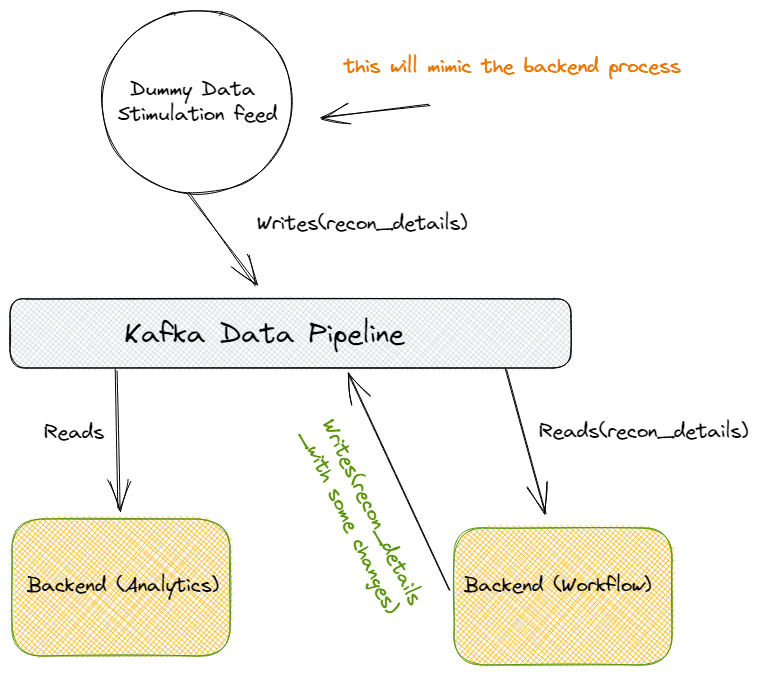
Kafka — Stimulate a Dummy Bank Reconciliation Workflow for Live Data Processing

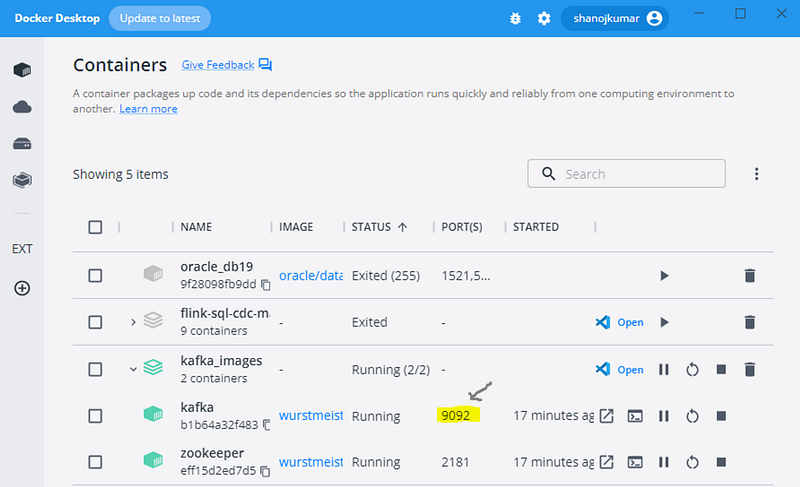
Build a Kafka development environment using docker images :

Create a dummy Kafka producer, so it will mimic the backend process to generate OLTP transactions (RECON_KAFKA_TOPIC = “recon_details”):

import json
import time
from kafka import KafkaProducer
RECON_KAFKA_TOPIC = "recon_details"
RECON_COUNT = 100
producer = KafkaProducer(bootstrap_servers="localhost:9092")
print("Generating reconciliation after 10 seconds")
print("Create one unique reconciliation every 10 seconds")
time.sleep(10)
for i in range(1, RECON_COUNT):
data = {
"item_id": i,
"bank_id": f"recon_{i}",
"total_amount": i * 10,
"source_systems": "NAM",
}
    producer.send(RECON_KAFKA_TOPIC, json.dumps(data).encode("utf-8"))
send_message = json.dumps(data).encode("utf-8")
print(f"Done Sending Topic..{send_message}")

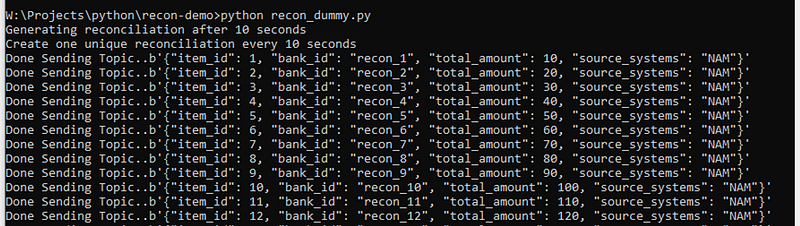
Output :

Create Workflow: To read the above Kafka topic (RECON_KAFKA_TOPIC = “recon_details”) and after adding some changes write it back to Kafka (RECON_DONE_KAFKA_TOPIC = “recon_done”) for the analytics.

import json
from kafka import KafkaConsumer
from kafka import KafkaProducer
RECON_KAFKA_TOPIC = "recon_details"
RECON_DONE_KAFKA_TOPIC = "recon_done"
consumer = KafkaConsumer(
RECON_KAFKA_TOPIC,
bootstrap_servers="localhost:9092"
)
producer = KafkaProducer(bootstrap_servers="localhost:9092")
print("Listening...")
while True:
for message in consumer:
print("Reading current transaction..")
consumed_message = json.loads(message.value.decode())
print(consumed_message)
item_id = consumed_message["item_id"]
total_amount = consumed_message["total_amount"]
data = {
"recon_id": item_id,
"total_amount": total_amount,
"recon_status": "Done"
}
print("Reconciliation Done!..")
producer.send(RECON_DONE_KAFKA_TOPIC, json.dumps(data).encode("utf-8"))
write_message = json.dumps(data).encode("utf-8")
print(write_message)

Finally, consume the above Kafka topic and do some additional data analytics:

import json
from kafka import KafkaConsumer
RECON_DONE_KAFKA_TOPIC = "recon_done"
consumer = KafkaConsumer(
RECON_DONE_KAFKA_TOPIC,
bootstrap_servers="localhost:9092"
)
total_recon_count = 0
print("Listening...")
while True:
for message in consumer:
print("Updating Recon Count..")
consumed_message = json.loads(message.value.decode())
total_recon_count += 1
print(f"Total recon: {total_recon_count}")

Also, please refer to the below screen recording of how all the above three scripts work together and process the data live:

https://www.youtube.com/watch?v=IdT9LeUk2G8

https://github.com/shanojpillai/kafka_demo.git

Stackademic

Thank you for reading until the end. Before you go:

  • Please consider clapping and following the writer! 👏
  • Follow us on Twitter(X), LinkedIn, and YouTube.
  • Visit Stackademic.com to find out more about how we are democratizing free programming education around the world.

Apache Flink Basics 101: Introduction to Apache Flink

Apache Flink is a robust, open-source data processing framework that handles large-scale data streams and batch-processing tasks. One of the critical features of Flink is its architecture, which allows it to manage both batch and stream processing in a single system.

Consider a retail company that wishes to analyse sales data in real-time. They can use Flink’s stream processing capabilities to process sales data as it comes in and batch processing capabilities to analyse historical data.

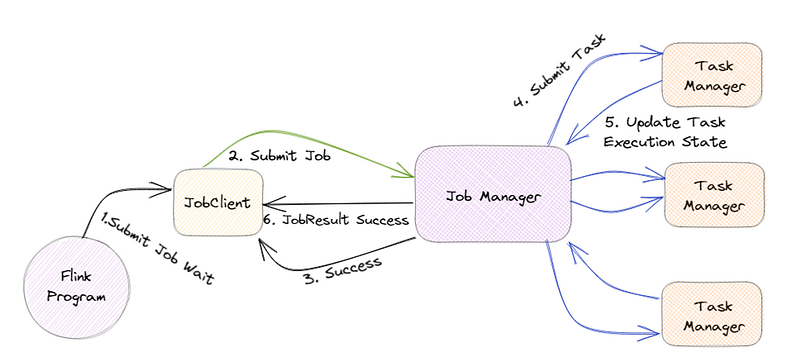
The JobManager is the central component of Flink’s architecture, and it is in charge of coordinating the execution of Flink jobs.

For example, if a large amount of data is submitted to Flink, the JobManager will divide it into smaller tasks and assign them to TaskManagers.

TaskManagers are responsible for executing the assigned tasks, and they can run on one or more nodes in a cluster. The TaskManagers are connected to the JobManager via a high-speed network, allowing them to exchange data and task information.

For example, when a TaskManager completes a task, it will send the results to the JobManager, who will then assign the next task.

Flink also has a distributed data storage system called the Distributed Data Management (DDM) system. It allows for storing and managing large data sets in a distributed manner across all the nodes in a cluster.

For example, imagine a company that wants to store and process petabytes of data, they can use Flink’s DDM system to store the data across multiple nodes, and process it in parallel.

Flink also has a built-in fault-tolerance mechanism, allowing it to recover automatically from failures. This is achieved by maintaining a consistent state across all the nodes in the cluster, which allows the system to recover from a failure by replaying the state from a consistent checkpoint.

For example, if a node goes down, Flink can automatically recover the data and continue processing without any interruption.

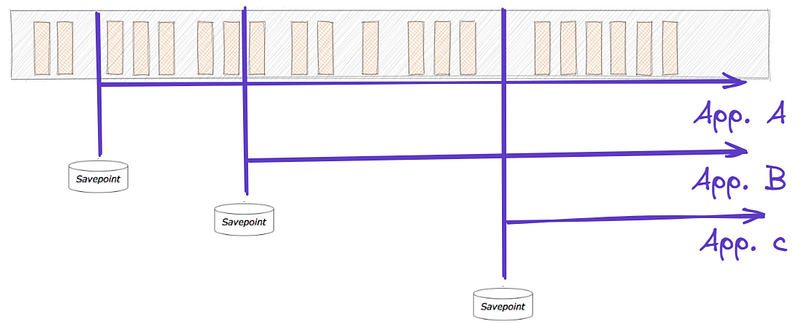
In addition, Flink also has a feature called “savepoints”, which allows users to take a snapshot of the state of a job at a particular point in time and later use this snapshot to restore the job to the same state.

For example, imagine a company is performing an update to their data processing pipeline and wants to test the new pipeline with the same data. They can use a savepoint to take a snapshot of the state of the job before making the update and then use that snapshot to restore the job to the same state for testing.

Flink also supports a wide range of data sources and sinks, including Kafka, Kinesis, and RabbitMQ, which allows it to integrate with other systems in a big data ecosystem easily.

For example, a company can use Flink to process streaming data from a Kafka topic and then sink the processed data into a data lake for further analysis.

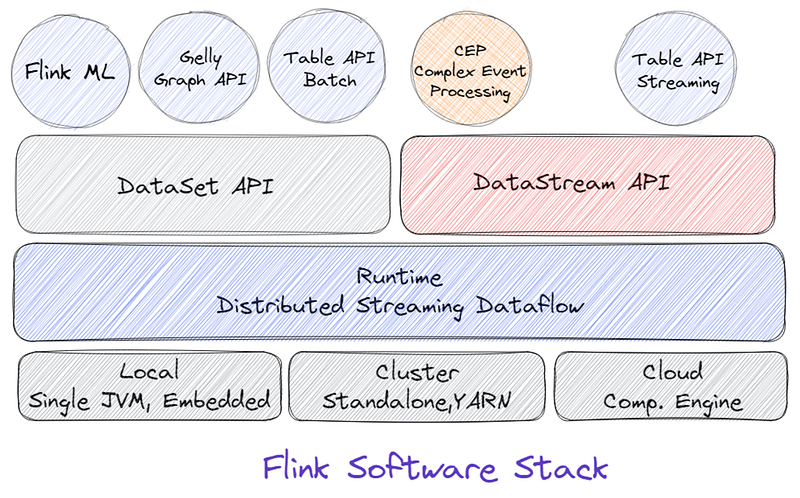
The critical feature of Flink is that it handles batch and stream processing in a single system. To support this, Flink provides two main APIs: the Dataset API and the DataStream API.

The Dataset API is a high-level API for Flink that allows for batch processing of data. It uses a type-safe, object-oriented programming model and offers a variety of operations such as filtering, mapping, and reducing, as well as support for SQL-like queries. This API is handy for dealing with a large amount of data and is well suited for use cases such as analyzing historical sales data of a retail company.

On the other hand, the DataStream API is a low-level API for Flink that allows for real-time data stream processing. It uses a functional programming model and offers a variety of operations such as filtering, mapping, and reducing, as well as support for windowing and event time processing. This API is particularly useful for dealing with real-time data and is well-suited for use cases such as real-time monitoring and analysis of sensor data.

In conclusion, Apache Flink’s architecture is designed to handle large-scale data streams and batch-processing tasks in a single system. It provides a distributed data storage system, built-in fault tolerance and savepoints, and support for a wide range of data sources and sinks, making it an attractive choice for big data processing. With its powerful and flexible architecture, Flink can be used in various use cases, from real-time data processing to batch data processing, and can be easily integrated with other systems in a big data ecosystem.

Stackademic

Thank you for reading until the end. Before you go:

  • Please consider clapping and following the writer! 👏
  • Follow us on Twitter(X), LinkedIn, and YouTube.
  • Visit Stackademic.com to find out more about how we are democratizing free programming education around the world.