
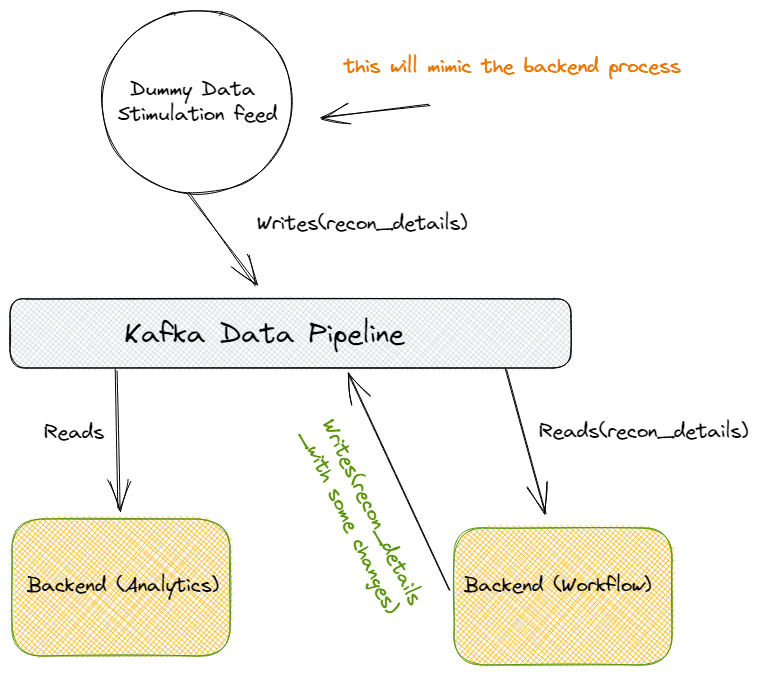
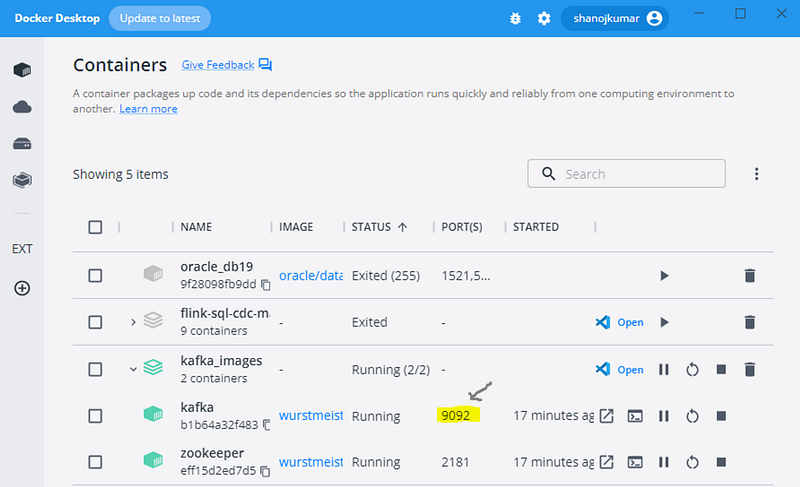
Build a Kafka development environment using docker images :
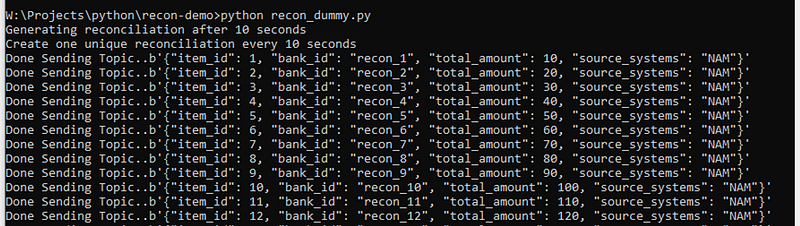
Create a dummy Kafka producer, so it will mimic the backend process to generate OLTP transactions (RECON_KAFKA_TOPIC = “recon_details”):
import json
import time
from kafka import KafkaProducer
RECON_KAFKA_TOPIC = "recon_details"
RECON_COUNT = 100
producer = KafkaProducer(bootstrap_servers="localhost:9092")
print("Generating reconciliation after 10 seconds")
print("Create one unique reconciliation every 10 seconds")
time.sleep(10)
for i in range(1, RECON_COUNT):
    data = {
        "item_id": i,
        "bank_id": f"recon_{i}",
        "total_amount": i * 10,
        "source_systems": "NAM",
    }
    producer.send(RECON_KAFKA_TOPIC, json.dumps(data).encode("utf-8"))
    send_message = json.dumps(data).encode("utf-8")
    print(f"Done Sending Topic..{send_message}")
Output :
Create Workflow: To read the above Kafka topic (RECON_KAFKA_TOPIC = “recon_details”) and after adding some changes write it back to Kafka (RECON_DONE_KAFKA_TOPIC = “recon_done”) for the analytics.
import json
from kafka import KafkaConsumer
from kafka import KafkaProducer
RECON_KAFKA_TOPIC = "recon_details"
RECON_DONE_KAFKA_TOPIC = "recon_done"
consumer = KafkaConsumer(
    RECON_KAFKA_TOPIC,
    bootstrap_servers="localhost:9092"
)
producer = KafkaProducer(bootstrap_servers="localhost:9092")
print("Listening...")
while True:
    for message in consumer:
        print("Reading current transaction..")
        consumed_message = json.loads(message.value.decode())
        print(consumed_message)
        item_id = consumed_message["item_id"]
        total_amount = consumed_message["total_amount"]
        data = {
            "recon_id": item_id,
            "total_amount": total_amount,
            "recon_status": "Done"
        }
        print("Reconciliation Done!..")
        producer.send(RECON_DONE_KAFKA_TOPIC, json.dumps(data).encode("utf-8"))
        write_message = json.dumps(data).encode("utf-8")
        print(write_message)
Finally, consume the above Kafka topic and do some additional data analytics:
import json
from kafka import KafkaConsumer
RECON_DONE_KAFKA_TOPIC = "recon_done"
consumer = KafkaConsumer(
    RECON_DONE_KAFKA_TOPIC,
    bootstrap_servers="localhost:9092"
)
total_recon_count = 0
print("Listening...")
while True:
    for message in consumer:
        print("Updating Recon Count..")
        consumed_message = json.loads(message.value.decode())
        total_recon_count += 1
        print(f"Total recon: {total_recon_count}")
Also, please refer to the below screen recording of how all the above three scripts work together and process the data live:
https://www.youtube.com/watch?v=IdT9LeUk2G8
https://github.com/shanojpillai/kafka_demo.git
Stackademic
Thank you for reading until the end. Before you go:
- Please consider clapping and following the writer! 👏
- Follow us on Twitter(X), LinkedIn, and YouTube.
- Visit Stackademic.com to find out more about how we are democratizing free programming education around the world.
 Shanoj