
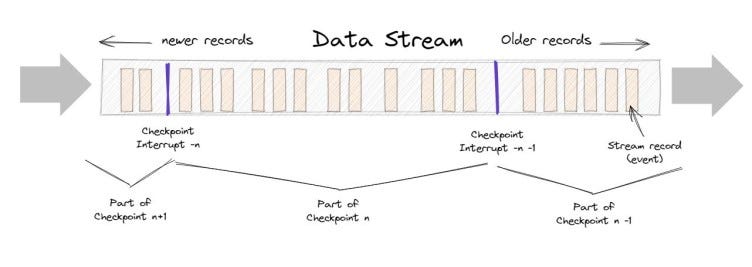
Checkpointing in Apache Flink is the process of saving the current state of a streaming application to a long-term storage system such as HDFS, S3, or a distributed file system on a regular basis. This enables the system to recover from failures by replaying a consistent checkpoint state.
The following are the primary use cases for checkpointing:
- Stateful Stream Processing: The checkpointing feature of Apache Flink is especially useful for stateful stream processing applications. For example, a real-time fraud detection system that saves the state of a user’s transactions can use checkpointing to save the state regularly and recover it in the event of a failure.
- Continuous Processing: Checkpointing can also implement continuous data stream processing. If the application is checkpointed at regular intervals, it can be resumed from the last checkpoint in case of a failure, ensuring no data is lost.
- Event-Driven Applications: It is critical in event-driven architectures to ensure that events are processed in the correct order. Checkpointing can be used to ensure that the application’s state is preserved.
- Machine Learning and Data Analytics: Checkpointing is also useful in machine learning and data analytics applications where the state of the application needs to be saved periodically to allow for training models or analyzing data.
- Rolling Upgrades: Checkpointing can be used to implement rolling upgrades of Flink applications. Checkpointing the application’s state before upgrading can be resumed from the last checkpoint after the upgrade, minimizing downtime.
Checkpointing can be enabled in a PyFlink application as follows:
from pyflink.datastream import StreamExecutionEnvironment
# create a StreamExecutionEnvironment
env = StreamExecutionEnvironment.get_execution_environment()
# enable checkpointing
env.enable_checkpointing(interval=1000, checkpoint_directory="hdfs://checkpoints")
In the preceding example, we enable checkpointing with a 1000-millisecond interval, meaning the application’s state will be checkpointed every 1000 milliseconds. The data from the checkpoints will be saved in the “hdfs:/checkpoints” directory.
When checkpointing fails, specify the number of retries and the time between retries.
# enable checkpointing with retries
env.enable_checkpointing(interval=1000, checkpoint_directory="hdfs://checkpoints",
                        max_concurrent_checkpoints=1,
                        min_pause_between_checkpoints=5000,
                        max_failures_before_checkpointing_aborts=3)
In this example, the max concurrent checkpoints parameter is set to 1, implying that only one checkpoint can be active at any given time. The minimum pause between checkpoints setting is set to 5000 milliseconds, meaning there must be a 5000-millisecond pause between two consecutive checkpoints. The value of max failures before checkpointing aborts is set to 3, meaning the application will be terminated if three consecutive checkpoint attempts fail.
Before enabling checkpointing in the application, you must configure the storage system and the directory you want to use for checkpointing.
Stackademic
Thank you for reading until the end. Before you go:
- Please consider clapping and following the writer! 👏
- Follow us on Twitter(X), LinkedIn, and YouTube.
- Visit Stackademic.com to find out more about how we are democratizing free programming education around the world.
 Shanoj