
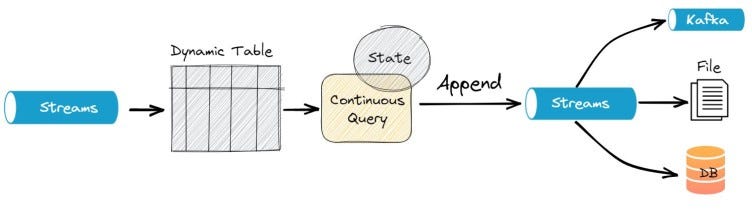
Apache Flink is a powerful data processing framework that handles batch and stream processing tasks in a single system. Flink provides a flexible and efficient architecture to process large-scale data in real time. In this article, we will discuss two important use cases for stream processing in Apache Flink: Stream as Append and Upsert in Dynamic Tables.
Stream as Append:
Stream as Append refers to continuously adding new data to an existing table. It is an everyday use case in real-time data processing where the new data must be combined with the current data to form a complete and up-to-date view. In Flink, this can be achieved using Dynamic Tables, which are a way to interact with stateful data streams and tables in Flink.
Suppose we have a sales data stream which a retail company is continuously generating. We want to store this data in a table and append the new data to the existing data.
Here is an example of how to achieve this in PyFlink:
from pyflink.table import StreamTableEnvironment, CsvTableSink, DataTypes
from pyflink.table.descriptors import Schema, OldCsv, FileSystem
# create a StreamTableEnvironment
st_env = StreamTableEnvironment.create()
# define the schema for the sales data stream
sales_schema = Schema().field("item", DataTypes.STRING())\\
                      .field("price", DataTypes.DOUBLE())\\
                      .field("timestamp", DataTypes.TIMESTAMP())
# register the sales data stream as a table
st_env.connect(FileSystem().path("/path/to/sales/data"))\\
      .with_format(OldCsv().field_delimiter(",").field("item", DataTypes.STRING())\\
                           .field("price", DataTypes.DOUBLE())\\
                           .field("timestamp", DataTypes.TIMESTAMP()))\\
      .with_schema(sales_schema)\\
      .create_temporary_table("sales_table")
# define a table sink to store the sales data
sales_sink = CsvTableSink(["/path/to/sales/table"], ",", 1, FileSystem.WriteMode.OVERWRITE)
# register the sales sink as a table
st_env.register_table_sink("sales_table_sink", sales_sink)
# stream the sales data as-append into the sales sink
st_env.from_path("sales_table").insert_into("sales_table_sink")
# execute the Flink job
st_env.execute("stream-as-append-in-dynamic-table-example")
In this example, we first define the schema for the sales data stream using the Schema API. Then, we use the connect API to register the sales data stream as a table in the StreamTableEnvironment.
Next, the with_format API is used to specify the data format in the sales data stream, which is CSV in this example. Finally, the with_schema API is used to determine the schema of the data in the sales data stream.
Reference: https://nightlies.apache.org/flink/flink-docs-release-1.12/dev/python/table_api_tutorial.html
Next, we define a table sink using the CsvTableSink API, and register it as a table in the StreamTableEnvironment using the register_table_sink API. Next, the insert_into API is used to stream the sales data as-append into the sales sink. Finally, we execute the Flink job using the implemented API.
Upsert in Dynamic Tables:
Upsert refers to the process of updating an existing record or inserting a new record if it does not exist. It is an everyday use case in real-time data processing where the data might need to be updated with new information. In Flink, this can be achieved using Dynamic Tables, which provide a flexible way to interact with stateful data streams and tables in Flink.
Here is an example of how to implement upsert in dynamic tables using PyFlink:
from pyflink.datastream import StreamExecutionEnvironment, TimeCharacteristic
from pyflink.table import StreamTableEnvironment, DataTypes
from pyflink.table.descriptors import Schema, OldCsv, FileSystem
# create a StreamExecutionEnvironment and set the time characteristic to EventTime
env = StreamExecutionEnvironment.get_execution_environment()
env.set_stream_time_characteristic(TimeCharacteristic.EventTime)
# create a StreamTableEnvironment
t_env = StreamTableEnvironment.create(env)
# register a dynamic table from the input stream with a unique key
t_env.connect(FileSystem().path("/tmp/sales_data.csv")) \\
    .with_format(OldCsv().field("transaction_id", DataTypes.BIGINT())
                .field("product", DataTypes.STRING())
                .field("amount", DataTypes.DOUBLE())
                .field("timestamp", DataTypes.TIMESTAMP())) \\
    .with_schema(Schema().field("transaction_id", DataTypes.BIGINT())
                 .field("product", DataTypes.STRING())
                 .field("amount", DataTypes.DOUBLE())
                 .field("timestamp", DataTypes.TIMESTAMP())) \\
    .create_temporary_table("sales_table")
# specify the updates using a SQL query
update_sql = "UPDATE sales_table SET amount = new_amount " \\
             "FROM (SELECT transaction_id, SUM(amount) AS new_amount " \\
             "FROM sales_table GROUP BY transaction_id)"
t_env.sql_update(update_sql)
# start the data processing and sink the result to a CSV file
t_env.execute("upsert_example")
In this example, we first create a StreamExecutionEnvironment and set the time characteristic to EventTime. Then, we create a StreamTableEnvironment and register a dynamic table from the input data stream using the connect method. Finally, the with_format method specifies the input data format, and the with_schema method defines the data schema.
Next, we specify the updates using a SQL query. In this case, we are updating the amount field of the sales_table by summing up the amounts for each transaction ID. Finally, the sql_update method is used to apply the updates to the dynamic table.
Finally, we start the data processing and sink the result to a CSV file using the execute method.
Stackademic
Thank you for reading until the end. Before you go:
- Please consider clapping and following the writer! 👏
- Follow us on Twitter(X), LinkedIn, and YouTube.
- Visit Stackademic.com to find out more about how we are democratizing free programming education around the world.


 Shanoj