Monthly Archives: December 2023

Generative AI 101: Building LLM-Powered Application

This article aims to guide you on how to create and utilize Large Language Models (LLMs) such as OpenAI’s GPT-3 for basic natural language processing applications. It provides a step-by-step process on how to set up your development environment and API keys, how to source and process text data, and how to leverage the power of LLMs to answer queries. This article offers a simplified approach to building and deploying an LLM-powered question-answering system by transforming documents into numerical embeddings and using vector databases for efficient retrieval. This system can produce insightful responses, showcasing the potential of generative AI in accessing and synthesizing knowledge.

Application Overview

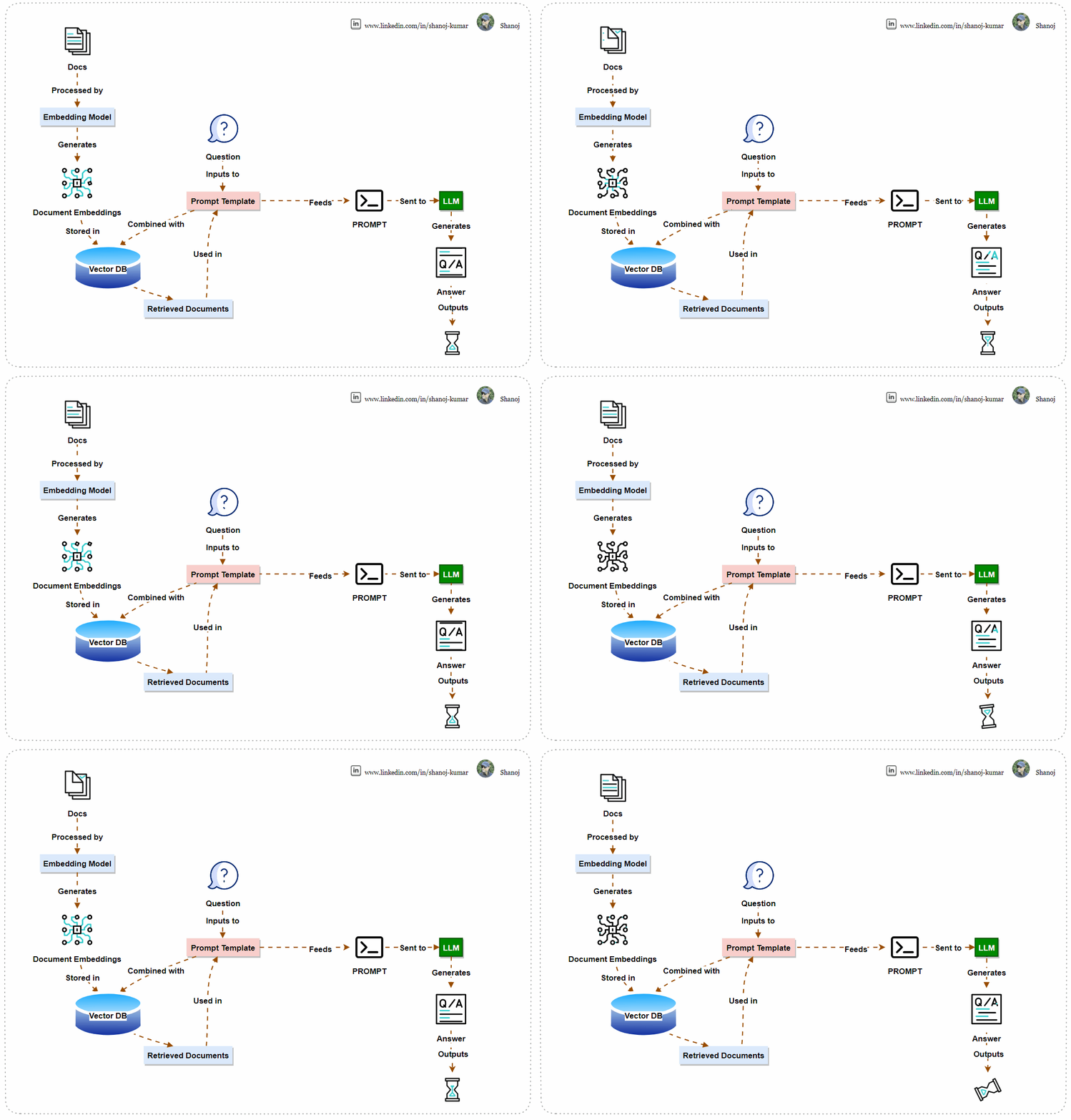
The system uses machine learning to find answers. It converts documents into numerical vectors and stores them in a Vector Database for easy retrieval. When a user asks a question, the system combines it with the documents using a Prompt Template and sends it to a Language Learning Model (LLM). The LLM generates an answer, which the system displays to the user. This AI-powered system efficiently processes language and finds information.

Step 1: Install Necessary Libraries

First, you’ll need to install the necessary Python libraries. These include tools for handling rich text, connecting to the OpenAI API, and various utilities from the langchain library.

!pip install -Uqqq rich openai tiktoken langchain unstructured tabulate pdf2image chromadb

Step 2: Import Libraries and Set Up API Key

Import the required libraries and ensure that your OpenAI API key is set up. The script will prompt you to enter your API key if it’s not found in your environment variables.

import os
from getpass import getpass

# Check for OpenAI API key and prompt if not found
if os.getenv("OPENAI_API_KEY") is None:
os.environ["OPENAI_API_KEY"] = getpass("Paste your OpenAI key from: https://platform.openai.com/account/api-keys\n")
assert os.getenv("OPENAI_API_KEY", "").startswith("sk-"), "This doesn't look like a valid OpenAI API key"

Step 3: Set the Model Name

Define the model you’ll be using from OpenAI. In this case, we’re using text-davinci-003, but you can replace it with gpt-4 or any other model you prefer.

MODEL_NAME = "text-davinci-003"

Note: text-davinci-003 is a version of OpenAI’s GPT-3 series, representing the most advanced in the “Davinci” line, known for its sophisticated natural language understanding and generation. As a versatile model, it’s used for a wide range of tasks requiring nuanced context, high-quality outputs, and creative content generation. While powerful, it’s also accessibly costly and requires careful consideration for ethical and responsible use due to its potential to influence and generate a wide array of content.

Step 4: Download Sample Data

Clone a repository containing sample markdown files to use as your data source.

!git clone https://github.com/mundimark/awesome-markdown.git

Note: Ensure the destination path doesn’t already contain a folder with the same name to avoid errors.

Step 5: Load and Prepare Documents

Load the markdown files and prepare them for processing. This involves finding all markdown files in the specified directory and loading them into a format suitable for the langchain library.

from langchain.document_loaders import DirectoryLoader

def find_md_files(directory):
dl = DirectoryLoader(directory, "**/*.md")
return dl.load()

documents = find_md_files('awesome-markdown/')

Step 6: Tokenize Documents

Count the number of tokens in each document. This is important to ensure that the inputs to the model don’t exceed the maximum token limit.

import tiktoken

tokenizer = tiktoken.encoding_for_model(MODEL_NAME)
def count_tokens(documents):
return [len(tokenizer.encode(document.page_content)) for document in documents]
token_counts = count_tokens(documents)
print(token_counts)

Note: TPM stands for “Tokens Per Minute,” a metric indicating the number of tokens the API can process within a minute. For the “gpt-3.5-turbo” model, the limit is set to 40,000 TPM. This means you can send up to 40,000 tokens worth of data to the API for processing every minute. This limit is in place to manage the load on the API and ensure fair usage among consumers. It’s important to design your interactions with the API to stay within these limits to avoid service interruptions or additional fees.

Step 7: Split Documents into Sections

Use the MarkdownTextSplitter to split the documents into manageable sections that the language model can handle.

from langchain.text_splitter import MarkdownTextSplitter

md_text_splitter = MarkdownTextSplitter(chunk_size=1000)
document_sections = md_text_splitter.split_documents(documents)
print(len(document_sections), max(count_tokens(document_sections)))

Step 8: Create Embeddings and a Vector Database

Use OpenAIEmbeddings to convert the text into embeddings, and then store these embeddings in a vector database (Chroma) for fast retrieval.

from langchain.embeddings import OpenAIEmbeddings
from langchain.vectorstores import Chroma

embeddings = OpenAIEmbeddings()
db = Chroma.from_documents(document_sections, embeddings)

Note: Embeddings in machine learning are numerical representations of text data, transforming words, sentences, or documents into vectors of real numbers so that computers can process natural language. They capture semantic meaning, allowing words with similar context or meaning to have similar representations, which enhances the ability of models to understand and perform tasks like translation, sentiment analysis, and more. Embeddings reduce the complexity of text data and enable advanced functionalities in language models, making them essential for understanding and generating human-like language in various applications.

Step 9: Create a Retriever

Create a retriever from the database to find the most relevant document sections based on your query.

retriever = db.as_retriever(search_kwargs=dict(k=3))

Step 10: Define and Retrieve Documents for Your Query

Define the query you’re interested in and use the retriever to find relevant document sections.

query = "Can you explain the origins and primary objectives of the Markdown language as described by its creators, John Gruber and Aaron Swartz, and how it aims to simplify web writing akin to composing plain text emails?"
docs = retriever.get_relevant_documents(query)

Step 11: Construct and Send the Prompt

Build the prompt by combining the context (retrieved document sections) with the query, and send it to the OpenAI model for answering.

context = "\n\n".join([doc.page_content for doc in docs])
prompt = f"""Use the following pieces of context to answer the question at the end.
If you don't know the answer, just say that you don't know, don't try to make up an answer.

{context}

Question: {query}
Helpful Answer:"""


from langchain.llms import OpenAI

llm = OpenAI()
response = llm.predict(prompt)

Step 12: Display the Result

Finally, print out the model’s response to your query.

print(response)

Stackademic

Thank you for reading until the end. Before you go:

  • Please consider clapping and following the writer! 👏
  • Follow us on Twitter(X), LinkedIn, and YouTube.
  • Visit Stackademic.com to find out more about how we are democratizing free programming education around the world.
Couchbase 101: Introduction

Couchbase is the outcome of a remarkable fusion of two innovative technologies. On the one hand, there was Membase, a high-performance key-value storage engine created by the pioneers of Memcached, who worked under the NorthScale brand. On the other hand, there was CouchDB, a solution designed for document-oriented database requirements, developed by Damien Katz, the founder of CouchOne.

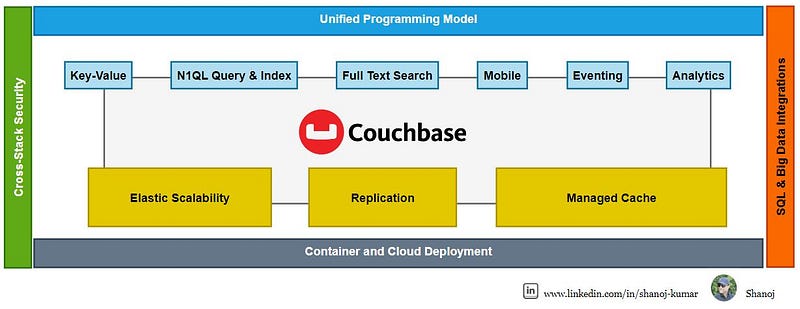
In February 2011, two technological forces joined together to create Couchbase, which is a comprehensive suite for NoSQL database needs. It combines a document-oriented data model with seamless indexing and querying capabilities, promising high performance and effortless scalability.

Couchbase Architecture & Features

Couchbase Server

Couchbase is built on a memory-first architecture which prioritizes in-memory processing to achieve high performance. Whenever a new item is saved, it is initially stored in memory, and associated data with Couchbase buckets is maintained persistently on disk.

Couchbase Server has a memory-first design for fast data access. Its active memory defragmenter optimizes performance. It supports a flexible JSON data model and direct in-memory access to its key-value engine for modern performance demands.

Consistency Models and N1QL Query Language

Let’s explore how Couchbase elegantly navigates the classic trade-offs in distributed systems, balancing Consistency, Availability, and Partition Tolerance, also known as the CAP theorem.

Couchbase offers a strategic shift from CP to AP, a choice that depends on your deployment topology and the desired system behaviour.

For a Single Cluster setup, Couchbase operates as a CP system, emphasizing strong consistency and partition tolerance, ensuring that your data remains accurate and synchronized across your cluster, which is ideal for scenarios where every transaction counts.

On the other hand, in a multi-cluster setup with cross-datacenter replication, abbreviated as XDCR, Couchbase adopts an AP approach, prioritizing availability over immediate consistency. This model is perfect for applications where uptime is critical, and data can eventually synchronize across clusters.

Highlighting its advanced capabilities, the N1QL Query Language in Couchbase now supports Distributed ACID Transactions.

This means you can perform complex transactions across your distributed Database with the assurance of atomicity, consistency, isolation, and durability — the cornerstone of reliable database management.

With these features, Couchbase ensures that your data is distributed, resilient and intelligently managed to meet the various demands of modern applications.

Concept 1 — Your Choice of Services

As we unfold the pages of Couchbase’s architecture, Concept 1 highlights ‘Your Choice of Services’. This high-level overview showcases the modular and resilient design of Couchbase, which empowers you to tailor your database architecture to your application’s specific needs.

Starting with Cluster Management, Couchbase offers a distributed architecture with no single point of failure, ensuring your system’s high availability. Automatic sharding through vBuckets ensures load balancing and scalability, while Cross Data Center Replication(XDCR) offers geographical redundancy.

The Data Service is the backbone, providing robust key-value storage with in-cluster and cross-data centre replication capabilities, all accelerated by a built-in cache for high performance.

Moving on to the Query Service, here we have the powerful N1QL, or SQL for JSON, for planning and executing queries, supporting JOINS, aggregations, and subqueries, giving you the flexibility of SQL with the power of JSON.

The Index Service seamlessly manages N1QL index creation, update, replication, and maintenance, while the Search Service provides comprehensive full-text indexing and search support.

Analytics Service offers isolated, distributed queries for long-running analytical operations without affecting your operational database performance.

Finally, the Eventing Service introduces event-driven data management, allowing you to respond to data mutations quickly.

Together, these services form a cohesive framework that stores and manages your data and integrates with your application logic for a seamless experience.

Image courtesy of Couchbase.

Each node or server in Couchbase is identical and capable of housing data in any configuration necessary to meet your application’s demands. As we see here, the four nodes are interconnected to form what is traditionally known as a cluster.

What’s unique about Couchbase is its flexibility in configuring these nodes. Depending on your changing capacity requirements, you can assign more or fewer resources to specific services. This adaptability is illustrated in our diagram, showing a variety of possible configurations.

In the first configuration, all services, from Data to Analytics, are distributed evenly across all nodes, ensuring a balanced workload and optimal utilization of resources.

In the second configuration, you can see that we’ve scaled up the Data Service across nodes to accommodate a heavier data load, demonstrating Couchbase’s agility in resource allocation.

The third configuration takes a specialized approach, with each node dedicated to a specific service, optimizing for intense workloads and dedicated tasks.

This level of customization ensures that as your application grows and evolves, your Couchbase cluster can adapt seamlessly, providing consistent performance and reliability.

Couchbase’s design philosophy is to provide you with the tools to build a database cluster that’s as dynamic as your business needs, without compromising on performance, availability, or scalability.

Image courtesy of Couchbase.

What is a Bucket?

In Couchbase, keys and documents are stored in a Bucket.

A Couchbase Bucket* stores data persistently, as well as in memory.
Buckets allow data to be automatically replicated for high availability and dynamically scaled across multiple databases by means of Cross Datacenter Replication (XDCR)

Bucket Storage

A Couchbase Database consists of one or more instances of Couchbase, each running a set of services, including the Data Service.

Each Bucket is sharded equally and automatically among the Servers, also known as Nodes, in the Database.

Bucket Composition

Within each Bucket are 1024 vBuckets, also known as shards, spread out equally and automatically only on Data nodes. Couchbase refers to this automatic distribution as auto-sharding.

VBuckets: Stores a subset of the total data set. Allow for horizontal scalability.

Concept 2 — Automatic Sharding

Image courtesy of Couchbase.

Concept 2 is centred on ‘Automatic Sharding’ — a pivotal feature of Couchbase that addresses the challenges of managing a growing dataset. As the volume of data increases, the need for efficient management becomes crucial. Couchbase rises to the occasion by automatically partitioning data across multiple nodes within the cluster, a technique known as sharding. This approach guarantees a balanced distribution of data, which is instrumental in enhancing both performance and scalability.

The mechanism behind this is the implementation of vBuckets or virtual buckets. These vBuckets are designed to distribute data evenly across all nodes, thus empowering horizontal scaling and bolstering fault tolerance and recovery. For developers, this means simplicity and ease of use, as the complexity of sharding is abstracted away, allowing them to concentrate on what they do best — building outstanding applications, assured that the data layer will scale as needed without any extra intervention.

Concept 3 — Database Change Protocol

Core Function: DCP (Database Change Protocol) is a key replication protocol in Couchbase Server, connecting nodes and clusters across different data centres.

DCP (Database Change Protocol)

Key Features: Includes ordered mutations, optimized restarts post-failures, efficient, consistent snapshot production, and eager changes streaming.

Concept 3 introduces the ‘Database Change Protocol’ at the heart of Couchbase’s real-time replication and synchronization capabilities. This protocol ensures that changes made to the Database are captured and communicated efficiently across different system parts.

Whether for cache invalidation, index maintenance, or cross-data centre replication, the Database Change Protocol ensures that all components of your Couchbase deployment stay in sync. This mechanism is crucial for maintaining data consistency, especially in distributed environments, and it supports Couchbase’s high availability and resilience promises to your applications.

Stackademic

Thank you for reading until the end. Before you go:

  • Please consider clapping and following the writer! 👏
  • Follow us on Twitter(X), LinkedIn, and YouTube.
  • Visit Stackademic.com to find out more about how we are democratizing free programming education around the world.

Apache Spark 101: Dynamic Allocation, spark-submit Command and Cluster Management

This diagram shows Apache Spark’s executor memory model in a YARN-managed cluster. Executors are allocated a specific amount of Heap and Off-Heap memory. Heap memory is divided into Execution Memory, Storage Memory, and User Memory. A small portion is reserved as Reserved Memory. Off-Heap memory is utilized for data not stored in the JVM heap and Overhead accounts for additional memory allocations beyond the executor memory. This allocation optimizes memory usage and performance in Spark applications while ensuring system resources are not exhausted.

Apache Spark’s dynamic allocation feature enables it to automatically adjust the number of executors used in a Spark application based on the workload. This feature is handy in shared cluster environments where resources must be efficiently allocated across multiple applications. Here’s an overview of the critical aspects:

  • Purpose: Automatically scales the number of executors up or down depending on the application’s needs.
  • Benefit: Improves resource utilization and handles varying workloads efficiently.

How It Works

  • Adding Executors: Spark requests more executors when tasks are pending, and resources are underutilized.
  • Removing Executors: Spark releases them back to the cluster if executors are idle for a certain period.
  • Resource Consideration: Takes into account the total number of cores and memory available in the cluster.

Configuration

  • spark.dynamicAllocation.enabled: Must be set to true allow for dynamic allocation.
  • spark.dynamicAllocation.minExecutors: Minimum number of executors Spark will retain.
  • spark.dynamicAllocation.maxExecutors: Maximum number of executors Spark can acquire.
  • spark.dynamicAllocation.initialExecutors: Initial number of executors to run if dynamic allocation is enabled.
  • spark.dynamicAllocation.executorIdleTimeout: Duration after which idle executors are removed.
  • spark.dynamicAllocation.schedulerBacklogTimeout: The time after which Spark will start adding new executors if there are pending tasks.

Integration with External Shuffle Service

  • Necessity: Essential for dynamic allocation to work effectively.
  • Function: Maintains shuffle data after executors are terminated, ensuring data is not lost when executors are dynamically removed.

Advantages

  • Efficient Resource Usage: Only uses resources as needed, freeing them when unused.
  • Adaptability: Adjusts to varying workloads without manual intervention.
  • Cost-Effective: In cloud environments, costs can be reduced by using fewer resources.

Considerations and Best Practices

  • Workload Characteristics: Best suited for jobs with varying stages and resource requirements.
  • Fine-tuning: Requires careful configuration to ensure optimal performance.
  • Monitoring: Keep an eye on application performance and adjust configurations as necessary.

Limitations

  • Not Ideal for All Workloads: It may not benefit applications with stable or predictable resource requirements.
  • Delay in Scaling: There can be a delay in executor allocation and deallocation, which might affect performance.

Use Cases

  • Variable Data Loads: Ideal for applications that experience fluctuating amounts of data.
  • Shared Clusters: Maximizes resource utilization in environments where multiple applications run concurrently.
  • Setup Spark Session with Dynamic Allocation Enabled This assumes Spark is set up with dynamic allocation enabled by default. You can create a Spark session like this:
from pyspark.sql import SparkSession

spark = SparkSession.builder \
.appName("DynamicAllocationDemo") \
.getOrCreate()
  • Run a Spark Job Now, run a simple Spark job to see dynamic allocation in action. For example, you can read a large dataset and perform some transformations or actions on it.
# Example: Load a dataset and perform an action
df = spark.read.csv("path_to_large_dataset.csv")
df.count()
  • Monitor Executors While the job is running, you can monitor the Spark UI (usually available at http://[driver-node]:4040) to see how executors are dynamically allocated and released based on the workload.

Turning Off Dynamic Allocation

To turn off dynamic allocation, you need to set spark.dynamicAllocation.enabled to false. This is how you can do it:

  • Modify Spark Session Configuration
spark.conf.set("spark.dynamicAllocation.enabled", "false")
  • Restart the Spark Session Restarting the Spark session is necessary for the configuration changes to take effect.
  • Verify the Setting You can verify if the dynamic allocation is turned off by checking the configuration:
print(spark.conf.get("spark.dynamicAllocation.enabled"))

Checking if Dynamic Allocation is Enabled

To check if dynamic allocation is currently enabled in your Spark session, you can use the following command:

print(spark.conf.get("spark.dynamicAllocation.enabled"))

This will print true if dynamic allocation is enabled and false if it is disabled.

Important Notes

  • Environment Setup: Ensure your Spark environment (like YARN or standalone cluster) supports dynamic allocation.
  • External Shuffle Service: An external shuffle service must be enabled in your cluster for dynamic allocation to work properly, especially when decreasing the number of executors.
  • Resource Manager: This demo assumes you have a resource manager (like YARN) that supports dynamic allocation.
  • Data and Resources: The effectiveness of the demo depends on the size of your data and the resources of your cluster. You might need a sufficiently large dataset and a cluster setup to observe dynamic allocation effectively.

spark-submit is a powerful tool used to submit Spark applications to a cluster for execution. It’s essential in the Spark ecosystem, especially when working with large-scale data processing. Let’s dive into both a high-level overview and a detailed explanation of spark-submit.

Spark Submit:

High-Level Overview

  • Purpose: spark-submit is the command-line interface for running Spark applications. It handles the packaging of your application, distributing it across the cluster, and executing it.
  • Usage: It’s typically used in environments where Spark is running in standalone cluster mode, Mesos, YARN, or Kubernetes. It’s not used in interactive environments like a Jupyter Notebook.
  • Flexibility: It supports submitting Scala, Java, and Python applications.
  • Cluster Manager Integration: It integrates seamlessly with various cluster managers to allocate resources and manage and monitor Spark jobs.

Detailed Explanation

Command Structure:

  • Basic Syntax: spark-submit [options] <app jar | python file> [app arguments]
  • Options: These include configurations for the Spark application, such as memory size, the number of executors, properties files, etc.
  • App Jar / Python File: The path to a bundled JAR file for Scala/Java applications or a .py file for Python applications.
  • App Arguments: Arguments that need to be passed to the primary method of your application.

Key Options:

  • --class: For Java/Scala applications, the entry point class.
  • --master: The master URL for the cluster (e.g., spark://23.195.26.187:7077, yarn, mesos://, k8s://).
  • --deploy-mode: Whether to deploy your driver on the worker nodes (cluster) or locally as an external client (client).
  • --conf: Arbitrary Spark configuration property in key=value format.
  • Resource Options: Like --executor-memory, --driver-memory, --executor-cores, etc.

Working with Cluster Managers:

  • In YARN mode, spark-submit can dynamically allocate resources based on demand.
  • For Mesos, it can run in either fine-grained mode (lower latency) or coarse-grained mode (higher throughput).
  • In Kubernetes, it can create containers for Spark jobs directly in a Kubernetes cluster.

Environment Variables:

  • Spark uses several environmental variables like SPARK_HOME, JAVA_HOME, etc. These need to be correctly set up.

Advanced Features:

  • Dynamic Allocation: This can allocate or deallocate resources dynamically based on the workload.
  • Logging and Monitoring: Integration with tools like Spark History Server for job monitoring and debugging.
spark-submit \
--class com.example.MyApp \
--master yarn \
--deploy-mode cluster \
--executor-memory 4g \
--total-executor-cores 4 \
/path/to/myApp.jar \
arg1 arg2

Usage Considerations

  • Application Packaging: Applications should be assembled into a fat JAR with all dependencies for Scala and Java.
  • Python Applications: Python dependencies should be managed carefully, especially when working with a cluster.
  • Testing: It’s good practice to test Spark applications locally in --master local mode before deploying to a cluster.
  • Debugging: Since applications are submitted to a cluster, debugging can be more challenging and often relies on log analysis.

Stackademic

Thank you for reading until the end. Before you go:

  • Please consider clapping and following the writer! 👏
  • Follow us on Twitter(X), LinkedIn, and YouTube.
  • Visit Stackademic.com to find out more about how we are democratizing free programming education around the world.

Apache Spark 101: Understanding DataFrame Write API Operation

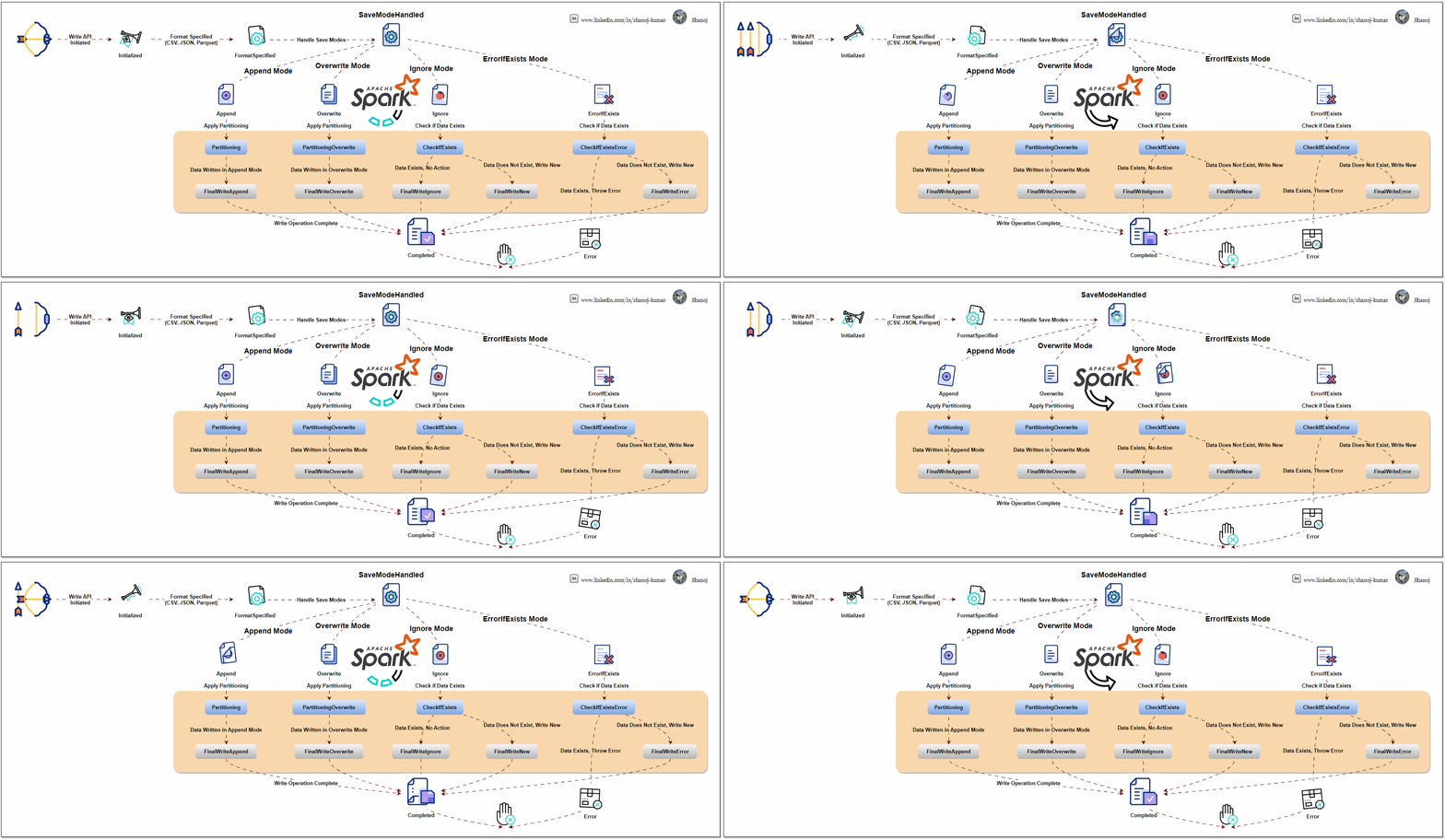
This diagram explains the Apache Spark DataFrame Write API process flow. It starts with an API call to write data in formats like CSV, JSON, or Parquet. The process diverges based on the save mode selected (append, overwrite, ignore, or error). Each mode performs necessary checks and operations, such as partitioning and data write handling. The process ends with either the final write of data or an error, depending on the outcome of these checks and operations.

Apache Spark is an open-source distributed computing system that provides a robust platform for processing large-scale data. The Write API is a fundamental component of Spark’s data processing capabilities, which allows users to write or output data from their Spark applications to different data sources.

Understanding the Spark Write API

Data Sources: Spark supports writing data to a variety of sources, including but not limited to:

  • Distributed file systems like HDFS
  • Cloud storage like AWS S3, Azure Blob Storage
  • Traditional databases (both SQL and NoSQL)
  • Big Data file formats (Parquet, Avro, ORC)

DataFrameWriter: The core class for the Write API is DataFrameWriter. It provides functionality to configure and execute write operations. You obtain a DataFrameWriter by calling the .write method on a DataFrame or Dataset.

Write Modes: Specify how Spark should handle existing data when writing data. Common modes are:

  • append: Adds the new data to the existing data.
  • overwrite: Overwrites existing data with new data.
  • ignore: If data already exists, the write operation is ignored.
  • errorIfExists (default): Throws an error if data already exists.

Format Specification: You can specify the format of the output data, like JSON, CSV, Parquet, etc. This is done using the .format("formatType") method.

Partitioning: For efficient data storage, you can partition the output data based on one or more columns using .partitionBy("column").

Configuration Options: You can set various options specific to the data source, like compression, custom delimiters for CSV files, etc., using .option("key", "value").

Saving the Data: Finally, you use .save("path") to write the DataFrame to the specified path. Other methods .saveAsTable("tableName") are also available for different writing scenarios.

from pyspark.sql import SparkSession
from pyspark.sql import Row
import os

# Initialize a SparkSession
spark = SparkSession.builder \
.appName("DataFrameWriterSaveModesExample") \
.getOrCreate()

# Sample data
data = [
Row(name="Alice", age=25, country="USA"),
Row(name="Bob", age=30, country="UK")
]

# Additional data for append mode
additional_data = [
Row(name="Carlos", age=35, country="Spain"),
Row(name="Daisy", age=40, country="Australia")
]

# Create DataFrames
df = spark.createDataFrame(data)
additional_df = spark.createDataFrame(additional_data)

# Define output path
output_path = "output/csv_save_modes"

# Function to list files in a directory
def list_files_in_directory(path):
files = os.listdir(path)
return files

# Show initial DataFrame
print("Initial DataFrame:")
df.show()

# Write to CSV format using overwrite mode
df.write.csv(output_path, mode="overwrite", header=True)
print("Files after overwrite mode:", list_files_in_directory(output_path))

# Show additional DataFrame
print("Additional DataFrame:")
additional_df.show()

# Write to CSV format using append mode
additional_df.write.csv(output_path, mode="append", header=True)
print("Files after append mode:", list_files_in_directory(output_path))

# Write to CSV format using ignore mode
additional_df.write.csv(output_path, mode="ignore", header=True)
print("Files after ignore mode:", list_files_in_directory(output_path))

# Write to CSV format using errorIfExists mode
try:
additional_df.write.csv(output_path, mode="errorIfExists", header=True)
except Exception as e:
print("An error occurred in errorIfExists mode:", e)


# Stop the SparkSession
spark.stop()

Spark’s Architecture Overview

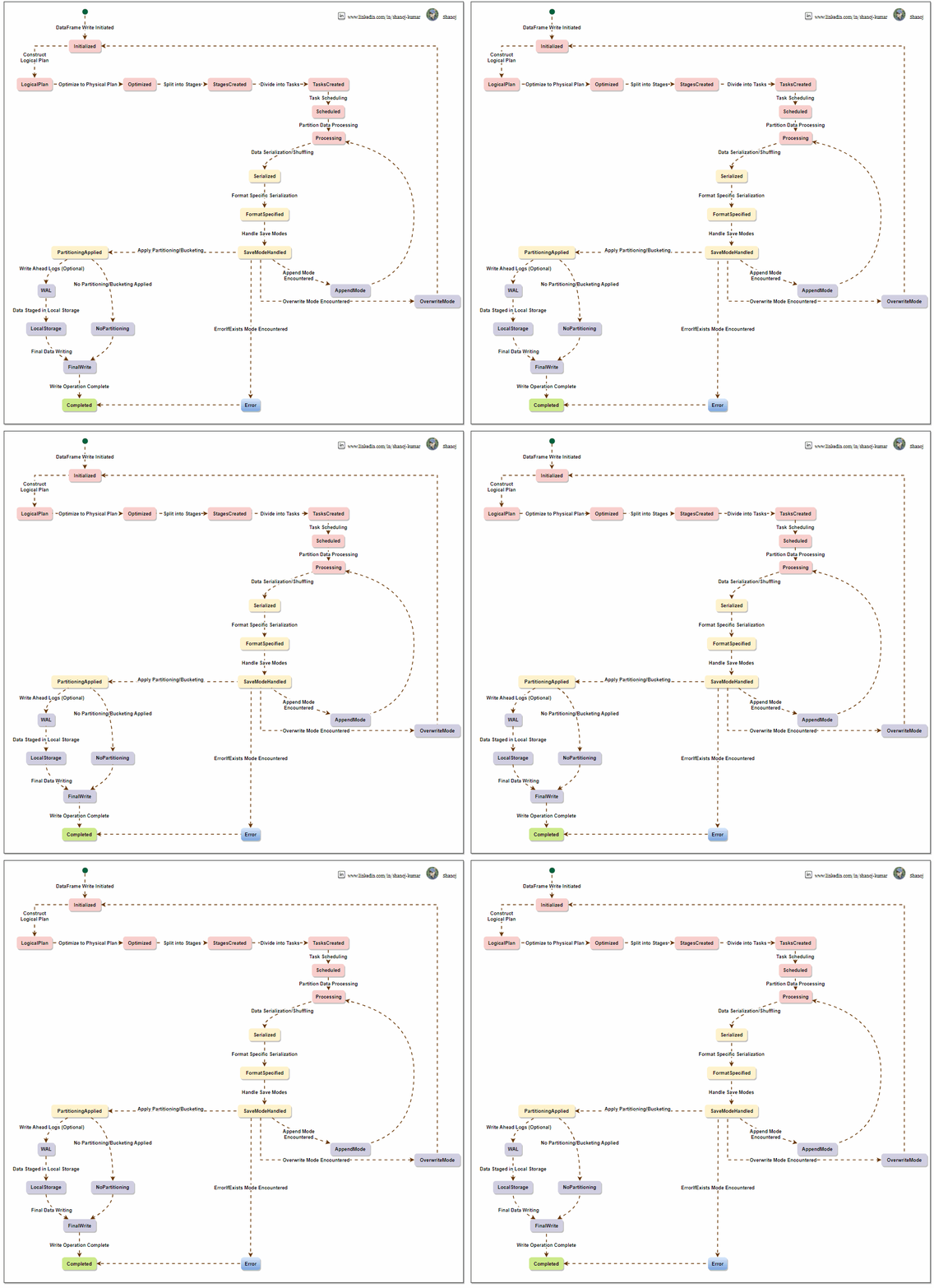
To write a DataFrame in Apache Spark, a sequential process is followed. Spark creates a logical plan based on the user’s DataFrame operations, which is optimized into a physical plan and divided into stages. The system processes data partition-wise, logs it for reliability, and writes it to local storage with defined partitioning and write modes. Spark’s architecture ensures efficient management and scaling of data writing tasks across a computing cluster.

The Apache Spark Write API, from the perspective of Spark’s internal architecture, involves understanding how Spark manages data processing, distribution, and writing operations under the hood. Let’s break it down:

Spark’s Architecture Overview

  1. Driver and Executors: Spark operates on a master-slave architecture. The driver node runs the main() function of the application and maintains information about the Spark application. Executor nodes perform the data processing and write operations.
  2. DAG Scheduler: When a write operation is triggered, Spark’s DAG (Directed Acyclic Graph) Scheduler translates high-level transformations into a series of stages that can be executed in parallel across the cluster.
  3. Task Scheduler: The Task Scheduler launches tasks within each stage. These tasks are distributed among executors.
  4. Execution Plan and Physical Plan: Spark uses the Catalyst optimizer to create an efficient execution plan. This includes converting the logical plan (what to do) into a physical plan (how to do it), considering partitioning, data locality, and other factors.

Writing Data Internally in Spark

Data Distribution: Data in Spark is distributed across partitions. When a write operation is initiated, Spark first determines the data layout across these partitions.

Task Execution for Write: Each partition’s data is handled by a task. These tasks are executed in parallel across different executors.

Write Modes and Consistency:

  • For overwrite and append modes, Spark ensures consistency by managing how data files are replaced or added to the data source.
  • For file-based sources, Spark writes data in a staged approach, writing to temporary locations before committing to the final location, which helps ensure consistency and handling failures.

Format Handling and Serialization: Depending on the specified format (e.g., Parquet, CSV), Spark uses the respective serializer to convert the data into the required format. Executors handle this process.

Partitioning and File Management:

  • If partitioning is specified, Spark sorts and organizes data accordingly before writing. This often involves shuffling data across executors.
  • Spark tries to minimize the number of files created per partition to optimize for large file sizes, which are more efficient in distributed file systems.

Error Handling and Fault Tolerance: In case of a task failure during a write operation, Spark can retry the task, ensuring fault tolerance. However, not all write operations are fully atomic, and specific scenarios might require manual intervention to ensure data integrity.

Optimization Techniques:

  • Catalyst Optimizer: Optimizes the write plan for efficiency, e.g., minimizing data shuffling.
  • Tungsten: Spark’s Tungsten engine optimizes memory and CPU usage during data serialization and deserialization processes.

Write Commit Protocol: Spark uses a write commit protocol for specific data sources to coordinate the process of task commits and aborts, ensuring a consistent view of the written data.


Efficient and reliable data writing is the ultimate goal of Spark’s Write API, which orchestrates task distribution, data serialization, and file management in a complex manner. It utilizes Spark’s core components, such as the DAG scheduler, task scheduler, and Catalyst optimizer, to perform write operations effectively.

Stackademic

Thank you for reading until the end. Before you go:

  • Please consider clapping and following the writer! 👏
  • Follow us on Twitter(X), LinkedIn, and YouTube.
  • Visit Stackademic.com to find out more about how we are democratizing free programming education around the world.