
This article aims to guide you on how to create and utilize Large Language Models (LLMs) such as OpenAI’s GPT-3 for basic natural language processing applications. It provides a step-by-step process on how to set up your development environment and API keys, how to source and process text data, and how to leverage the power of LLMs to answer queries. This article offers a simplified approach to building and deploying an LLM-powered question-answering system by transforming documents into numerical embeddings and using vector databases for efficient retrieval. This system can produce insightful responses, showcasing the potential of generative AI in accessing and synthesizing knowledge.
Application Overview
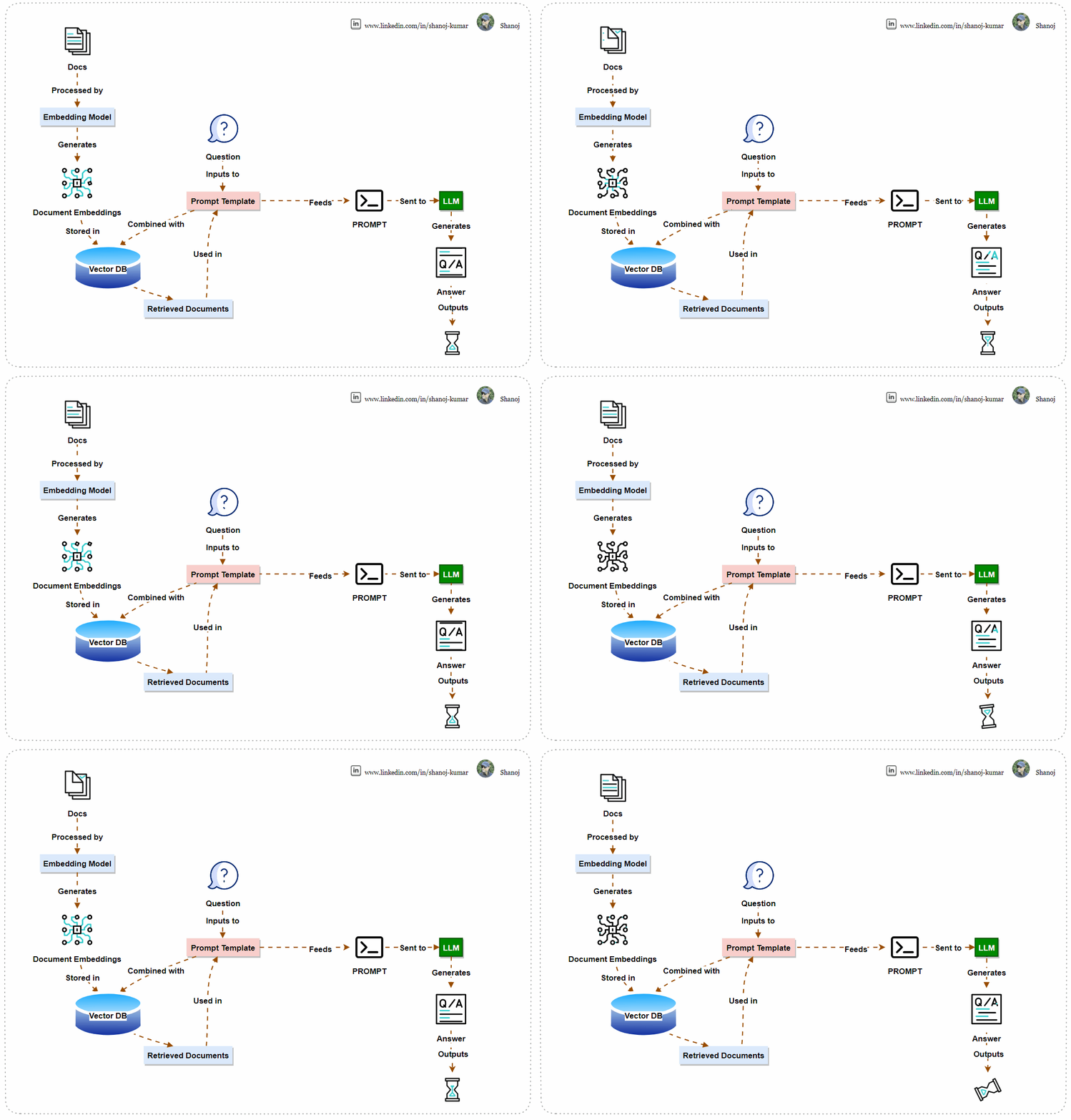
The system uses machine learning to find answers. It converts documents into numerical vectors and stores them in a Vector Database for easy retrieval. When a user asks a question, the system combines it with the documents using a Prompt Template and sends it to a Language Learning Model (LLM). The LLM generates an answer, which the system displays to the user. This AI-powered system efficiently processes language and finds information.

Step 1: Install Necessary Libraries
First, you’ll need to install the necessary Python libraries. These include tools for handling rich text, connecting to the OpenAI API, and various utilities from the langchain library.
!pip install -Uqqq rich openai tiktoken langchain unstructured tabulate pdf2image chromadb
Step 2: Import Libraries and Set Up API Key
Import the required libraries and ensure that your OpenAI API key is set up. The script will prompt you to enter your API key if it’s not found in your environment variables.
import os
from getpass import getpass

# Check for OpenAI API key and prompt if not found
if os.getenv("OPENAI_API_KEY") is None:
    os.environ["OPENAI_API_KEY"] = getpass("Paste your OpenAI key from: https://platform.openai.com/account/api-keys\n")
assert os.getenv("OPENAI_API_KEY", "").startswith("sk-"), "This doesn't look like a valid OpenAI API key"
Step 3: Set the Model Name
Define the model you’ll be using from OpenAI. In this case, we’re using text-davinci-003, but you can replace it with gpt-4 or any other model you prefer.
MODEL_NAME = "text-davinci-003"
Note: text-davinci-003 is a version of OpenAI’s GPT-3 series, representing the most advanced in the “Davinci” line, known for its sophisticated natural language understanding and generation. As a versatile model, it’s used for a wide range of tasks requiring nuanced context, high-quality outputs, and creative content generation. While powerful, it’s also accessibly costly and requires careful consideration for ethical and responsible use due to its potential to influence and generate a wide array of content.
Step 4: Download Sample Data
Clone a repository containing sample markdown files to use as your data source.
!git clone https://github.com/mundimark/awesome-markdown.git
Note: Ensure the destination path doesn’t already contain a folder with the same name to avoid errors.
Step 5: Load and Prepare Documents
Load the markdown files and prepare them for processing. This involves finding all markdown files in the specified directory and loading them into a format suitable for the langchain library.
from langchain.document_loaders import DirectoryLoader

def find_md_files(directory):
    dl = DirectoryLoader(directory, "**/*.md")
    return dl.load()

documents = find_md_files('awesome-markdown/')
Step 6: Tokenize Documents
Count the number of tokens in each document. This is important to ensure that the inputs to the model don’t exceed the maximum token limit.
import tiktoken

tokenizer = tiktoken.encoding_for_model(MODEL_NAME)
def count_tokens(documents):
    return [len(tokenizer.encode(document.page_content)) for document in documents]
token_counts = count_tokens(documents)
print(token_counts)
Note: TPM stands for “Tokens Per Minute,” a metric indicating the number of tokens the API can process within a minute. For the “gpt-3.5-turbo” model, the limit is set to 40,000 TPM. This means you can send up to 40,000 tokens worth of data to the API for processing every minute. This limit is in place to manage the load on the API and ensure fair usage among consumers. It’s important to design your interactions with the API to stay within these limits to avoid service interruptions or additional fees.
Step 7: Split Documents into Sections
Use the MarkdownTextSplitter to split the documents into manageable sections that the language model can handle.
from langchain.text_splitter import MarkdownTextSplitter

md_text_splitter = MarkdownTextSplitter(chunk_size=1000)
document_sections = md_text_splitter.split_documents(documents)
print(len(document_sections), max(count_tokens(document_sections)))
Step 8: Create Embeddings and a Vector Database
Use OpenAIEmbeddings to convert the text into embeddings, and then store these embeddings in a vector database (Chroma) for fast retrieval.
from langchain.embeddings import OpenAIEmbeddings
from langchain.vectorstores import Chroma

embeddings = OpenAIEmbeddings()
db = Chroma.from_documents(document_sections, embeddings)
Note: Embeddings in machine learning are numerical representations of text data, transforming words, sentences, or documents into vectors of real numbers so that computers can process natural language. They capture semantic meaning, allowing words with similar context or meaning to have similar representations, which enhances the ability of models to understand and perform tasks like translation, sentiment analysis, and more. Embeddings reduce the complexity of text data and enable advanced functionalities in language models, making them essential for understanding and generating human-like language in various applications.
Step 9: Create a Retriever
Create a retriever from the database to find the most relevant document sections based on your query.
retriever = db.as_retriever(search_kwargs=dict(k=3))
Step 10: Define and Retrieve Documents for Your Query
Define the query you’re interested in and use the retriever to find relevant document sections.
query = "Can you explain the origins and primary objectives of the Markdown language as described by its creators, John Gruber and Aaron Swartz, and how it aims to simplify web writing akin to composing plain text emails?"
docs = retriever.get_relevant_documents(query)
Step 11: Construct and Send the Prompt
Build the prompt by combining the context (retrieved document sections) with the query, and send it to the OpenAI model for answering.
context = "\n\n".join([doc.page_content for doc in docs])
prompt = f"""Use the following pieces of context to answer the question at the end.
If you don't know the answer, just say that you don't know, don't try to make up an answer.

{context}

Question: {query}
Helpful Answer:"""

from langchain.llms import OpenAI

llm = OpenAI()
response = llm.predict(prompt)
Step 12: Display the Result
Finally, print out the model’s response to your query.
print(response)
Stackademic
Thank you for reading until the end. Before you go:
- Please consider clapping and following the writer! 👏
- Follow us on Twitter(X), LinkedIn, and YouTube.
- Visit Stackademic.com to find out more about how we are democratizing free programming education around the world.
 Shanoj