Monthly Archives: July 2024

Microservices Architectures: The SAGA Pattern

The Saga pattern is an architectural pattern utilized for managing distributed transactions in microservices architectures. It ensures data consistency across multiple services without relying on distributed transactions, which can be complex and inefficient in a microservices environment.

Key Concepts of the Saga Pattern

In the Saga pattern, a business process is broken down into a series of local transactions. Each local transaction updates the database and publishes an event or message to trigger the next transaction in the sequence. This approach helps maintain data consistency across services by ensuring that each step is completed before moving to the next one.

Types of Saga Patterns

There are several variations of the Saga pattern, each suited to different scenarios:

Choreography-based Saga: Each service listens for events and decides whether to proceed with the next step based on the events it receives. This decentralized approach is useful for loosely coupled services.

Orchestration-based Saga: A central coordinator, known as the orchestrator, manages the sequence of actions. This approach provides a higher level of control and is beneficial when precise coordination is required.

State-based Saga: Uses a shared state or state machine to track the progress of a transaction. Microservices update this state as they execute their actions, guiding subsequent steps.

Reverse Choreography Saga: An extension of the Choreography-based Saga where services explicitly communicate about how to compensate for failed actions.

Event-based Saga: Microservices react to events generated by changes in the system, performing necessary actions or compensations asynchronously.

Challenges Addressed by the Saga Pattern

The Saga pattern solves the problem of maintaining data consistency across multiple microservices in distributed transactions. It addresses several key challenges that arise in microservices architectures:

Distributed Transactions: In a microservices environment, a single business transaction often spans multiple services, each with its own database. Traditional ACID transactions don’t work well in this distributed context.

Data Consistency: Ensuring data consistency across different services and their databases is challenging when you can’t use a single, atomic transaction.

Scalability and Performance: Two-phase commit (2PC) protocols, which are often used for distributed transactions, can lead to performance issues and reduced scalability in microservices architectures.

Solutions Provided by the Saga Pattern

The Saga pattern solves these problems by:

  • Breaking down distributed transactions into a sequence of local transactions, each handled by a single service.
  • Using compensating transactions to undo changes if a step in the sequence fails, ensuring eventual consistency.
  • Flexibility in transaction management, allowing services to be added, modified, or removed without significantly impacting the overall transactional flow.
  • Better scalability by allowing each service to manage its own local transaction independently.
  • Improving fault tolerance by providing mechanisms to handle and recover from failures in the transaction sequence.
  • Visibility into the transaction process, which aids in debugging, auditing, and compliance.

Implementation Approaches

Choreography-Based Sagas

  • Decentralized Control: Each service involved in the saga listens for events and reacts to them independently, without a central controller.
  • Event-Driven Communication: Services communicate by publishing and subscribing to events.
  • Autonomy and Flexibility: Services can be added, removed, or modified without significantly impacting the overall system.
  • Scalability: Choreography can handle complex and frequent interactions more flexibly, making it suitable for highly scalable systems.

Orchestration-Based Sagas

  • Centralized Control: A central orchestrator manages the sequence of transactions, directing each service on what to do and when.
  • Command-Driven Communication: The orchestrator sends commands to services to perform specific actions.
  • Visibility and Control: The orchestrator has a global view of the saga, making it easier to manage and troubleshoot.

Choosing Between Choreography and Orchestration

When to Use Choreography

  • When you want to avoid creating a single point of failure.
  • When services need to be highly autonomous and independent.
  • When adding or removing services without disrupting the overall flow is a priority.

When to Use Orchestration

  • When you need to guarantee a specific order of execution.
  • When centralized control and visibility are crucial for managing complex workflows.
  • When you need to manage the lifecycle of microservices execution centrally.

Hybrid Approach

In some cases, a combination of both approaches can be beneficial. Choreography can be used for parts of the saga that require high flexibility and autonomy, while orchestration can manage parts that need strict control and coordination.

Challenges and Considerations

  • Complexity: Implementing SAGA can be more complex than traditional transactions.
  • Lack of Isolation: Intermediate states are visible, which can lead to consistency issues.
  • Error Handling: Designing and implementing compensating transactions can be tricky.
  • Testing: Thorough testing of all possible scenarios is crucial but can be challenging.

The Saga pattern is powerful for managing distributed transactions in microservices architectures, offering a balance between consistency, scalability, and resilience. By carefully selecting the appropriate implementation approach, organizations can effectively address the challenges of distributed transactions and maintain data consistency across their services.

Stackademic 🎓

Thank you for reading until the end. Before you go:

Apache Hive 101: Enabling ACID Transactions

To create ACID tables, ensure Hive is configured to support ACID transactions by setting the following properties:

SET hive.support.concurrency=true;
SET hive.txn.manager=org.apache.hadoop.hive.ql.lockmgr.DbTxnManager;
SET hive.compactor.initiator.on=true;
SET hive.compactor.worker.threads=1;

Hive Version Compatibility

ACID transactions in Hive are supported from version 0.14.0 onwards. Ensure that your Hive installation is at least this version. Hive 3.x introduced significant improvements and additional features for ACID transactions.

Creating ACID Tables

Full ACID Table

Full ACID tables support all CRUD (Create, Retrieve, Update, Delete) operations and require the ORC file format:

CREATE TABLE acidtbl (
key int,
value string
)
STORED AS ORC
TBLPROPERTIES ("transactional"="true")
;

Insert-Only ACID Table

Insert-only ACID tables support only insert operations and can use various storage formats:

CREATE TABLE acidtbl_insert_only (
key int,
value string
)
STORED AS TEXTFILE
TBLPROPERTIES ("transactional"="true", "transactional_properties"="insert_only")
;

Converting Tables to ACID

Non-ACID to Full ACID

To convert a non-ACID managed table to a full ACID table (requires ORC format):

ALTER TABLE nonacidtbl SET TBLPROPERTIES ('transactional'='true');

Non-ACID to Insert-Only ACID

To convert a non-ACID managed table to an insert-only ACID table:

ALTER TABLE nonacidtbl SET TBLPROPERTIES ('transactional'='true', 'transactional_properties'='insert_only');

Data Operations on ACID Tables

Inserting Data

INSERT INTO acidtbl VALUES (1, 'a');
INSERT INTO acidtbl VALUES (2, 'b');

Updating Data

UPDATE acidtbl SET value='updated' WHERE key=1;

Performing Merge Operations

MERGE INTO acidtbl USING src
ON acidtbl.key = src.key
WHEN MATCHED AND src.value IS NULL THEN DELETE
WHEN MATCHED AND (acidtbl.value != src.value) THEN UPDATE SET value = src.value
WHEN NOT MATCHED THEN INSERT VALUES (src.key, src.value);

Understanding Table Structures

ACID Tables (Transactional)

ACID tables have a specific directory structure in HDFS:

/user/hive/warehouse/t/
├── base_0000022/
│ └── bucket_00000
├── delta_0000023_0000023_0000/
│ └── bucket_00000
└── delta_0000024_0000024_0000/
└── bucket_00000
  • Base Directory: Contains the original data files.
  • Delta Directories: Store changes (inserts, updates, deletes).

Non-ACID Tables

Non-ACID tables have a simpler structure:

/user/hive/warehouse/table_name/
├── file1.orc
├── file2.orc
└── file3.orc

# For partitioned tables:
/user/hive/warehouse/table_name/
├── partition_column=value1/
│ ├── file1.orc
│ └── file2.orc
└── partition_column=value2/
├── file3.orc
└── file4.orc

File Format Considerations

  • Full ACID Tables: Only the ORC (Optimized Row Columnar) file format is supported for full ACID tables that allow all CRUD operations.
  • Insert-Only ACID Tables: These tables support various file formats, not limited to ORC. You can use formats like TEXTFILE, CSV, AVRO, or JSON.
  • Managed Tables: The managed table storage type is required for ACID tables.
  • External Tables: ACID properties cannot be applied to external tables, as changes to external tables are beyond Hive’s control.
  • Converting Existing Tables: When converting a non-ACID managed table to a full ACID table, the data must be in ORC format.
  • Default Format: When creating a full ACID table without specifying the storage format, Hive defaults to using ORC.

Managed vs. External Tables

  • Managed Tables: Support ACID transactions. They can be created as transactional (either full ACID or insert-only).

Example of a full ACID managed table:

CREATE TABLE managed_acid_table (
id INT,
name STRING
)
STORED AS ORC
TBLPROPERTIES ("transactional"="true");

Example of an insert-only ACID managed table:

CREATE TABLE managed_insert_only_table (
id INT,
name STRING
)
STORED AS TEXTFILE
TBLPROPERTIES ("transactional"="true", "transactional_properties"="insert_only");

External Tables: Do not support ACID transactions. These tables are used for data managed outside Hive’s control.

Example of an external table:

CREATE EXTERNAL TABLE external_table (
id INT,
name STRING
)
STORED AS TEXTFILE
LOCATION '/path/to/external/data';

Limitations of ACID Tables

  1. Performance Overhead: ACID tables introduce additional overhead due to the need for transactional logging and compaction processes.
  2. Storage Requirements: The delta files and base files can increase storage requirements.
  3. Compaction: Regular compaction is necessary to maintain performance and manage storage, which can add complexity.
  4. Version Dependency: Ensure that you are using a Hive version that supports the desired ACID features, as improvements and bug fixes are version-dependent.
  5. External Table Limitation: ACID properties cannot be applied to external tables.

Key Points

  1. Only managed tables can be converted to ACID tables.
  2. External tables cannot be made transactional.
  3. Full ACID tables require the ORC file format.
  4. Converting ACID tables back to non-ACID tables is not supported.

Stackademic 🎓

Thank you for reading until the end. Before you go:

Bulkhead Architecture Pattern: Data Security & Governance

Today during an Azure learning session focused on data security and governance, our instructor had to leave unexpectedly due to a personal emergency. Reflecting on the discussion and drawing from my background in fintech and solution architecture, I believe it would be beneficial to explore an architecture pattern relevant to our conversation: the Bulkhead Architecture Pattern.

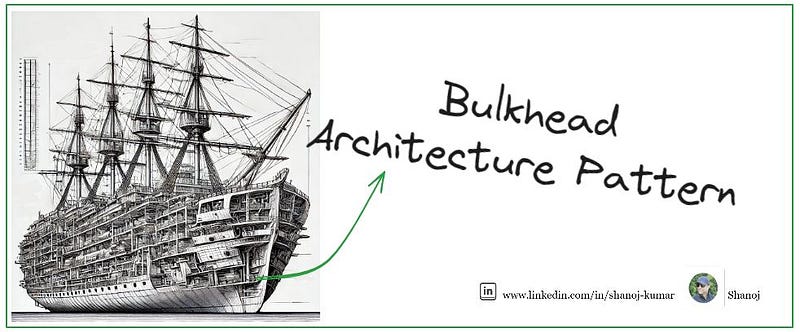
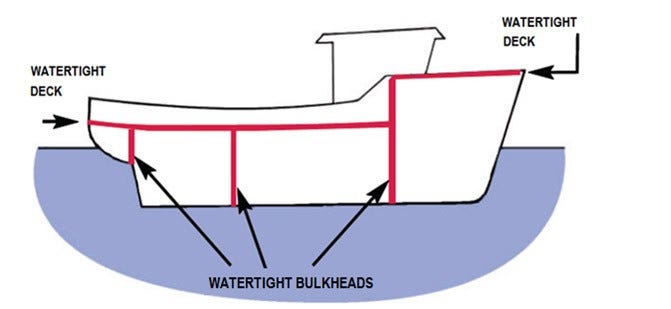
Inspired by ship design, the Bulkhead architecture pattern divides the base of a ship into partitions called bulkheads. This ensures that if there’s a leak in one section, it doesn’t sink the entire ship; only the affected partition fills with water. Translating this principle to software architecture, the pattern focuses on fault isolation by decomposing a monolithic architecture into a microservices architecture.

Use Case: Bank Reconciliation Reporting

Consider a scenario involving trade data across various regions such as APAC, EMEA, LATAM, and NAM. Given the regulatory challenges related to cross-country data movement, ensuring proper data governance when consolidating data in a data warehouse environment becomes crucial. Specifically, it is essential to manage the challenge of ensuring that data from India cannot be accessed from the NAM region and vice versa. Additionally, restricting data movement at the data centre level is critical.

Microservices Isolation

  • Microservices A, B, C: Each microservice is deployed in its own Azure Kubernetes Service (AKS) cluster or Azure App Service.
  • Independent Databases: Each microservice uses a separate database instance, such as Azure SQL Database or Cosmos DB, to avoid single points of failure.

Network Isolation

  • Virtual Networks (VNets): Each microservice is deployed in its own VNet. Use Network Security Groups (NSGs) to control inbound and outbound traffic.
  • Private Endpoints: Secure access to Azure services (e.g., storage accounts, databases) using private endpoints.

Load Balancing and Traffic Management

  • Azure Front Door: Provides global load balancing and application acceleration for microservices.
  • Application Gateway: Offers application-level routing and web application firewall (WAF) capabilities.
  • Traffic Manager: A DNS-based traffic load balancer for distributing traffic across multiple regions.

Service Communication

  • Service Bus: Use Azure Service Bus for decoupled communication between microservices.
  • Event Grid: Event-driven architecture for handling events across microservices.

Fault Isolation and Circuit Breakers

  • Polly: Implement circuit breakers and retries within microservices to handle transient faults.
  • Azure Functions: Use serverless functions for non-critical, independently scalable tasks.

Data Partitioning and Isolation

  • Sharding: Partition data across multiple databases to improve performance and fault tolerance.
  • Data Sync: Use Azure Data Sync to replicate data across regions for redundancy.

Monitoring and Logging

  • Azure Monitor: Centralized monitoring for performance and availability metrics.
  • Application Insights: Deep application performance monitoring and diagnostics.
  • Log Analytics: Aggregated logging and querying for troubleshooting and analysis.

Advanced Threat Protection

  • Azure Defender for Storage: Enable Azure Defender for Storage to detect unusual and potentially harmful attempts to access or exploit storage accounts.

Key Points

  • Isolation: Each microservice and its database are isolated in separate clusters and databases.
  • Network Security: VNets and private endpoints ensure secure communication.
  • Resilience: Circuit breakers and retries handle transient faults.
  • Monitoring: Centralized monitoring and logging for visibility and diagnostics.
  • Scalability: Each component can be independently scaled based on load.

Bulkhead Pattern Concepts

Isolation

The primary goal of the Bulkhead pattern is to isolate different parts of a system to contain failures within a specific component, preventing them from cascading and affecting the entire system. This isolation can be achieved through various means such as separate thread pools, processes, or containers.

Fault Tolerance

By containing faults within isolated compartments, the Bulkhead pattern enhances the system’s ability to tolerate failures. If one component fails, the rest of the system can continue to operate normally, thereby improving overall reliability and stability.

Resource Management

The pattern helps in managing resources efficiently by allocating specific resources (like CPU, memory, and network bandwidth) to different components. This prevents resource contention and ensures that a failure in one component does not exhaust resources needed by other components.

Implementation Examples in K8s

Kubernetes

An example of implementing the Bulkhead pattern in Kubernetes involves creating isolated containers for different services, each with its own CPU and memory resources and limits. This configuration is for a service called payment-processing.

apiVersion: v1
kind: Pod
metadata:
name: payment-processing
spec:
containers:
- name: payment-processing-container
image: payment-service:latest
resources:
requests:
memory: "128Mi"
cpu: "500m"
limits:
memory: "256Mi"
cpu: "2"
---
apiVersion: v1
kind: Pod
metadata:
name: order-management
spec:
containers:
- name: order-management-container
image: order-service:latest
resources:
requests:
memory: "64Mi"
cpu: "250m"
limits:
memory: "128Mi"
cpu: "1"
---
apiVersion: v1
kind: Pod
metadata:
name: inventory-control
spec:
containers:
- name: inventory-control-container
image: inventory-service:latest
resources:
requests:
memory: "96Mi"
cpu: "300m"
limits:
memory: "192Mi"
cpu: "1.5"

In this configuration:

  • The payment-processing service is allocated 128Mi of memory and 500m of CPU as a request, with limits set to 256Mi of memory and 2 CPUs.
  • The order-management service has its own isolated resources, with 64Mi of memory and 250m of CPU as a request, and limits set to 128Mi of memory and 1 CPU.
  • The inventory-control service is given 96Mi of memory and 300m of CPU as a request, with limits set to 192Mi of memory and 1.5 CPUs.

This setup ensures that each service operates within its own resource limits, preventing any single service from exhausting resources and affecting the others.

Hystrix

Hystrix, a Netflix API for latency and fault tolerance, uses the Bulkhead pattern to limit the number of concurrent calls to a component. This is achieved through thread isolation, where each component is assigned a separate thread pool, and semaphore isolation, where callers must acquire a permit before making a request. This prevents the entire system from becoming unresponsive if one component fails.

Ref: https://github.com/Netflix/Hystrix

AWS App Mesh

In AWS App Mesh, the Bulkhead pattern can be implemented at the service-mesh level. For example, in an e-commerce application with different API endpoints for reading and writing prices, resource-intensive write operations can be isolated from read operations by using separate resource pools. This prevents resource contention and ensures that read operations remain unaffected even if write operations experience a high load.

Benefits

  • Fault Containment: Isolates faults within specific components, preventing them from spreading and causing systemic failures.
  • Improved Resilience: Enhances the system’s ability to withstand unexpected failures and maintain stability.
  • Performance Optimization: Allocates resources more efficiently, avoiding bottlenecks and ensuring consistent performance.
  • Scalability: Allows independent scaling of different components based on workload demands.
  • Security Enhancement: Reduces the attack surface by isolating sensitive components, limiting the impact of security breaches.

The Bulkhead pattern is a critical design principle for constructing resilient, fault-tolerant, and efficient systems by isolating components and managing resources effectively.

Stackademic 🎓

Thank you for reading until the end. Before you go:

Apache Hive 101: MSCK Repair Table

The MSCK REPAIR TABLE command in Hive is used to update the metadata in the Hive metastore to reflect the current state of the partitions in the file system. This is particularly necessary for external tables where partitions might be added directly to the file system (such as HDFS or Amazon S3) without using Hive commands.

What MSCK REPAIR TABLE Does

  1. Scans the File System: It scans the file system (e.g., HDFS or S3) for Hive-compatible partitions that were added after the table was created.
  2. Updates Metadata: It compares the partitions in the table metadata with those in the file system. If it finds new partitions in the file system that are not in the metadata, it adds them to the Hive metastore.
  3. Partition Detection: It detects partitions by reading the directory structure and creating partitions based on the folder names.

Why MSCK REPAIR TABLE is Needed

  1. Partition Awareness: Hive stores a list of partitions for each table in its metastore. When new partitions are added directly to the file system, Hive is not aware of these partitions unless the metadata is updated. Running MSCK REPAIR TABLE ensures that the Hive metastore is synchronized with the actual data layout in the file system.
  2. Querying New Data: Without updating the metadata, queries on the table will not include the data in the new partitions. By running MSCK REPAIR TABLE, you make the new data available for querying.
  3. Automated Ingestion: For workflows that involve automated data ingestion, running MSCK REPAIR TABLE after each data load ensures that the newly ingested data is recognized by Hive without manually adding each partition.

Command to Run MSCK REPAIR TABLE

MSCK REPAIR TABLE table_name;

Replace table_name with the name of your Hive table.

Considerations and Limitations

  1. Performance: The operation can be slow, especially with a large number of partitions, as it involves scanning the entire directory structure.
  2. Incomplete Updates: If the operation times out, it may leave the table in an incomplete state where only some partitions are added. It may be necessary to run the command multiple times until all partitions are included.
  3. Compatibility: MSCK REPAIR TABLE only adds partitions to metadata; it does not remove them. For removing partitions, other commands like ALTER TABLE DROP PARTITION must be used.
  4. Hive Compatibility: Partitions must be Hive-compatible. For partitions that are not, manual addition using ALTER TABLE ADD PARTITION is required.