
Today during an Azure learning session focused on data security and governance, our instructor had to leave unexpectedly due to a personal emergency. Reflecting on the discussion and drawing from my background in fintech and solution architecture, I believe it would be beneficial to explore an architecture pattern relevant to our conversation: the Bulkhead Architecture Pattern.
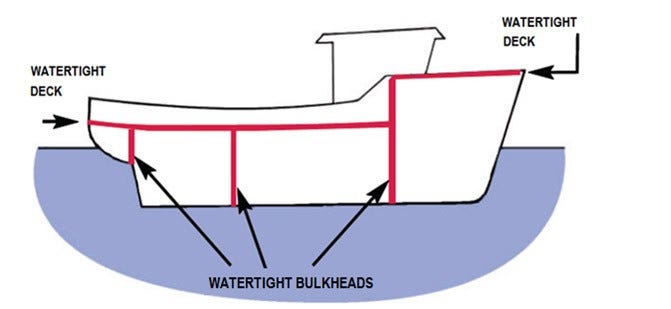
Inspired by ship design, the Bulkhead architecture pattern divides the base of a ship into partitions called bulkheads. This ensures that if there’s a leak in one section, it doesn’t sink the entire ship; only the affected partition fills with water. Translating this principle to software architecture, the pattern focuses on fault isolation by decomposing a monolithic architecture into a microservices architecture.
Use Case: Bank Reconciliation Reporting
Consider a scenario involving trade data across various regions such as APAC, EMEA, LATAM, and NAM. Given the regulatory challenges related to cross-country data movement, ensuring proper data governance when consolidating data in a data warehouse environment becomes crucial. Specifically, it is essential to manage the challenge of ensuring that data from India cannot be accessed from the NAM region and vice versa. Additionally, restricting data movement at the data centre level is critical.

Microservices Isolation
- Microservices A, B, C: Each microservice is deployed in its own Azure Kubernetes Service (AKS) cluster or Azure App Service.
- Independent Databases: Each microservice uses a separate database instance, such as Azure SQL Database or Cosmos DB, to avoid single points of failure.
Network Isolation
- Virtual Networks (VNets): Each microservice is deployed in its own VNet. Use Network Security Groups (NSGs) to control inbound and outbound traffic.
- Private Endpoints: Secure access to Azure services (e.g., storage accounts, databases) using private endpoints.
Load Balancing and Traffic Management
- Azure Front Door: Provides global load balancing and application acceleration for microservices.
- Application Gateway: Offers application-level routing and web application firewall (WAF) capabilities.
- Traffic Manager: A DNS-based traffic load balancer for distributing traffic across multiple regions.
Service Communication
- Service Bus: Use Azure Service Bus for decoupled communication between microservices.
- Event Grid: Event-driven architecture for handling events across microservices.
Fault Isolation and Circuit Breakers
- Polly: Implement circuit breakers and retries within microservices to handle transient faults.
- Azure Functions: Use serverless functions for non-critical, independently scalable tasks.
Data Partitioning and Isolation
- Sharding: Partition data across multiple databases to improve performance and fault tolerance.
- Data Sync: Use Azure Data Sync to replicate data across regions for redundancy.
Monitoring and Logging
- Azure Monitor: Centralized monitoring for performance and availability metrics.
- Application Insights: Deep application performance monitoring and diagnostics.
- Log Analytics: Aggregated logging and querying for troubleshooting and analysis.
Advanced Threat Protection
- Azure Defender for Storage: Enable Azure Defender for Storage to detect unusual and potentially harmful attempts to access or exploit storage accounts.
Key Points
- Isolation: Each microservice and its database are isolated in separate clusters and databases.
- Network Security: VNets and private endpoints ensure secure communication.
- Resilience: Circuit breakers and retries handle transient faults.
- Monitoring: Centralized monitoring and logging for visibility and diagnostics.
- Scalability: Each component can be independently scaled based on load.
Bulkhead Pattern Concepts
Isolation
The primary goal of the Bulkhead pattern is to isolate different parts of a system to contain failures within a specific component, preventing them from cascading and affecting the entire system. This isolation can be achieved through various means such as separate thread pools, processes, or containers.
Fault Tolerance
By containing faults within isolated compartments, the Bulkhead pattern enhances the system’s ability to tolerate failures. If one component fails, the rest of the system can continue to operate normally, thereby improving overall reliability and stability.
Resource Management
The pattern helps in managing resources efficiently by allocating specific resources (like CPU, memory, and network bandwidth) to different components. This prevents resource contention and ensures that a failure in one component does not exhaust resources needed by other components.
Implementation Examples in K8s
Kubernetes
An example of implementing the Bulkhead pattern in Kubernetes involves creating isolated containers for different services, each with its own CPU and memory resources and limits. This configuration is for a service called payment-processing.
apiVersion: v1
kind: Pod
metadata:
  name: payment-processing
spec:
  containers:
  - name: payment-processing-container
    image: payment-service:latest
    resources:
      requests:
        memory: "128Mi"
        cpu: "500m"
      limits:
        memory: "256Mi"
        cpu: "2"
---
apiVersion: v1
kind: Pod
metadata:
  name: order-management
spec:
  containers:
  - name: order-management-container
    image: order-service:latest
    resources:
      requests:
        memory: "64Mi"
        cpu: "250m"
      limits:
        memory: "128Mi"
        cpu: "1"
---
apiVersion: v1
kind: Pod
metadata:
  name: inventory-control
spec:
  containers:
  - name: inventory-control-container
    image: inventory-service:latest
    resources:
      requests:
        memory: "96Mi"
        cpu: "300m"
      limits:
        memory: "192Mi"
        cpu: "1.5"
In this configuration:
- The
payment-processingservice is allocated 128Mi of memory and 500m of CPU as a request, with limits set to 256Mi of memory and 2 CPUs. - The
order-managementservice has its own isolated resources, with 64Mi of memory and 250m of CPU as a request, and limits set to 128Mi of memory and 1 CPU. - The
inventory-controlservice is given 96Mi of memory and 300m of CPU as a request, with limits set to 192Mi of memory and 1.5 CPUs.
This setup ensures that each service operates within its own resource limits, preventing any single service from exhausting resources and affecting the others.
Hystrix
Hystrix, a Netflix API for latency and fault tolerance, uses the Bulkhead pattern to limit the number of concurrent calls to a component. This is achieved through thread isolation, where each component is assigned a separate thread pool, and semaphore isolation, where callers must acquire a permit before making a request. This prevents the entire system from becoming unresponsive if one component fails.
Ref: https://github.com/Netflix/Hystrix
AWS App Mesh
In AWS App Mesh, the Bulkhead pattern can be implemented at the service-mesh level. For example, in an e-commerce application with different API endpoints for reading and writing prices, resource-intensive write operations can be isolated from read operations by using separate resource pools. This prevents resource contention and ensures that read operations remain unaffected even if write operations experience a high load.

Benefits
- Fault Containment: Isolates faults within specific components, preventing them from spreading and causing systemic failures.
- Improved Resilience: Enhances the system’s ability to withstand unexpected failures and maintain stability.
- Performance Optimization: Allocates resources more efficiently, avoiding bottlenecks and ensuring consistent performance.
- Scalability: Allows independent scaling of different components based on workload demands.
- Security Enhancement: Reduces the attack surface by isolating sensitive components, limiting the impact of security breaches.
The Bulkhead pattern is a critical design principle for constructing resilient, fault-tolerant, and efficient systems by isolating components and managing resources effectively.
Stackademic 🎓
Thank you for reading until the end. Before you go:
- Please consider clapping and following the writer! 👏
- Follow us X | LinkedIn | YouTube | Discord
- Visit our other platforms: In Plain English | CoFeed | Differ
- More content at Stackademic.com
 Shanoj