Monthly Archives: August 2024

Distribution Styles in Amazon Redshift: A Banking Reconciliation Use Case

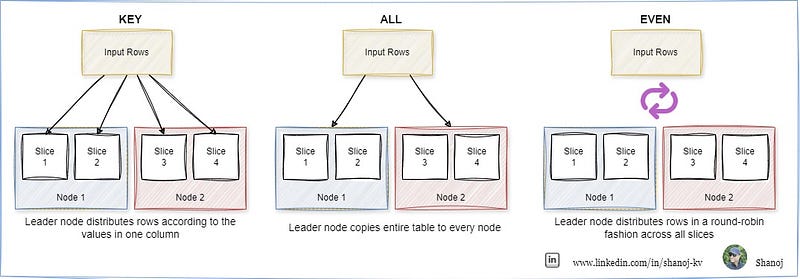
When loading data into a table in Amazon Redshift, the rows are distributed across the node slices according to the table’s designated distribution style. Selecting the right distribution style (DISTSTYLE) is crucial for optimizing performance.

  • The primary goal is evenly distributing the data across the cluster, ensuring efficient parallel processing.
  • The secondary goal is to minimize the cost of data movement during query processing. Ideally, the data should be positioned where it’s needed before the query is executed, reducing unnecessary data shuffling.

Let’s bring this concept to life with an example from the banking industry, specifically focused on reconciliation processes — a common yet critical operation in financial institutions.

In a banking reconciliation system, transactions from various accounts and systems (e.g., internal bank records and external clearing houses) must be matched and validated to ensure accuracy. This process often involves large datasets with numerous transactions that need to be compared across different tables.

Example Table Structures

To demonstrate how different distribution styles can be applied, consider the following sample tables:

Transactions Table (Internal Bank Records)

CREATE TABLE internal_transactions (
transaction_id BIGINT,
account_number VARCHAR(20),
transaction_date DATE,
transaction_amount DECIMAL(10,2),
transaction_type VARCHAR(10)
)
DISTSTYLE KEY
DISTKEY (transaction_id);

The internal_transactions table is distributed using the KEY distribution style on the transaction_id column. This means that records with the same transaction_id will be stored together on the same node slice. This is particularly useful when these transactions are frequently joined with another table, such as external transactions, on the transaction_id.

Transactions Table (External Clearing House Records)

CREATE TABLE external_transactions (
transaction_id BIGINT,
clearinghouse_id VARCHAR(20),
transaction_date DATE,
transaction_amount DECIMAL(10,2),
status VARCHAR(10)
)
DISTSTYLE KEY
DISTKEY (transaction_id);

Similar to the internal transactions table, the external_transactions table is also distributed using the KEY distribution style on the transaction_id column. This ensures that when a join operation is performed between the internal and external transactions on the transaction_id, the data is already co-located, minimizing the need for data movement and speeding up the reconciliation process.

CREATE TABLE currency_exchange_rates (
currency_code VARCHAR(3),
exchange_rate DECIMAL(10,4),
effective_date DATE
)
DISTSTYLE ALL;

The currency_exchange_rates table uses the ALL distribution style. A full copy of this table is stored on the first slice of each node, which is ideal for small reference tables that are frequently joined with larger tables (such as transactions) but are not updated frequently. This eliminates the need for data movement during joins and improves query performance.

CREATE TABLE audit_logs (
log_id BIGINT IDENTITY(1,1),
transaction_id BIGINT,
action VARCHAR(100),
action_date TIMESTAMP,
user_id VARCHAR(50)
)
DISTSTYLE EVEN;

The audit_logs table uses the EVEN distribution style. Since this table may not participate in frequent joins and primarily serves as a log of actions performed during the reconciliation process, EVEN distribution ensures that the data is evenly spread across all node slices, balancing the load and allowing for efficient processing.

Applying the Distribution Styles in a Reconciliation Process

In this banking reconciliation scenario, let’s assume we need to reconcile internal and external transactions, convert amounts using the latest exchange rates, and log the reconciliation process.

  • The internal and external transactions will be joined on transaction_id. Since both tables use KEY distribution on transaction_id, the join operation will be efficient, as related data is already co-located.
  • Currency conversion will use the currency_exchange_rates table. With ALL distribution, a copy of this table is readily available on each node, ensuring fast lookups during the conversion process.
  • As actions are performed, logs are written to the audit_logs table, with EVEN distribution ensuring that logging operations are spread out evenly, preventing any single node from becoming a bottleneck.

This approach demonstrates how thoughtful selection of distribution styles can significantly enhance the performance and scalability of your data processing in Amazon Redshift, particularly in a complex, data-intensive scenario like banking reconciliation.

In Plain English 🚀

Thank you for being a part of the In Plain English community! Before you go:

My Leadership Journey: An Open Letter to My Team

Dear Team,

This letter is for all of you who have walked this leadership journey with me — through the highs and lows, the challenges and triumphs, the late nights and the early mornings. Many of the details I’ll mention here will be experiences you’ve had while working with me on various engagements. As we continue to grow and evolve together, I believe it’s important to take a moment to reflect on the leadership styles that guide our day-to-day interactions and the success of our projects.

The Core of Flexible Leadership

Leadership isn’t a one-size-fits-all approach. In my experience, a successful leader needs to be flexible, adapting their style based on the situation, the needs of the team, and the objectives of the organization. This flexibility isn’t just a theoretical concept; it’s something I practice daily. You’ve likely seen it in action during our one-on-ones, project kick-offs, and those challenging moments when we’re navigating through complex problems.

“Sometimes it is better to lose and do the right thing than to win and do the wrong thing.” — Tony Blair

Tony Blair’s words remind us that leadership involves making tough decisions and sometimes steering the ship through stormy waters. My approach to leadership is much like navigating a ship through diverse and sometimes unpredictable seas. Depending on the waves — whether they’re calm or tumultuous — I adjust the sails, not just for myself, but for all of you aboard.

Visionary Leadership

One of the foundational pillars of my leadership style is being visionary. When we kick off a project, I make it a point to set a clear vision (end to end) that aligns with our company goals. This isn’t just about outlining what needs to be done; it’s about communicating why we’re doing it, the impact it will have, and how it aligns with the bigger picture. You might recall our discussions where I’ve shared how customers appreciate our work, how leadership is eager to see the project go live, or how our efforts will make a significant difference. This is all part of the visionary approach.

I’ve always believed that a motivated team is a productive team. By continuously reinforcing the vision, I aim to keep the team focused and driven, even when we hit inevitable roadblocks. Visionary leadership is crucial, especially during challenging times like organizational changes or market shifts. It’s during these times that we need to look forward, not backward, and concentrate on the opportunities ahead.

“Leadership is the capacity to translate vision into reality.” — Warren Bennis

Warren Bennis’s quote perfectly encapsulates what I strive for in my leadership. Translating vision into reality is what we do every day, and it’s a journey I’m proud to take with all of you.

Coaching

Another key aspect of my leadership style is coaching. I see my role as not just a leader, but as a mentor — a GPS that helps you navigate your career paths. During our one-on-ones or when delegating tasks, I focus on understanding where you are now, where you want to go, and how we can get you there together. This isn’t about dictating your path but rather guiding you to find your way.

For instance, when I delegate tasks, I don’t just consider your skills and timelines; I also factor in your interests and career goals. It’s about finding the sweet spot where what you’re passionate about intersects with what needs to be done. I often use frameworks like WWW (What Went Well) and EBI (Even Better If) during feedback sessions to ensure that the coaching process is constructive and growth-oriented.

“A leader is one who knows the way, goes the way, and shows the way.” — John C. Maxwell

John C. Maxwell’s perspective on leadership aligns with my own. It’s about more than just knowing the way; it’s about walking the path alongside you and showing you how to navigate it successfully.

Democratic Leadership

When it comes to decision-making, particularly on matters like architecture decisions, prioritizing tech debt, or reviewing sprint retrospectives, I lean towards a democratic leadership style. You’ve seen this in our sprint planning meetings and retrospectives, where I encourage each of you to voice your opinions and share your insights. This isn’t just about reaching a consensus; it’s about fostering a collaborative environment where everyone feels they have a stake in the outcome.

I believe that when you’re involved in the decision-making process, it not only leads to better decisions but also empowers you to take ownership of the project’s success. This collective approach promotes team effort and collaboration, which are critical to our success.

“The strength of the team is each individual member. The strength of each member is the team.” — Phil Jackson

Phil Jackson’s quote highlights the essence of democratic leadership. It’s about recognizing that our collective strength comes from each of you contributing your unique perspectives and skills to the team.

Affiliative Leadership

Leadership isn’t just about pushing towards goals; it’s also about creating an environment where everyone feels supported and valued. That’s where affiliative leadership comes in. Whether it’s organizing team lunches, celebrating wins, or simply being there during tough times, I prioritize building a positive and harmonious work environment. You’ve likely experienced this during our team-building activities or in moments where we’ve had to support each other through challenges.

During stressful times, whether due to external pressures or internal changes, I focus on compassion and empathy. It’s about putting goals and standards aside temporarily to ensure that your immediate needs are met, creating a safe space where you feel valued and understood.

“People will forget what you said, people will forget what you did, but people will never forget how you made them feel.” — Maya Angelou

Maya Angelou’s words serve as a reminder that leadership is deeply personal. It’s about how we make each other feel as we work towards our goals.

Pacesetting Leadership

There are moments when urgency and high standards are necessary, and this is where pacesetting leadership comes into play. You’ve seen this when we’ve faced critical production issues or tight deadlines. In such situations, I step in to lead by example, guiding the team through the process and setting a high standard for performance. This isn’t about micromanaging but rather about showing you what excellence looks like in action and helping you rise to the occasion.

“The best way to lead people into the future is to connect with them deeply in the present.” — James M. Kouzes

Kouzes’s quote reflects my approach during these critical moments. It’s about being present, hands-on, and ensuring that we move forward together.

Avoiding Coercive Leadership

One leadership style I consciously avoid is coercive leadership — giving direct orders without seeking input or considering the team’s perspectives. This style can create an environment of fear and insecurity, which is the opposite of what I strive for. In high-performing, motivated teams like ours, coercive leadership stifles creativity and reduces job satisfaction. It’s a last resort, used only when no other options remain.

“Leadership is not about being in charge. It is about taking care of those in your charge.” — Simon Sinek

Simon Sinek’s philosophy resonates with me deeply. Leadership is about care, respect, and fostering an environment where everyone can thrive.

A Journey of Continuous Learning

My leadership style is not static; it evolves with each interaction, project, and challenge we face together. Over the years, I’ve learned from experience, as well as from formal education, books and training programs, but the real learning comes from working with all of you.

I hope this deep dive into my leadership style resonates with your experiences and offers insights into how and why I lead the way I do. Together, we’ve achieved great things, and I’m excited about what we will accomplish in the future.

“The only way to do great work is to love what you do.” — Steve Jobs

Let’s continue to love what we do, support each other, and strive for excellence in everything we undertake.

With gratitude and respect,

Shanoj Kumar V

Daily Dose of Cloud Learning: AWS Resource Cleanup with Cloud-nuke

If you’re diving into AWS for testing, development, or experimentation, you know how crucial it is to clean up your environment afterwards. Often, manual cleanup can be tedious, error-prone, and may leave resources running that could cost you later. That’s where Cloud-nuke comes into play — a command-line utility designed to automate the deletion of all resources within your AWS account.

Cloud-nuke is a powerful and potentially destructive tool, as it will delete all specified resources within an account. Users should exercise caution and ensure they have backups or have excluded critical resources before running the tool.

Step 1: Install Cloud-nuke

Download Cloud-nuke:

Visit the Cloud-nuke GitHub releases page.

Download the appropriate .exefile for Windows and run the installer.

Windows: You can install cloud-nuke using winget:

winget install cloud-nuke

Verify Installation:

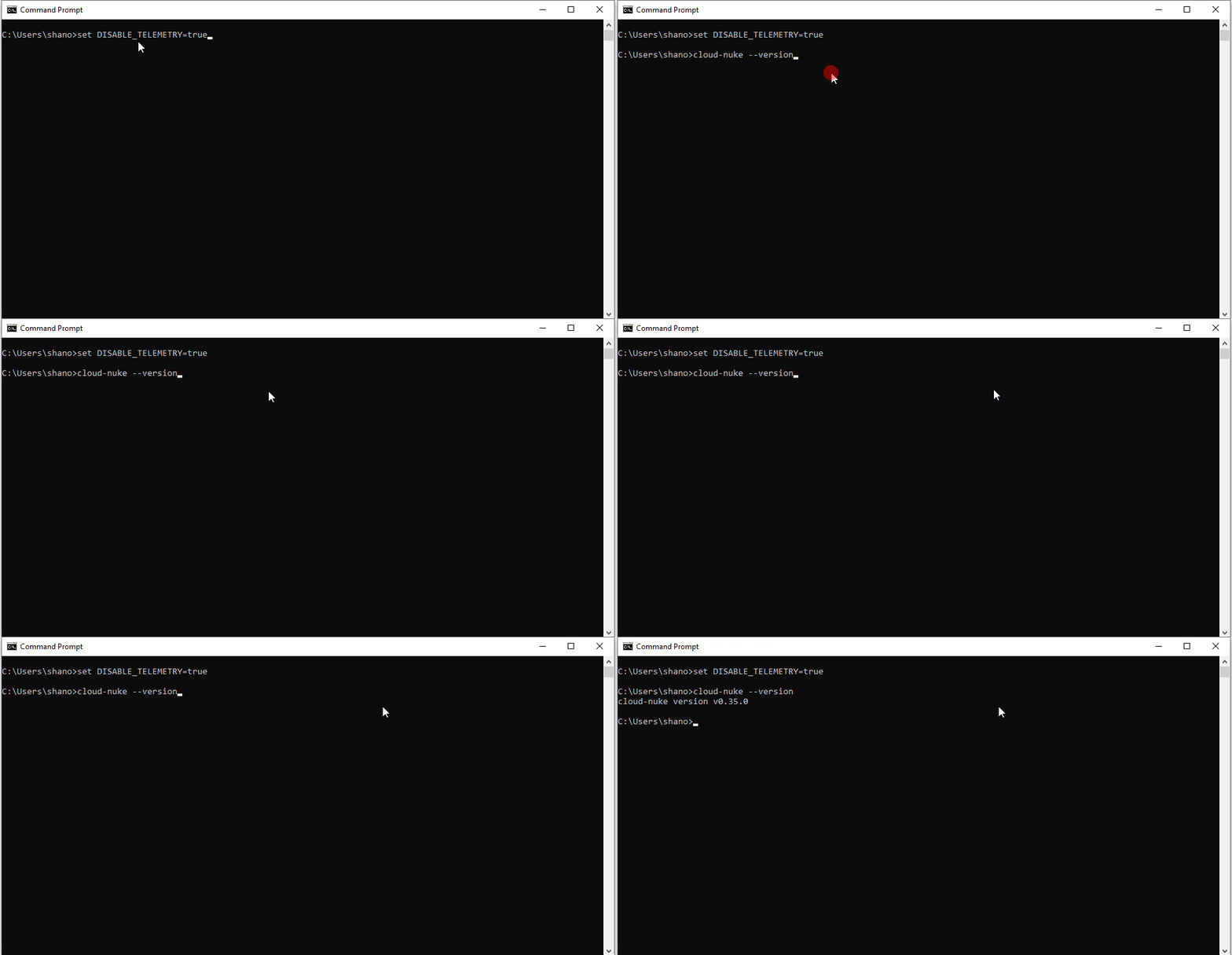
Open the Command Prompt and type cloud-nuke --version to verify that Cloud-nuke is installed correctly.

Step 2: Configure AWS CLI with Your Profile

Install AWS CLI:

If you don’t have the AWS CLI installed, download and install it from here.

Configure AWS CLI:

Open Command Prompt. Run the following command:

aws configure --profile your-profile-name

Provide the required credentials (Access Key ID, Secret Access Key) for your AWS account.

Specify your preferred default region (e.g., us-west-2).

Specify the output format (e.g., json).

Step 3: Use Cloud-nuke to Clean Up Resources

Run Cloud-nuke with IAM Exclusion:

To ensure no IAM users are deleted, include the --resource-type flag to exclude IAM resources:

cloud-nuke aws --exclude-resource-type iam

This command will target all resources except IAM.

Bonus Commands:

  • To list all the profiles configured on your system, use the following command:
aws configure list-profiles
  • This will display all the profiles you have configured.
  • To see the configuration details for a specific profile, use the following command:
aws configure list --profile your-profile-name

This command will display the following details:

  • Access Key ID: The AWS access key ID.
  • Secret Access Key: The AWS secret access key (masked).
  • Region: The default AWS region.
  • Output Format: The default output format (e.g., json, text, yaml).

I hope this article helps those who plan to use Cloud-nuke. It’s a handy tool that can save you time and prevent unnecessary costs by automating the cleanup process after you’ve tried out resources in your AWS account.

In Plain English 🚀

Thank you for being a part of the In Plain English community! Before you go: