Author : Shanoj
is a Data engineer and solutions architect passionate about delivering business value and actionable insights through well-architected data products. He holds several certifications on AWS, Oracle, Apache, Google Cloud, Docker, Linux and focuses on data engineering and analysis using SQL, Python, BigData, RDBMS, Apache Spark, among other technologies.
He has 17+ years of history working with various technologies in the Retail and BFS domains.
This book is a well-structured guide that adeptly bridges the gap between theoretical concepts and their practical application in the field of LLMs, an aspect crucial for professionals like myself.
The initial chapters of the book provide a solid foundation, introducing key concepts of LLMs in a manner that is both thorough and accessible. This sets the stage for deeper exploration into more complex topics.
Key Highlights:
Foundation Building: The first chapters offer a comprehensive introduction to LLMs, essential for understanding their fundamental workings and capabilities.
Practical Application: The book translates theoretical knowledge into practical scenarios.
Advanced Topics Coverage: In-depth exploration of modifying model architectures, embeddings, and next-generation models, providing insights for advanced solution design.
Hands-On Examples and Case Studies: Practical examples and real-world case studies enable architects to visualize the application of concepts.
Trends and Future Outlook: Discussion on multimodal Transformer architectures and reinforcement learning keeps readers abreast of the latest trends in LLMs.
What stands out in Ozdemir’s book is its comprehensive coverage of topics relevant to LLMs. It dives into essential areas such as semantic search, effective prompt engineering, and the fine-tuning of these models.
The practical guidance provided in the book is its most significant strength. The hands-on examples and case studies are particularly beneficial as they translate theoretical knowledge into actionable insights.
Furthermore, the book’s exploration into more advanced topics, such as modifying model architectures and embeddings and insights into next-generation models, is highly beneficial.
The book is well-organised in terms of content delivery and structure, making it easy to follow and reference. The clarity of explanations helps in demystifying complex topics, making them digestible for professionals who may need a deeper background in machine learning or NLP but are keen to apply these technologies in their projects.
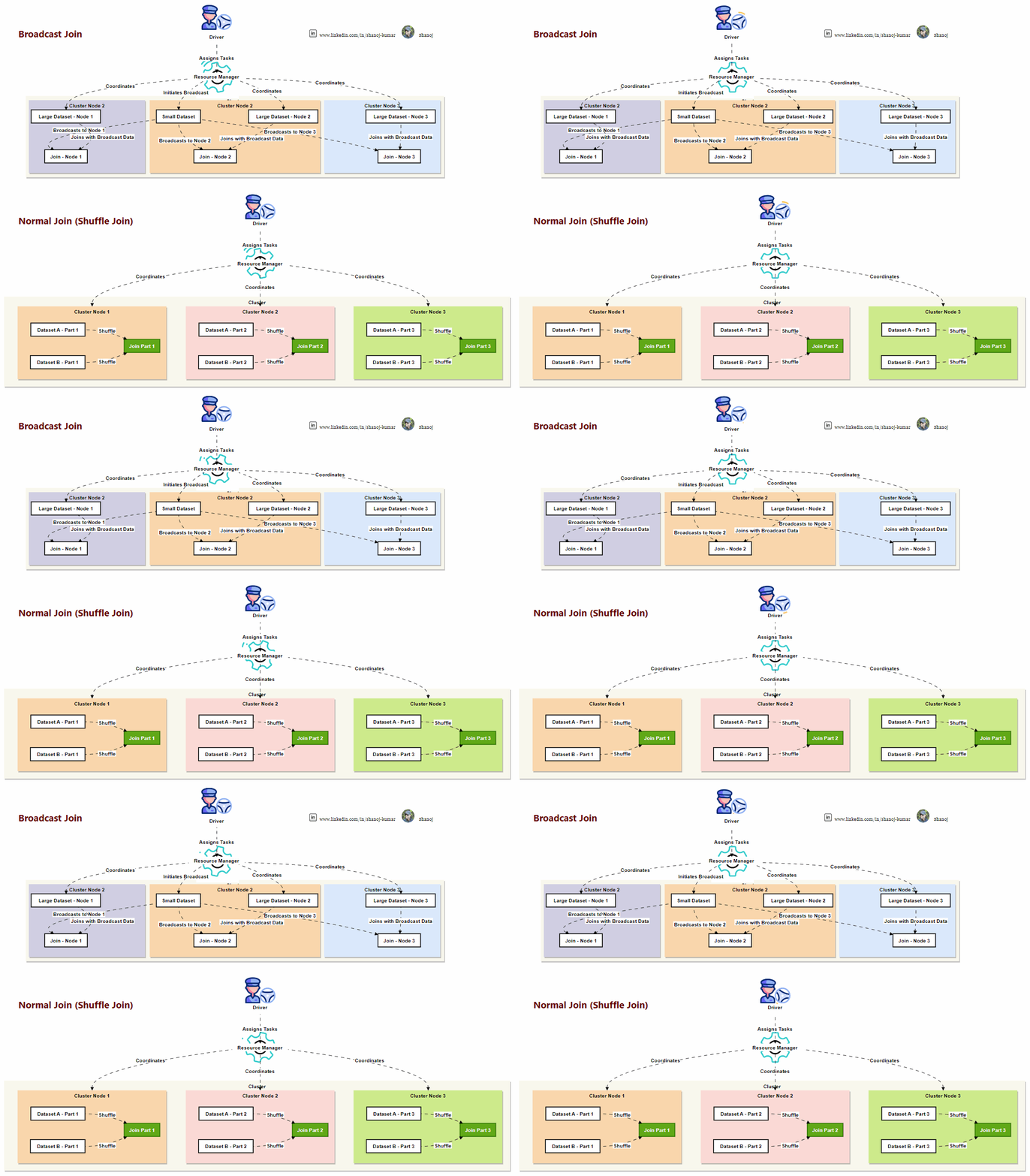
Apache Spark is an analytics engine that processes large-scale data in distributed computing environments. It offers various join operations that are essential for handling big data efficiently. In this article, we will take an in-depth look at Spark joins. We will compare normal (shuffle) joins with broadcast joins and explore other available join types.
Understanding Joins in Apache Spark
Joins in Apache Spark are operations that combine rows from two or more datasets based on a common key. The way Spark processes these joins, especially in a distributed setting, significantly impacts the performance and scalability of data processing tasks.
Normal Join (Shuffle Join)
Operation
Shuffling: Both data sets are shuffled across the cluster based on the join keys in a regular join. This process involves transferring data across different nodes, which can be network-intensive.
Use Case
Large Datasets: Best for large datasets where both sides of the join have substantial data. Typically used when no dataset is small enough to fit in the memory of a single worker node.
Performance Considerations
Speed: This can be slower due to extensive data shuffling.
Bottlenecks: Network I/O and disk writes during shuffling can become bottlenecks, especially for large datasets.
Scalability
Large Data Handling: Scales well with large datasets but can only be efficient if optimized (e.g., by partitioning).
Broadcast Join
Operation
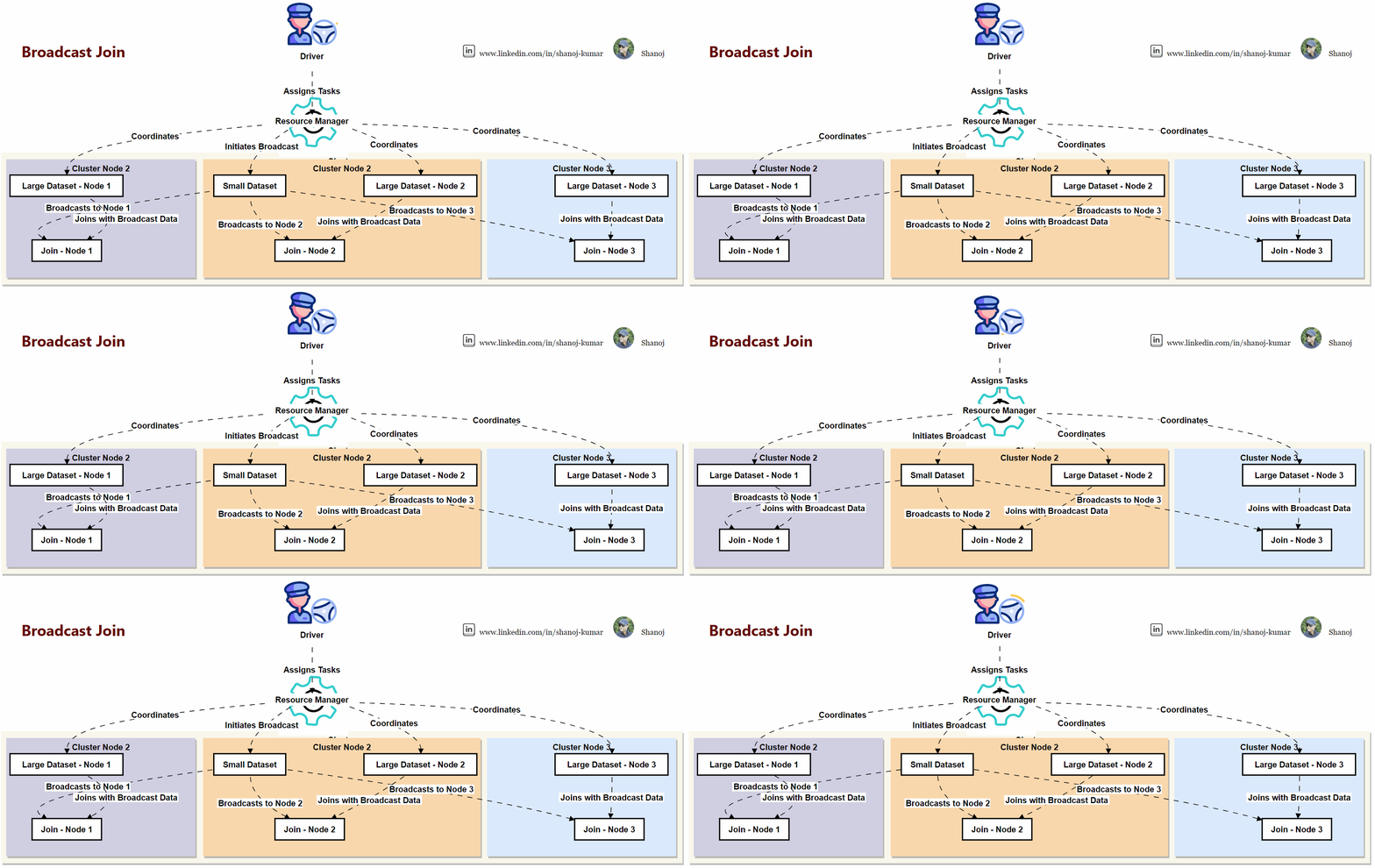
Broadcasting: In a broadcast join, the smaller dataset is sent (broadcast) to each node in the cluster, avoiding shuffling the larger dataset.
Use Case
Uneven Data Size: Ideal when one dataset is significantly smaller than the other. The smaller dataset should be small enough to fit in the memory of each worker node.
Performance Considerations
Speed: Typically faster than normal joins as it minimizes data shuffling.
Reduced Overhead: Reduces network I/O and disk write overhead.
Scalability
Small Dataset Joins: Works well for joins with small datasets but is not suitable for large to large dataset joins.
Choosing Between Normal and Broadcast Joins
The choice between a normal join and a broadcast join in Apache Spark largely depends on the size of the datasets involved and the resources of your Spark cluster. Here are key factors to consider:
Data Size and Distribution: A broadcast join is usually more efficient if one dataset is small. For two large datasets, a normal join is more suitable.
Cluster Resources: Consider the memory and network resources of your Spark cluster.
Tuning and Optimization: Spark’s ability to optimize queries (e.g., Catalyst optimizer) can sometimes automatically choose the best join strategy.
The configurations that affect broadcast joins in Apache Spark:
spark.sql.autoBroadcastJoinThreshold: Sets the maximum size of a table that can be broadcast. Lowering the threshold can disable broadcast joins for larger tables, while increasing it can enable broadcast joins for bigger tables.
spark.sql.broadcastTimeout: Determines the timeout for the broadcast operation. Spark may fallback to a shuffle join if the broadcast takes longer than this.
spark.driver.memory: Allocates memory to the driver. Since the driver coordinates broadcasting, insufficient memory can hinder the broadcast join operation.
Other Types of Joins in Spark
Apart from normal and broadcast joins, Spark supports several other join types:
Inner Join: Combines rows from both datasets where the join condition is met.
Outer Joins: Includes left outer, right outer, and full outer joins, which retain rows from one or both datasets even when no matching join key is found.
Cross Join (Cartesian Join): Produces a Cartesian product of the rows from both datasets. Every row of the first dataset is joined with every row of the second dataset, often resulting in many rows.
Left Semi Join: This join type returns only the rows from the left dataset for which there is a corresponding row in the right dataset, but the columns from the right dataset are not included in the output.
Left Anti Join: Opposite to the Left Semi Join, this join type returns rows from the left dataset that do not have a corresponding row in the right dataset.
Self Join: This is not a different type of join per se, but rather a technique where a dataset is joined with itself. This can be useful for hierarchical or sequential data analysis.
Considerations for Efficient Use of Joins in Spark
When implementing joins in Spark, several considerations can help optimize performance:
Data Skewness: Imbalanced data distribution can lead to skewed processing across the cluster. Addressing data skewness is crucial for maintaining performance.
Memory Management: Ensuring that the broadcasted dataset fits into memory is crucial for broadcast joins. Out-of-memory errors can significantly impact performance.
Join Conditions: Optimal use of join keys and conditions can reduce the amount of data shuffled across the network.
Partitioning and Clustering: Proper partitioning and clustering of data can enhance join performance by minimizing data movement.
Use of DataFrames and Datasets: Utilizing DataFrames and Datasets API for joins can leverage Spark’s Catalyst Optimizer for better execution plans.
PySpark code for the broadcast join:
from pyspark.sql import SparkSession from pyspark.sql.functions import broadcast
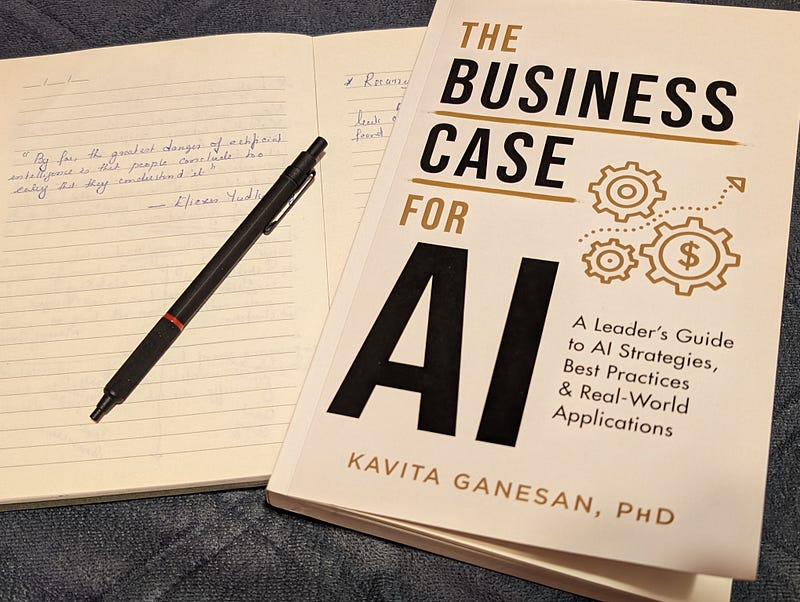
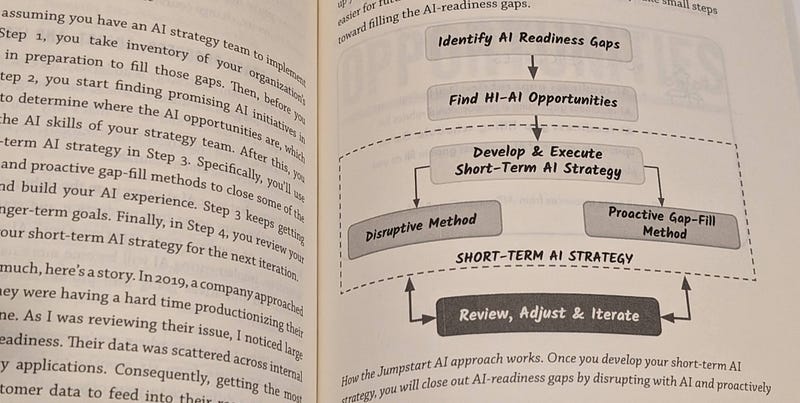
“The Business Case for AI: A Leader’s Guide to AI Strategies, Best Practices & Real-World Applications” is undoubtedly my best read of 2023, and remarkably, it’s a book that can be digested in just a few days. This is largely due to the author, Kavita Ganesan, PhD, who knows precisely what she aims to deliver and does so in a refreshingly straightforward manner. The book is thoughtfully segmented into five parts: Frame Your AI Thinking, Get AI Ideas Flowing, Prepare for AI, Find AI Opportunities, and Bring Your AI Vision to Life.
The book kicks off with a bold and provocative statement:
“Stop using AI. That’s right — I have told several teams to stop and rethink.”
This isn’t just a book that mindlessly champions the use of AI; it’s a critical and thoughtful guide to understanding when, how, and why AI should be incorporated into business strategies.
Image courtesy of The Business Case for AI
It’s an invaluable resource for Technology leaders like myself who need to understand AI trends and assess their applicability and potential impact on our operations. The book doesn’t just dive into technical jargon from the get-go; instead, it starts with the basics and gradually builds up to more complex concepts, making it accessible and informative.
The comprehensive cost-benefit analysis provided is particularly useful, offering readers a clear framework for deciding when it’s appropriate to integrate AI into their business strategies.
However, it’s important to note that the fast-paced nature of AI development means some examples might feel slightly outdated, a testament to the field’s rapid evolution. Despite this, the book’s strengths far outweigh its limitations.
This book is an essential read for anyone looking to genuinely understand the strategic implications and applications of AI in business. It’s not just another book on the shelf; it’s a guide, an eye-opener, and a source of valuable insights all rolled into one. If you’re considering AI solutions for your work or wish to learn about the potential of this transformative technology,
Get ready to discover:
What’s true, what’s hype, and what’s realistic to expect from AI and machine learning systems
Ideas for applying AI in your business to increase revenues, optimize decision-making, and eliminate business process inefficiencies.
How to spot lucrative AI opportunities in your organization and capitalize on them in creative ways.
Three Pillars of AI success, a systematic framework for testing and evaluating the value of AI initiatives.
A blueprint for AI success without statistics, data science, or technical jargon.
I would say this book is essential for anyone looking to understand not just the hype around AI but the real strategic implications and applications for businesses. It’s an eye-opener, a guide, and a thought-provoker all in one, making it a valuable addition to any leader’s bookshelf.
Stackademic
Thank you for reading until the end. Before you go:
Please consider clapping and following the writer! 👏
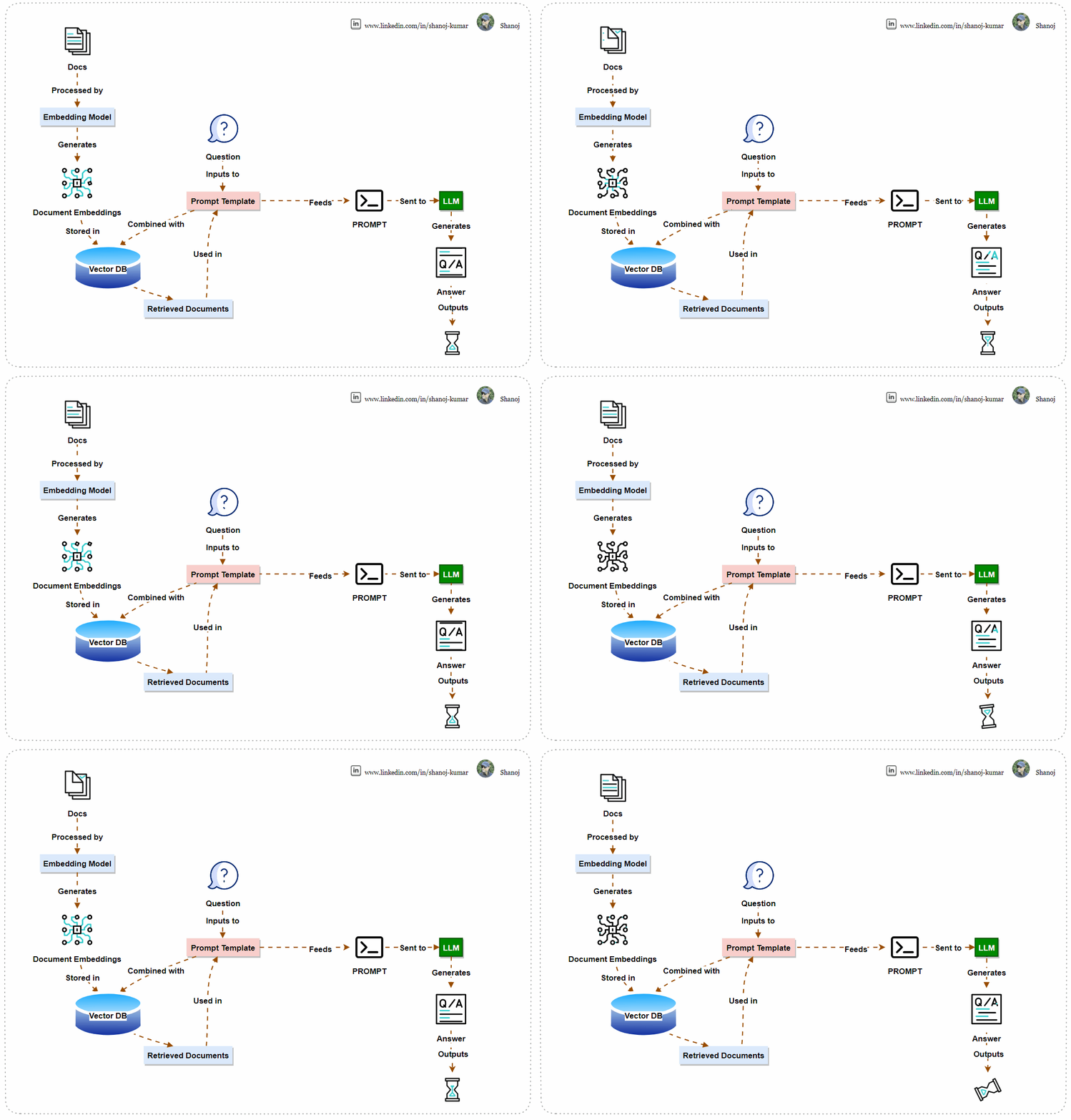
This article aims to guide you on how to create and utilize Large Language Models (LLMs) such as OpenAI’s GPT-3 for basic natural language processing applications. It provides a step-by-step process on how to set up your development environment and API keys, how to source and process text data, and how to leverage the power of LLMs to answer queries. This article offers a simplified approach to building and deploying an LLM-powered question-answering system by transforming documents into numerical embeddings and using vector databases for efficient retrieval. This system can produce insightful responses, showcasing the potential of generative AI in accessing and synthesizing knowledge.
Application Overview
The system uses machine learning to find answers. It converts documents into numerical vectors and stores them in a Vector Database for easy retrieval. When a user asks a question, the system combines it with the documents using a Prompt Template and sends it to a Language Learning Model (LLM). The LLM generates an answer, which the system displays to the user. This AI-powered system efficiently processes language and finds information.
Step 1: Install Necessary Libraries
First, you’ll need to install the necessary Python libraries. These include tools for handling rich text, connecting to the OpenAI API, and various utilities from the langchain library.
Import the required libraries and ensure that your OpenAI API key is set up. The script will prompt you to enter your API key if it’s not found in your environment variables.
import os from getpass import getpass
# Check for OpenAI API key and prompt if not found if os.getenv("OPENAI_API_KEY") isNone: os.environ["OPENAI_API_KEY"] = getpass("Paste your OpenAI key from: https://platform.openai.com/account/api-keys\n") assert os.getenv("OPENAI_API_KEY", "").startswith("sk-"), "This doesn't look like a valid OpenAI API key"
Step 3: Set the Model Name
Define the model you’ll be using from OpenAI. In this case, we’re using text-davinci-003, but you can replace it with gpt-4 or any other model you prefer.
MODEL_NAME = "text-davinci-003"
Note:text-davinci-003 is a version of OpenAI’s GPT-3 series, representing the most advanced in the “Davinci” line, known for its sophisticated natural language understanding and generation. As a versatile model, it’s used for a wide range of tasks requiring nuanced context, high-quality outputs, and creative content generation. While powerful, it’s also accessibly costly and requires careful consideration for ethical and responsible use due to its potential to influence and generate a wide array of content.
Step 4: Download Sample Data
Clone a repository containing sample markdown files to use as your data source.
Note: Ensure the destination path doesn’t already contain a folder with the same name to avoid errors.
Step 5: Load and Prepare Documents
Load the markdown files and prepare them for processing. This involves finding all markdown files in the specified directory and loading them into a format suitable for the langchain library.
from langchain.document_loaders import DirectoryLoader
Count the number of tokens in each document. This is important to ensure that the inputs to the model don’t exceed the maximum token limit.
import tiktoken
tokenizer = tiktoken.encoding_for_model(MODEL_NAME) defcount_tokens(documents): return [len(tokenizer.encode(document.page_content)) for document in documents] token_counts = count_tokens(documents) print(token_counts)
Note: TPM stands for “Tokens Per Minute,” a metric indicating the number of tokens the API can process within a minute. For the “gpt-3.5-turbo” model, the limit is set to 40,000 TPM. This means you can send up to 40,000 tokens worth of data to the API for processing every minute. This limit is in place to manage the load on the API and ensure fair usage among consumers. It’s important to design your interactions with the API to stay within these limits to avoid service interruptions or additional fees.
Step 7: Split Documents into Sections
Use the MarkdownTextSplitter to split the documents into manageable sections that the language model can handle.
from langchain.text_splitter import MarkdownTextSplitter
Use OpenAIEmbeddings to convert the text into embeddings, and then store these embeddings in a vector database (Chroma) for fast retrieval.
from langchain.embeddingsimportOpenAIEmbeddings from langchain.vectorstoresimportChroma
embeddings = OpenAIEmbeddings() db = Chroma.from_documents(document_sections, embeddings)
Note: Embeddings in machine learning are numerical representations of text data, transforming words, sentences, or documents into vectors of real numbers so that computers can process natural language. They capture semantic meaning, allowing words with similar context or meaning to have similar representations, which enhances the ability of models to understand and perform tasks like translation, sentiment analysis, and more. Embeddings reduce the complexity of text data and enable advanced functionalities in language models, making them essential for understanding and generating human-like language in various applications.
Step 9: Create a Retriever
Create a retriever from the database to find the most relevant document sections based on your query.
Step 10: Define and Retrieve Documents for Your Query
Define the query you’re interested in and use the retriever to find relevant document sections.
query = "Can you explain the origins and primary objectives of the Markdown language as described by its creators, John Gruber and Aaron Swartz, and how it aims to simplify web writing akin to composing plain text emails?"
docs = retriever.get_relevant_documents(query)
Step 11: Construct and Send the Prompt
Build the prompt by combining the context (retrieved document sections) with the query, and send it to the OpenAI model for answering.
context = "\n\n".join([doc.page_content for doc in docs])
prompt = f"""Use the following pieces of context to answer the question at the end.
If you don't know the answer, just say that you don't know, don't try to make up an answer.

{context}

Question: {query}
Helpful Answer:"""

from langchain.llms import OpenAI

llm = OpenAI()
response = llm.predict(prompt)
Step 12: Display the Result
Finally, print out the model’s response to your query.
print(response)
Stackademic
Thank you for reading until the end. Before you go:
Please consider clapping and following the writer! 👏
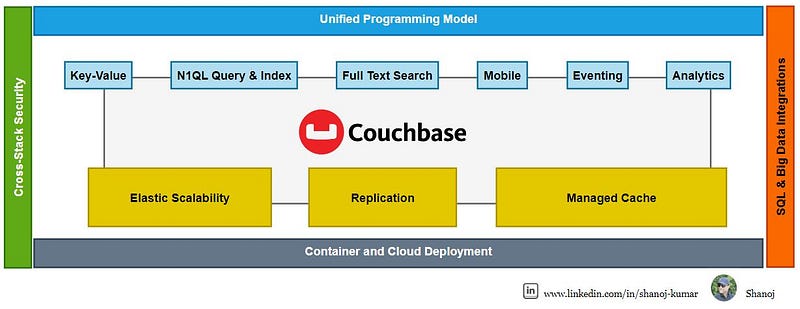
Couchbase is the outcome of a remarkable fusion of two innovative technologies. On the one hand, there was Membase, a high-performance key-value storage engine created by the pioneers of Memcached, who worked under the NorthScale brand. On the other hand, there was CouchDB, a solution designed for document-oriented database requirements, developed by Damien Katz, the founder of CouchOne.
In February 2011, two technological forces joined together to create Couchbase, which is a comprehensive suite for NoSQL database needs. It combines a document-oriented data model with seamless indexing and querying capabilities, promising high performance and effortless scalability.
Couchbase Architecture & Features
Couchbase Server
Couchbase is built on a memory-first architecture which prioritizes in-memory processing to achieve high performance. Whenever a new item is saved, it is initially stored in memory, and associated data with Couchbase buckets is maintained persistently on disk.
Couchbase Server has a memory-first design for fast data access. Its active memory defragmenter optimizes performance. It supports a flexible JSON data model and direct in-memory access to its key-value engine for modern performance demands.
Consistency Models and N1QL Query Language
Let’s explore how Couchbase elegantly navigates the classic trade-offs in distributed systems, balancing Consistency, Availability, and Partition Tolerance, also known as the CAP theorem.
Couchbase offers a strategic shift from CP to AP, a choice that depends on your deployment topology and the desired system behaviour.
For a Single Cluster setup, Couchbase operates as a CP system, emphasizing strong consistency and partition tolerance, ensuring that your data remains accurate and synchronized across your cluster, which is ideal for scenarios where every transaction counts.
On the other hand, in a multi-cluster setup with cross-datacenter replication, abbreviated as XDCR, Couchbase adopts an AP approach, prioritizing availability over immediate consistency. This model is perfect for applications where uptime is critical, and data can eventually synchronize across clusters.
Highlighting its advanced capabilities, the N1QL Query Language in Couchbase now supports Distributed ACID Transactions.
This means you can perform complex transactions across your distributed Database with the assurance of atomicity, consistency, isolation, and durability — the cornerstone of reliable database management.
With these features, Couchbase ensures that your data is distributed, resilient and intelligently managed to meet the various demands of modern applications.
Concept 1 — Your Choice of Services
As we unfold the pages of Couchbase’s architecture, Concept 1 highlights ‘Your Choice of Services’. This high-level overview showcases the modular and resilient design of Couchbase, which empowers you to tailor your database architecture to your application’s specific needs.
Starting with Cluster Management, Couchbase offers a distributed architecture with no single point of failure, ensuring your system’s high availability. Automatic sharding through vBuckets ensures load balancing and scalability, while Cross Data Center Replication(XDCR) offers geographical redundancy.
The Data Service is the backbone, providing robust key-value storage with in-cluster and cross-data centre replication capabilities, all accelerated by a built-in cache for high performance.
Moving on to the Query Service, here we have the powerful N1QL, or SQL for JSON, for planning and executing queries, supporting JOINS, aggregations, and subqueries, giving you the flexibility of SQL with the power of JSON.
The Index Service seamlessly manages N1QL index creation, update, replication, and maintenance, while the Search Service provides comprehensive full-text indexing and search support.
Analytics Service offers isolated, distributed queries for long-running analytical operations without affecting your operational database performance.
Finally, the Eventing Service introduces event-driven data management, allowing you to respond to data mutations quickly.
Together, these services form a cohesive framework that stores and manages your data and integrates with your application logic for a seamless experience.
Each node or server in Couchbase is identical and capable of housing data in any configuration necessary to meet your application’s demands. As we see here, the four nodes are interconnected to form what is traditionally known as a cluster.
What’s unique about Couchbase is its flexibility in configuring these nodes. Depending on your changing capacity requirements, you can assign more or fewer resources to specific services. This adaptability is illustrated in our diagram, showing a variety of possible configurations.
In the first configuration, all services, from Data to Analytics, are distributed evenly across all nodes, ensuring a balanced workload and optimal utilization of resources.
In the second configuration, you can see that we’ve scaled up the Data Service across nodes to accommodate a heavier data load, demonstrating Couchbase’s agility in resource allocation.
The third configuration takes a specialized approach, with each node dedicated to a specific service, optimizing for intense workloads and dedicated tasks.
This level of customization ensures that as your application grows and evolves, your Couchbase cluster can adapt seamlessly, providing consistent performance and reliability.
Couchbase’s design philosophy is to provide you with the tools to build a database cluster that’s as dynamic as your business needs, without compromising on performance, availability, or scalability.
In Couchbase, keys and documents are stored in a Bucket.
A Couchbase Bucket* stores data persistently, as well as in memory. Buckets allow data to be automatically replicated for high availability and dynamically scaled across multiple databases by means of Cross Datacenter Replication (XDCR)
Bucket Storage
A Couchbase Database consists of one or more instances of Couchbase, each running a set of services, including the Data Service.
Each Bucket is sharded equally and automatically among the Servers, also known as Nodes, in the Database.
Bucket Composition
Within each Bucket are 1024 vBuckets, also known as shards, spread out equally and automatically only on Data nodes. Couchbase refers to this automatic distribution as auto-sharding.
VBuckets: Stores a subset of the total data set. Allow for horizontal scalability.
Concept 2 is centred on ‘Automatic Sharding’ — a pivotal feature of Couchbase that addresses the challenges of managing a growing dataset. As the volume of data increases, the need for efficient management becomes crucial. Couchbase rises to the occasion by automatically partitioning data across multiple nodes within the cluster, a technique known as sharding. This approach guarantees a balanced distribution of data, which is instrumental in enhancing both performance and scalability.
The mechanism behind this is the implementation of vBuckets or virtual buckets. These vBuckets are designed to distribute data evenly across all nodes, thus empowering horizontal scaling and bolstering fault tolerance and recovery. For developers, this means simplicity and ease of use, as the complexity of sharding is abstracted away, allowing them to concentrate on what they do best — building outstanding applications, assured that the data layer will scale as needed without any extra intervention.
Concept 3 — Database Change Protocol
Core Function: DCP (Database Change Protocol) is a key replication protocol in Couchbase Server, connecting nodes and clusters across different data centres.
DCP (Database Change Protocol)
Key Features: Includes ordered mutations, optimized restarts post-failures, efficient, consistent snapshot production, and eager changes streaming.
Concept 3 introduces the ‘Database Change Protocol’ at the heart of Couchbase’s real-time replication and synchronization capabilities. This protocol ensures that changes made to the Database are captured and communicated efficiently across different system parts.
Whether for cache invalidation, index maintenance, or cross-data centre replication, the Database Change Protocol ensures that all components of your Couchbase deployment stay in sync. This mechanism is crucial for maintaining data consistency, especially in distributed environments, and it supports Couchbase’s high availability and resilience promises to your applications.
Stackademic
Thank you for reading until the end. Before you go:
Please consider clapping and following the writer! 👏
This diagram shows Apache Spark’s executor memory model in a YARN-managed cluster. Executors are allocated a specific amount of Heap and Off-Heap memory. Heap memory is divided into Execution Memory, Storage Memory, and User Memory. A small portion is reserved as Reserved Memory. Off-Heap memory is utilized for data not stored in the JVM heap and Overhead accounts for additional memory allocations beyond the executor memory. This allocation optimizes memory usage and performance in Spark applications while ensuring system resources are not exhausted.
Apache Spark’s dynamic allocation feature enables it to automatically adjust the number of executors used in a Spark application based on the workload. This feature is handy in shared cluster environments where resources must be efficiently allocated across multiple applications. Here’s an overview of the critical aspects:
Purpose: Automatically scales the number of executors up or down depending on the application’s needs.
Benefit: Improves resource utilization and handles varying workloads efficiently.
How It Works
Adding Executors: Spark requests more executors when tasks are pending, and resources are underutilized.
Removing Executors: Spark releases them back to the cluster if executors are idle for a certain period.
Resource Consideration: Takes into account the total number of cores and memory available in the cluster.
Configuration
spark.dynamicAllocation.enabled: Must be set to true allow for dynamic allocation.
spark.dynamicAllocation.minExecutors: Minimum number of executors Spark will retain.
spark.dynamicAllocation.maxExecutors: Maximum number of executors Spark can acquire.
spark.dynamicAllocation.initialExecutors: Initial number of executors to run if dynamic allocation is enabled.
spark.dynamicAllocation.executorIdleTimeout: Duration after which idle executors are removed.
spark.dynamicAllocation.schedulerBacklogTimeout: The time after which Spark will start adding new executors if there are pending tasks.
Integration with External Shuffle Service
Necessity: Essential for dynamic allocation to work effectively.
Function: Maintains shuffle data after executors are terminated, ensuring data is not lost when executors are dynamically removed.
Advantages
Efficient Resource Usage: Only uses resources as needed, freeing them when unused.
Adaptability: Adjusts to varying workloads without manual intervention.
Cost-Effective: In cloud environments, costs can be reduced by using fewer resources.
Considerations and Best Practices
Workload Characteristics: Best suited for jobs with varying stages and resource requirements.
Fine-tuning: Requires careful configuration to ensure optimal performance.
Monitoring: Keep an eye on application performance and adjust configurations as necessary.
Limitations
Not Ideal for All Workloads: It may not benefit applications with stable or predictable resource requirements.
Delay in Scaling: There can be a delay in executor allocation and deallocation, which might affect performance.
Use Cases
Variable Data Loads: Ideal for applications that experience fluctuating amounts of data.
Shared Clusters: Maximizes resource utilization in environments where multiple applications run concurrently.
Setup Spark Session with Dynamic Allocation Enabled This assumes Spark is set up with dynamic allocation enabled by default. You can create a Spark session like this:
Run a Spark Job Now, run a simple Spark job to see dynamic allocation in action. For example, you can read a large dataset and perform some transformations or actions on it.
# Example: Load a dataset and perform an action
df = spark.read.csv("path_to_large_dataset.csv")
df.count()
Monitor Executors While the job is running, you can monitor the Spark UI (usually available at http://[driver-node]:4040) to see how executors are dynamically allocated and released based on the workload.
Turning Off Dynamic Allocation
To turn off dynamic allocation, you need to set spark.dynamicAllocation.enabled to false. This is how you can do it:
This will print true if dynamic allocation is enabled and false if it is disabled.
Important Notes
Environment Setup: Ensure your Spark environment (like YARN or standalone cluster) supports dynamic allocation.
External Shuffle Service: An external shuffle service must be enabled in your cluster for dynamic allocation to work properly, especially when decreasing the number of executors.
Resource Manager: This demo assumes you have a resource manager (like YARN) that supports dynamic allocation.
Data and Resources: The effectiveness of the demo depends on the size of your data and the resources of your cluster. You might need a sufficiently large dataset and a cluster setup to observe dynamic allocation effectively.
spark-submit is a powerful tool used to submit Spark applications to a cluster for execution. It’s essential in the Spark ecosystem, especially when working with large-scale data processing. Let’s dive into both a high-level overview and a detailed explanation of spark-submit.
Spark Submit:
High-Level Overview
Purpose:spark-submit is the command-line interface for running Spark applications. It handles the packaging of your application, distributing it across the cluster, and executing it.
Usage: It’s typically used in environments where Spark is running in standalone cluster mode, Mesos, YARN, or Kubernetes. It’s not used in interactive environments like a Jupyter Notebook.
Flexibility: It supports submitting Scala, Java, and Python applications.
Cluster Manager Integration: It integrates seamlessly with various cluster managers to allocate resources and manage and monitor Spark jobs.
Detailed Explanation
Command Structure:
Basic Syntax:spark-submit [options] <app jar | python file> [app arguments]
Options: These include configurations for the Spark application, such as memory size, the number of executors, properties files, etc.
App Jar / Python File: The path to a bundled JAR file for Scala/Java applications or a .py file for Python applications.
App Arguments: Arguments that need to be passed to the primary method of your application.
Key Options:
--class: For Java/Scala applications, the entry point class.
--master: The master URL for the cluster (e.g., spark://23.195.26.187:7077, yarn, mesos://, k8s://).
--deploy-mode: Whether to deploy your driver on the worker nodes (cluster) or locally as an external client (client).
--conf: Arbitrary Spark configuration property in key=value format.
Resource Options: Like --executor-memory, --driver-memory, --executor-cores, etc.
Working with Cluster Managers:
In YARN mode, spark-submit can dynamically allocate resources based on demand.
For Mesos, it can run in either fine-grained mode (lower latency) or coarse-grained mode (higher throughput).
In Kubernetes, it can create containers for Spark jobs directly in a Kubernetes cluster.
Environment Variables:
Spark uses several environmental variables like SPARK_HOME, JAVA_HOME, etc. These need to be correctly set up.
Advanced Features:
Dynamic Allocation: This can allocate or deallocate resources dynamically based on the workload.
Logging and Monitoring: Integration with tools like Spark History Server for job monitoring and debugging.
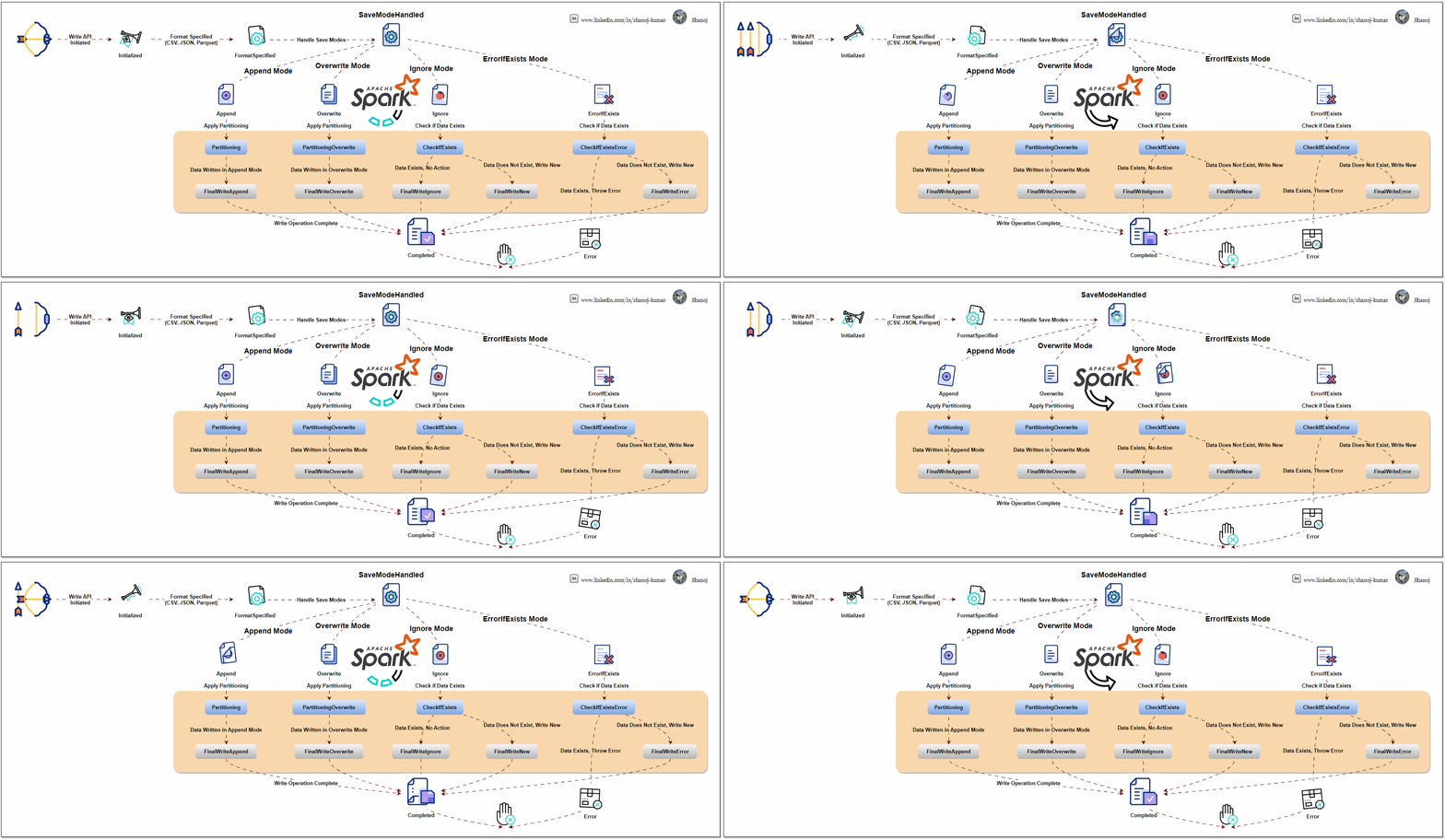
This diagram explains the Apache Spark DataFrame Write API process flow. It starts with an API call to write data in formats like CSV, JSON, or Parquet. The process diverges based on the save mode selected (append, overwrite, ignore, or error). Each mode performs necessary checks and operations, such as partitioning and data write handling. The process ends with either the final write of data or an error, depending on the outcome of these checks and operations.
Apache Spark is an open-source distributed computing system that provides a robust platform for processing large-scale data. The Write API is a fundamental component of Spark’s data processing capabilities, which allows users to write or output data from their Spark applications to different data sources.
Understanding the Spark Write API
Data Sources: Spark supports writing data to a variety of sources, including but not limited to:
Distributed file systems like HDFS
Cloud storage like AWS S3, Azure Blob Storage
Traditional databases (both SQL and NoSQL)
Big Data file formats (Parquet, Avro, ORC)
DataFrameWriter: The core class for the Write API is DataFrameWriter. It provides functionality to configure and execute write operations. You obtain a DataFrameWriter by calling the .write method on a DataFrame or Dataset.
Write Modes: Specify how Spark should handle existing data when writing data. Common modes are:
append: Adds the new data to the existing data.
overwrite: Overwrites existing data with new data.
ignore: If data already exists, the write operation is ignored.
errorIfExists (default): Throws an error if data already exists.
Format Specification: You can specify the format of the output data, like JSON, CSV, Parquet, etc. This is done using the .format("formatType") method.
Partitioning: For efficient data storage, you can partition the output data based on one or more columns using .partitionBy("column").
Configuration Options: You can set various options specific to the data source, like compression, custom delimiters for CSV files, etc., using .option("key", "value").
Saving the Data: Finally, you use .save("path") to write the DataFrame to the specified path. Other methods .saveAsTable("tableName") are also available for different writing scenarios.
from pyspark.sql import SparkSession from pyspark.sql import Row import os
# Function to list files in a directory deflist_files_in_directory(path): files = os.listdir(path) return files
# Show initial DataFrame print("Initial DataFrame:") df.show()
# Write to CSV format using overwrite mode df.write.csv(output_path, mode="overwrite", header=True) print("Files after overwrite mode:", list_files_in_directory(output_path))
# Show additional DataFrame print("Additional DataFrame:") additional_df.show()
# Write to CSV format using append mode additional_df.write.csv(output_path, mode="append", header=True) print("Files after append mode:", list_files_in_directory(output_path))
# Write to CSV format using ignore mode additional_df.write.csv(output_path, mode="ignore", header=True) print("Files after ignore mode:", list_files_in_directory(output_path))
# Write to CSV format using errorIfExists mode try: additional_df.write.csv(output_path, mode="errorIfExists", header=True) except Exception as e: print("An error occurred in errorIfExists mode:", e)
# Stop the SparkSession spark.stop()
Spark’s Architecture Overview
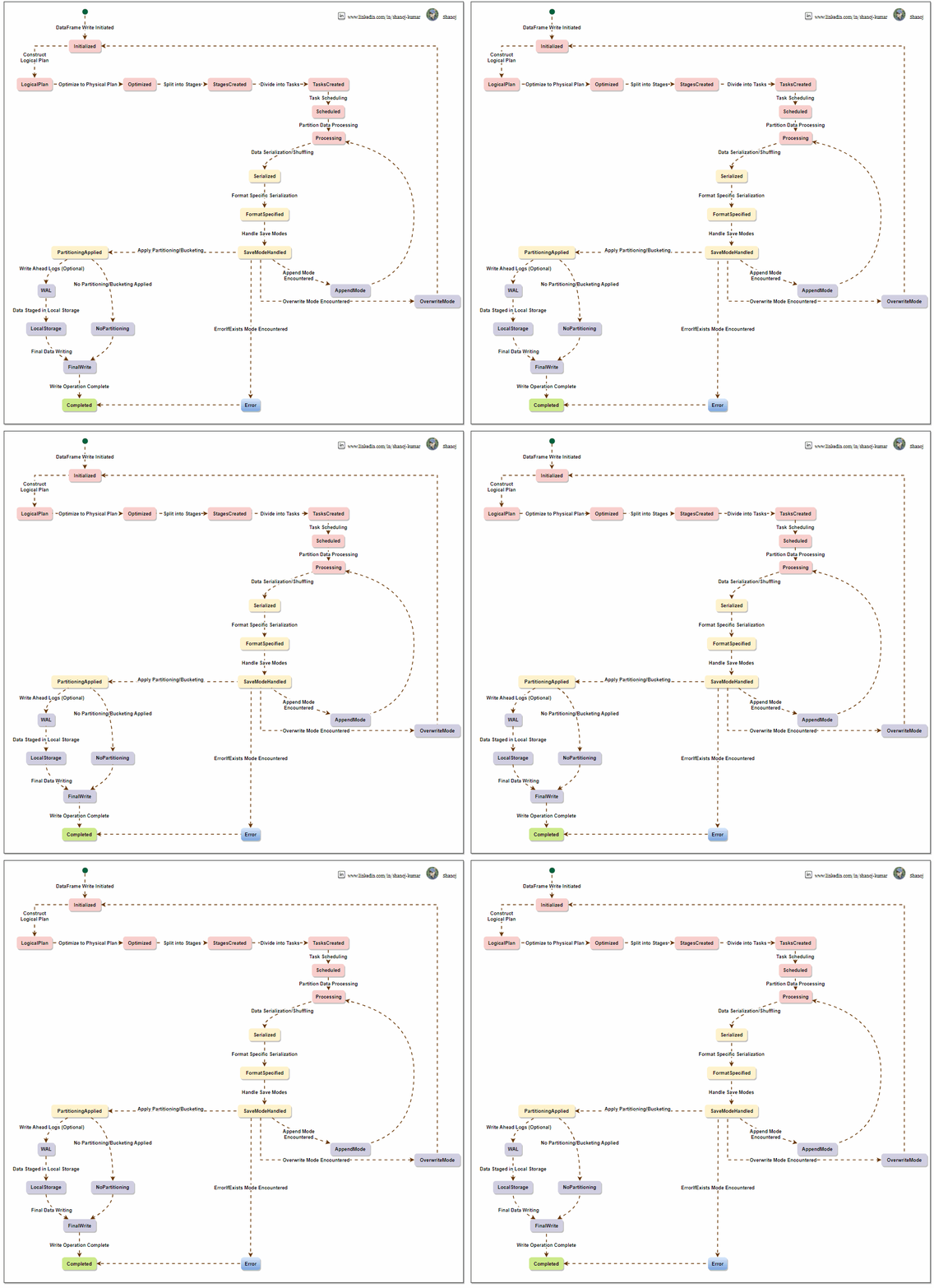
To write a DataFrame in Apache Spark, a sequential process is followed. Spark creates a logical plan based on the user’s DataFrame operations, which is optimized into a physical plan and divided into stages. The system processes data partition-wise, logs it for reliability, and writes it to local storage with defined partitioning and write modes. Spark’s architecture ensures efficient management and scaling of data writing tasks across a computing cluster.
The Apache Spark Write API, from the perspective of Spark’s internal architecture, involves understanding how Spark manages data processing, distribution, and writing operations under the hood. Let’s break it down:
Spark’s Architecture Overview
Driver and Executors: Spark operates on a master-slave architecture. The driver node runs the main() function of the application and maintains information about the Spark application. Executor nodes perform the data processing and write operations.
DAG Scheduler: When a write operation is triggered, Spark’s DAG (Directed Acyclic Graph) Scheduler translates high-level transformations into a series of stages that can be executed in parallel across the cluster.
Task Scheduler: The Task Scheduler launches tasks within each stage. These tasks are distributed among executors.
Execution Plan and Physical Plan: Spark uses the Catalyst optimizer to create an efficient execution plan. This includes converting the logical plan (what to do) into a physical plan (how to do it), considering partitioning, data locality, and other factors.
Writing Data Internally in Spark
Data Distribution: Data in Spark is distributed across partitions. When a write operation is initiated, Spark first determines the data layout across these partitions.
Task Execution for Write: Each partition’s data is handled by a task. These tasks are executed in parallel across different executors.
Write Modes and Consistency:
For overwrite and append modes, Spark ensures consistency by managing how data files are replaced or added to the data source.
For file-based sources, Spark writes data in a staged approach, writing to temporary locations before committing to the final location, which helps ensure consistency and handling failures.
Format Handling and Serialization: Depending on the specified format (e.g., Parquet, CSV), Spark uses the respective serializer to convert the data into the required format. Executors handle this process.
Partitioning and File Management:
If partitioning is specified, Spark sorts and organizes data accordingly before writing. This often involves shuffling data across executors.
Spark tries to minimize the number of files created per partition to optimize for large file sizes, which are more efficient in distributed file systems.
Error Handling and Fault Tolerance: In case of a task failure during a write operation, Spark can retry the task, ensuring fault tolerance. However, not all write operations are fully atomic, and specific scenarios might require manual intervention to ensure data integrity.
Optimization Techniques:
Catalyst Optimizer: Optimizes the write plan for efficiency, e.g., minimizing data shuffling.
Tungsten: Spark’s Tungsten engine optimizes memory and CPU usage during data serialization and deserialization processes.
Write Commit Protocol: Spark uses a write commit protocol for specific data sources to coordinate the process of task commits and aborts, ensuring a consistent view of the written data.
Efficient and reliable data writing is the ultimate goal of Spark’s Write API, which orchestrates task distribution, data serialization, and file management in a complex manner. It utilizes Spark’s core components, such as the DAG scheduler, task scheduler, and Catalyst optimizer, to perform write operations effectively.
Stackademic
Thank you for reading until the end. Before you go:
Please consider clapping and following the writer! 👏
The process begins with data partitioning to enable distributed processing, followed by shuffling and sorting data within partitions and executing partition-level operations. Spark employs a lazy evaluation strategy that postpones the actual computation until an action triggers it. At this point, the Catalyst Optimizer refines the execution plan, including specific optimizations for window functions. The Tungsten Execution Engine executes the plan, optimizing for memory and CPU usage and completing the process.
Apache Spark offers a robust collection of window functions, allowing users to conduct intricate calculations and analysis over a set of input rows. These functions improve the flexibility of Spark’s SQL and DataFrame APIs, simplifying the execution of advanced data manipulation and analytics.
Understanding Window Functions
Window functions in Spark allow users to perform calculations across a set of rows related to the current row. These functions operate on a window of input rows and are particularly useful for ranking, aggregation, and accessing data from adjacent rows without using self-joins.
Common Window Functions
Rank:
Assigns a ranking within a window partition, with gaps for tied values.
If two rows are tied for rank 1, the next rank will be 3, reflecting the ties in the sequence.
Advantages: Handles ties and provides a clear ranking context.
Disadvantages: Gaps may cause confusion; less efficient on larger datasets due to ranking calculations.
Dense Rank:
Operates like rank but without gaps in the ranking order.
Tied rows receive the same rank, and the subsequent rank number is consecutive.
Advantages: No gaps in ranking, continuous sequence.
Disadvantages: Less distinction in ties; can be computationally intensive.
Row Number:
Gives a unique sequential identifier to each row in a partition.
It does not account for ties, as each row is given a distinct number.
Advantages: Assigns a unique identifier; generally faster than rank and dense_rank.
Disadvantages: No tie handling; sensitive to order, which can affect the outcome.
Lead:
Provides access to subsequent row data, valid for comparisons with the current row.
lead(column, 1) returns the value of column from the next row.
Lag:
Retrieves data from the previous row, allowing for retrospective comparison.
lag(column, 1) fetches the value of column from the preceding row.
Advantages: Allows for forward and backward analysis; the number of rows to look ahead or back can be specified.
Disadvantages: Edge cases where null is returned for rows without subsequent or previous data; dependent on row order.
These functions are typically used with the OVER clause to define the specifics of the window, such as partitioning and ordering of the rows.
Here’s a simple example to illustrate:
from pyspark.sql import SparkSession from pyspark.sql.window import Window import pyspark.sql.functions as F
Common Elements in Spark’s Architecture for Window Functions:
Lazy Evaluation:
Spark’s transformation operations, including window functions, are lazily evaluated. This means the actual computation happens only when an action (like collect or show) is called. This approach allows Spark to optimize the execution plan.
Lazy evaluation in Spark’s architecture allows for the postponement of computations until they are required, enabling the system to optimize the execution plan and minimize unnecessary processing. This approach is particularly beneficial when working with window functions, as it allows Spark to efficiently handle complex calculations and analysis over a range of input rows. The benefits of lazy evaluation in the context of window functions include reduced unnecessary computations, optimized query plans, minimized data movement, and the ability to enable pipelining for efficient task scheduling.
Catalyst Optimizer:
The Catalyst Optimizer applies a series of optimization techniques to enhance query execution time, some particularly relevant to window functions. These optimizations include but are not limited to:
Predicate Pushdown: This optimization pushes filters and predicates closer to the data source, reducing the amount of unnecessary data that needs to be processed. When applied to window functions, predicate pushdown can optimize data filtering within the window, leading to more efficient processing.
Column Pruning: It eliminates unnecessary columns from being read or loaded during query execution, reducing I/O and memory usage. This optimization can be beneficial when working with window functions, as it minimizes the amount of data that needs to be processed within the window.
Constant Folding: This optimization identifies and evaluates constant expressions during query analysis, reducing unnecessary computations during query execution. While not directly related to window functions, constant folding contributes to overall query efficiency.
Cost-Based Optimization: It leverages statistics and cost models to estimate the cost of different query plans and selects the most efficient plan based on these estimates. This optimization can help select the most efficient execution plan for window function queries.
The Catalyst Optimizer also involves code generation, where it generates an efficient Java bytecode or optimizes Spark SQL code for executing the query. This code generation process further improves the performance by leveraging the optimizations provided by the underlying execution engine.
In the context of window functions, the Catalyst Optimizer aims to optimize the processing of window operations, including ranking, aggregation, and data access within the window. By applying these optimization techniques, the Catalyst Optimizer contributes to improved performance and efficient execution of Spark SQL queries involving window functions.
Tungsten Execution Engine:
The Tungsten Execution Engine is designed to optimize Spark jobs for CPU and memory efficiency, focusing on the hardware architecture of Spark’s platform. By leveraging off-heap memory management, cache-aware computation, and whole-stage code generation, Tungsten aims to substantially reduce the usage of JVM objects, improve cache locality, and generate efficient code for accessing memory structures.
Integrating the Tungsten Execution Engine with the Catalyst Optimizer allows Spark to handle complex calculations and analysis efficiently, including those involving window functions. This leads to improved performance and optimized data processing.
In the context of window functions, the Catalyst Optimizer generates an optimized physical query plan from the logical query plan by applying a series of transformations. This optimized query plan is then used by the Tungsten Execution Engine to generate optimized code, leveraging the Whole-Stage Codegen functionality introduced in Spark 2.0. The Tungsten Execution Engine focuses on optimizing Spark jobs for CPU and memory efficiency, and it leverages the optimized physical query plan generated by the Catalyst Optimizer to generate efficient code that resembles hand-written code.
Window functions within Spark’s architecture involve several stages:
Data Partitioning:
Data is divided into partitions for parallel processing across cluster nodes.
For window functions, partitioning is typically done based on specified columns.
Shuffle and Sort:
Spark may shuffle data to ensure all rows for a partition are on the same node.
Data is then sorted within each partition to prepare for rank calculations.
Rank Calculation and Ties Handling:
Ranks are computed within each partition, allowing nodes to process data independently.
Ties are managed during sorting, which is made efficient by Spark’s partitioning mechanism.
Lead and Lag Operations:
These functions work row-wise within partitions, processing rows in the context of their neighbours.
Data locality within partitions minimizes network data transfer, which is crucial for performance.
Execution Plan Optimization:
Spark employs lazy evaluation, triggering computations only upon an action request.
The Catalyst Optimizer refines the execution plan, aiming to minimize data shuffles.
The Tungsten Execution Engine optimizes memory and CPU resources, enhancing the performance of window function calculations.
Apache Spark window functions are a powerful tool for advanced data manipulation and analysis. They enable efficient ranking, aggregation, and access to adjacent rows without complex self-joins. By using these functions effectively, users can unlock the full potential of Apache Spark for analytical and processing needs and derive valuable insights from their data.
Stackademic
Thank you for reading until the end. Before you go:
Please consider clapping and following the writer! 👏
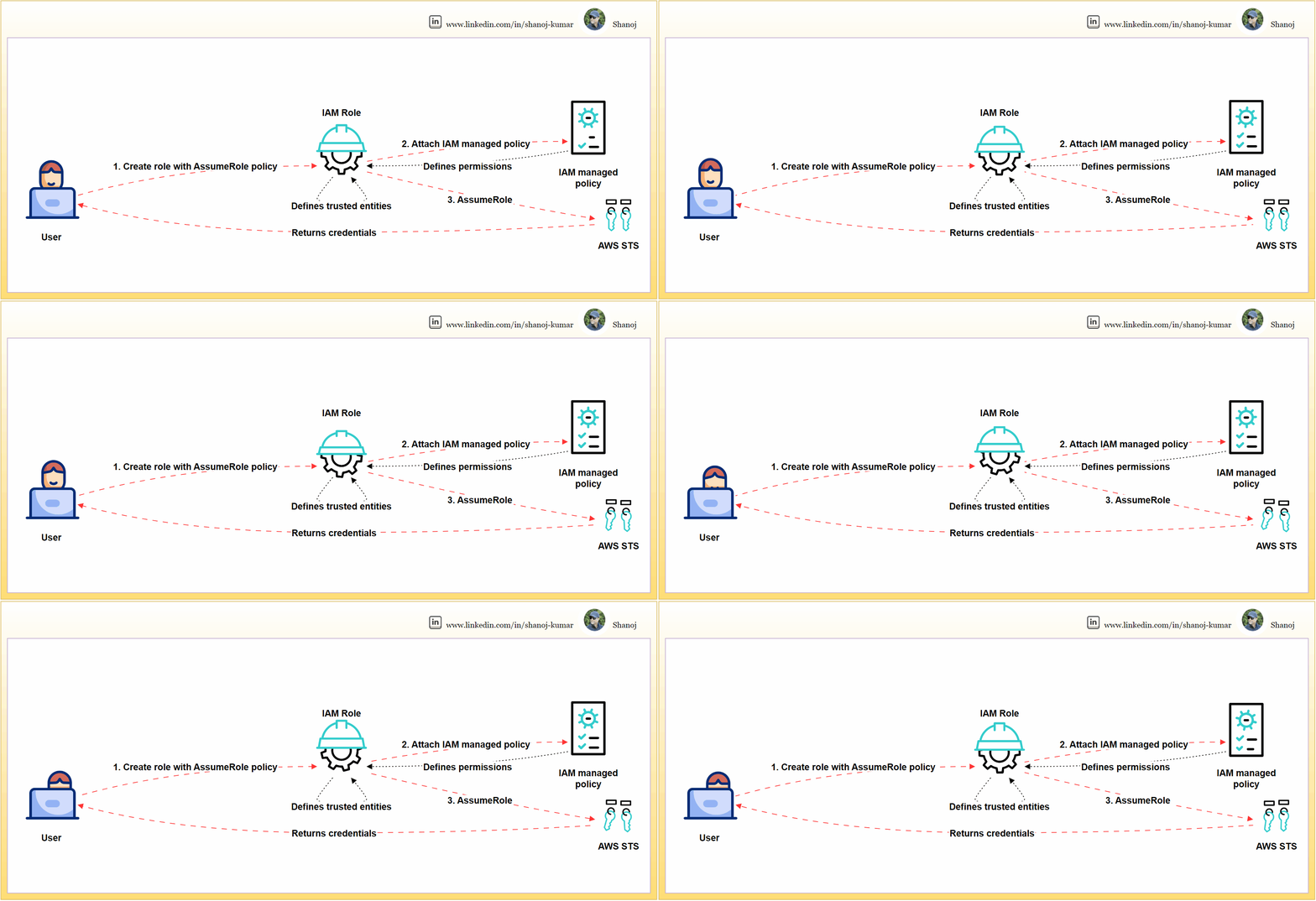
Setting up and using an IAM role in AWS involves three steps. Firstly, the user creates an IAM role and defines its trust relationships using an AssumeRole policy. Secondly, the user attaches an IAM-managed policy to the role, which specifies the permissions that the role has within AWS. Finally, the role is assumed through the AWS Security Token Service (STS), which grants temporary security credentials for accessing AWS services. This cycle of trust and permission granting, from user action to AWS STS and back, underpins secure AWS operations.
IAM roles are crucial for access management in AWS. This article provides a step-by-step walkthrough for creating a user-specific IAM role, attaching necessary policies, and validating for security and functionality.
Step 1: Compose a JSON file named assume-role-policy.json.
This policy explicitly defines the trusted entities that can assume the role, effectively safeguarding it against unauthorized access.
This policy snippet should be modified by replacing PRINCIPAL_ARN it with the actual ARN of the user or service that needs to assume the role. The ARN can be obtained programmatically, as shown in the next step.
Step 2: Establishing the IAM Role via AWS CLI
The CLI is a direct and scriptable interface for AWS services, facilitating efficient role creation and management.
# Retrieve the ARN for the current user and store it in a variable
PRINCIPAL_ARN=$(aws sts get-caller-identity --query Arn --output text)

# Replace the placeholder in the policy template and create the actual policy
sed -i "s|PRINCIPAL_ARN|$PRINCIPAL_ARN|g" assume-role-policy.json

# Create the IAM role with the updated assume role policy
aws iam create-role --role-name DeveloperRole \
     --assume-role-policy-document file://assume-role-policy.json \
     --query 'Role.Arn' --output text
This command sequence fetches the user’s ARN, substitutes it into the policy document, and then creates the role DeveloperRole with the updated policy.
Step 3: Link the ‘PowerUserAccess’ managed policy to the newly created IAM role.
This policy confers essential permissions for a broad range of development tasks while adhering to the principle of least privilege by excluding full administrative privileges.
# Attach the 'PowerUserAccess' policy to the 'DeveloperRole'
aws iam attach-role-policy --role-name DeveloperRole \
     --policy-arn arn:aws:iam::aws:policy/PowerUserAccess
The command attaches the necessary permissions to the DeveloperRole without conferring overly permissive access.
Assuming the IAM Role
Assume the IAM role to procure temporary security credentials. Assuming a role with temporary credentials minimizes security risks compared to using long-term access keys and confines access to a session’s duration.
# Assume the 'DeveloperRole'and specify the MFA device serial number and token code aws sts assume-role --role-arn ROLE_ARN \ --role-session-name DeveloperSession \ --serial-number MFA_DEVICE_SERIAL_NUMBER \ --token-code MFA_TOKEN_CODE
The command now includes parameters for MFA, enhancing security. Replace ROLE_ARN the role’s ARN MFA_DEVICE_SERIAL_NUMBER with the serial number of the MFA device and MFA_TOKEN_CODE with the current MFA code.
Validation Checks
Execute commands to verify the permissions of the IAM role.
Validation is essential to confirm that the role possesses the correct permissions and is operative as anticipated.
List S3 Buckets:
# List S3 buckets using the assumed role's credentials
aws s3 ls --profile DeveloperSessionCredentials
This checks the ability to list S3 buckets, verifying that S3-related permissions are correctly granted to the role.
Describe EC2 Instances:
# Describe EC2 instances using the assumed role's credentials
aws ec2 describe-instances --profile DeveloperSessionCredentials
Validates the role’s permissions to view details about EC2 instances.
Attempt a Restricted Action:
# Try listing IAM users, which should be outside the 'PowerUserAccess' policy scope
aws iam list-users --profile DeveloperSessionCredentials
This command should fail, reaffirming that the role does not have administrative privileges.
Note: Replace --profile DeveloperSessionCredentials with the actual AWS CLI profile that has been configured with the assumed role’s credentials. To set up the profile with the new temporary credentials, you’ll need to update your AWS credentials file, typically located at ~/.aws/credentials.
Developers can securely manage AWS resources by creating an IAM role with scoped privileges. This involves meticulously validating the permissions of the role. Additionally, the role assumption process can be fortified with MFA to ensure an even higher level of security.
Apache Spark is a powerful distributed data processing engine widely used in big data and machine learning applications. Thanks to its enriched API and robust data structures such as DataFrames and Datasets, it offers a higher level of abstraction than traditional map-reduce jobs.
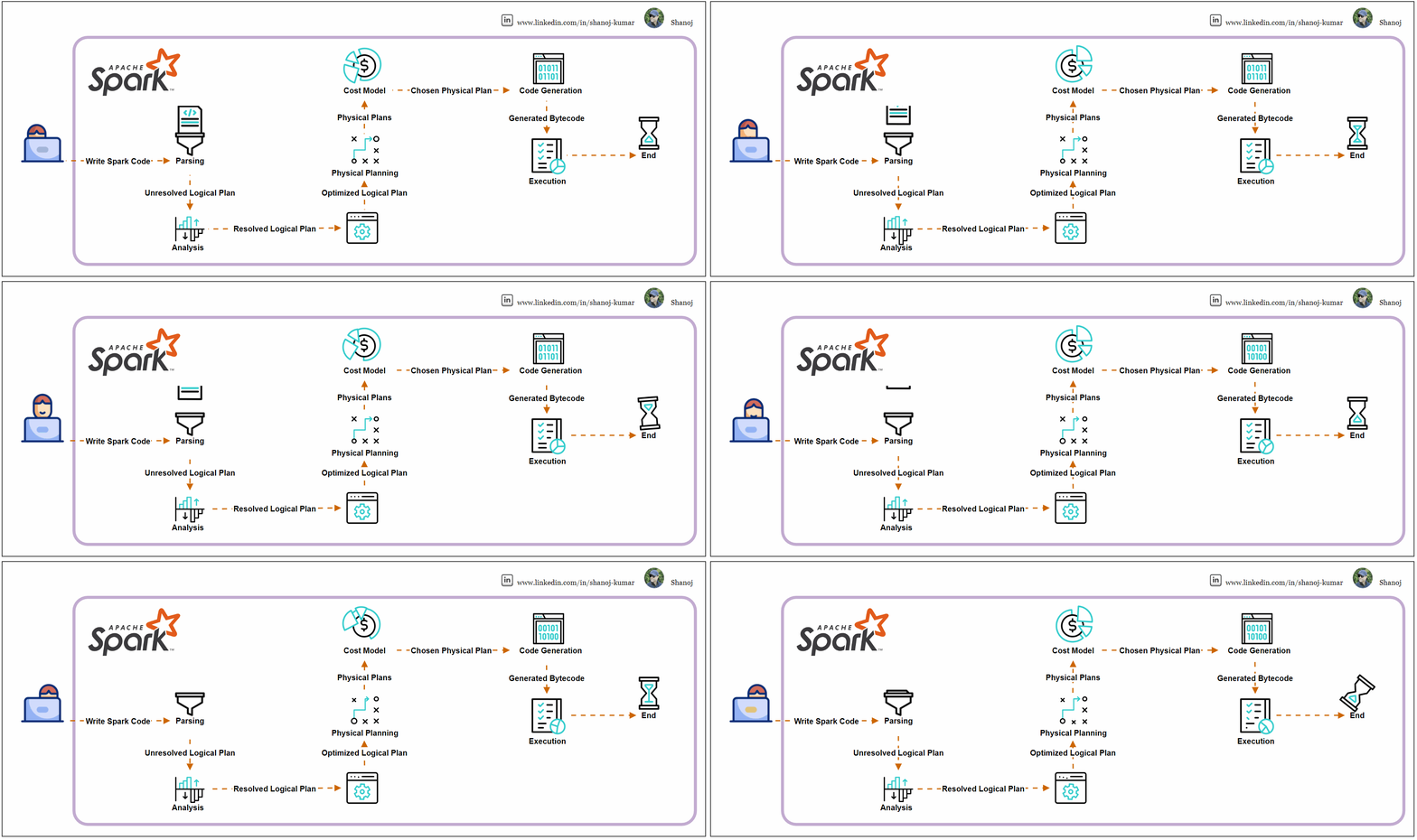
Spark Code Execution Journey
Parsing
Spark SQL queries or DataFrame API methods are parsed into an unresolved logical plan.
The parsing step converts the code into a Spark-understandable format without checking table or column existence.
Analysis
The unresolved logical plan undergoes analysis by the Catalyst optimizer, Spark’s optimization framework.
This phase confirms the existence of tables, columns, and functions, resulting in a resolved logical plan where all references are validated against the catalogue schema.
Logical Plan Optimization
The Catalyst optimizer applies optimization rules to the resolved logical plan, potentially reordering joins, pushing down predicates, or combining filters, creating an optimized logical plan.
Physical Planning
The optimized logical plan is transformed into one or more physical plans, outlining the execution strategy and order of operations like map, filter, and join.
Cost Model
Spark evaluates these physical plans using a cost model, selecting the most efficient one based on data sizes and distribution heuristics.
Code Generation
Once the final physical plan is chosen, Spark employs WholeStage CodeGen to generate optimized Java bytecode that will run on the executors, minimizing JVM calls and optimizing execution.
Execution
The bytecode is distributed to executors across the cluster for execution, with tasks running in parallel, processing data in partitions, and producing the final output.
The Catalyst optimizer is integral throughout these steps, enhancing the performance of Spark SQL queries and DataFrame operations using rule-based and cost-based optimization.
Example Execution Plan
Consider a SQL query that joins two tables and filters and aggregates the data:
SELECT department, COUNT(*) FROM employees JOIN departments ON employees.dep_id = departments.id WHERE employees.age >30 GROUPBY department
The execution plan may follow these steps:
· Parsed Logical Plan: The initial SQL command is parsed into an unresolved logical plan.
· Analyzed Logical Plan: The plan is analyzed and resolved against the table schemas.
· Optimized Logical Plan: The Catalyst optimizer optimizes the plan.
· Physical Plan: A cost-effective physical plan is selected.
· Execution: The physical plan is executed across the Spark cluster.
The execution plan for the given SQL query in Apache Spark involves several stages, from logical planning to physical execution. Here’s a simplified breakdown:
Parsed Logical Plan: Spark parses the SQL query into an initial logical plan. This plan is unresolved as it only represents the structure of the query without checking the existence of the tables or columns.
Analyzed Logical Plan: The parsed logical plan is analyzed against the database catalogue. This resolves table and column names and checks for invalid operations or data types.
Optimized Logical Plan: The Catalyst optimizer applies a series of rules to the logical plan to optimize it. It may reorder joins, push down filters, and perform other optimizations.
Physical Plan: Spark generates one or more physical plans from the logical plan. It then uses a cost model to choose the most efficient physical plan for execution.
Code Generation: Spark generates Java bytecode for the chosen physical plan to run on each executor. This process is known as WholeStage CodeGen.
Execution: The bytecode is sent to Spark executors distributed across the cluster. Executors run the tasks in parallel, processing the data in partitions.
During execution, tasks are executed within stages, and stages may have shuffle boundaries where data is redistributed across the cluster. The Exchange hashpartitioning indicates a shuffle operation due to the GROUP BY clause.
Stackademic
Thank you for reading until the end. Before you go:
Please consider clapping and following the writer! 👏










 Shanoj