Apache Flink is a robust, open-source data processing framework that handles large-scale data streams and batch-processing tasks. One of the critical features of Flink is its architecture, which allows it to manage both batch and stream processing in a single system.
Consider a retail company that wishes to analyse sales data in real-time. They can use Flink’s stream processing capabilities to process sales data as it comes in and batch processing capabilities to analyse historical data.
The JobManager is the central component of Flink’s architecture, and it is in charge of coordinating the execution of Flink jobs.
For example, if a large amount of data is submitted to Flink, the JobManager will divide it into smaller tasks and assign them to TaskManagers.
TaskManagers are responsible for executing the assigned tasks, and they can run on one or more nodes in a cluster. The TaskManagers are connected to the JobManager via a high-speed network, allowing them to exchange data and task information.
For example, when a TaskManager completes a task, it will send the results to the JobManager, who will then assign the next task.
Flink also has a distributed data storage system called the Distributed Data Management (DDM) system. It allows for storing and managing large data sets in a distributed manner across all the nodes in a cluster.
For example, imagine a company that wants to store and process petabytes of data, they can use Flink’s DDM system to store the data across multiple nodes, and process it in parallel.
Flink also has a built-in fault-tolerance mechanism, allowing it to recover automatically from failures. This is achieved by maintaining a consistent state across all the nodes in the cluster, which allows the system to recover from a failure by replaying the state from a consistent checkpoint.
For example, if a node goes down, Flink can automatically recover the data and continue processing without any interruption.
In addition, Flink also has a feature called “savepoints”, which allows users to take a snapshot of the state of a job at a particular point in time and later use this snapshot to restore the job to the same state.
For example, imagine a company is performing an update to their data processing pipeline and wants to test the new pipeline with the same data. They can use a savepoint to take a snapshot of the state of the job before making the update and then use that snapshot to restore the job to the same state for testing.
Flink also supports a wide range of data sources and sinks, including Kafka, Kinesis, and RabbitMQ, which allows it to integrate with other systems in a big data ecosystem easily.
For example, a company can use Flink to process streaming data from a Kafka topic and then sink the processed data into a data lake for further analysis.
The critical feature of Flink is that it handles batch and stream processing in a single system. To support this, Flink provides two main APIs: the Dataset API and the DataStream API.
The Dataset API is a high-level API for Flink that allows for batch processing of data. It uses a type-safe, object-oriented programming model and offers a variety of operations such as filtering, mapping, and reducing, as well as support for SQL-like queries. This API is handy for dealing with a large amount of data and is well suited for use cases such as analyzing historical sales data of a retail company.
On the other hand, the DataStream API is a low-level API for Flink that allows for real-time data stream processing. It uses a functional programming model and offers a variety of operations such as filtering, mapping, and reducing, as well as support for windowing and event time processing. This API is particularly useful for dealing with real-time data and is well-suited for use cases such as real-time monitoring and analysis of sensor data.
In conclusion, Apache Flink’s architecture is designed to handle large-scale data streams and batch-processing tasks in a single system. It provides a distributed data storage system, built-in fault tolerance and savepoints, and support for a wide range of data sources and sinks, making it an attractive choice for big data processing. With its powerful and flexible architecture, Flink can be used in various use cases, from real-time data processing to batch data processing, and can be easily integrated with other systems in a big data ecosystem.
Why every developer should understand the fundamentals of language model processing
TL;DR
Text processing is the foundation of all language model applications, yet most developers use pre-built libraries without understanding the underlying mechanics. In this Day 2 tutorial of our learning journey, I’ll walk you through building a complete text processing pipeline from scratch using Python. You’ll implement tokenization strategies, vocabulary building, word embeddings, and a simple language model with interactive visualizations. The focus is on understanding how each component works rather than using black-box solutions. By the end, you’ll have created a modular, well-structured text processing system for language models that runs locally, giving you deeper insights into how tools like ChatGPT process language at their core. Get ready for a hands-on, question-driven journey into the fundamentals of LLM text processing!
Introduction: Why Text Processing Matters for LLMs
Have you ever wondered what happens to your text before it reaches a language model like ChatGPT? Before any AI can generate a response, raw text must go through a sophisticated pipeline that transforms it into a format the model can understand. This processing pipeline is the foundation of all language model applications, yet it’s often treated as a black box.
In this Day 2 project of our learning journey, we’ll demystify the text processing pipeline by building each component from scratch. Instead of relying on pre-built libraries that hide the inner workings, we’ll implement our own tokenization, vocabulary building, word embeddings, and a simple language model. This hands-on approach will give you a deeper understanding of the fundamentals that power modern NLP applications.
What sets our approach apart is a focus on question-driven development — we’ll learn by doing. At each step, we’ll pose real development questions and challenges (e.g., “How do different tokenization strategies affect vocabulary size?”) and solve them hands-on. This way, you’ll build a genuine understanding of text processing rather than just following instructions.
Learning Note: Text processing transforms raw text into numerical representations that language models can work with. Understanding this process gives you valuable insights into why models behave the way they do and how to optimize them for your specific needs.
Project Overview: A Complete Text Processing Pipeline
The Concept
We’re building a modular text processing pipeline that transforms raw text into a format suitable for language models and includes visualization tools to understand what’s happening at each step. The pipeline includes text cleaning, multiple tokenization strategies, vocabulary building with special tokens, word embeddings with dimensionality reduction visualizations, and a simple language model for text generation. We’ll implement this with a clean Streamlit interface for interactive experimentation.
Key Learning Objectives
Tokenization Strategies: Implement and compare different approaches to breaking text into tokens
Vocabulary Management: Build frequency-based vocabularies with special token handling
Word Embeddings: Create and visualize vector representations that capture semantic meaning
Simple Language Model: Implement a basic LSTM model for text generation
Visualization Techniques: Use interactive visualizations to understand abstract NLP concepts
Project Structure: Design a clean, maintainable code architecture
Learning Note: What is tokenization? Tokenization is the process of breaking text into smaller units (tokens) that a language model can process. These can be words, subwords, or characters. Different tokenization strategies dramatically affect a model’s abilities, especially with rare words or multilingual text.
Project Structure
I’ve organized the project with the following structure to ensure clarity and easy maintenance:
Our pipeline follows a clean, modular architecture where data flows through a series of transformations:
Let’s explore each component of this architecture:
1. Text Preprocessing Layer
The preprocessing layer handles the initial transformation of raw text:
Text Cleaning (src/preprocessing/cleaner.py): Normalizes text by converting to lowercase, removing extra whitespace, and handling special characters.
Tokenization (src/preprocessing/tokenization.py): Implements multiple strategies for breaking text into tokens:
Basic word tokenization (splits on whitespace with punctuation handling)
Advanced tokenization (more sophisticated handling of special characters)
Character tokenization (treats each character as a separate token)
Learning Note: Different tokenization strategies have significant tradeoffs. Word-level tokenization creates larger vocabularies but handles each word as a unit. Character-level has tiny vocabularies but requires longer sequences. Subword methods like BPE offer a middle ground, which is why they’re used in most modern LLMs.
2. Vocabulary Building Layer
The vocabulary layer creates mappings between tokens and numerical IDs:
Vocabulary Construction (src/vocabulary/vocab_builder.py): Builds dictionaries mapping tokens to unique IDs based on frequency.
Special Tokens: Adds utility tokens like <|unk|> (unknown), <|endoftext|>, [BOS] (beginning of sequence), and [EOS] (end of sequence).
Token ID Conversion: Transforms text to sequences of token IDs that models can process.
3. Embedding Layer
The embedding layer creates vector representations of tokens:
Embedding Creation (src/models/embeddings.py): Initializes vector representations for each token.
Embedding Visualization: Projects high-dimensional embeddings to 2D using PCA or t-SNE for visualization.
Semantic Analysis: Provides tools to explore relationships between words in the embedding space
4. Language Model Layer
The model layer implements a simple text generation system:
Model Architecture (src/models/language_model.py): Defines an LSTM-based neural network for sequence prediction.
Text Generation: Using the model to produce new text based on a prompt.
Temperature Control: Adjusting the randomness of generated text.
5. Interactive Interface Layer
The user interface provides interactive exploration of the pipeline:
Streamlit App (app.py): Creates a web interface for experimenting with all pipeline components.
Visualization Tools: Interactive charts and visualizations that help understand abstract concepts.
Parameter Controls: Sliders and inputs for adjusting model parameters and seeing results in real-time.
By separating these components, the architecture allows you to experiment with different approaches at each layer. For example, you could swap the tokenization strategy without affecting other parts of the pipeline, or try different embedding techniques while keeping the rest constant.
Data Flow: From Raw Text to Language Model Input
To understand how our pipeline processes text, let’s follow the journey of a sample sentence from raw input to model-ready format:
In this diagram, you can see how raw text transforms through each step:
Raw Text: “The quick brown fox jumps over the lazy dog.”
Text Cleaning: Conversion to lowercase, whitespace normalization
Tokenization: Breaking into tokens like [“the”, “quick”, “brown”, …]
Embedding: Transforming IDs to vector representations
Language Model: Processing embedded sequences for prediction or generation
This end-to-end flow demonstrates how text gradually transforms from human-readable format to the numerical representations that language models require.
One of the most important aspects of our implementation is the support for different tokenization approaches. In src/preprocessing/tokenization.py, we implement three distinct strategies:
Basic Word Tokenization: A straightforward approach that splits text on whitespace and handles punctuation separately. This is similar to how traditional NLP systems process text.
Advanced Tokenization: A more sophisticated approach that provides better handling of special characters and punctuation. This approach is useful for cleaning noisy text from sources like social media.
Character Tokenization: The simplest approach that treats each character as an individual token. While this creates shorter vocabularies, it requires much longer sequences to represent the same text.
By implementing multiple strategies, we can compare their effects on vocabulary size, sequence length, and downstream model performance. This helps us understand why modern LLMs use more complex methods like Byte Pair Encoding (BPE).
Vocabulary Building with Special Tokens
Our vocabulary implementation in src/vocabulary/vocab_builder.py demonstrates several important concepts:
Frequency-Based Ranking: Tokens are sorted by frequency, ensuring that common words get lower IDs. This is a standard practice in vocabulary design.
Special Token Handling: We explicitly add tokens like <|unk|> for unknown words and [BOS]/[EOS] for marking sequence boundaries. These special tokens are crucial for model training and inference.
Vocabulary Size Management: The implementation includes options to limit vocabulary size, which is essential for practical language models where memory constraints are important.
Word Embeddings Visualization
Perhaps the most visually engaging part of our implementation is the embedding of the visualization in src/models/embeddings.py:
Vector Representation: Each token is a high-dimensional vector, capturing semantic relationships between words.
Dimensionality Reduction: We use techniques like PCA and t-SNE to project these high-dimensional vectors into a 2D space for visualization.
Semantic Clustering: The visualizations reveal how semantically similar words cluster together in the embedding space, demonstrating how embeddings capture meaning.
Simple Language Model Implementation
The language model in src/models/language_model.py demonstrates the core architecture of sequence prediction models:
LSTM Architecture: We use a Long Short-Term Memory network to capture sequential dependencies in text.
Embedding Layer Integration: The model begins by converting token IDs to their embedding representations.
Text Generation: We implement a sampling-based generation approach that can produce new text based on a prompt.
Interactive Exploration with Streamlit
The Streamlit application in app.py ties everything together:
Interactive Input: Users can enter their own text to see how it’s processed through each stage of the pipeline.
Real-Time Visualization: The app displays tokenization results, vocabulary statistics, embedding visualizations, and generated text.
Parameter Tuning: Sliders and controls allow users to adjust model parameters like temperature or embedding dimension and see the effects instantly.
Challenges & Learnings
Challenge 1: Creating Intuitive Visualizations for Abstract Concepts
The Problem: Many NLP concepts like word embeddings are inherently high-dimensional and abstract, making them difficult to visualize and understand.
The Solution: We implemented dimensionality reduction techniques (PCA and t-SNE) to project high-dimensional embeddings into 2D space, allowing users to visualize relationships between words.
What You’ll Learn: Abstract concepts become more accessible when visualized appropriately. Even if the visualizations aren’t perfect representations of the underlying mathematics, they provide intuitive anchors that help develop mental models of complex concepts.
The Problem: Each component in the pipeline has different input/output requirements. Ensuring these components work together seamlessly is challenging, especially when different tokenization strategies are used.
The Solution: We created a clear data flow architecture with well-defined interfaces between components. Each component accepts standardized inputs and returns standardized outputs, making it easy to swap implementations.
What You’ll Learn: Well-defined interfaces between components are as important as the components themselves. Clear documentation and consistent data structures make it possible to experiment with different implementations while maintaining a functional pipeline.
Results & Impact
By working through this project, you’ll develop several key skills and insights:
Understanding of Tokenization Tradeoffs
You’ll learn how different tokenization strategies affect vocabulary size, sequence length, and the model’s ability to handle out-of-vocabulary words. This understanding is crucial for working with custom datasets or domain-specific language.
Vocabulary Management Principles
You’ll discover how vocabulary design impacts both model quality and computational efficiency. The practices you learn (frequency-based ordering, special tokens, size limitations) are directly applicable to production language model systems.
Embedding Space Intuition
The visualizations help build intuition about how semantic information is encoded in vector spaces. You’ll see firsthand how words with similar meanings cluster together, revealing how models “understand” language.
Model Architecture Insights
Building a simple language model provides the foundation for understanding more complex architectures like Transformers. The core concepts of embedding lookup, sequential processing, and generation through sampling are universal.
Practical Applications
These skills apply directly to real-world NLP tasks:
Custom Domain Adaptation: Apply specialized tokenization for fields like medicine, law, or finance
Resource-Constrained Deployments: Optimize vocabulary size and model architecture for edge devices
Debugging Complex Models: Identify issues in larger systems by understanding fundamental components
Data Preparation Pipelines: Build efficient preprocessing for large-scale NLP applications
Final Thoughts & Future Possibilities
Building a text processing pipeline from scratch gives you invaluable insights into the foundations of language models. You’ll understand that:
Tokenization choices significantly impact vocabulary size and model performance
Vocabulary management involves important tradeoffs between coverage and efficiency
Word embeddings capture semantic relationships in a mathematically useful way
Simple language models can demonstrate core principles before moving to transformers
As you continue your learning journey, this project provides a solid foundation that can be extended in multiple directions:
Implement Byte Pair Encoding (BPE): Add a more sophisticated tokenization approach used by models like GPT
Build a Transformer Architecture: Replace the LSTM with a simple Transformer encoder-decoder
Add Attention Mechanisms: Implement basic attention to improve model performance
Create Cross-Lingual Embeddings: Extend the system to handle multiple languages
Implement Model Fine-Tuning: Add capabilities to adapt pre-trained embeddings to specific domains
What component of the text processing pipeline are you most interested in exploring further? The foundations you’ve built in this project will serve you well as you continue to explore the fascinating world of language models.
This is part of an ongoing series on building practical understanding of LLM fundamentals through hands-on mini-projects. Check out Day 1: Building a Local Q&A Assistant if you missed it, and stay tuned for more installments!
Imagine deploying a cutting-edge Large Language Model (LLM), only to watch it struggle — its responses lagging, its insights outdated — not because of the model itself, but because the data pipeline feeding it can’t keep up. In enterprise AI, even the most advanced LLM is only as powerful as the infrastructure that sustains it. Without a scalable, high-throughput pipeline delivering fresh, diverse, and real-time data, an LLM quickly loses relevance, turning from a strategic asset into an expensive liability.
That’s why enterprise architects must prioritize designing scalable data pipelines — systems that evolve alongside their LLM initiatives, ensuring continuous data ingestion, transformation, and validation at scale. A well-architected pipeline fuels an LLM with the latest information, enabling high accuracy, contextual relevance, and adaptability. Conversely, without a robust data foundation, even the most sophisticated model risks being starved of timely insights, and forced to rely on outdated knowledge — a scenario that stifles innovation and limits business impact.
Ultimately, a scalable data pipeline isn’t just a supporting component — it’s the backbone of any successful enterprise LLM strategy, ensuring these powerful models deliver real, sustained value.
Enterprise View: LLM Pipeline Within Organizational Architecture
The Scale Challenge: Beyond Traditional Enterprise Data
LLM data pipelines operate on a scale that surpasses traditional enterprise systems. Consider this comparison with familiar enterprise architectures:
While your data warehouse may manage terabytes of structured data, LLMs necessitate petabytes of diverse content. GPT-4 is reportedly trained on approximately 13 trillion tokens, with estimates suggesting the training data size could be around 1 petabyte. This vast dataset necessitates distributed processing across thousands of specialized computing units. Even a modest LLM project within an enterprise will likely handle data volumes 10–100 times larger than your largest data warehouse.
The Quality Imperative: Architectural Implications
For enterprise architects, data quality in LLM pipelines presents unique architectural challenges that go beyond traditional data governance frameworks.
A Fortune 500 manufacturer discovered this when their customer-facing LLM began generating regulatory advice containing subtle inaccuracies. The root cause wasn’t a code issue but an architectural one: their traditional data quality frameworks, designed for transactional consistency, failed to address semantic inconsistencies in training data. The resulting compliance review and remediation cost $4.3 million and required a complete architectural redesign of their quality assurance layer.
The Enterprise Integration Challenge
LLM pipelines must seamlessly integrate with your existing enterprise architecture while introducing new patterns and capabilities.
Traditional enterprise data integration focuses on structured data with well-defined semantics, primarily flowing between systems with stable interfaces. Most enterprise architects design for predictable data volumes with predetermined schema and clear lineage.
LLM data architecture, however, must handle everything from structured databases to unstructured documents, streaming media, and real-time content. The processing complexity extends beyond traditional ETL operations to include complex transformations like tokenization, embedding generation, and bias detection. The quality assurance requirements incorporate ethical dimensions not typically found in traditional data governance frameworks.
The Governance and Compliance Imperative
For enterprise architects, LLM data governance extends beyond standard regulatory compliance.
The EU’s AI Act and similar emerging regulations explicitly mandate documentation of training data sources and processing steps. Non-compliance can result in significant penalties, including fines of up to €35 million or 7% of the company’s total worldwide annual turnover for the preceding financial year, whichever is higher. This has significant architectural implications for traceability, lineage, and audit capabilities that must be designed into the system from the outset.
The Architectural Cost of Getting It Wrong
Beyond regulatory concerns, architectural missteps in LLM data pipelines create enterprise-wide impacts:
For instance, a company might face substantial financial losses if data contamination goes undetected in its pipeline, leading to the need to discard and redo expensive training runs.
A healthcare AI startup delayed its market entry by 14 months due to pipeline scalability issues that couldn’t handle its specialized medical corpus
A financial services company found their data preprocessing costs exceeding their model training costs by 5:1 due to inefficient architectural patterns
As LLM initiatives become central to digital transformation, the architectural decisions you make today will determine whether your organization can effectively harness these technologies at scale.
The Architectural Solution Framework
Enterprise architects need a reference architecture for LLM data pipelines that addresses the unique challenges of scale, quality, and integration within an organizational context.
Reference Architecture: Six Architectural Layers
The reference architecture for LLM data pipelines consists of six distinct architectural layers, each addressing specific aspects of the data lifecycle:
Data Source Layer: Interfaces with diverse data origins including databases, APIs, file systems, streaming sources, and web content
Data Ingestion Layer: Provides adaptable connectors, buffer systems, and initial normalization services
Data Processing Layer: Handles cleaning, tokenization, deduplication, PII redaction, and feature extraction
Data Storage Layer: Manages the persistence of data at various stages of processing
Orchestration Layer: Coordinates workflows, handles errors, and manages the overall pipeline lifecycle
Unlike traditional enterprise data architectures that often merge these concerns, the strict separation enables independent scaling, governance, and evolution of each layer — a critical requirement for LLM systems.
Architectural Decision Framework for LLM Data Pipelines
Architectural Principles for LLM Data Pipelines
Enterprise architects should apply these foundational principles when designing LLM data pipelines:
Key Architectural Patterns
The cornerstone of effective LLM data pipeline architecture is modularity — breaking the pipeline into independent, self-contained components that can be developed, deployed, and scaled independently.
When designing LLM data pipelines, several architectural patterns have proven particularly effective:
Event-Driven Architecture: Using message queues and pub/sub mechanisms to decouple pipeline components, enhancing resilience and enabling independent scaling.
Lambda Architecture: Combining batch processing for historical data with stream processing for real-time data — particularly valuable when LLMs need to incorporate both archived content and fresh data.
Tiered Processing Architecture: Implementing multiple processing paths optimized for different data characteristics and quality requirements. This allows fast-path processing for time-sensitive data alongside deep processing for complex content.
Quality Gate Pattern: Implementing progressive validation that increases in sophistication as data moves through the pipeline, with clear enforcement policies at each gate.
Polyglot Persistence Pattern: Using specialized storage technologies for different data types and access patterns, recognizing that no single storage technology meets all LLM data requirements.
Selecting the right pattern mix depends on your specific organizational context, data characteristics, and strategic objectives.
Architectural Components in Depth
Let’s explore the architectural considerations for each component of the LLM data pipeline reference architecture.
Data Source Layer Design
The data source layer must incorporate diverse inputs while standardizing their integration with the pipeline — a design challenge unique to LLM architectures.
Key Architectural Considerations:
Source Classification Framework: Design a system that classifies data sources based on:
Reliability profile (guaranteed delivery vs. best effort)
Security requirements (public vs. sensitive)
Connector Architecture: Implement a modular connector framework with:
Standardized interfaces for all source types
Version-aware adapters that handle schema evolution
Monitoring hooks for data quality and availability metrics
Circuit breakers for source system failures
Access Pattern Optimization: Design source access patterns based on:
Pull-based retrieval for stable, batch-oriented sources
Push-based for real-time, event-driven sources
Change Data Capture (CDC) for database sources
Streaming integration for high-volume continuous sources
Enterprise Integration Considerations:
When integrating with existing enterprise systems, carefully evaluate:
Impacts on source systems (load, performance, availability)
Authentication and authorization requirements across security domains
Data ownership and stewardship boundaries
Existing enterprise integration patterns and standards
Quality Assurance Layer Design
The quality assurance layer represents one of the most architecturally significant components of LLM data pipelines, requiring capabilities beyond traditional data quality frameworks.
Key Architectural Considerations:
Multidimensional Quality Framework: Design a quality system that addresses multiple dimensions:
Accuracy: Correctness of factual content
Completeness: Presence of all necessary information
Consistency: Internal coherence and logical flow
Relevance: Alignment with intended use cases
Diversity: Balanced representation of viewpoints and sources
Early-stage validation for basic format and completeness
Mid-stage validation for content quality and relevance
Late-stage validation for context-aware quality and bias detection
Quality Enforcement Strategy: Design contextual quality gates based on:
Blocking gates for critical quality dimensions
Filtering approaches for moderate concerns
Weighting mechanisms for nuanced quality assessment
Transformation paths for fixable quality issues
Enterprise Governance Considerations:
When integrating with enterprise governance frameworks:
Align quality metrics with existing data governance standards
Extend standard data quality frameworks with LLM-specific dimensions
Implement automated reporting aligned with governance requirements
Create clear paths for quality issue escalation and resolution
Security and Compliance Considerations
Architecting LLM data pipelines requires comprehensive security and compliance controls that extend throughout the entire stack.
Key Architectural Considerations:
Identity and Access Management: Design comprehensive IAM controls that:
Implement fine-grained access control at each pipeline stage
Integrate with enterprise authentication systems
Apply principle of least privilege throughout
Provide separation of duties for sensitive operations
Incorporate role-based access aligned with organizational structure
Data Protection: Implement protection mechanisms including:
Encryption in transit between all components
Encryption at rest for all stored data
Tokenization for sensitive identifiers
Data masking for protected information
Key management integrated with enterprise systems
Compliance Frameworks: Design for specific regulatory requirements:
GDPR and privacy regulations requiring data minimization and right-to-be-forgotten
Industry-specific regulations (HIPAA, FINRA, etc.) with specialized requirements
AI-specific regulations like the EU AI Act requiring documentation and risk assessment
Internal compliance requirements and corporate policies
Enterprise Security Integration:
When integrating with enterprise security frameworks:
Align with existing security architecture principles and patterns
Leverage enterprise security monitoring and SIEM systems
Incorporate pipeline-specific security events into enterprise monitoring
Participate in organization-wide security assessment and audit processes
Architectural Challenges & Solutions
When implementing LLM data pipelines, enterprise architects face several recurring challenges that require thoughtful architectural responses.
Challenge #1: Managing the Scale-Performance Tradeoff
The Problem: LLM data pipelines must balance massive scale with acceptable performance. Traditional architectures force an unacceptable choice between throughput and latency.
Architectural Solution:
Data Processing Paths Drop-off
We implemented a hybrid processing architecture with multiple processing paths to effectively balance scale and performance:
Hybrid Processing Architecture for Scale-Performance Balance
Intelligent Workload Classification: We designed an intelligent routing layer that classifies incoming data based on:
Complexity of required processing
Quality sensitivity of the content
Time sensitivity of the data
Business value to downstream LLM applications
Multi-Path Processing Architecture: We implemented three distinct processing paths:
Fast Path: Optimized for speed with simplified processing, handling time-sensitive or structurally simple data (~10% of volume)
Standard Path: Balanced approach processing the majority of data with full but optimized processing (~60% of volume)
Deep Processing Path: Comprehensive processing for complex, high-value data requiring extensive quality checks and enrichment (~30% of volume)
Resource Isolation and Optimization: Each path’s infrastructure is specially tailored:
Fast Path: In-memory processing with high-performance computing resources
Standard Path: Balanced memory/disk approach with cost-effective compute
Deep Path: Storage-optimized systems with specialized processing capabilities
Architectural Insight: The classification system is implemented as an event-driven service that acts as a smart router, examining incoming data characteristics and routing to the appropriate processing path based on configurable rules. This approach increases overall throughput while maintaining appropriate quality controls based on data characteristics and business requirements.
Challenge #2: Ensuring Data Quality at Architectural Scale
The Problem: Traditional quality control approaches that rely on manual review or simple rule-based validation cannot scale to handle LLM data volumes. Yet quality issues in training data severely compromise model performance.
One major financial services firm discovered that 22% of their LLM’s hallucinations could be traced directly to quality issues in their training data that escaped detection in their pipeline.
Architectural Solution:
We implemented a multi-layered quality architecture with progressive validation:
The diagram will provide visual reinforcement of how data flows through the four validation layers (structural, statistical, ML-based semantic, and targeted human validation), showing the increasingly sophisticated quality checks at each stage.
Layered Quality Framework: We designed a validation pipeline with increasing sophistication:
Layer 1 — Structural Validation: Fast, rule-based checks for format integrity
Layer 4 — Targeted Human Validation: Intelligent sampling for human review of critical cases
Quality Scoring System: We developed a composite quality scoring framework that:
Assigns weights to different quality dimensions based on business impact
Creates normalized scores across disparate checks
Implements domain-specific quality scoring for specialized content
Tracks quality metrics through the pipeline for trend analysis
Feedback Loop Integration: We established connections between model performance and data quality:
Tracing model errors back to training data characteristics
Automatically adjusting quality thresholds based on downstream impact
Creating continuous improvement mechanisms for quality checks
Implementing quality-aware sampling for model evaluation
Architectural Insight: The quality framework design pattern separates quality definition from enforcement mechanisms. This allows business stakeholders to define quality criteria while architects design the optimal enforcement approach for each criterion. For critical dimensions (e.g., regulatory compliance), we implement blocking gates, while for others (e.g., style consistency), we use weighting mechanisms that influence but don’t block processing.
Challenge #3: Governance and Compliance at Scale
The Problem: Traditional governance frameworks aren’t designed for the volume, velocity, and complexity of LLM data pipelines. Manual governance processes become bottlenecks, yet regulatory requirements for AI systems are becoming more stringent.
Architectural Solution:
The diagram visually represents how policies flow from definition through implementation to enforcement, with feedback loops between the layers. It illustrates the relationship between regulatory requirements, corporate policies, and their technical implementation through specialized services.
We implemented an automated governance framework with three architectural layers:
Policy Definition Layer: We created a machine-readable policy framework that:
Translates regulatory requirements into specific validation rules
Codifies corporate policies into enforceable constraints
Encodes ethical guidelines into measurable criteria
Defines data standards as executable quality checks
Policy Implementation Layer: We built specialized services to enforce policies:
Data Protection: Automated PII detection, data masking, and consent verification
Bias Detection: Algorithmic fairness analysis across demographic dimensions
Attribution: Source tracking, usage rights verification, license compliance checks
Enforcement & Monitoring Layer: We created a unified system to:
Enforce policies in real-time at multiple pipeline control points
Generate automated compliance reports for regulatory purposes
Provide dashboards for governance stakeholders
Manage policy exceptions with appropriate approvals
Architectural Insight: The key architectural innovation is the complete separation of policy definition (the “what”) from policy implementation (the “how”). Policies are defined in a declarative, machine-readable format that stakeholders can review and approve, while technical implementation details are encapsulated in the enforcement services. This enables non-technical governance stakeholders to understand and validate policies while allowing engineers to optimize implementation.
Results & Impact
Implementing a properly architected data pipeline for LLMs delivers transformative results across multiple dimensions:
Performance Improvements
Processing Throughput: Increased from 500GB–1TB/day to 10–25TB/day, representing a 10–25 times improvement.
End-to-End Pipeline Latency: Reduced from 7–14 days to 8–24 hours (85–95% reduction)
Data Freshness: Improved from 30+ days to 1–2 days (93–97% reduction) from source to training
Processing Success Rate: Improved from 85–90% to 99.5%+ (~10% improvement)
Resource Utilization: Increased from 30–40% to 70–85% (~2x improvement)
Scaling Response Time: Decreased from 4–8 hours to 5–15 minutes (95–98% reduction)
These performance gains translate directly into business value: faster model iterations, more current knowledge in deployed models, and greater agility in responding to changing requirements.
Quality Enhancements
The architecture significantly improved data quality across multiple dimensions:
Factual Accuracy: Improved from 75–85% to 92–97% accuracy in training data, resulting in 30–50% reduction in factual hallucinations
Duplication Rate: Reduced from 8–15% to <1% (>90% reduction)
PII Detection Accuracy: Improved from 80–90% to 99.5%+ (~15% improvement)
Bias Detection Coverage: Expanded from limited manual review to comprehensive automated detection
Format Consistency: Improved from widely varying to >98% standardized (~30% improvement)
Content Filtering Precision: Increased from 70–80% to 90–95% (~20% improvement)
Architectural Evolution and Future Directions
As enterprise architects design LLM data pipelines, it’s critical to consider how the architecture will evolve over time. Our experience suggests a four-stage evolution path:
This stage represents the architectural north star — a pipeline that can largely self-manage, continuously adapt, and require minimal human intervention for routine operations.
Emerging Architectural Trends
Looking ahead, several emerging architectural patterns will shape the future of LLM data pipelines:
AI-Powered Data Pipelines: Self-optimizing pipelines using AI to adjust processing strategies, detect quality issues, and allocate resources will become standard. This meta-learning approach — using ML to improve ML infrastructure — will dramatically reduce operational overhead.
Federated Data Processing: As privacy regulations tighten and data sovereignty concerns grow, processing data at or near its source without centralization will become increasingly important. This architectural approach addresses privacy and regulatory concerns while enabling secure collaboration across organizational boundaries.
Semantic-Aware Processing: Future pipeline architectures will incorporate deeper semantic understanding of content, enabling more intelligent filtering, enrichment, and quality control through content-aware components that understand meaning rather than just structure.
Zero-ETL Architecture: Emerging approaches aim to reduce reliance on traditional extract-transform-load patterns by enabling more direct integration between data sources and consumption layers, thereby minimizing intermediate transformations while preserving governance controls.
Key Takeaways for Enterprise Architects
As enterprise architects designing LLM data pipelines, we recommend focusing on these critical architectural principles:
Embrace Modularity as Non-Negotiable: Design pipeline components with clear boundaries and interfaces to enable independent scaling and evolution. This modularity isn’t an architectural nicety but an essential requirement for managing the complexity of LLM data pipelines.
Prioritize Quality by Design: Implement multi-dimensional quality frameworks that move beyond simple validation to comprehensive quality assurance. The quality of your LLM is directly bounded by the quality of your training data, making this an architectural priority.
Design for Cost Efficiency: Treat cost as a first-class architectural concern by implementing tiered processing, intelligent resource allocation, and data-aware optimizations from the beginning. Cost optimization retrofitted later is exponentially more difficult.
Build Observability as a Foundation: Implement comprehensive monitoring covering performance, quality, cost, and business impact metrics. LLM data pipelines are too complex to operate without deep visibility into all aspects of their operation.
Establish Governance Foundations Early: Integrate compliance, security, and ethical considerations into the architecture from day one. These aspects are significantly harder to retrofit and can become project-killing constraints if discovered late.
As LLMs continue to transform organizations, the competitive advantage will increasingly shift from model architecture to data pipeline capabilities. The organizations that master the art and science of scalable data pipelines will be best positioned to harness the full potential of Large Language Models.
A Data Engineer’s Complete Roadmap: From Napkin Diagrams to Production-Ready Architecture
TL;DR
This article provides data engineers with a comprehensive breakdown of the specialized infrastructure needed to effectively implement and manage Large Language Models. We examine the unique challenges LLMs present for traditional data infrastructure, from compute requirements to vector databases. Offering both conceptual explanations and hands-on implementation steps, this guide bridges the gap between theory and practice with real-world examples and solutions. Our approach uniquely combines architectural patterns like RAG with practical deployment strategies to help you build performant, cost-efficient LLM systems.
The Problem (Why Does This Matter?)
Large Language Models have revolutionized how organizations process and leverage unstructured text data. From powering intelligent chatbots to automating content generation and enabling advanced data analysis, LLMs are rapidly becoming essential components of modern data stacks. For data engineers, this represents both an opportunity and a significant challenge.
The infrastructure traditionally used for data management and processing simply wasn’t designed for LLM workloads. Here’s why that matters:
Scale and computational demands are unprecedented. LLMs require massive computational resources that dwarf traditional data applications. While a typical data pipeline might process gigabytes of structured data, LLMs work with billions of parameters and are trained on terabytes of text, requiring specialized hardware like GPUs and TPUs.
Unstructured data dominates the landscape. Traditional data engineering focuses on structured data in data warehouses with well-defined schemas. LLMs primarily consume unstructured text data that doesn’t fit neatly into conventional ETL paradigms or relational databases.
Real-time performance expectations have increased. Users expect LLM applications to respond with human-like speed, creating demands for low-latency infrastructure that can be difficult to achieve with standard setups.
Data quality has different dimensions. While data quality has always been important, LLMs introduce new dimensions of concern, including training data biases, token optimization, and semantic drift over time.
These challenges are becoming increasingly urgent as organizations race to integrate LLMs into their operations. According to a recent survey, 78% of enterprise organizations are planning to implement LLM-powered applications by the end of 2025, yet 65% report significant infrastructure limitations as their primary obstacle.
Without specialized infrastructure designed explicitly for LLMs, data engineers face:
Prohibitive costs from inefficient resource utilization
Performance bottlenecks that impact user experience
Scalability limitations that prevent enterprise-wide adoption
Integration difficulties with existing data ecosystems
“The gap between traditional data infrastructure and what’s needed for effective LLM implementation is creating a new digital divide between organizations that can harness this technology and those that cannot.”
The Solution (Conceptual Overview)
Building effective LLM infrastructure requires a fundamentally different approach to data engineering architecture. Let’s examine the key components and how they fit together.
Core Infrastructure Components
A robust LLM infrastructure rests on four foundational pillars:
Compute Resources: Specialized hardware optimized for the parallel processing demands of LLMs, including:
GPUs (Graphics Processing Units) for training and inference
TPUs (Tensor Processing Units) for TensorFlow-based implementations
CPU clusters for certain preprocessing and orchestration tasks
2. Storage Solutions: Multi-tiered storage systems that balance performance and cost:
Object storage (S3, GCS, Azure Blob) for large training datasets
Vector databases for embedding storage and semantic search
Caching layers for frequently accessed data
3. Networking: High-bandwidth, low-latency connections between components:
Inter-node communication for distributed training
API gateways for service endpoints
Content delivery networks for global deployment
4. Data Management: Specialized tools and practices for handling LLM data:
Data ingestion pipelines for unstructured text
Vector embedding generation and management
Data versioning and lineage tracking
The following comparison highlights the key differences between traditional data infrastructure and LLM-optimized infrastructure:
Key Architectural Patterns
Two architectural patterns have emerged as particularly effective for LLM infrastructure:
1. Retrieval-Augmented Generation (RAG)
RAG enhances LLMs by enabling them to access external knowledge beyond their training data. This pattern combines:
Text embedding models that convert documents into vector representations
Vector databases that store these embeddings for efficient similarity search
Prompt augmentation that incorporates retrieved-context into LLM queries
RAG solves the critical “hallucination” problem where LLMs generate plausible but incorrect information by grounding responses in factual source material.
2. Hybrid Deployment Models
Rather than choosing between cloud and on-premises deployment, a hybrid approach offers optimal flexibility:
Sensitive workloads and proprietary data remain on-premises
Burst capacity and specialized services leverage cloud resources
Orchestration layers manage workload placement based on cost, performance, and compliance needs
This pattern allows organizations to balance control, cost, and capability while avoiding vendor lock-in.
Why This Approach Is Superior
This infrastructure approach offers several advantages over attempting to force-fit LLMs into traditional data environments:
Cost Efficiency: By matching specialized resources to specific workload requirements, organizations can achieve 30–40% lower total cost of ownership compared to general-purpose infrastructure.
Scalability: The distributed nature of this architecture allows for linear scaling as demands increase, avoiding the exponential cost increases typical of monolithic approaches.
Flexibility: Components can be upgraded or replaced independently as technology evolves, protecting investments against the rapid pace of LLM advancement.
Performance: Purpose-built components deliver optimized performance, with inference latency improvements of 5–10x compared to generic infrastructure.
Implementation
Let’s walk through the practical steps to implement a robust LLM infrastructure, focusing on the essential components and configuration.
Step 1: Configure Compute Resources
Set up appropriate compute resources based on your workload requirements:
For Training: High-performance GPU clusters (e.g., NVIDIA A100s) with NVLink for inter-GPU communication
For Inference: Smaller GPU instances or specialized inference accelerators with model quantization
For Data Processing: CPU clusters for preprocessing and orchestration tasks
Consider using auto-scaling groups to dynamically adjust resources based on workload demands.
Step 2: Set Up Distributed Storage
Implement a multi-tiered storage solution:
Object Storage: Set up cloud object storage (S3, GCS) for large datasets and model artifacts
Vector Database: Deploy a vector database (Pinecone, Weaviate, Chroma) for embedding storage and retrieval
Caching Layer: Implement Redis or similar for caching frequent queries and responses
Configure appropriate lifecycle policies to manage storage costs by automatically transitioning older data to cheaper storage tiers.
Step 3: Implement Data Processing Pipelines
Create robust pipelines for processing unstructured text data:
Data Collection: Implement connectors for various data sources (databases, APIs, file systems)
Preprocessing: Build text cleaning, normalization, and tokenization workflows
Embedding Generation: Set up services to convert text into vector embeddings
Vector Indexing: Create processes to efficiently index and update vector databases
Use workflow orchestration tools like Apache Airflow to manage dependencies and scheduling.
Step 4: Configure Model Management
Set up infrastructure for model versioning, deployment, and monitoring:
Model Registry: Establish a central repository for model versions and artifacts
Deployment Pipeline: Create CI/CD workflows for model deployment
Monitoring System: Implement tracking for model performance, drift, and resource utilization
A/B Testing Framework: Build infrastructure for comparing model versions in production
Step 5: Implement RAG Architecture
Set up a Retrieval-Augmented Generation system:
Document Processing: Create pipelines for chunking and embedding documents
Context Assembly: Build services that format retrieved context into prompts
Response Generation: Set up LLM inference endpoints that incorporate retrieved context
Step 6: Deploy a Serving Layer
Create a robust serving infrastructure:
API Gateway: Set up unified entry points with authentication and rate limiting
Load Balancer: Implement traffic distribution across inference nodes
Caching: Add result caching for common queries
Fallback Mechanisms: Create graceful degradation paths for system failures
Challenges & Learnings
Building and managing LLM infrastructure presents several significant challenges. Here are the key obstacles we’ve encountered and how to overcome them:
Challenge 1: Data Drift and Model Performance Degradation
LLM performance often deteriorates over time as the statistical properties of real-world data change from what the model was trained on. This “drift” occurs due to evolving terminology, current events, or shifting user behaviour patterns.
The Problem: In one implementation, we observed a 23% decline in customer satisfaction scores over six months as an LLM-powered support chatbot gradually provided increasingly outdated and irrelevant responses.
The Solution: Implement continuous monitoring and feedback loops:
Regular evaluation: Establish a benchmark test set that’s periodically updated with current data.
User feedback collection: Implement explicit (thumbs up/down) and implicit (conversation abandonment) feedback mechanisms.
Continuous fine-tuning: Schedule regular model updates with new data while preserving performance on historical tasks.
Key Learning: Data drift is inevitable in LLM applications. Build infrastructure with the assumption that models will need ongoing maintenance, not just one-time deployment.
Challenge 2: Scaling Costs vs. Performance
The computational demands of LLMs create a difficult balancing act between performance and cost management.
The Problem: A financial services client initially deployed their document analysis system using full-precision models, resulting in monthly cloud costs exceeding $75,000 with average inference times of 2.3 seconds per query.
The Solution: Implement a tiered serving approach:
Model quantization: Convert models from 32-bit to 8-bit or 4-bit precision, reducing memory footprint by 75%.
Query routing: Direct simple queries to smaller models and complex queries to larger models.
Result caching: Cache common query results to avoid redundant processing.
Batch processing: Aggregate non-time-sensitive requests for more efficient processing.
Key Learning: There’s rarely a one-size-fits-all approach to LLM deployment. A thoughtful multi-tiered architecture that matches computational resources to query complexity can reduce costs by 60–70% while maintaining or even improving performance for most use cases.
Challenge 3: Integration with Existing Data Ecosystems
LLMs don’t exist in isolation; they need to connect with existing data sources, applications, and workflows.
The Problem: A manufacturing client struggled to integrate their LLM-powered equipment maintenance advisor with their existing ERP system, operational databases, and IoT sensor feeds.
The Solution: Develop a comprehensive integration strategy:
API standardization: Create consistent REST and GraphQL interfaces for LLM services.
Data connector framework: Build modular connectors for common data sources (SQL databases, document stores, streaming platforms).
Authentication middleware: Implement centralized auth to maintain security across systems.
Event-driven architecture: Use message queues and event streams to decouple systems while maintaining data flow.
Key Learning: Integration complexity often exceeds model deployment complexity. Allocate at least 30–40% of your infrastructure planning to integration concerns from the beginning, rather than treating them as an afterthought.
Results & Impact
Properly implemented LLM infrastructure delivers quantifiable improvements across multiple dimensions:
Performance Metrics
Organizations that have adopted the architectural patterns described in this guide have achieved remarkable improvements:
Before-and-After Scenarios
Building effective LLM infrastructure represents a significant evolution in data engineering practice. Rather than simply extending existing data pipelines, organizations need to embrace new architectural patterns, hardware configurations, and deployment strategies specifically optimized for language models.
The key takeaways from this guide include:
Specialized hardware matters: The right combination of GPUs, storage, and networking makes an enormous difference in both performance and cost.
Architectural patterns are evolving rapidly: Techniques like RAG and hybrid deployment are becoming standard practice for production LLM systems.
Integration is as important as implementation: LLMs deliver maximum value when seamlessly connected to existing data ecosystems.
Monitoring and maintenance are essential: LLM infrastructure requires continuous attention to combat data drift and optimize performance.
Looking ahead, several emerging trends will likely shape the future of LLM infrastructure:
Hardware specialization: New chip designs specifically optimized for inference workloads will enable more cost-efficient deployments.
Federated fine-tuning: The ability to update models on distributed data without centralization will address privacy concerns.
Multimodal infrastructure: Systems designed to handle text, images, audio, and video simultaneously will become increasingly important.
Automated infrastructure optimization: AI-powered tools that dynamically tune infrastructure parameters based on workload characteristics.
To start your journey of building effective LLM infrastructure, consider these next steps:
Audit your existing data infrastructure to identify gaps that would impact LLM performance
Experiment with small-scale RAG implementations to understand the integration requirements
Evaluate cloud vs. on-premises vs. hybrid approaches based on your organization’s needs
Develop a cost model that captures both direct infrastructure expenses and potential efficiency gains
What challenges are you facing with your current LLM infrastructure, and which architectural pattern do you think would best address your specific use case?
Hands-on Learning with Python, LLMs, and Streamlit
TL;DR
Local Large Language Models (LLMs) have made it possible to build powerful AI apps on everyday hardware — no expensive GPU or cloud API needed. In this Day 1 tutorial, we’ll walk through creating a Q&A chatbot powered by a local LLM running on your CPU, using Ollama for model management and Streamlit for a friendly UI. Along the way, we emphasize good software practices: a clean project structure, robust fallback strategies, and conversation context handling. By the end, you’ll have a working AI assistant on your machine and hands-on experience with Python, LLM integration, and modern development best practices. Get ready for a practical, question-driven journey into the world of local LLMs!
Introduction: The Power of Local LLMs
Have you ever wanted to build your own AI assistant like ChatGPT without relying on cloud services or high-end hardware? The recent emergence of optimized, open-source LLMs has made this possible even on standard laptops. By running these models locally, you gain complete privacy, eliminate usage costs, and get a deeper understanding of how LLMs function under the hood.
In this Day 1 project of our learning journey, we’ll build a Q&A application powered by locally running LLMs through Ollama. This project teaches not just how to integrate with these models, but also how to structure a professional Python application, design effective prompts, and create an intuitive user interface.
What sets our approach apart is a focus on question-driven development — we’ll learn by doing. At each step, we’ll pose real development questions and challenges (e.g., “How do we handle model failures?”) and solve them hands-on. This way, you’ll build a genuine understanding of LLM application development rather than just following instructions.
Learning Note:What is an LLM? A large language model (LLM) is a type of machine learning model designed for natural language processing tasks like understanding and generating text. Recent open-source LLMs (e.g. Meta’s LLaMA) can run on everyday computers, enabling personal AI apps.
Project Overview: A Local LLM Q&A Assistant
The Concept
We’re building a chat Q&A application that connects to Ollama (a tool for running LLMs locally), formats user questions into effective prompts, and maintains conversation context for follow-ups. The app will provide a clean web interface via Streamlit and include fallback mechanisms for when the primary model isn’t available. In short, it’s like creating your own local ChatGPT that you fully control.
Key Learning Objectives
Python Application Architecture: Design a modular project structure for clarity and maintainability.
LLM Integration & Prompting: Connect with local LLMs (via Ollama) and craft prompts that yield good answers.
Streamlit UI Development: Build an interactive web interface for chat interactions.
Error Handling & Fallbacks: Implement robust strategies to handle model unavailability or timeouts (e.g. use a Hugging Face model if Ollama fails).
Project Management: Use Git and best practices to manage code as your project grows.
Learning Note:What is Ollama?Ollama is an open-source tool that lets you download and run popular LLMs on your local machine through a simple API. We’ll use it to manage our models so we can generate answers without any cloud services.
Project Structure
We’ve organized our project with the following structure to ensure clarity and easy maintenance:
Our application follows a layered architecture with a clean separation of concerns:
Let’s explore each component in this architecture:
1. User Interface Layer (Streamlight)
The Streamlit framework provides our web interface, handling:
Displaying the chat history and receiving user input (questions).
Options for model selection or settings (e.g. temperature, response length).
Visual feedback (like a “Thinking…” message while the model processes).
Learning Note:What is Streamlit?Streamlit (streamlit.io)is an open-source Python framework for building interactive web apps quickly. It lets us create a chat interface in just a few lines of code, perfect for prototyping our AI assistant.
2. Application Logic Layer
The core application logic manages:
User Input Processing: Capturing the user’s question and updating the conversation history.
Conversation State: Keeping track of past Q&A pairs to provide context for follow-up questions.
Model Selection: Deciding whether to use the Ollama LLM or a fallback model.
Response Handling: Formatting the model’s answer and updating the UI.
3. Model Integration Layer
This layer handles all LLM interactions:
Connecting to the Ollama API to run the local LLM and get responses.
Formatting prompts using templates (ensuring the model gets clear instructions and context).
Managing generation parameters (like model temperature or max tokens).
Fallback to Hugging Face models if the local Ollama model isn’t available.
Learning Note:Hugging Face Models as Fallback — Hugging Face hosts many pre-trained models that can run locally. In our app, if Ollama’s model fails, we can query a smaller model from Hugging Face’s library to ensure the assistant still responds. This way, the app remains usable even if the primary model isn’t running.
4. Utility Layer
Supporting functions and configurations that underpin the above layers:
Logging: (utils/logger.py) for debugging and monitoring the app’s behavior.
Helper Utilities: (utils/helpers.py) for common tasks (e.g. formatting timestamps or checking API status).
Settings Management: (config/settings.py) for configuration like API endpoints or default parameters.
By separating these layers, we make the app easier to understand and modify. For instance, you could swap out the UI (Layer 1) or the LLM engine (Layer 3) without heavily affecting other parts of the system.
Data Flow: From Question to Answer
Here’s a step-by-step breakdown of how a user’s question travels through our application and comes back with an answer:
The quality of responses from any LLM depends heavily on how we structure our prompts. In our application, the prompt_templates.py file defines templates for various use cases. For example, a simple question-answering template might look like:
""" Prompt templates for different use cases. """
classPromptTemplate: """ Class to handle prompt templates and formatting. """
@staticmethod defqa_template(question, conversation_history=None): """ Format a question-answering prompt.
Args: question (str): User question conversation_history (list, optional): List of previous conversation turns
Returns: str: Formatted prompt """ ifnot conversation_history: returnf""" You are a helpful assistant. Answer the following question:
Question: {question}
Answer: """.strip()
# Format conversation history history_text = "" for turn in conversation_history: role = turn.get("role", "") content = turn.get("content", "") if role.lower() == "user": history_text += f"Human: {content}\n" elif role.lower() == "assistant": history_text += f"Assistant: {content}\n"
# Add the current question history_text += f"Human: {question}\nAssistant:"
returnf""" You are a helpful assistant. Here's the conversation so far:
{history_text} """.strip()
@staticmethod defcoding_template(question, language=None): """ Format a prompt for coding questions.
Args: question (str): User's coding question language (str, optional): Programming language
returnf""" You are an educational assistant helping a {level} learner {topic_context}. Provide a clear and helpful explanation for the following question:
Question: {question}
Explanation: """.strip()
This template-based approach:
Provides clear instructions to the model on what we expect (e.g., answer format or style).
Includes conversation history consistently, so the model has context for follow-up questions.
Can be extended for different modes (educational Q&A, coding assistant, etc.) by tweaking the prompt wording without changing code.
In short, good prompt engineering helps the LLM give better answers by setting the stage properly.
Resilient Model Management
A key lesson in LLM app development is planning for failure. Things can go wrong — the model might not be running, an API call might fail, etc. Our llm_loader.py implements a sophisticated fallback mechanism to handle these cases:
""" LLM loader for different model backends (Ollama and HuggingFace). """
import sys import json import requests from pathlib import Path from transformers import pipeline
# Add src directory to path for imports src_dir = str(Path(__file__).resolve().parent.parent) if src_dir notin sys.path: sys.path.insert(0, src_dir)
from utils.logger import logger from utils.helpers import time_function, check_ollama_status from config import settings
classLLMManager: """ Manager for loading and interacting with different LLM backends. """
# Check if Ollama is available self.ollama_available = check_ollama_status(self.ollama_host) logger.info(f"Ollama available: {self.ollama_available}")
# Initialize HuggingFace model if needed self.hf_pipeline = None ifnot self.ollama_available: logger.info(f"Initializing HuggingFace model: {self.default_hf_model}") self._initialize_hf_model(self.default_hf_model)
def_initialize_hf_model(self, model_name): """Initialize a HuggingFace model pipeline.""" try: self.hf_pipeline = pipeline( "text2text-generation", model=model_name, max_length=settings.DEFAULT_MAX_LENGTH, device=-1, # Use CPU ) logger.info(f"Successfully loaded HuggingFace model: {model_name}") except Exception as e: logger.error(f"Error loading HuggingFace model: {str(e)}") self.hf_pipeline = None
@time_function defgenerate_with_ollama(self, prompt, model=None, temperature=None, max_tokens=None): """ Generate text using Ollama API.
Args: prompt (str): Input prompt model (str, optional): Model name temperature (float, optional): Sampling temperature max_tokens (int, optional): Maximum tokens to generate
Returns: str: Generated text """ ifnot self.ollama_available: logger.warning("Ollama not available, falling back to HuggingFace") return self.generate_with_hf(prompt)
model = model or self.default_ollama_model temperature = temperature or settings.DEFAULT_TEMPERATURE max_tokens = max_tokens or settings.DEFAULT_MAX_LENGTH
if response.status_code == 200: result = response.json() return result.get("message", {}).get("content", "")
# Fall back to completion endpoint response = requests.post( f"{self.ollama_host}/api/completion", json=request_data, headers={"Content-Type": "application/json"} )
if response.status_code == 200: result = response.json() return result.get("response", "")
# Fall back to the older generate endpoint response = requests.post( f"{self.ollama_host}/api/generate", json=request_data, headers={"Content-Type": "application/json"} )
if response.status_code == 200: result = response.json() return result.get("response", "") else: logger.error(f"Ollama API error: {response.status_code} - {response.text}") return self.generate_with_hf(prompt)
except Exception as e: logger.error(f"Error generating with Ollama: {str(e)}") return self.generate_with_hf(prompt)
@time_function defgenerate_with_hf(self, prompt, model=None, temperature=None, max_length=None): """ Generate text using HuggingFace pipeline.
Args: prompt (str): Input prompt model (str, optional): Model name temperature (float, optional): Sampling temperature max_length (int, optional): Maximum length to generate
Returns: str: Generated text """ model = model or self.default_hf_model temperature = temperature or settings.DEFAULT_TEMPERATURE max_length = max_length or settings.DEFAULT_MAX_LENGTH
# Initialize model if not done yet or if model changed if self.hf_pipeline isNoneor self.hf_pipeline.model.name_or_path != model: self._initialize_hf_model(model)
if self.hf_pipeline isNone: return"Sorry, the model is not available at the moment."
try: result = self.hf_pipeline( prompt, temperature=temperature, max_length=max_length ) return result[0]["generated_text"]
except Exception as e: logger.error(f"Error generating with HuggingFace: {str(e)}") return"Sorry, an error occurred during text generation."
defgenerate(self, prompt, use_ollama=True, **kwargs): """ Generate text using the preferred backend.
Args: prompt (str): Input prompt use_ollama (bool): Whether to use Ollama if available **kwargs: Additional generation parameters
Returns: str: Generated text """ if use_ollama and self.ollama_available: return self.generate_with_ollama(prompt, **kwargs) else: return self.generate_with_hf(prompt, **kwargs)
defget_available_models(self): """ Get a list of available models from both backends.
Returns: dict: Dictionary with available models """ models = { "ollama": [], "huggingface": settings.AVAILABLE_HF_MODELS }
# Get Ollama models if available if self.ollama_available: try: response = requests.get(f"{self.ollama_host}/api/tags") if response.status_code == 200: data = response.json() models["ollama"] = [model["name"] for model in data.get("models", [])] else: models["ollama"] = settings.AVAILABLE_OLLAMA_MODELS except: models["ollama"] = settings.AVAILABLE_OLLAMA_MODELS
return models
This approach ensures our application remains functional even when:
Ollama isn’t running or the primary API endpoint is unavailable.
A specific model fails to load or respond.
The API has changed (we try multiple versions of endpoints as shown above).
Generation takes too long or times out.
By layering these fallbacks, we avoid a total failure. If Ollama doesn’t respond, the app will automatically try another route or model so the user still gets an answer.
Conversation Context Management
LLMs have no built-in memory between requests — they treat each prompt independently. To create a realistic conversational experience, our app needs to remember past interactions. We manage this using Streamlit’s session state and prompt templates:
""" Main application file for the LocalLLM Q&A Assistant.
This is the entry point for the Streamlit application that provides a chat interface for interacting with locally running LLMs via Ollama, with fallback to HuggingFace models. """
import sys import time from pathlib import Path
# Add parent directory to sys.path sys.path.append(str(Path(__file__).resolve().parent))
# Import Streamlit and other dependencies import streamlit as st
# Import local modules from config import settings from utils.logger import logger from utils.helpers import check_ollama_status, format_time from models.llm_loader import LLMManager from models.prompt_templates import PromptTemplate
temperature = st.slider( "Temperature:", min_value=0.1, max_value=1.0, value=settings.DEFAULT_TEMPERATURE, step=0.1, help="Higher values make the output more random, lower values make it more deterministic." )
max_length = st.slider( "Max Length:", min_value=64, max_value=2048, value=settings.DEFAULT_MAX_LENGTH, step=64, help="Maximum number of tokens to generate." )
# About section st.subheader("About") st.markdown(""" This application uses locally running LLM models to answer questions. - Primary: Ollama API - Fallback: HuggingFace Models """)
# Show status st.subheader("Status") ollama_status = "✅ Connected"if llm_manager.ollama_available else"❌ Not available" st.markdown(f"**Ollama API**: {ollama_status}")
if st.session_state.generation_time: st.markdown(f"**Last generation time**: {st.session_state.generation_time}")
# Main chat interface st.title("💬 LocalLLM Q&A Assistant") st.markdown("Ask a question and get answers from a locally running LLM.")
# Display chat messages for message in st.session_state.messages: with st.chat_message(message["role"]): st.markdown(message["content"])
# Chat input if prompt := st.chat_input("Ask a question..."): # Add user message to history st.session_state.messages.append({"role": "user", "content": prompt})
# Display user message with st.chat_message("user"): st.markdown(prompt)
# Generate response with st.chat_message("assistant"): message_placeholder = st.empty() message_placeholder.markdown("Thinking...")
try: # Format prompt with template and history template = PromptTemplate.qa_template( prompt, st.session_state.messages[:-1] iflen(st.session_state.messages) > 1elseNone )
# Measure generation time start_time = time.time()
# Footer st.markdown("---") st.markdown( "Built with Streamlit, Ollama, and HuggingFace. " "Running LLMs locally on CPU. " "<br><b>Author:</b> Shanoj", unsafe_allow_html=True )
This approach:
Preserves conversation state across interactions by storing all messages in st.session_state.
Formats the history into the prompt so the LLM can see the context of previous questions and answers.
Manages the history length (you might limit how far back to include to stay within model token limits).
Results in coherent multi-turn conversations — the AI can refer back to earlier topics naturally.
Without this, the assistant would give disjointed answers with no memory of what was said before. Managing state is crucial for a chatbot-like experience.
Challenges and Solutions
Throughout development, we faced a few specific challenges. Here’s how we addressed each:
Challenge 1: Handling Different Ollama API Versions
Ollama’s API has evolved, meaning an endpoint that worked in one version might not work in another. To make our app robust to these changes, we implemented multiple endpoint attempts (as shown earlier in llm_loader.generate). In practice, the code tries the latest endpoint first (/api/chat), and if it receives a 404 error (not found), it automatically falls back to older endpoints (/api/completion, then /api/generate).
Solution: By cascading through possible endpoints, we ensure compatibility with different Ollama versions without requiring the user to manually update anything. The assistant “just works” with whichever API is available.
Challenge 2: Python Path Management
In a modular Python project, getting imports to work correctly can be tricky, especially when running the app from different directories or as a module. We encountered issues where our modules couldn’t find each other. Our solution was to use explicit path management at runtime:
# At the top of src/app.py or relevant entry point from pathlib import Path import sys
# Add parent directory (project src root) to sys.path for module discovery src_dir = str(Path(__file__).resolve().parent.parent) if src_dir notin sys.path: sys.path.insert(0, src_dir)
Solution: This ensures that the src/ directory is always in Python’s module search path, so modules like models and utils can be imported reliably regardless of how the app is launched. This explicit approach prevents those “module not found” errors that often plague larger Python projects.
Challenge 3: Balancing UI Responsiveness with Processing Time
LLMs can take several seconds (or more) to generate a response, which might leave the user staring at a blank screen wondering if anything is happening. We wanted to keep the UI responsive and informative during these waits.
Solution: We implemented a simple loading indicator in the Streamlit UI. Before sending the prompt to the model, we display a temporary message:
# In src/app.py, just before calling the LLM generate function
message_placeholder = st.empty()
message_placeholder.markdown("_Thinking..._")

# Call the model to generate the answer (which may take time)
response = llm.generate(prompt)

# Once we have a response, replace the placeholder with the answer
message_placeholder.markdown(response)
Using st.empty() gives us a placeholder in the chat area that we can update later. First we show a “Thinking…” message immediately, so the user knows the question was received. After generation finishes, we overwrite that placeholder with the actual answer. This provides instant feedback (no more frozen feeling) and improves the user experience greatly.
Running the Application
Now that everything is implemented, running the application is straightforward. From the project’s root directory, execute the Streamlit app:
streamlit run src/app.py
This will launch the Streamlit web interface in your browser. Here’s what you can do with it:
Ask questions in natural language through the chat UI.
Get responses from your local LLM (the answer appears right below your question).
Adjust settings like which model to use, the response creativity (temperature), or maximum answer length.
View conversation history as the dialogue grows, ensuring context is maintained.
The application automatically detects available Ollama models on your machine. If the primary model isn’t available, it will gracefully fall back to a secondary option (e.g., a Hugging Face model you’ve configured) so you’re never left without an answer. You now have your own private Q&A assistant running on your computer!
Learning Note:Tip — Installing Models. Make sure you have at least one LLM model installed via Ollama (for example, LLaMA or Mistral). You can run ollama pull <model-name> to download a model. Our app will list and use any model that Ollama has available locally.
I built a customer support chatbot that can answer user queries and track orders using Mistral 7B, SQLite, and Docker. This chatbot is integrated with Ollama to generate intelligent responses and can retrieve real-time order statuses from a database. The project is fully containerized using Docker and version-controlled with GitHub.
In Part 1, we cover: ✅ Setting up Mistral 7B with Ollama (Dockerized Version) ✅ Connecting the chatbot to SQLite for order tracking ✅ Running everything inside Docker ✅ Pushing the project to GitHub
In Part 2, we will expand the chatbot by: 🚀 Turning it into an API with FastAPI 🎨 Building a Web UI using Streamlit 💾 Allowing users to add new orders dynamically
📂 Project Structure
Here’s the structure of the project:
llm-chatbot/
├── Dockerfile            # Docker setup for chatbot
├── setup_db.py           # Initializes the SQLite database
├── chatbot.py            # Main chatbot Python script
├── requirements.txt      # Python dependencies
├── orders.db             # SQLite Database (created dynamically, not tracked in Git)
└── README.md             # Documentation
✅ The database (orders.db) is dynamically created and not committed to Git to keep things clean.
🚀 Tech Stack
🔧 Step 1: Setting Up Mistral 7B With Ollama (Dockerized Version)
To generate human-like responses, we use Mistral 7B, an open-source LLM that runs efficiently on local machines. Instead of installing Ollama directly, we use its Dockerized version.
📌 Install Ollama (Docker Version)
Run the following command to pull and start Ollama as a Docker container:
docker run -d -v ollama:/root/.ollama -p 11434:11434 --name ollama ollama/ollama
-d → Runs Ollama in the background
-v ollama:/root/.ollama → Saves model files persistently
-p 11434:11434 → Exposes Ollama’s API on port 11434
--name ollama → Names the container “ollama”
📌 Download Mistral 7B
Once Ollama is running in Docker, download Mistral 7B by running:
docker exec -it ollama ollama pull mistral
✅ Now we have Mistral 7B running inside Docker! 🎉
📦 Step 2: Creating the Chatbot
📌 chatbot.py (Main Chatbot Code)
This Python script: ✅ Takes user input ✅ Checks if it’s an order query ✅ Fetches order status from SQLite (if needed) ✅ If not an order query, sends it to Mistral 7B
import requests import sqlite3 import os
# Ollama API endpoint url = "http://localhost:11434/api/generate"
# Explicitly set the correct database path inside Docker DB_PATH = "/app/orders.db"
# Function to fetch order status from SQLite defget_order_status(order_id): # Ensure the database file exists before trying to connect ifnot os.path.exists(DB_PATH): return"Error: Database file not found! Please ensure the database is initialized."
# Check if the orders table exists cursor.execute("SELECT name FROM sqlite_master WHERE type='table' AND name='orders';") table_exists = cursor.fetchone() ifnot table_exists: conn.close() return"Error: Orders table does not exist!"
cursor.execute("SELECT status FROM orders WHERE order_id = ?", (order_id,)) result = cursor.fetchone() conn.close()
return result[0] if result else"Sorry, I couldn't find that order."
# System instruction for chatbot system_prompt = """ You are a customer support assistant for an online shopping company. Your job is to help customers with order tracking, returns, and product details. Always be polite and provide helpful answers. If the user asks about an order, ask them for their order number. """
print("Welcome to the Customer Support Chatbot! Type 'exit' to stop.\n")
whileTrue: user_input = input("You: ")
if user_input.lower() == "exit": print("Goodbye! 👋") break
# Check if the user provided an order number (5-digit number) words = user_input.split() order_id = next((word for word in words if word.isdigit() andlen(word) == 5), None)
if order_id: chatbot_response = f"Order {order_id} Status: {get_order_status(order_id)}" else: # Send the question to Mistral for a response data = { "model": "mistral", "prompt": f"{system_prompt}\nCustomer: {user_input}\nAgent:", "stream": False }
Automatically runs setup_db.py before starting chatbot.py
💾 Step 3: Storing Orders in SQLite
We need a database to store order tracking details. We use SQLite, a lightweight database that’s perfect for small projects.
📌 setup_db.py (Creates the Database)
import sqlite3

# Store the database inside Docker at /app/orders.db
DB_PATH = "/app/orders.db"
# Connect to the database
conn = sqlite3.connect(DB_PATH)
cursor = conn.cursor()
# Create the orders table
cursor.execute("""
CREATE TABLE IF NOT EXISTS orders (
    order_id TEXT PRIMARY KEY,
    status TEXT
)
""")
# Insert some sample data
orders = [
    ("12345", "Shipped - Expected delivery: Feb 28, 2025"),
    ("67890", "Processing - Your order is being prepared."),
    ("11121", "Delivered - Your package was delivered on Feb 20, 2025."),
]
cursor.executemany("INSERT OR IGNORE INTO orders VALUES (?, ?)", orders)
conn.commit()
conn.close()
print("✅ Database setup complete inside Docker!")
✅ Now our chatbot can track real orders!
📦 Step 4: Building the Docker Image
📌 Dockerfile (Defines the Chatbot Container)
# Use an official Python image
FROM python:3.10

# Install SQLite inside the container
RUN apt-get update && apt-get install -y sqlite3
# Set the working directory inside the container
WORKDIR /app
# Copy project files into the container
COPY . .
# Install required Python packages
RUN pip install requests
# Expose port (optional, if we later add an API)
EXPOSE 5000
# Run the chatbot script
CMD ["python", "chatbot.py"]
# Ensure the database is set up before running
RUN python setup_db.py
“The Business Case for AI: A Leader’s Guide to AI Strategies, Best Practices & Real-World Applications” is undoubtedly my best read of 2023, and remarkably, it’s a book that can be digested in just a few days. This is largely due to the author, Kavita Ganesan, PhD, who knows precisely what she aims to deliver and does so in a refreshingly straightforward manner. The book is thoughtfully segmented into five parts: Frame Your AI Thinking, Get AI Ideas Flowing, Prepare for AI, Find AI Opportunities, and Bring Your AI Vision to Life.
The book kicks off with a bold and provocative statement:
“Stop using AI. That’s right — I have told several teams to stop and rethink.”
This isn’t just a book that mindlessly champions the use of AI; it’s a critical and thoughtful guide to understanding when, how, and why AI should be incorporated into business strategies.
Image courtesy of The Business Case for AI
It’s an invaluable resource for Technology leaders like myself who need to understand AI trends and assess their applicability and potential impact on our operations. The book doesn’t just dive into technical jargon from the get-go; instead, it starts with the basics and gradually builds up to more complex concepts, making it accessible and informative.
The comprehensive cost-benefit analysis provided is particularly useful, offering readers a clear framework for deciding when it’s appropriate to integrate AI into their business strategies.
However, it’s important to note that the fast-paced nature of AI development means some examples might feel slightly outdated, a testament to the field’s rapid evolution. Despite this, the book’s strengths far outweigh its limitations.
This book is an essential read for anyone looking to genuinely understand the strategic implications and applications of AI in business. It’s not just another book on the shelf; it’s a guide, an eye-opener, and a source of valuable insights all rolled into one. If you’re considering AI solutions for your work or wish to learn about the potential of this transformative technology,
Get ready to discover:
What’s true, what’s hype, and what’s realistic to expect from AI and machine learning systems
Ideas for applying AI in your business to increase revenues, optimize decision-making, and eliminate business process inefficiencies.
How to spot lucrative AI opportunities in your organization and capitalize on them in creative ways.
Three Pillars of AI success, a systematic framework for testing and evaluating the value of AI initiatives.
A blueprint for AI success without statistics, data science, or technical jargon.
I would say this book is essential for anyone looking to understand not just the hype around AI but the real strategic implications and applications for businesses. It’s an eye-opener, a guide, and a thought-provoker all in one, making it a valuable addition to any leader’s bookshelf.
Stackademic
Thank you for reading until the end. Before you go:
Please consider clapping and following the writer! 👏

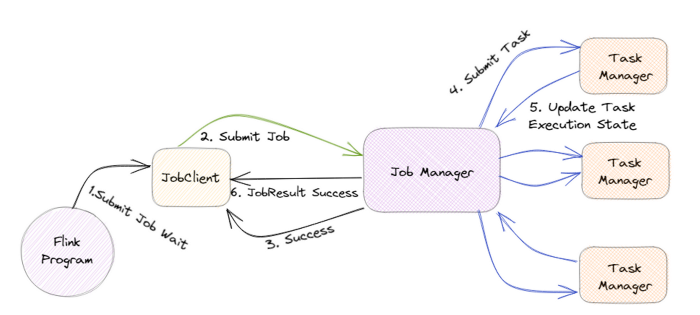


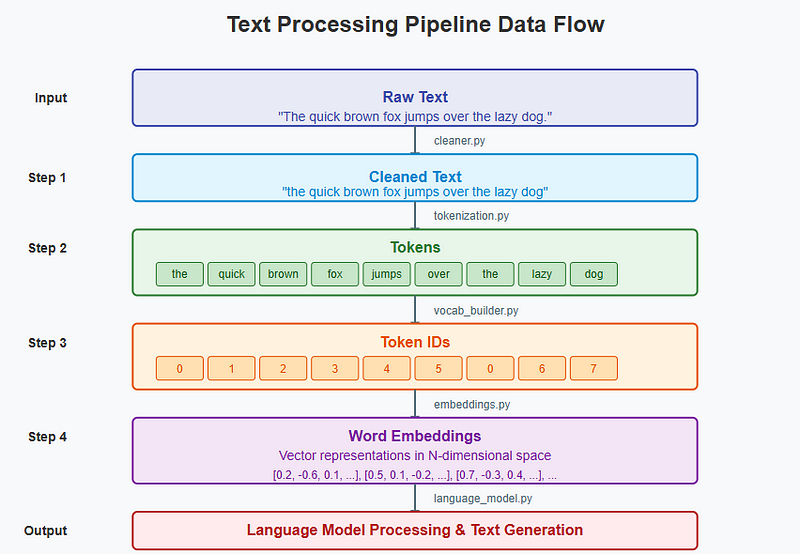




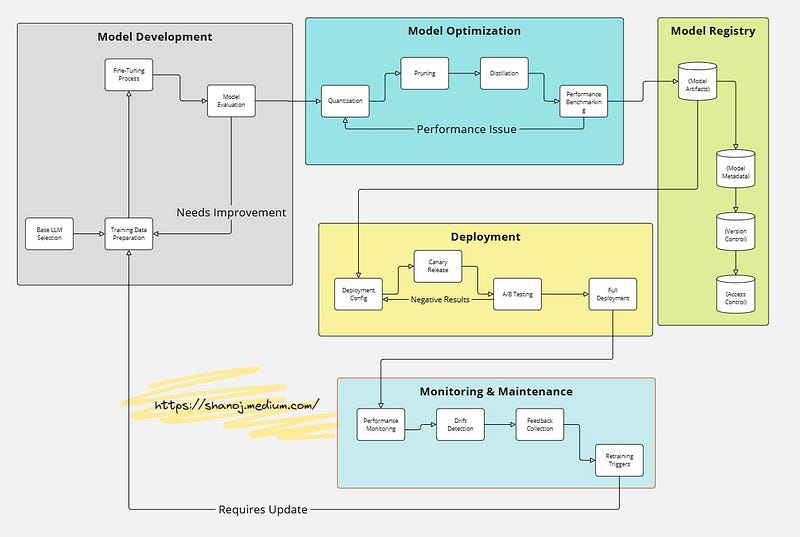
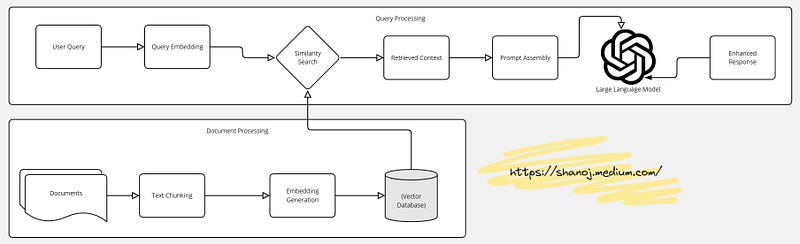
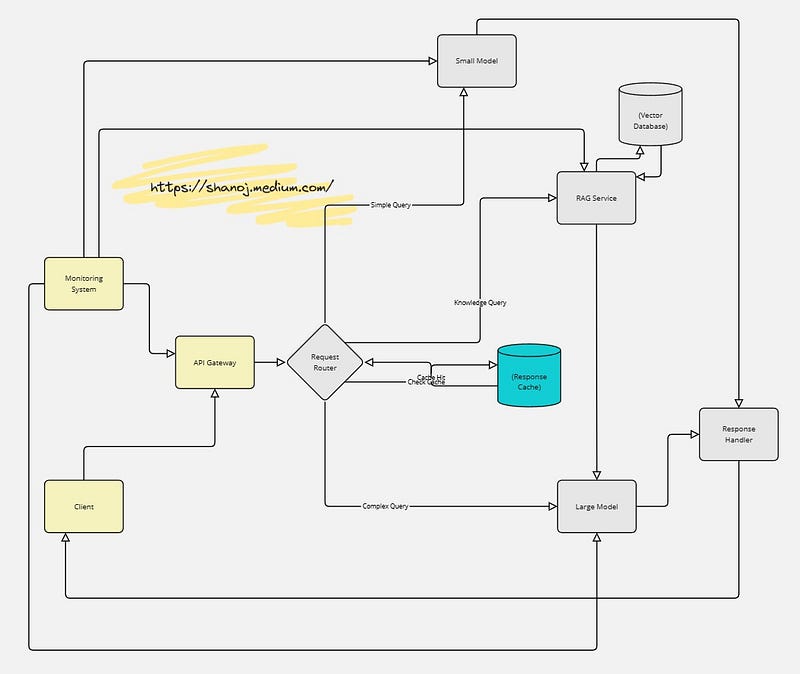


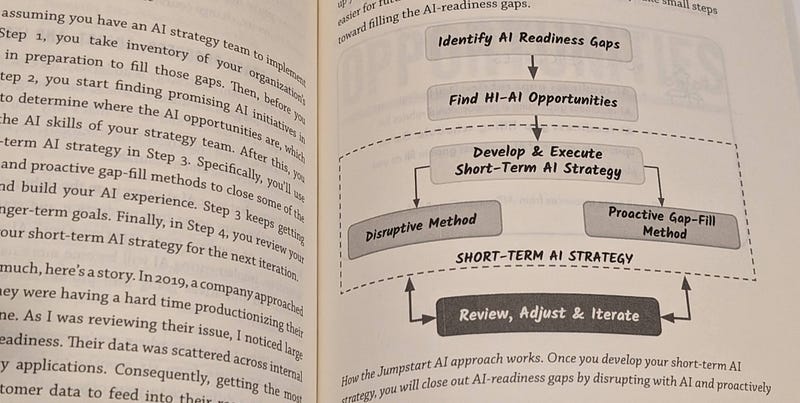
 Shanoj