Tag Archives: AWS

AWS Step Functions Distributed Map: Scaling Interactive Bank Reconciliation

Problem Statement: Scaling Interactive Bank Reconciliation

Bank reconciliation is a crucial but often complex and resource-intensive process. Suppose we have 500,000 reconciliation files stored in S3 for a two-way reconciliation process. These files are split into two categories:

  • 250,000 bank statement files
  • 250,000 transaction files from the company’s internal records

The objective is to reconcile these files by matching the transactions from both sources and loading the results into a database, followed by triggering reporting jobs.

Legacy System

Challenges with Current Approaches:

Sequential Processing Limitations:

  • A simple approach might involve iterating through the 500,000 files in a loop, but this would take an impractical amount of time. Processing even smaller datasets of 5,000 files would already show the inefficiency of sequential processing for this scale.

Data Scalability:

  • As the number of files increases (say, to 1 million files), this approach becomes completely unfeasible without significant performance degradation. Traditional methods are not designed to scale effectively.

Fault Tolerance:

  • In a large-scale operation like this, system failures can happen. If one node fails during reconciliation, the entire process could stop, requiring complex error-handling logic to ensure continuity.

Cost & Resource Management:

  • Balancing the cost of infrastructure with performance is another challenge. Over-provisioning resources to handle peak load times could be expensive while under-provisioning could lead to delays and failed jobs.

Complexity in Distributed Processing:

  • Setting up distributed processing frameworks, such as Hadoop or Spark, introduces a significant learning curve for developers who aren’t experienced with big data frameworks. Additionally, provisioning and maintaining clusters of machines adds further complexity.

Solution: Leveraging AWS Step Functions Distributed Map

AWS Step Functions, a serverless workflow orchestration service, solves these challenges efficiently by enabling scalable, distributed processing with minimal infrastructure management. With the Step Functions Distributed Map feature, large datasets like the 500,000 reconciliation files can be processed in parallel, simplifying the workflow while ensuring scalability, fault tolerance, and cost-effectiveness.

Key Benefits of the Solution:

Parallel Processing for Faster Reconciliation:

  • Distributed Map breaks down the 500,000 reconciliation tasks across multiple compute nodes, allowing files to be processed concurrently. This greatly reduces the time needed to reconcile large volumes of data.

Scalability:

  • The workflow scales effortlessly as the number of reconciliation files increases. Step Functions Distributed Map handles the coordination, ensuring that you can move from 500,000 to 1 million files without requiring a major redesign.

Fault Tolerance & Recovery:

  • If a node fails during the reconciliation process, the coordinator will rerun the failed tasks on another compute node, preventing the entire process from stalling. This ensures greater resilience in high-scale operations.

Cost Optimization:

  • As a serverless service, Step Functions automatically scales based on usage, meaning you’re only charged for what you use. There’s no need to over-provision resources, and scaling happens without manual intervention.

Developer-Friendly:

  • Developers don’t need to learn complex big data frameworks like Spark or Hadoop. Step Functions allows for orchestration of workflows using simple tasks and services like AWS Lambda, making it accessible to a broader range of teams.

Workflow Implementation:

The proposed Step Functions Distributed Map workflow for bank reconciliation can be broken down into the following steps:

Stage the Data:

  • AWS Athena is used to stage the reconciliation data, preparing it for further processing.

Gather Third-Party Data:

  • A Lambda function fetches any necessary third-party data, such as exchange rates or fraud detection information, to enrich the reconciliation process.

Run Distributed Map:

  • The Distributed Map state initiates the reconciliation between each pair of files (one from the bank statements and one from the internal records). Each pair is processed in parallel, maximizing throughput and minimizing reconciliation time.

Aggregation:

  • Once all pairs are reconciled, the results are aggregated into a summary report. This report is stored in a database, making the data ready for reporting and further analysis.
{
"Comment": "Reconciliation Workflow using Distributed Map in Step Functions",
"StartAt": "StageReconciliationData",
"States": {
"StageReconciliationData": {
"Type": "Task",
"Resource": "arn:aws:athena:us-west-2:123456789012:workgroup/reconciliation-query",
"Next": "FetchBankFiles"
},
"FetchBankFiles": {
"Type": "Task",
"Resource": "arn:aws:lambda:us-west-2:123456789012:function:FetchBankFilesLambda",
"Next": "FetchInternalFiles"
},
"FetchInternalFiles": {
"Type": "Task",
"Resource": "arn:aws:lambda:us-west-2:123456789012:function:FetchInternalFilesLambda",
"Next": "ReconciliationDistributedMap"
},
"ReconciliationDistributedMap": {
"Type": "Map",
"ItemReader": {
"Type": "S3ListReader",
"Configuration": {
"BucketName": "your-bank-statements-bucket",
"Prefix": "bank_files/"
}
},
"MaxConcurrency": 1000,
"ItemProcessor": {
"ProcessorConfig": {
"Mode": "DISTRIBUTED",
"ExecutionType": "STANDARD"
},
"StartAt": "ReconcileFiles"
},
"ItemBatchSize": 50,
"Next": "AggregateResults"
},
"ReconcileFiles": {
"Type": "Task",
"Resource": "arn:aws:lambda:us-west-2:123456789012:function:ReconcileFilesLambda",
"Parameters": {
"bankFile.$": "$.S3ObjectKey",
"internalFile": "s3://your-internal-files-bucket/internal_files/{file-matching-key}"
},
"Next": "CheckReconciliationStatus"
},
"CheckReconciliationStatus": {
"Type": "Choice",
"Choices": [
{
"Variable": "$.status",
"StringEquals": "FAILED",
"Next": "HandleFailedReconciliation"
}
],
"Default": "ReconciliationSuccessful"
},
"ReconciliationSuccessful": {
"Type": "Pass",
"Next": "AggregateResults"
},
"HandleFailedReconciliation": {
"Type": "Task",
"Resource": "arn:aws:lambda:us-west-2:123456789012:function:HandleFailedReconciliationLambda",
"Next": "ReconciliationSuccessful"
},
"AggregateResults": {
"Type": "Task",
"Resource": "arn:aws:lambda:us-west-2:123456789012:function:AggregateResultsLambda",
"Next": "GenerateReports"
},
"GenerateReports": {
"Type": "Task",
"Resource": "arn:aws:lambda:us-west-2:123456789012:function:GenerateReportsLambda",
"End": true
}
}
}

AWS Step Functions Distributed Map offers a scalable, fault-tolerant, and cost-effective solution to processing large datasets for bank reconciliation. Its serverless nature removes the complexity of managing infrastructure and enables developers to focus on the core business logic. By integrating services like AWS Lambda and Athena, businesses can achieve better performance and efficiency in high-scale reconciliation processes and many other use cases.

In Plain English 🚀

Thank you for being a part of the In Plain English community! Before you go:

System Design: Automating Banking Reconciliation with AWS

This article outlines the system design for automating the banking reconciliation process by migrating existing manual tasks to AWS. The solution leverages various AWS services to create a scalable, secure, and efficient system. The goal is to reduce manual effort, minimize errors, and enhance operational efficiency within the financial reconciliation workflow.

Key Objectives:

  • Develop a user-friendly custom interface for managing reconciliation tasks.
  • Utilize AWS services like Lambda, Glue, S3, and EMR for data processing automation.
  • Implement robust security and monitoring mechanisms to ensure system reliability.
  • Provide post-deployment support and monitoring for continuous improvement.

Architecture Overview

The architecture comprises several AWS services, each fulfilling specific roles within the system, and integrates with corporate on-premises resources via Direct Connect.

  • Direct Connect: Securely connects the corporate data center to the AWS VPC, enabling fast and secure data transfer between on-premises systems and AWS services.

Data Ingestion

  • Amazon S3 (Incoming Files Bucket): Acts as the primary data repository where incoming files are stored. The bucket triggers the Lambda function when new data is uploaded.
  • Bucket Policy: Ensures that only authorized services and users can access and interact with the data stored in S3.

Event-Driven Processing

  • AWS Lambda: Placed in a private subnet, this function is triggered by S3 events (e.g., file uploads) and initiates data processing tasks.
  • IAM Permissions: Lambda has permissions to access the S3 bucket and trigger the Glue ETL job.

Data Transformation

  • AWS Glue ETL Job: Handles the extraction, transformation, and loading (ETL) of data from the S3 bucket, preparing it for further processing.
  • NAT Gateway: Located in a public subnet, the NAT Gateway allows the Lambda function and Glue ETL job to access the internet for downloading dependencies without exposing them to inbound internet traffic.

Data Processing and Storage

  • Amazon EMR: Performs complex transformations and applies business rules necessary for reconciliation processes, processing data securely within the private subnet.
  • Amazon Redshift: Serves as the central data warehouse where processed data is stored, facilitating further analysis and reporting.
  • RDS Proxy: Manages secure and efficient database connections between Glue ETL, EMR, and Redshift.

Business Intelligence

  • Amazon QuickSight: A visualization tool that provides dashboards and reports based on the data stored in Redshift, helping users to make informed decisions.

User Interface

  • Reconciliation UI: Hosted on AWS and integrated with RDS, this custom UI allows finance teams to manage reconciliation tasks efficiently.
  • Okta SSO: Manages secure user authentication via Azure AD, ensuring that only authorized users can access the reconciliation UI.

Orchestration and Workflow Management

  • AWS Step Functions: Orchestrates the entire workflow, ensuring that each step in the reconciliation process is executed in sequence and managed effectively.
  • Parameter Store: Holds configuration data, allowing dynamic and flexible workflow management.

Security and Monitoring

  • AWS Secrets Manager: Securely stores and manages credentials needed by various AWS services.
  • Monitoring and Logging:
  • Scalyr: Provides backend log collection and analysis, enabling visibility into system operations.
  • New Relic: Monitors application performance and tracks key metrics to alert on any issues or anomalies.

Notifications

  • AWS SNS: Sends notifications to users about the status of reconciliation tasks, including completions, failures, or other important events.

Security Considerations

Least Privilege Principle:
All IAM roles and policies are configured to ensure that each service has only the permissions necessary to perform its functions, reducing the risk of unauthorized access.

Encryption:
Data is encrypted at rest in S3, Redshift, and in transit, meeting compliance and security standards.

Network Security:
The use of private subnets, security groups, and network ACLs ensures that resources are securely isolated within the VPC, protecting them from unauthorized access.


Code Implementation

Below are the key pieces of code required to implement the Lambda function and the CloudFormation template for the AWS infrastructure.

Lambda Python Code to Trigger Glue

Here’s a Python code snippet that can be deployed as part of the Lambda function to trigger the Glue ETL job upon receiving a new file in the S3 bucket:

import json
import boto3
import logging

# Set up logging
logger = logging.getLogger()
logger.setLevel(logging.INFO)

# Initialize the Glue and S3 clients
glue_client = boto3.client('glue')
s3_client = boto3.client('s3')

def lambda_handler(event, context):
"""
Lambda function to trigger an AWS Glue job when a new file is uploaded to S3.
"""

try:
# Extract the bucket name and object key from the event
bucket_name = event['Records'][0]['s3']['bucket']['name']
object_key = event['Records'][0]['s3']['object']['key']

# Log the file details
logger.info(f"File uploaded to S3 bucket {bucket_name}: {object_key}")

# Define the Glue job name
glue_job_name = "your_glue_job_name"

# Start the Glue job with the required arguments
response = glue_client.start_job_run(
JobName=glue_job_name,
Arguments={
'--s3_input_file': f"s3://{bucket_name}/{object_key}",
'--other_param': 'value' # Add any other necessary Glue job parameters here
}
)

# Log the response from Glue
logger.info(f"Started Glue job: {response['JobRunId']}")

except Exception as e:
logger.error(f"Error triggering Glue job: {str(e)}")
raise e

The Lambda function code is structured as follows:

  • Import Libraries: Imports necessary libraries like json, boto3, and logging to handle JSON data, interact with AWS services, and manage logging.
  • Set Up Logging: Configures logging to capture INFO level messages, which is crucial for monitoring and debugging the Lambda function.
  • Initialize AWS Clients: Initializes Glue and S3 clients using boto3 to interact with these AWS services.
  • Define Lambda Handler Function: The main function, lambda_handler(event, context), serves as the entry point and handles events triggered by S3.
  • Extract Event Data: Retrieves the S3 bucket name (bucket_name) and object key (object_key) from the event data passed to the function.
  • Log File Details: Logs the bucket name and object key of the uploaded file to help track what is being processed.
  • Trigger Glue Job: Initiates a Glue ETL job using start_job_run with the S3 object passed as input, kicking off the data transformation process.
  • Log Job Run ID: Logs the Glue job’s JobRunId for tracking purposes, helping to monitor the job’s progress.
  • Error Handling: Catches and logs any exceptions that occur during execution to ensure issues are identified and resolved quickly.
  • IAM Role Configuration: Ensures the Lambda execution role has the necessary permissions (glue:StartJobRun, s3:GetObject, etc.) to interact with AWS resources securely.

CloudFormation Template

Below is the CloudFormation template that defines the infrastructure required for this architecture:

AWSTemplateFormatVersion: '2010-09-09'
Description: CloudFormation template for automating banking reconciliation on AWS

Resources:

S3Bucket:
Type: AWS::S3::Bucket
Properties:
BucketName: !Sub 'banking-reconciliation-bucket-${AWS::AccountId}'
AccessControl: Private
VersioningConfiguration:
Status: Enabled

LambdaExecutionRole:
Type: AWS::IAM::Role
Properties:
RoleName: lambda-glue-execution-role
AssumeRolePolicyDocument:
Version: '2012-10-17'
Statement:
- Effect: Allow
Principal:
Service: lambda.amazonaws.com
Action: sts:AssumeRole
Policies:
- PolicyName: lambda-glue-policy
PolicyDocument:
Version: '2012-10-17'
Statement:
- Effect: Allow
Action:
- glue:StartJobRun
- glue:GetJobRun
- s3:GetObject
- s3:PutObject
Resource: "*"

LambdaFunction:
Type: AWS::Lambda::Function
Properties:
FunctionName: trigger-glue-job
Handler: index.lambda_handler
Role: !GetAtt LambdaExecutionRole.Arn
Code:
ZipFile: |
import json
import boto3
import logging

logger = logging.getLogger()
logger.setLevel(logging.INFO)

glue_client = boto3.client('glue')
s3_client = boto3.client('s3')

def lambda_handler(event, context):
try:
bucket_name = event['Records'][0]['s3']['bucket']['name']
object_key = event['Records'][0]['s3']['object']['key']

logger.info(f"File uploaded to S3 bucket {bucket_name}: {object_key}")

glue_job_name = "
your_glue_job_name"

response = glue_client.start_job_run(
JobName=glue_job_name,
Arguments={
'--s3_input_file': f"s3://{bucket_name}/{object_key}",
'--other_param': 'value'
}
)

logger.info(f"Started Glue job: {response['JobRunId']}")

except Exception as e:
logger.error(f"
Error triggering Glue job: {str(e)}")
raise e
Runtime: python3.8
Timeout: 60

S3BucketNotification:
Type: AWS::S3::BucketNotification
Properties:
Bucket: !Ref S3Bucket
NotificationConfiguration:
LambdaConfigurations:
- Event: s3:ObjectCreated:*
Function: !GetAtt LambdaFunction.Arn

GlueJob:
Type: AWS::Glue::Job
Properties:
Name: your_glue_job_name
Role: !GetAtt LambdaExecutionRole.Arn
Command:
Name: glueetl
ScriptLocation: !Sub 's3://${S3Bucket}/scripts/glue_etl_script.py'
PythonVersion: '3'
DefaultArguments:
--job-bookmark-option: job-bookmark-disable
MaxRetries: 1
ExecutionProperty:
MaxConcurrentRuns: 1
GlueVersion: "
2.0"
Timeout: 2880

Outputs:
S3BucketName:
Description: "
Name of the S3 bucket created for incoming files"
Value: !Ref S3Bucket
Export:
Name: S3BucketName

LambdaFunctionName:
Description: "Name of the Lambda function that triggers the Glue job"
Value: !Ref LambdaFunction
Export:
Name: LambdaFunctionName

GlueJobName:
Description: "Name of the Glue job that processes the incoming files"
Value: !Ref GlueJob
Export:
Name: GlueJobName

This CloudFormation template sets up the following resources:

  • S3 Bucket: For storing incoming files that will trigger further processing.
  • Lambda Execution Role: An IAM role with the necessary permissions for the Lambda function to interact with S3 and Glue.
  • Lambda Function: The function that is triggered when a new object is created in the S3 bucket, which then triggers the Glue ETL job.
  • S3 Bucket Notification: Configures the S3 bucket to trigger the Lambda function when a new file is uploaded.
  • Glue Job: Configures the Glue ETL job that processes the incoming data.

This system design article outlines a comprehensive approach to automating banking reconciliation processes using AWS services.

In Plain English 🚀

Thank you for being a part of the In Plain English community! Before you go:

Distribution Styles in Amazon Redshift: A Banking Reconciliation Use Case

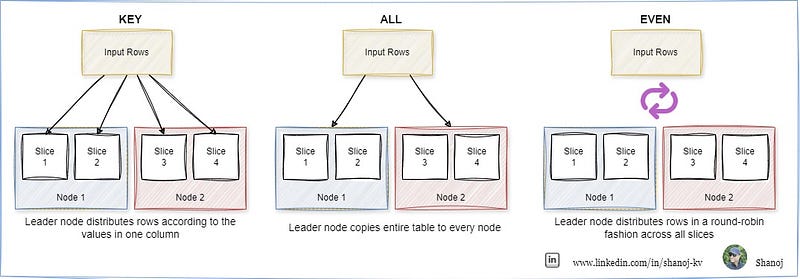
When loading data into a table in Amazon Redshift, the rows are distributed across the node slices according to the table’s designated distribution style. Selecting the right distribution style (DISTSTYLE) is crucial for optimizing performance.

  • The primary goal is evenly distributing the data across the cluster, ensuring efficient parallel processing.
  • The secondary goal is to minimize the cost of data movement during query processing. Ideally, the data should be positioned where it’s needed before the query is executed, reducing unnecessary data shuffling.

Let’s bring this concept to life with an example from the banking industry, specifically focused on reconciliation processes — a common yet critical operation in financial institutions.

In a banking reconciliation system, transactions from various accounts and systems (e.g., internal bank records and external clearing houses) must be matched and validated to ensure accuracy. This process often involves large datasets with numerous transactions that need to be compared across different tables.

Example Table Structures

To demonstrate how different distribution styles can be applied, consider the following sample tables:

Transactions Table (Internal Bank Records)

CREATE TABLE internal_transactions (
transaction_id BIGINT,
account_number VARCHAR(20),
transaction_date DATE,
transaction_amount DECIMAL(10,2),
transaction_type VARCHAR(10)
)
DISTSTYLE KEY
DISTKEY (transaction_id);

The internal_transactions table is distributed using the KEY distribution style on the transaction_id column. This means that records with the same transaction_id will be stored together on the same node slice. This is particularly useful when these transactions are frequently joined with another table, such as external transactions, on the transaction_id.

Transactions Table (External Clearing House Records)

CREATE TABLE external_transactions (
transaction_id BIGINT,
clearinghouse_id VARCHAR(20),
transaction_date DATE,
transaction_amount DECIMAL(10,2),
status VARCHAR(10)
)
DISTSTYLE KEY
DISTKEY (transaction_id);

Similar to the internal transactions table, the external_transactions table is also distributed using the KEY distribution style on the transaction_id column. This ensures that when a join operation is performed between the internal and external transactions on the transaction_id, the data is already co-located, minimizing the need for data movement and speeding up the reconciliation process.

CREATE TABLE currency_exchange_rates (
currency_code VARCHAR(3),
exchange_rate DECIMAL(10,4),
effective_date DATE
)
DISTSTYLE ALL;

The currency_exchange_rates table uses the ALL distribution style. A full copy of this table is stored on the first slice of each node, which is ideal for small reference tables that are frequently joined with larger tables (such as transactions) but are not updated frequently. This eliminates the need for data movement during joins and improves query performance.

CREATE TABLE audit_logs (
log_id BIGINT IDENTITY(1,1),
transaction_id BIGINT,
action VARCHAR(100),
action_date TIMESTAMP,
user_id VARCHAR(50)
)
DISTSTYLE EVEN;

The audit_logs table uses the EVEN distribution style. Since this table may not participate in frequent joins and primarily serves as a log of actions performed during the reconciliation process, EVEN distribution ensures that the data is evenly spread across all node slices, balancing the load and allowing for efficient processing.

Applying the Distribution Styles in a Reconciliation Process

In this banking reconciliation scenario, let’s assume we need to reconcile internal and external transactions, convert amounts using the latest exchange rates, and log the reconciliation process.

  • The internal and external transactions will be joined on transaction_id. Since both tables use KEY distribution on transaction_id, the join operation will be efficient, as related data is already co-located.
  • Currency conversion will use the currency_exchange_rates table. With ALL distribution, a copy of this table is readily available on each node, ensuring fast lookups during the conversion process.
  • As actions are performed, logs are written to the audit_logs table, with EVEN distribution ensuring that logging operations are spread out evenly, preventing any single node from becoming a bottleneck.

This approach demonstrates how thoughtful selection of distribution styles can significantly enhance the performance and scalability of your data processing in Amazon Redshift, particularly in a complex, data-intensive scenario like banking reconciliation.

In Plain English 🚀

Thank you for being a part of the In Plain English community! Before you go:

Daily Dose of Cloud Learning: AWS Resource Cleanup with Cloud-nuke

If you’re diving into AWS for testing, development, or experimentation, you know how crucial it is to clean up your environment afterwards. Often, manual cleanup can be tedious, error-prone, and may leave resources running that could cost you later. That’s where Cloud-nuke comes into play — a command-line utility designed to automate the deletion of all resources within your AWS account.

Cloud-nuke is a powerful and potentially destructive tool, as it will delete all specified resources within an account. Users should exercise caution and ensure they have backups or have excluded critical resources before running the tool.

Step 1: Install Cloud-nuke

Download Cloud-nuke:

Visit the Cloud-nuke GitHub releases page.

Download the appropriate .exefile for Windows and run the installer.

Windows: You can install cloud-nuke using winget:

winget install cloud-nuke

Verify Installation:

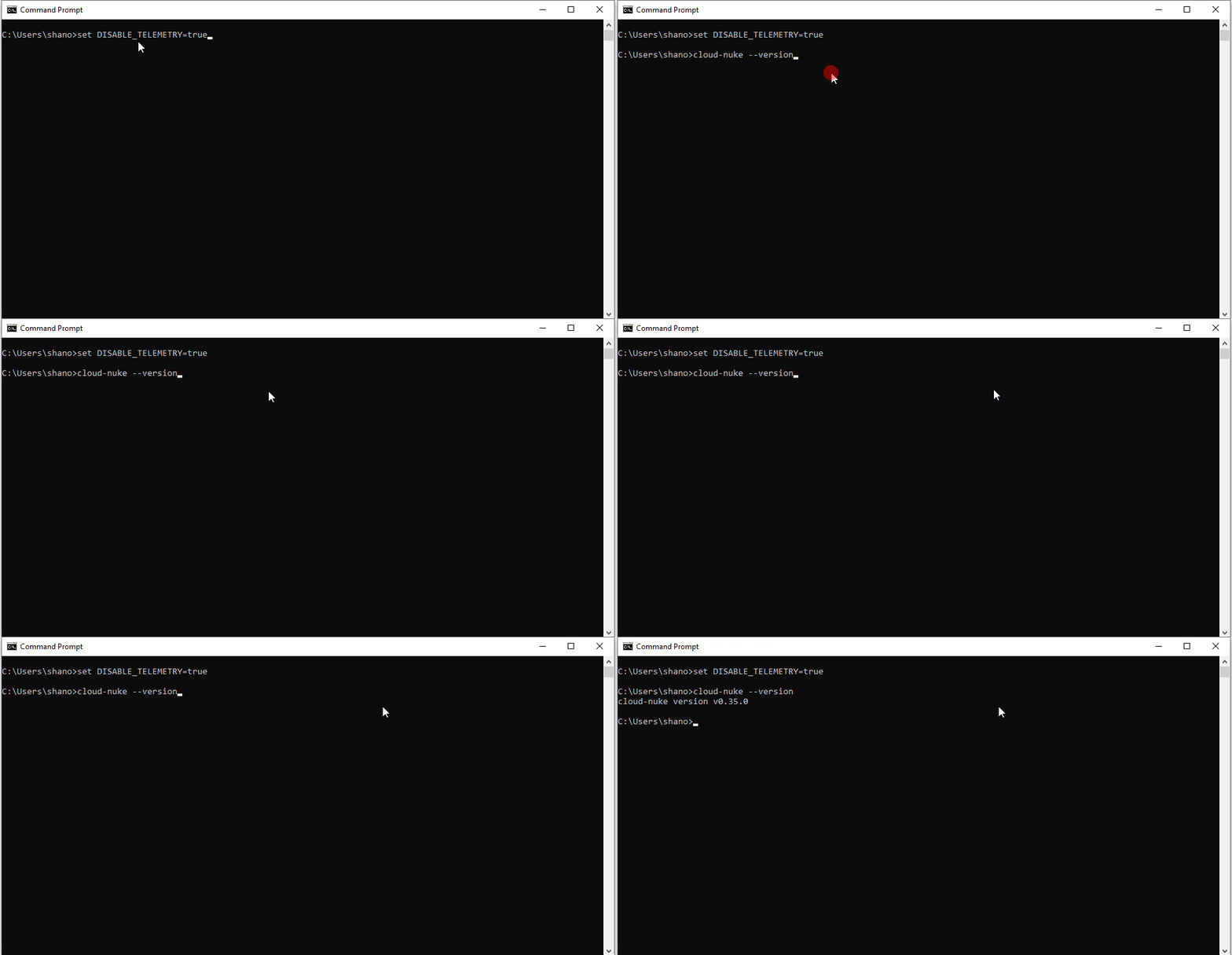
Open the Command Prompt and type cloud-nuke --version to verify that Cloud-nuke is installed correctly.

Step 2: Configure AWS CLI with Your Profile

Install AWS CLI:

If you don’t have the AWS CLI installed, download and install it from here.

Configure AWS CLI:

Open Command Prompt. Run the following command:

aws configure --profile your-profile-name

Provide the required credentials (Access Key ID, Secret Access Key) for your AWS account.

Specify your preferred default region (e.g., us-west-2).

Specify the output format (e.g., json).

Step 3: Use Cloud-nuke to Clean Up Resources

Run Cloud-nuke with IAM Exclusion:

To ensure no IAM users are deleted, include the --resource-type flag to exclude IAM resources:

cloud-nuke aws --exclude-resource-type iam

This command will target all resources except IAM.

Bonus Commands:

  • To list all the profiles configured on your system, use the following command:
aws configure list-profiles
  • This will display all the profiles you have configured.
  • To see the configuration details for a specific profile, use the following command:
aws configure list --profile your-profile-name

This command will display the following details:

  • Access Key ID: The AWS access key ID.
  • Secret Access Key: The AWS secret access key (masked).
  • Region: The default AWS region.
  • Output Format: The default output format (e.g., json, text, yaml).

I hope this article helps those who plan to use Cloud-nuke. It’s a handy tool that can save you time and prevent unnecessary costs by automating the cleanup process after you’ve tried out resources in your AWS account.

In Plain English 🚀

Thank you for being a part of the In Plain English community! Before you go:

AWS-Powered Banking: Automating Reconciliation with Cloud Efficiency

This article explains how a Bank Reconciliation System is structured on AWS, with the aim of processing and reconciling banking transactions. The system automates the matching of transactions from batch feeds and provides a user interface for manually reconciling any open items.

Architecture Overview

The BRS (Bank Reconciliation System) is engineered to support high-volume transaction processing with an emphasis on automation, accuracy, and user engagement for manual interventions. The system incorporates AWS cloud services to ensure scalability, availability, and security.

Technical Flow

  1. Batch Feed Ingestion: Transaction files, referred to as “left” and “right” feeds, are exported from an on-premises data center into the AWS environment.
  2. Storage and Processing: Files are stored in an S3 bucket, triggering AWS Lambda functions.
  3. Automated Reconciliation: Lambda functions process the batch feeds to perform automated matching of transactions. Matched transactions are termed “auto-match.”
  4. Database Storage: Both the auto-matched transactions and the unmatched transactions, known as “open items,” are stored in an Amazon Aurora database.
  5. Application Layer: A backend application, developed with Spring Boot, interacts with the database to retrieve and manage transaction data.
  6. User Interface: An Angular front-end application presents the open items to application users (bank employees) for manual reconciliation.

System Components

  • AWS S3: Initial repository for batch feeds. Its event-driven capabilities trigger processing via Lambda.
  • AWS Lambda: The serverless compute layer that processes batch feeds and performs auto-reconciliation.
  • Amazon Aurora: A MySQL and PostgreSQL compatible relational database used to store both auto-matched and open transactions.
  • Spring Boot: Provides the backend services that facilitate the retrieval and management of transaction data for the front-end application.
  • Angular: The front-end framework used to build the user interface for the manual reconciliation process.

System Interaction

  1. Ingestion: Batch feeds from the on-premises data center are uploaded to AWS S3.
  2. Triggering Lambda: S3 events upon file upload automatically invoke Lambda functions dedicated to processing these feeds.
  3. Processing: Lambda functions parse the batch feeds, automatically reconcile transactions where possible, and identify open items for manual reconciliation.
  4. Storing Results: Lambda functions store the outcomes in the Aurora database, segregating auto-matched and open items.
  5. User Engagement: The Spring Boot application provides an API for the Angular front-end, through which bank employees access and work on open items.
  6. Manual Reconciliation: Users perform manual reconciliations via the Angular application, which updates the status of transactions within the Aurora database accordingly.

Security and Compliance

  • Data Encryption: All data in transit and at rest are encrypted using AWS security services.
  • Identity Management: Amazon Cognito ensures secure user authentication for application access.
  • Web Application Firewall: AWS WAF protects against common web threats and vulnerabilities.

Monitoring and Reliability

  • CloudWatch: Monitors the system, logging all events, and setting up alerts for anomalies.
  • High Availability: The system spans multiple Availability Zones for resilience and employs Elastic Load Balancing for traffic distribution.

Scalability

  • Elastic Beanstalk & EKS: Both services can scale the compute resources automatically in response to the load, ensuring that the BRS can handle peak volumes efficiently.

Note: When you deploy an application using Elastic Beanstalk, it automatically sets up an Elastic Load Balancer in front of the EC2 instances that are running your application. This is to distribute incoming traffic across those instances to balance the load and provide fault tolerance.

Cost Optimization

  • S3 Intelligent-Tiering: Manages storage costs by automatically moving less frequently accessed data to lower-cost tiers.

DevOps Practices

  • CodeCommit & ECR: Source code management and container image repository are handled via AWS CodeCommit and ECR, respectively, streamlining the CI/CD pipeline.

The BRS leverages AWS services to create a seamless, automated reconciliation process, complemented by an intuitive user interface for manual intervention, ensuring a robust solution for the bank’s reconciliation needs.

Stackademic 🎓

Thank you for reading until the end. Before you go:

Data Analytics with AWS Redshift and Redshift Spectrum: A Scenario-Based Approach

In exploring the integration of Amazon Redshift and Redshift Spectrum for data warehousing and data lake architectures, it’s essential to consider a scenario where a data engineer sets up a daily data loading pipeline into a data warehouse.

This setup is geared towards optimizing the warehouse for the majority of reporting queries, which typically focus on the latest 12 months of data. To maintain efficiency and manage storage, the engineer might also implement a process to remove data older than 12 months. However, this strategy raises a question: how to handle the 20% of queries that require historical data beyond this period?

Amazon Redshift is a powerful, scalable data warehouse service that simplifies the process of analyzing large volumes of data with high speed and efficiency. It allows for complex queries over vast datasets, providing the backbone for modern data analytics. Redshift’s architecture is designed to handle high query loads and vast amounts of data, making it an ideal solution for businesses seeking to leverage their data for insights and decision-making. Its columnar storage and data compression capabilities ensure that data is stored efficiently, reducing the cost and increasing the performance of data operations.

Redshift Spectrum extends the capabilities of Amazon Redshift by allowing users to query and analyze data stored in Amazon S3 directly from within Redshift, without the need for loading or transferring the data into the data warehouse. This feature is significant because it enables users to access both recent and historical data seamlessly, bridging the gap between the data stored in Redshift and the extensive, unstructured data residing in a data lake. Spectrum offers the flexibility to query vast amounts of data across a data lake, providing the ability to run complex analyses on data that is not stored within the Redshift cluster itself.

Here, Redshift Spectrum plays a crucial role. It’s a feature that extends the capabilities of the Amazon Redshift data warehouse, allowing it to query data stored externally in a data lake. This functionality is significant because it enables users to access both recent and historical data without the need to store all of it directly within the data warehouse.

The process starts with the AWS Glue Data Catalog, which acts as a central repository for all the databases and tables in the data lake. By setting up Amazon Redshift to work with the AWS Glue Data Catalog, users can seamlessly query tables both inside Redshift and those cataloged in the AWS Glue. This setup is particularly advantageous for comprehensive data analysis, bridging the gap between the structured environment of the data warehouse and the more extensive, unstructured realm of the data lake.

AWS Glue Data Catalog and Apache Hive Metastore are both metadata repositories for managing data structures in data lakes and warehouses. AWS Glue Data Catalog, a cloud-native service, integrates seamlessly with AWS analytics services, offering automatic schema discovery and a fully managed experience. In contrast, Hive Metastore requires more manual setup and maintenance and is primarily used in on-premises or hybrid cloud environments. AWS Glue Data Catalog is easier to use, automated, and tightly integrated within the AWS ecosystem, making it the preferred choice for users invested in AWS services.

In Plain English 🚀

Thank you for being a part of the In Plain English community! Before you go:

AWS Glue for Serverless Spark Processing

AWS Glue Overview

AWS Glue is a managed and serverless service that assists in data preparation for analytics. It automates the ETL (Extract, Transform, Load) process and provides two primary components for data transformation: the Glue Python Shell for smaller datasets and Apache Spark for larger datasets. Both of these components can interact with data in Amazon S3, the AWS Glue Data Catalog, and various databases or data integration services. AWS Glue simplifies ETL tasks by managing the computing resources required, which are measured in data processing units (DPUs).

Key Takeaway: AWS Glue eliminates the need for server management and is highly scalable, making it an ideal choice for businesses looking to streamline their data transformation and loading processes without deep infrastructure knowledge.

AWS Glue Data Catalog

The AWS Glue Data Catalog acts as a central repository for metadata storage, akin to a Hive metastore, facilitating the management of ETL jobs. It integrates seamlessly with other AWS services like Athena and Amazon EMR, allowing for efficient data queries and analytics. Glue Crawlers automatically discover and catalog data across services, simplifying the process of ETL job design and execution.

Key Takeaway: Utilizing the AWS Glue Data Catalog can significantly reduce the time and effort required to prepare data for analytics, providing an automated, organized approach to data management and integration.

Amazon EMR Overview

Amazon EMR is a cloud big data platform for processing massive amounts of data using open-source tools such as Apache Spark, HBase, Presto, and Hadoop. Unlike AWS Glue’s serverless approach, EMR requires the manual setup of clusters, offering a more customizable environment. EMR supports a broader range of big data tools and frameworks, making it suitable for complex analytical workloads that benefit from specific configurations and optimizations.

Key Takeaway: Amazon EMR is best suited for users with specific requirements for their big data processing tasks that necessitate fine-tuned control over their computing environments, as well as those looking to leverage a broader ecosystem of big data tools.

Glue Workflows for Orchestrating Components

AWS Glue Workflows provides a managed orchestration service for automating the sequencing of ETL jobs. This feature allows users to design complex data processing pipelines triggered by schedule, event, or job completion, ensuring a seamless flow of data transformation and loading tasks.

Key Takeaway: By leveraging AWS Glue Workflows, businesses can efficiently automate their data processing tasks, reducing manual oversight and speeding up the delivery of analytics-ready data.


In Plain English 🚀

Thank you for being a part of the In Plain English community! Before you go:

Data Lake 101: Architecture

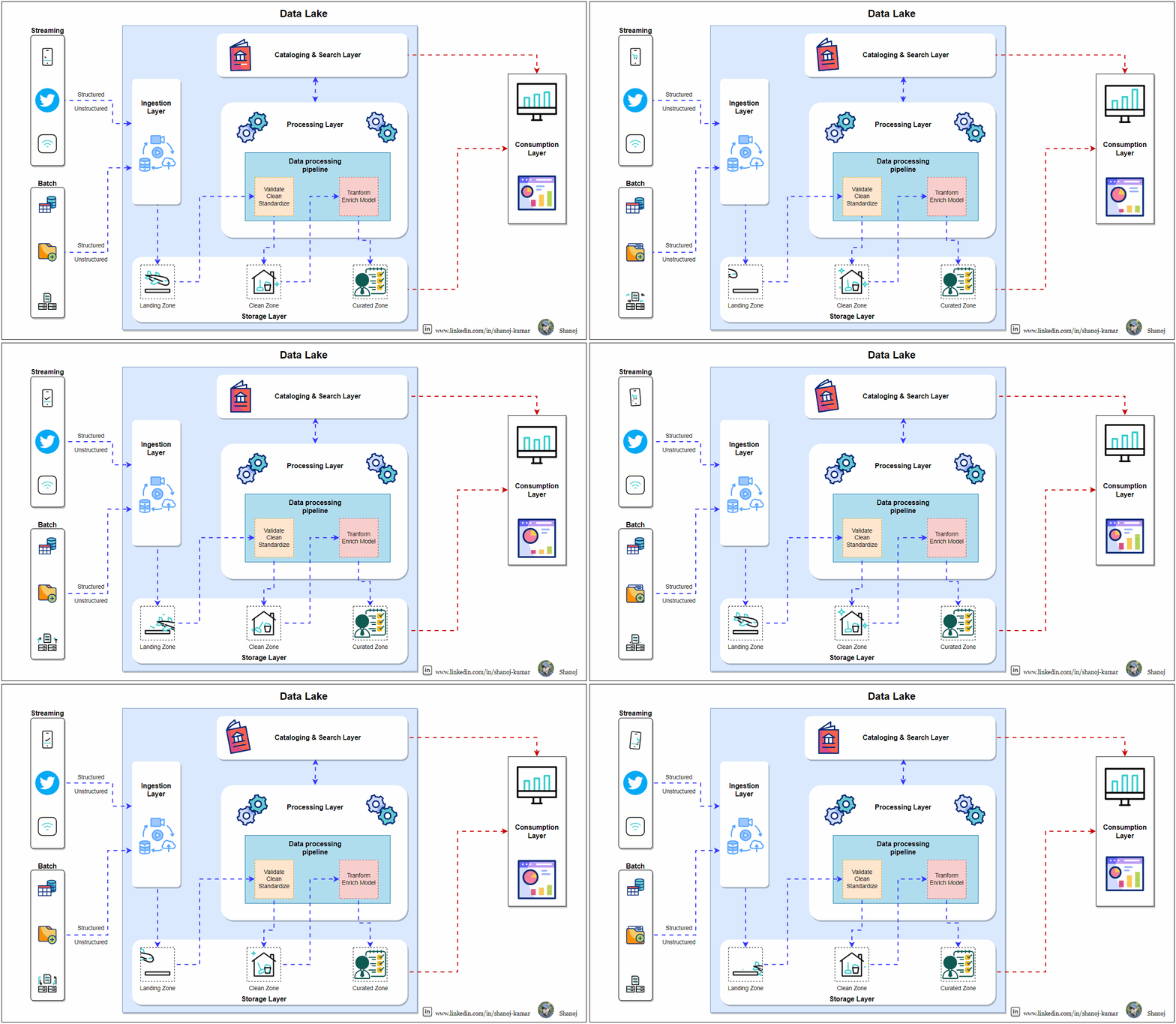
A Data Lake is a centralized location designed to store, process, and protect large amounts of data from various sources in its original format. It is built to manage the scale, versatility, and complexity of big data, which includes structured, semi-structured, and unstructured data. It provides extensive data storage, efficient data management, and advanced analytical processing across different data types. The logical architecture of a Data Lake typically consists of several layers, each with a distinct purpose in the data lifecycle, from data intake to utilization.

Data Delivery Type and Production Cadence

Data within the Data Lake can be delivered in multiple forms, including table rows, data streams, and discrete data files. It supports various production cadences, catering to batch processing and real-time streaming, to meet different operational and analytical needs.

Landing / Raw Zone The Landing or Raw Zone

Is the initial repository for all incoming data, where it is stored in its original, unprocessed form. This area serves as the data’s entry point, maintaining its integrity and ensuring traceability by preserving it immutable.

Clean/Transform Zone

Following the landing zone, data is moved to the Clean/Transform Zone, where it undergoes cleaning, normalization, and transformation. This step prepares the data for analysis by standardizing its format and structure, enhancing data quality and usability.

Cataloguing & Search Layer

The Ingestion Layer manages data entry into the Data Lake, capturing essential metadata and categorizing data appropriately. It supports various data ingestion methods, including batch and real-time streams, facilitating efficient data discovery and management.

Data Structure

The Data Lake accommodates a wide range of data structures, from structured, such as databases and CSV files, to semi-structured, like JSON and XML, and unstructured data, including text documents and multimedia files.

Processing Layer

The Processing Layer is at the heart of the Data Lake, equipped with powerful tools and engines for data manipulation, transformation, and analysis. It facilitates complex data processing tasks, enabling advanced analytics and data science projects.

Curated/Enriched Zone

Data that has been cleaned and transformed is further refined in the Curated/Enriched Zone. It is enriched with additional context or combined with other data sources, making it highly valuable for analytical and business intelligence purposes. This zone hosts data ready for consumption by end-users and applications.

Consumption Layer

Finally, the Consumption Layer provides mechanisms for end-users to access and utilize the data. Through various tools and applications, including business intelligence platforms, data visualization tools, and APIs, users can extract insights and drive decision-making processes based on the data stored in the Data Lake.


AWS Data Lakehouse Architecture

Oversimplified/high-level

An AWS Data Lakehouse is a powerful combination of data lakes and data warehouses, which utilizes Amazon Web Services to establish a centralized data storage solution. This solution caters to both raw data in its primitive form and the precision required for intricate analysis. By breaking down data silos, a Data Lakehouse strengthens data governance and security while simplifying advanced analytics. It offers businesses an opportunity to uncover new insights while preserving the flexibility of data management and analytical capabilities.

Kinesis Firehose

Amazon Kinesis Firehose is a fully managed service provided by Amazon Web Services (AWS) that enables you to easily capture and load streaming data into data stores and analytics tools. With Kinesis Firehose, you can ingest, transform, and deliver data in real time to various destinations such as Amazon S3, Amazon Redshift, and Amazon Elasticsearch Service. The service is designed to scale automatically to handle any amount of streaming data and requires no administration. Kinesis Firehose supports data formats such as JSON, CSV, and Apache Parquet, among others, and provides built-in data transformation capabilities to prepare data for analysis. With Kinesis Firehose, you can focus on your data processing logic and leave the data delivery infrastructure to AWS.

Amazon CloudWatch

Amazon CloudWatch is a monitoring service that helps you keep track of your operational metrics and logs and sends alerts to optimize performance. It enables you to monitor and collect data on various resources like EC2 instances, RDS databases, and Lambda functions, in real-time. With CloudWatch, you can gain insights into your application’s performance and troubleshoot issues quickly.

Amazon S3 for State Backend

The Amazon S3 state backend serves as the backbone of the Data Lakehouse. It acts as a repository for the state of streaming data, eternally preserving it.

Amazon Kinesis Data Analytics

Amazon Kinesis Data Analytics uses SQL and Apache Flink to provide real-time analytics on streaming data with precision.

Amazon S3

Amazon S3 is a secure, scalable, and resilient storage for the Data Lakehouse’s data.

AWS Glue Data Catalog

The AWS Glue Data Catalog is a fully managed metadata repository that enables easy data discovery, organization, and management for streamlined analytics and processing in the Data Lakehouse. It provides a unified view of all data assets, including databases, tables, and partitions, making it easier for data engineers, analysts, and scientists to find and use the data they need. The AWS Glue Data Catalog also supports automatic schema discovery and inference, making it easier to maintain accurate and up-to-date metadata for all data assets. With the AWS Glue Data Catalog, organizations can improve data governance and compliance, reduce data silos, and accelerate time-to-insight.

Amazon Athena

Amazon Athena enables users to query data in Amazon S3 using standard SQL without ETL complexities, thanks to its serverless and interactive architecture.

Amazon Redshift

Amazon Redshift is a highly efficient and scalable data warehouse service that streamlines the process of data analysis. It is designed to enable users to query vast amounts of structured and semi-structured data stored across their data warehouse, operational database, and data lake using standard SQL. With Amazon Redshift, users can gain valuable insights and make data-driven decisions quickly and easily. Additionally, Amazon Redshift is fully managed, allowing users to focus on their data analysis efforts rather than worrying about infrastructure management. Its flexible pricing model, based on usage, makes it a cost-effective solution for businesses of all sizes.

Consumption Layer

The Consumption Layer includes business intelligence tools and applications like Amazon QuickSight. This layer allows end-users to visualize, analyze, and interpret the processed data to derive actionable business insights.

In Plain English 🚀

Thank you for being a part of the In Plain English community! Before you go:

AWS 101: Implementing IAM Roles for Enhanced Developer Access with Assume Role Policy

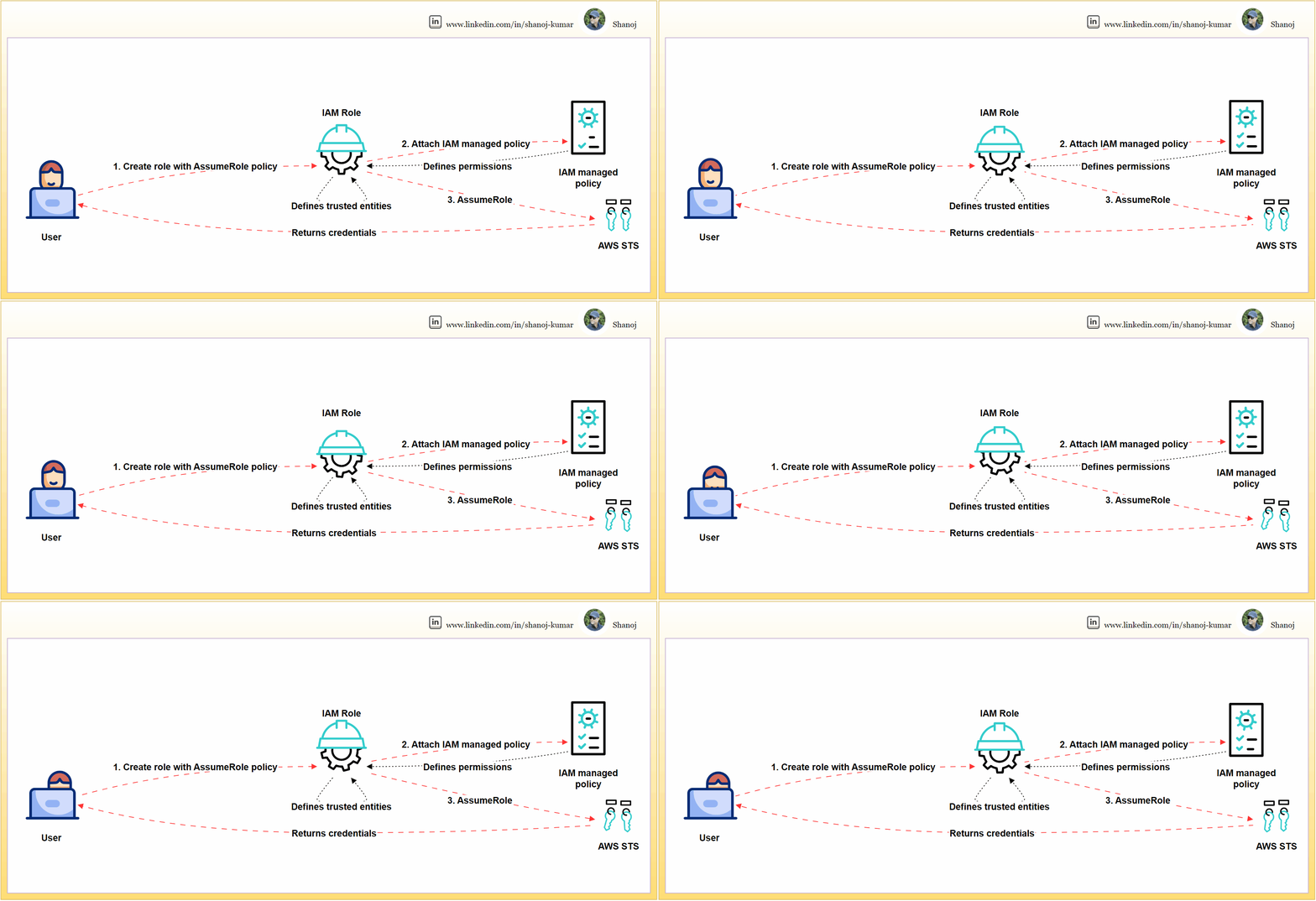
Setting up and using an IAM role in AWS involves three steps. Firstly, the user creates an IAM role and defines its trust relationships using an AssumeRole policy. Secondly, the user attaches an IAM-managed policy to the role, which specifies the permissions that the role has within AWS. Finally, the role is assumed through the AWS Security Token Service (STS), which grants temporary security credentials for accessing AWS services. This cycle of trust and permission granting, from user action to AWS STS and back, underpins secure AWS operations.

IAM roles are crucial for access management in AWS. This article provides a step-by-step walkthrough for creating a user-specific IAM role, attaching necessary policies, and validating for security and functionality.

Step 1: Compose a JSON file named assume-role-policy.json.

This policy explicitly defines the trusted entities that can assume the role, effectively safeguarding it against unauthorized access.

{
"Version": "2012-10-17",
"Statement": [
{
"Effect": "Allow",
"Principal": {
"AWS": "PRINCIPAL_ARN"
},
"Action": "sts:AssumeRole"
}
]
}

This policy snippet should be modified by replacing PRINCIPAL_ARN it with the actual ARN of the user or service that needs to assume the role. The ARN can be obtained programmatically, as shown in the next step.

Step 2: Establishing the IAM Role via AWS CLI

The CLI is a direct and scriptable interface for AWS services, facilitating efficient role creation and management.

# Retrieve the ARN for the current user and store it in a variable
PRINCIPAL_ARN=$(aws sts get-caller-identity --query Arn --output text)

# Replace the placeholder in the policy template and create the actual policy
sed -i "s|PRINCIPAL_ARN|$PRINCIPAL_ARN|g" assume-role-policy.json

# Create the IAM role with the updated assume role policy
aws iam create-role --role-name DeveloperRole \
--assume-role-policy-document file://assume-role-policy.json \
--query 'Role.Arn' --output text

This command sequence fetches the user’s ARN, substitutes it into the policy document, and then creates the role DeveloperRole with the updated policy.

Step 3: Link the ‘PowerUserAccess’ managed policy to the newly created IAM role.

This policy confers essential permissions for a broad range of development tasks while adhering to the principle of least privilege by excluding full administrative privileges.

# Attach the 'PowerUserAccess' policy to the 'DeveloperRole'
aws iam attach-role-policy --role-name DeveloperRole \
--policy-arn arn:aws:iam::aws:policy/PowerUserAccess

The command attaches the necessary permissions to the DeveloperRole without conferring overly permissive access.

Assuming the IAM Role

Assume the IAM role to procure temporary security credentials. Assuming a role with temporary credentials minimizes security risks compared to using long-term access keys and confines access to a session’s duration.

# Assume the 'DeveloperRole' and specify the MFA device serial number and token code
aws sts assume-role --role-arn ROLE_ARN \
--role-session-name DeveloperSession \
--serial-number MFA_DEVICE_SERIAL_NUMBER \
--token-code MFA_TOKEN_CODE

The command now includes parameters for MFA, enhancing security. Replace ROLE_ARN the role’s ARN MFA_DEVICE_SERIAL_NUMBER with the serial number of the MFA device and MFA_TOKEN_CODE with the current MFA code.

Validation Checks

Execute commands to verify the permissions of the IAM role.

Validation is essential to confirm that the role possesses the correct permissions and is operative as anticipated.

List S3 Buckets:

# List S3 buckets using the assumed role's credentials
aws s3 ls --profile DeveloperSessionCredentials

This checks the ability to list S3 buckets, verifying that S3-related permissions are correctly granted to the role.

Describe EC2 Instances:

# Describe EC2 instances using the assumed role's credentials
aws ec2 describe-instances --profile DeveloperSessionCredentials

Validates the role’s permissions to view details about EC2 instances.

Attempt a Restricted Action:

# Try listing IAM users, which should be outside the 'PowerUserAccess' policy scope
aws iam list-users --profile DeveloperSessionCredentials

This command should fail, reaffirming that the role does not have administrative privileges.

Note: Replace --profile DeveloperSessionCredentials with the actual AWS CLI profile that has been configured with the assumed role’s credentials. To set up the profile with the new temporary credentials, you’ll need to update your AWS credentials file, typically located at ~/.aws/credentials.


Developers can securely manage AWS resources by creating an IAM role with scoped privileges. This involves meticulously validating the permissions of the role. Additionally, the role assumption process can be fortified with MFA to ensure an even higher level of security.

PlainEnglish.io 🚀

Thank you for being a part of the In Plain English community! Before you go:

Optimizing Cloud Banking Service: Service Mesh for Secure Microservices Integration

As cloud computing continues to evolve, microservices architectures are becoming increasingly complex. To effectively manage this complexity, service meshes are being adopted. In this article, we will explain what a service mesh is, why it is necessary for modern cloud architectures, and how it addresses some of the most pressing challenges developers face today.

Understanding the Service Mesh

A service mesh is a configurable infrastructure layer built into an application that allows for the facilitation of flexible, reliable, and secure communications between individual service instances. Within a cloud-native environment, especially one that embraces containerization, a service mesh is critical in handling service-to-service communications, allowing for enhanced control, management, and security.

Why a Service Mesh?

As applications grow and evolve into distributed systems composed of many microservices, they often encounter challenges in service discovery, load balancing, failure recovery, security, and observability. A service mesh addresses these challenges by providing:

  • Dynamic Traffic Management: Adjusting the flow of requests and responses to accommodate changes in the infrastructure.
  • Improved Resiliency: Adding robustness to the system with patterns like retries, timeouts, and circuit breakers.
  • Enhanced Observability: Offering tools for monitoring, logging, and tracing to understand system performance and behaviour.
  • Security Enhancements: Ensuring secure communication through encryption and authentication protocols.

By implementing a service mesh, these distributed and loosely coupled applications can be managed more effectively, ensuring operational efficiency and security at scale.

Foundational Elements: Service Discovery and Proxies

The service mesh relies on two essential components — Consul and Envoy. The consul is responsible for service discovery, which means it keeps track of services, locations, and health status. It ensures that the system can adapt to changes in the environment. On the other hand, Envoy manages proxy services. It’s deployed alongside service instances and handles network communication. Envoy acts as an abstraction layer for traffic management and message routing.

Architectural Overview

The architecture consists of a Public and Private VPC setup, which encloses different clusters. The ‘LEFT_CLUSTER’ in the VPC is dedicated to critical services like logging and monitoring, which provide insights into the system’s operation and manage transactions. On the other hand, the ‘RIGHT_CLUSTER’ in the VPC contains services for Audit and compliance, Dashboards, and Archived Data, ensuring a robust approach to data management and regulatory compliance.

The diagram shows a service mesh architecture for sensitive banking operations in AWS. It comprises two clusters: the Left Cluster ( VPC) includes a Mesh Gateway, Bank Interface, Authentication and Authorization systems, and a Reconciliation Engine. Right Cluster (VPC) manages Audit, provides a Dashboard, stores Archived Data, and handles Notifications. Consul and Envoy Proxies efficiently manage communication. Monitored by dedicated tools, it ensures operational integrity and security in a complex banking ecosystem.

Mesh Gateways and Envoy Proxies

Mesh Gateways are crucial for inter-cluster communication, simplifying connectivity and network configurations. Envoy Proxies are strategically placed within the service mesh, managing the flow of traffic and enhancing the system’s ability to scale dynamically.

Security and User Interaction

The user’s journey begins with the authentication and authorization measures in place to verify and secure user access.

The Role of Consul

Consul’s service discovery capabilities are essential in allowing services like the Bank Interface and the Reconciliation Engine to discover each other and interact seamlessly, bypassing the limitations of static IP addresses.

Operational Efficiency

The service mesh’s contribution to operational efficiency is particularly evident in its integration with the Reconciliation Engine. This ensures that financial data requiring reconciliation is processed efficiently, securely, and directed towards the relevant services.

The Case for Service Mesh Integration

The shift to cloud-native architecture emphasizes the need for service meshes. This blueprint enhances agility, security, and technology, affirming the service mesh as pivotal for modern cloud networking.

In Plain English

Thank you for being a part of our community! Before you go: