Tag Archives: AWS

System Design 101: Design a Twitter-Like Platform

In this article, I talk about how to build a system like Twitter. I focus on the problems that come up when very famous people, like Elon Musk, tweet and many people see it at once. I’ll share the basic steps, common issues, and how to keep everything running smoothly. My goal is to give you a simple guide on how to make and run such a system.

System Requirements

Functional Requirements:

  • User Management: Includes registration, login, and profile management.
  • Tweeting: Enables users to broadcast short messages.
  • Retweeting: This lets users share others’ content.
  • Timeline: Showcases tweets from the user and those they follow.

Non-functional Requirements:

  • Scalability: Must accommodate millions of users.
  • Availability: High uptime is the goal, achieved through multi-regional deployments.
  • Latency: Prioritizes real-time data retrieval and instantaneous content updates.
  • Security: Ensures protection against unauthorized breaches and data attacks.

Architecture Overview

This diagram outlines a microservices-based social media platform design. The user’s request flows through a CDN, then a load balancer to distribute the load among web servers. Core services and data storage solutions like DynamoDB, Blob Storage, and Amazon RDS are defined. An intermediary cache ensures fast data retrieval, and the Amazon Elasticsearch Service provides advanced search capabilities. Asynchronous tasks are managed through SQS, and specialized services for trending topics, direct messaging, and DDoS mitigation are included for a holistic approach to user experience and security.

Scalability

  • Load Balancer: Directs traffic to multiple servers to balance the load.
  • Microservices: Functional divisions ensure scalability without interference.
  • Auto Scaling: Adjusts resources based on the current demand.

High Availability

  • Multi-Region Deployment: Geographic redundancy ensures uptime.
  • Data Replication: Databases like DynamoDB replicate data across different locations.
  • CDN: Content Delivery Networks ensure swift asset delivery, minimizing latency.

Security

  • Authentication: OAuth 2.0 for stringent user validation.
  • Authorization: Role-Based Access Control (RBAC) defines user permissions.
  • Encryption: SSL/TLS for data during transit; AWS KMS for data at rest.
  • DDoS Protection: AWS Shield protects against volumetric attacks.

Data Design (NoSQL, e.g., DynamoDB)

User Table

Tweets Table

Timeline Table

Multimedia Content Storage (Blob Storage)

In the multimedia age, platforms akin to Twitter necessitate a system adept at managing images, GIFs, and videos. Blob storage, tailored for unstructured data, is ideal for efficiently storing and retrieving multimedia content, ensuring scalable, secure, and prompt access.

Backup Databases

In the dynamic world of microblogging, maintaining data integrity is imperative. Backup databases offer redundant data copies, shielding against losses from hardware mishaps, software anomalies, or malicious intents. Strategically positioned backup databases bolster quick recovery, promoting high availability.

Queue Service

The real-time interaction essence of platforms like Twitter underscores the importance of the Queue Service. This service is indispensable when managing asynchronous tasks and coping with sudden traffic influxes, especially with high-profile tweets. This queuing system:

  • Handles requests in an orderly fashion, preventing server inundations.
  • Decouples system components, safeguarding against cascading failures.
  • Preserves system responsiveness during high-traffic episodes.

Workflow Design

Standard Workflow

  • Tweeting: User submits a tweet → Handled by the Tweet Microservice → Authentication & Authorization → Stored in the database → Updated on the user’s timeline and followers’ timelines.
  • Retweeting: User shares another’s tweet → Retweet Microservice handles the action → Authentication & Authorization → The retweet is stored and updated on timelines.
  • Timeline Management: A user’s timeline combines tweets, retweets, and tweets from users they follow. Caching mechanisms like Redis can enhance timeline retrieval speed for frequently accessed ones.

Enhanced Workflow Design

Tweeting by High-Profile Users (high retrieval rate):

  • Tweet Submission: Elon Musk (or any high-profile user) submits a tweet.
  • Tweet Microservice Handling: The tweet is directed to the Tweet Microservice via the Load Balancer. Authentication and Authorization checks are executed.
  • Database Update: Once approved, the tweet is stored in the Tweets Table.
  • Deferred Update for Followers: High-profile tweets can be efficiently disseminated without overloading the system using a publish/subscribe (Pub/Sub) mechanism.
  • Caching: Popular tweets, due to their high retrieval rate, benefit from caching mechanisms and CDN deployments.
  • Notifications: A selective notification system prioritizes active or frequent interaction followers for immediate notifications.
  • Monitoring and Auto-scaling: Resources are adjusted based on real-time monitoring to handle activity surges post high-profile tweets.

Advanced Features and Considerations

Though the bedrock components of a Twitter-esque system are pivotal, integrating advanced features can significantly boost user experience and overall performance.

Trending Topics and Analytics

A hallmark of platforms like Twitter is real-time trend spotting. An ever-watchful service can analyze tweets for patterns, hashtags, or mentions, displaying live trends. Combined with analytics, this offers insights into user patterns and preferences, peak tweeting times, and favoured content.

Direct Messaging

Given the inherently public nature of tweets, a direct messaging system serves as a private communication channel. This feature necessitates additional storage, retrieval mechanisms, and advanced encryption measures to preserve the sanctity of private interactions.

Push Notifications

To foster user engagement, real-time push notifications can be implemented. These alerts can inform users about new tweets, direct messages, mentions, or other salient account activities, ensuring the user stays connected and engaged.

Search Functionality

With the exponential growth in tweets and users, a sophisticated search mechanism becomes indispensable. An advanced search service, backed by technologies like ElasticSearch, can render the task of content discovery effortless and precise.

Monetization Strategies

Integrating monetisation mechanisms is paramount to ensure the platform’s sustainability and profitability. This includes display advertisements, promoted tweets, business collaborations, and more. However, striking a balance is crucial, ensuring these monetization strategies don’t intrude on the user experience.


To make a site like Twitter, you need a good system, strong safety, and features people like. Basic things like balancing traffic, organizing data, and keeping it safe are a must. But what really makes a site stand out are the new and advanced features. By thinking carefully about all these things, you can build a site that’s big and safe, but also fun and easy for people to use.


If you enjoyed reading this and would like to explore similar content, please refer to the following link:

System Design 101: Adapting & Evolving Design Patterns in Software Development

Enterprise Software Development 101: Navigating the Basics

Designing an AWS-Based Notification System

System Design Interview: Serverless Web Crawler using AWS

AWS-Based URL Shortener: Design, Logic, and Scalability

In Plain English

Thank you for being a part of our community! Before you go:

Designing an AWS-Based Notification System

To build an effective notification system, it’s essential to understand the components and flow of each notification service.

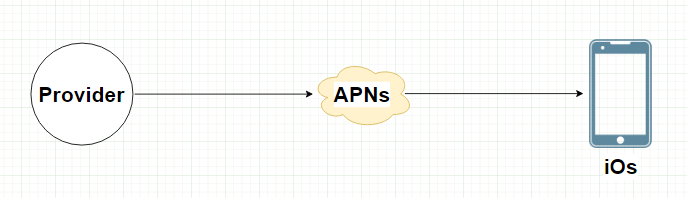
iOS Push Notifications with AWS

  • Provider: Host your backend on Amazon EC2 instances.
  • APNS Integration: Use Amazon SNS (Simple Notification Service) to interface with APNS.

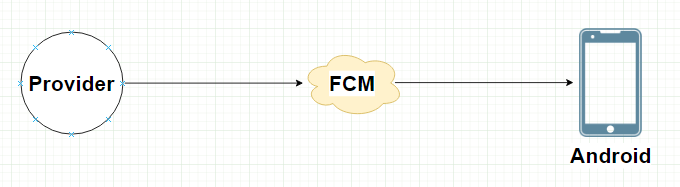
Android Push Notifications with AWS

  • Provider: Deploy your backend on AWS Elastic Beanstalk or Lambda.
  • FCM Integration: Connect your backend to FCM through HTTP requests.

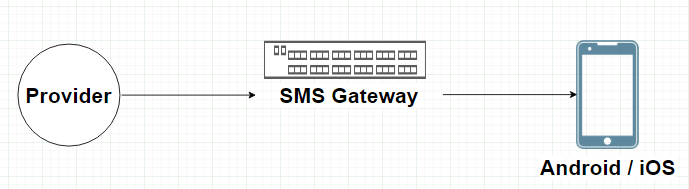
SMS Messages with AWS

  • Provider: Integrate your system with AWS Lambda.
  • SMS Gateway: AWS Pinpoint can be used as an SMS gateway for delivery.

Email Notifications with AWS

  • Provider: Leverage Amazon SES for sending emails.
  • Email Service: Utilize Amazon SES’s built-in email templates.

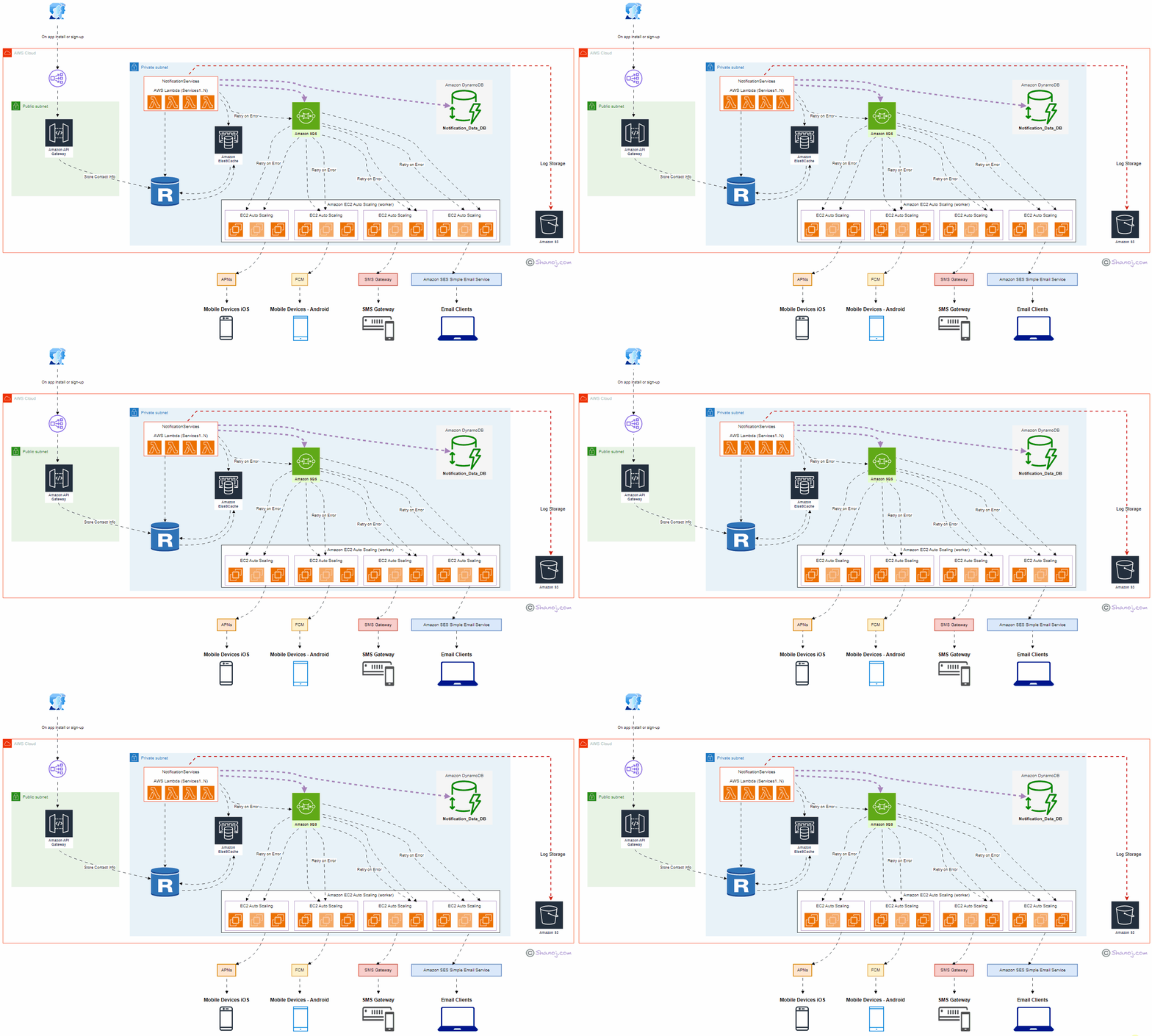
System Components

User: Represents end-users interacting with the system through mobile applications or email clients. User onboarding takes place during app installation or new signups.

ELB (Public): Amazon Elastic Load Balancer (ELB) serves as the entry point to the system, distributing incoming requests to the appropriate components. It ensures high availability and scalability.

API Gateway: Amazon API Gateway manages and exposes APIs to the external world. It securely handles API requests and forwards them to the Notification Service.

NotificationService (AWS Lambda — Services1..N): Implemented using AWS Lambda, this central component processes incoming notifications, orchestrates the delivery flow and communicates with other services. It’s designed to scale automatically with demand.

Amazon DynamoDB: DynamoDB stores notification content data in JSON format. This helps prevent data loss and enables efficient querying and retrieval of notification history.

Amazon RDS: Amazon Relational Database Service (RDS) stores contact information securely. It’s used to manage user data, enhancing the personalized delivery of notifications.

Amazon ElastiCache: Amazon ElastiCache provides an in-memory caching layer, improving system responsiveness by storing frequently accessed notifications.

Amazon SQS: Amazon Simple Queue Service (SQS) manages notification queues, including iOS, Android, SMS, and email. It ensures efficient distribution and processing.

Worker Servers (Amazon EC2 Auto Scaling): Auto-scaling Amazon EC2 instances act as workers responsible for processing notifications, handling retries, and interacting with third-party services.

Third-Party Services: These services, such as APNs, FCM, SMS Gateways, and Amazon SES (Simple Email Service), deliver notifications to end-user devices or email clients.

S3 (Amazon Simple Storage Service): Amazon S3 is used for storing system logs, facilitating auditing, monitoring, and debugging.

Design Considerations:

Scalability: The system is designed to scale horizontally and vertically to accommodate increasing user loads and notification volumes. AWS Lambda, EC2 Auto Scaling, and API Gateway handle dynamic scaling efficiently.

Data Persistence: Critical data, including contact information and notification content, is stored persistently in Amazon RDS and DynamoDB to prevent data loss.

High Availability: Multiple availability zones and fault-tolerant architecture enhance system availability and fault tolerance. ELB and Auto Scaling further contribute to high availability.

Redundancy: Redundancy in components and services ensures continuous operation even during failures. For example, multiple Worker Servers and Third-Party Services guarantee reliable notification delivery.

Security: AWS Identity and Access Management (IAM) and encryption mechanisms are employed to ensure data security and access control.

Performance: ElastiCache and caching mechanisms optimize system performance, reducing latency and enhancing user experience.

Cost Optimization: The pay-as-you-go model of AWS allows cost optimization by scaling resources based on actual usage, reducing infrastructure costs during idle periods.

Stackademic

Thank you for reading until the end. Before you go:

  • Please consider clapping and following the writer! 👏
  • Follow us on Twitter(X), LinkedIn, and YouTube.
  • Visit Stackademic.com to find out more about how we are democratizing free programming education around the world.

System Design Interview: Serverless Web Crawler using AWS

Architecture Overview:

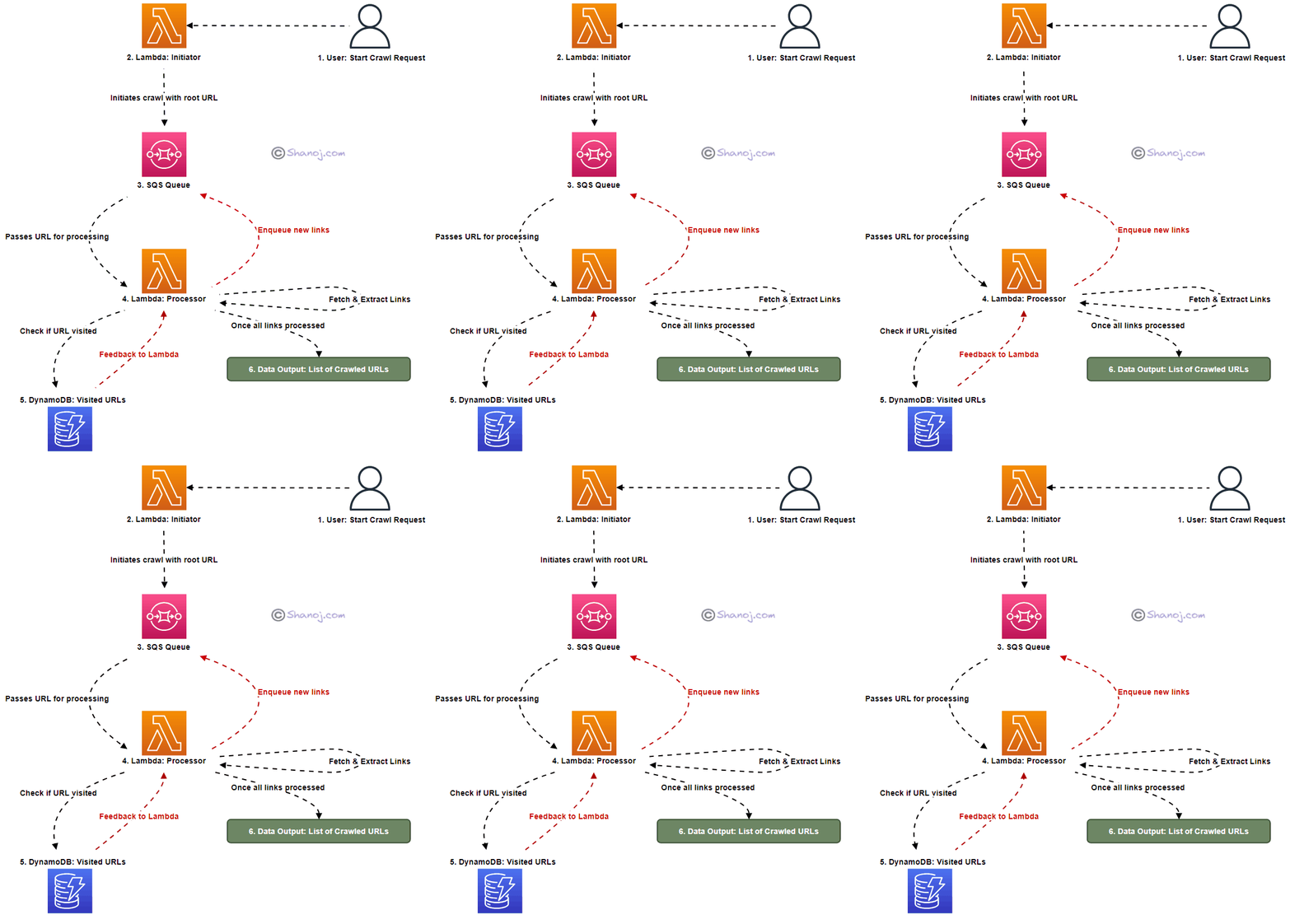
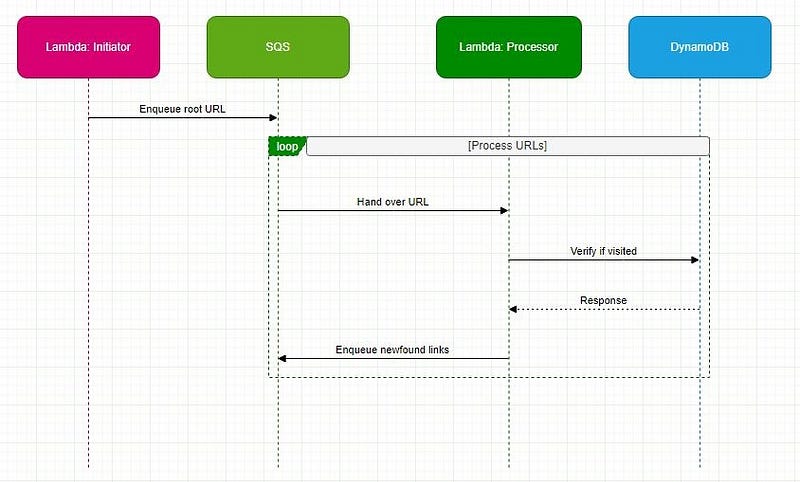
The main components of our serverless crawler are Lambda functions, an SQS queue, and a DynamoDB table. Here’s a breakdown:

  • Lambda: Two distinct functions — one for initiating the crawl and another for the actual processing.
  • SQS: Manages pending crawl tasks as a buffer and task distributor.
  • DynamoDB: Stores visited URLs, ensuring we avoid redundant visits.

Workflow & Logic Rationale:

Initiation:

Starting Point (Root URL):

Logic: The crawl starts with a root URL, e.g., “www.shanoj.com”.

Rationale: A defined beginning allows the crawler to commence in a guided manner.

Uniqueness with UUID:

Logic: A unique run ID is generated for every crawl to ensure distinction.

Rationale: These guards against potential data overlap in the case of concurrent crawls.

Avoiding Redundant Visits:

Logic: The root URL is pre-emptively marked as “visited”.

Rationale: This step is integral to maximizing efficiency by sidestepping repeated processing.

The URL then finds its way to SQS, awaiting crawling.

Processing:

Link Extraction:

Logic: A secondary Lambda function polls SQS for URLs. Once a URL is retrieved, the associated webpage is fetched. All the links are identified and extracted within this webpage for further processing.

Rationale: Extracting all navigable paths from our current location is pivotal to web exploration.

Depth-First Exploration Strategy:

Logic: Extracted links undergo a check against DynamoDB. If previously unvisited, they’re designated as such in the database and enqueued back into SQS.

Rationale: This approach delves deep into one link’s pathways before backtracking, optimizing resource utilization.

Special Considerations:

A challenge for web crawlers is the potential for link loops, which can usher in infinite cycles. By verifying the “visited” status of URLs in DynamoDB, we proactively truncate these cycles.

Back-of-the-Envelope Estimation for Web Crawling:

1. Data Download:

  • Webpages per month: 1 billion
  • The average size of a webpage: 500 KB

Total data downloaded per month:

1,000,000,000 (webpages) × 500 KB = 500,000,000,000 KB

or 500 TB (terabytes) of data every month.

2. Lambda Execution:

Assuming that the Lambda function needs to be invoked for each webpage to process and extract links:

  • Number of Lambda executions per month: 1 billion

(One would need to further consider the execution time for each Lambda function and the associated costs)

3. DynamoDB Storage:

Let’s assume that for each webpage, we store only the URL and some metadata which might, on average, be 1 KB:

  • Total storage needed for DynamoDB per month:
  • 1,000,000,000 (webpages) × 1 KB = 1,000,000,000 KB
  • or 1 TB of data storage every month.

(However, if you’re marking URLs as “visited” and removing them post the crawl, then the storage might be significantly less on a persistent basis.)

4. SQS Messages:

Each webpage URL to be crawled would be a message in SQS:

  • Number of SQS messages per month: 1 billion

The system would require:

  • 500 TB of data storage and transfer capacity for the actual web pages each month.
  • One billion Lambda function executions monthly for processing.
  • About 1 TB of storage in DynamoDB might vary based on retention and removal strategies.
  • One billion SQS messages to manage the crawl queue.

Stackademic

Thank you for reading until the end. Before you go:

  • Please consider clapping and following the writer! 👏
  • Follow us on Twitter(X), LinkedIn, and YouTube.
  • Visit Stackademic.com to find out more about how we are democratizing free programming education around the world.