Tag Archives: Cloud

Introduction to Apache Flink

Apache Flink is a robust, open-source data processing framework that handles large-scale data streams and batch-processing tasks. One of the critical features of Flink is its architecture, which allows it to manage both batch and stream processing in a single system.

Consider a retail company that wishes to analyse sales data in real-time. They can use Flink’s stream processing capabilities to process sales data as it comes in and batch processing capabilities to analyse historical data.

The JobManager is the central component of Flink’s architecture, and it is in charge of coordinating the execution of Flink jobs.

For example, if a large amount of data is submitted to Flink, the JobManager will divide it into smaller tasks and assign them to TaskManagers.
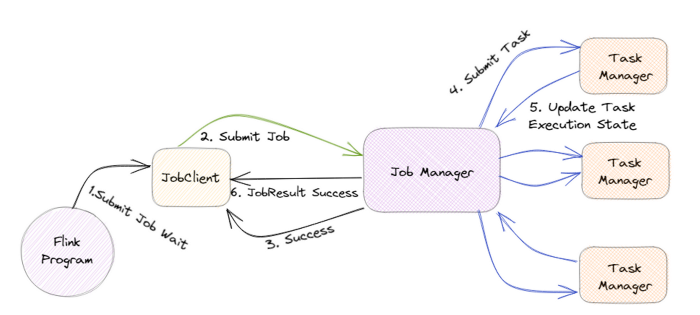
TaskManagers are responsible for executing the assigned tasks, and they can run on one or more nodes in a cluster. The TaskManagers are connected to the JobManager via a high-speed network, allowing them to exchange data and task information.

For example, when a TaskManager completes a task, it will send the results to the JobManager, who will then assign the next task.

Flink also has a distributed data storage system called the Distributed Data Management (DDM) system. It allows for storing and managing large data sets in a distributed manner across all the nodes in a cluster.

For example, imagine a company that wants to store and process petabytes of data, they can use Flink’s DDM system to store the data across multiple nodes, and process it in parallel.

Flink also has a built-in fault-tolerance mechanism, allowing it to recover automatically from failures. This is achieved by maintaining a consistent state across all the nodes in the cluster, which allows the system to recover from a failure by replaying the state from a consistent checkpoint.

For example, if a node goes down, Flink can automatically recover the data and continue processing without any interruption.

In addition, Flink also has a feature called “savepoints”, which allows users to take a snapshot of the state of a job at a particular point in time and later use this snapshot to restore the job to the same state.

For example, imagine a company is performing an update to their data processing pipeline and wants to test the new pipeline with the same data. They can use a savepoint to take a snapshot of the state of the job before making the update and then use that snapshot to restore the job to the same state for testing.

Flink also supports a wide range of data sources and sinks, including Kafka, Kinesis, and RabbitMQ, which allows it to integrate with other systems in a big data ecosystem easily.

For example, a company can use Flink to process streaming data from a Kafka topic and then sink the processed data into a data lake for further analysis.

The critical feature of Flink is that it handles batch and stream processing in a single system. To support this, Flink provides two main APIs: the Dataset API and the DataStream API.

The Dataset API is a high-level API for Flink that allows for batch processing of data. It uses a type-safe, object-oriented programming model and offers a variety of operations such as filtering, mapping, and reducing, as well as support for SQL-like queries. This API is handy for dealing with a large amount of data and is well suited for use cases such as analyzing historical sales data of a retail company.

On the other hand, the DataStream API is a low-level API for Flink that allows for real-time data stream processing. It uses a functional programming model and offers a variety of operations such as filtering, mapping, and reducing, as well as support for windowing and event time processing. This API is particularly useful for dealing with real-time data and is well-suited for use cases such as real-time monitoring and analysis of sensor data.

In conclusion, Apache Flink’s architecture is designed to handle large-scale data streams and batch-processing tasks in a single system. It provides a distributed data storage system, built-in fault tolerance and savepoints, and support for a wide range of data sources and sinks, making it an attractive choice for big data processing. With its powerful and flexible architecture, Flink can be used in various use cases, from real-time data processing to batch data processing, and can be easily integrated with other systems in a big data ecosystem.
AWS 101: Implementing IAM Roles for Enhanced Developer Access with Assume Role Policy

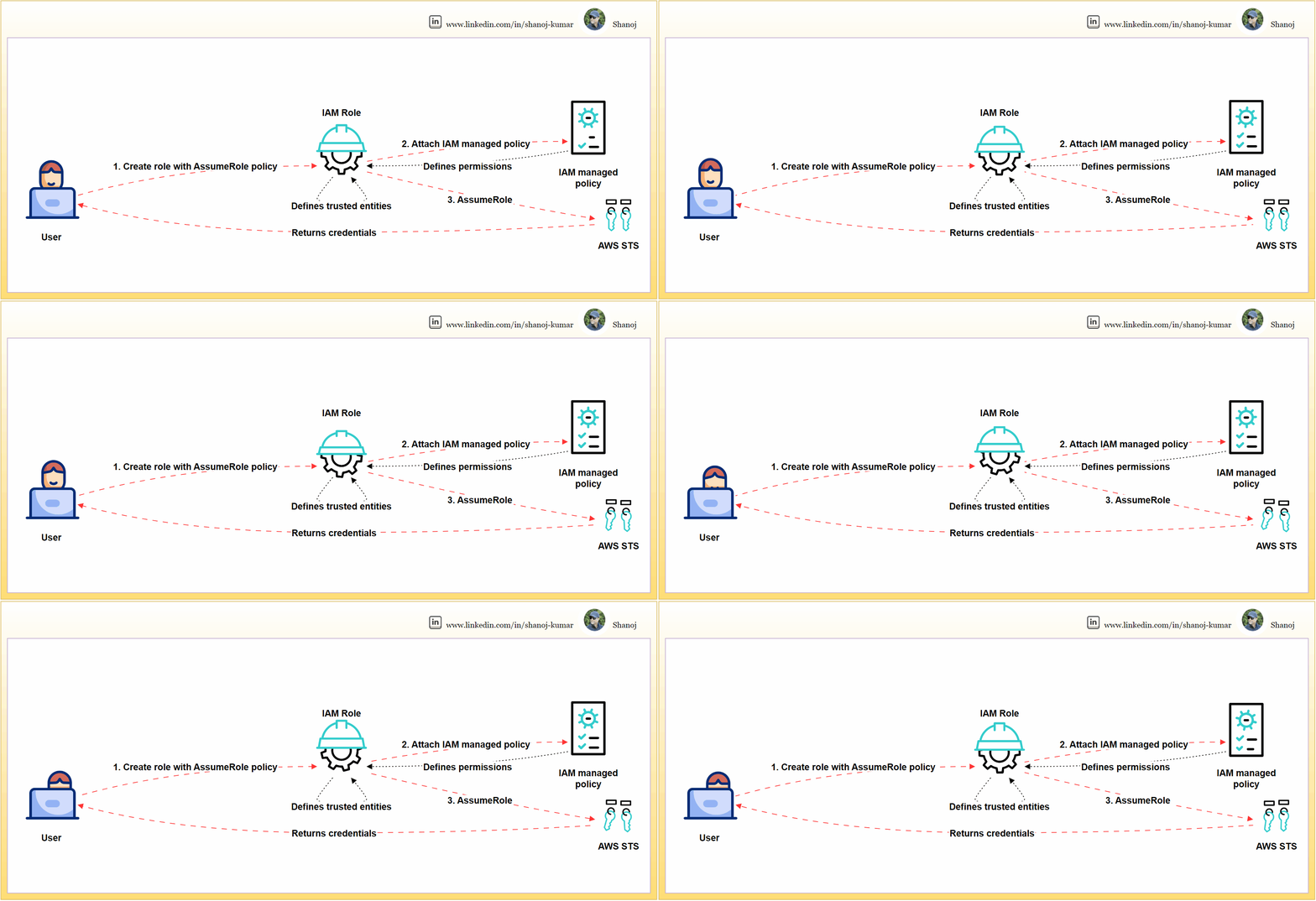
Setting up and using an IAM role in AWS involves three steps. Firstly, the user creates an IAM role and defines its trust relationships using an AssumeRole policy. Secondly, the user attaches an IAM-managed policy to the role, which specifies the permissions that the role has within AWS. Finally, the role is assumed through the AWS Security Token Service (STS), which grants temporary security credentials for accessing AWS services. This cycle of trust and permission granting, from user action to AWS STS and back, underpins secure AWS operations.

IAM roles are crucial for access management in AWS. This article provides a step-by-step walkthrough for creating a user-specific IAM role, attaching necessary policies, and validating for security and functionality.

Step 1: Compose a JSON file named assume-role-policy.json.

This policy explicitly defines the trusted entities that can assume the role, effectively safeguarding it against unauthorized access.

{
"Version": "2012-10-17",
"Statement": [
{
"Effect": "Allow",
"Principal": {
"AWS": "PRINCIPAL_ARN"
},
"Action": "sts:AssumeRole"
}
]
}

This policy snippet should be modified by replacing PRINCIPAL_ARN it with the actual ARN of the user or service that needs to assume the role. The ARN can be obtained programmatically, as shown in the next step.

Step 2: Establishing the IAM Role via AWS CLI

The CLI is a direct and scriptable interface for AWS services, facilitating efficient role creation and management.

# Retrieve the ARN for the current user and store it in a variable
PRINCIPAL_ARN=$(aws sts get-caller-identity --query Arn --output text)

# Replace the placeholder in the policy template and create the actual policy
sed -i "s|PRINCIPAL_ARN|$PRINCIPAL_ARN|g" assume-role-policy.json

# Create the IAM role with the updated assume role policy
aws iam create-role --role-name DeveloperRole \
--assume-role-policy-document file://assume-role-policy.json \
--query 'Role.Arn' --output text

This command sequence fetches the user’s ARN, substitutes it into the policy document, and then creates the role DeveloperRole with the updated policy.

Step 3: Link the ‘PowerUserAccess’ managed policy to the newly created IAM role.

This policy confers essential permissions for a broad range of development tasks while adhering to the principle of least privilege by excluding full administrative privileges.

# Attach the 'PowerUserAccess' policy to the 'DeveloperRole'
aws iam attach-role-policy --role-name DeveloperRole \
--policy-arn arn:aws:iam::aws:policy/PowerUserAccess

The command attaches the necessary permissions to the DeveloperRole without conferring overly permissive access.

Assuming the IAM Role

Assume the IAM role to procure temporary security credentials. Assuming a role with temporary credentials minimizes security risks compared to using long-term access keys and confines access to a session’s duration.

# Assume the 'DeveloperRole' and specify the MFA device serial number and token code
aws sts assume-role --role-arn ROLE_ARN \
--role-session-name DeveloperSession \
--serial-number MFA_DEVICE_SERIAL_NUMBER \
--token-code MFA_TOKEN_CODE

The command now includes parameters for MFA, enhancing security. Replace ROLE_ARN the role’s ARN MFA_DEVICE_SERIAL_NUMBER with the serial number of the MFA device and MFA_TOKEN_CODE with the current MFA code.

Validation Checks

Execute commands to verify the permissions of the IAM role.

Validation is essential to confirm that the role possesses the correct permissions and is operative as anticipated.

List S3 Buckets:

# List S3 buckets using the assumed role's credentials
aws s3 ls --profile DeveloperSessionCredentials

This checks the ability to list S3 buckets, verifying that S3-related permissions are correctly granted to the role.

Describe EC2 Instances:

# Describe EC2 instances using the assumed role's credentials
aws ec2 describe-instances --profile DeveloperSessionCredentials

Validates the role’s permissions to view details about EC2 instances.

Attempt a Restricted Action:

# Try listing IAM users, which should be outside the 'PowerUserAccess' policy scope
aws iam list-users --profile DeveloperSessionCredentials

This command should fail, reaffirming that the role does not have administrative privileges.

Note: Replace --profile DeveloperSessionCredentials with the actual AWS CLI profile that has been configured with the assumed role’s credentials. To set up the profile with the new temporary credentials, you’ll need to update your AWS credentials file, typically located at ~/.aws/credentials.


Developers can securely manage AWS resources by creating an IAM role with scoped privileges. This involves meticulously validating the permissions of the role. Additionally, the role assumption process can be fortified with MFA to ensure an even higher level of security.

PlainEnglish.io 🚀

Thank you for being a part of the In Plain English community! Before you go:

Optimizing Cloud Banking Service: Service Mesh for Secure Microservices Integration

As cloud computing continues to evolve, microservices architectures are becoming increasingly complex. To effectively manage this complexity, service meshes are being adopted. In this article, we will explain what a service mesh is, why it is necessary for modern cloud architectures, and how it addresses some of the most pressing challenges developers face today.

Understanding the Service Mesh

A service mesh is a configurable infrastructure layer built into an application that allows for the facilitation of flexible, reliable, and secure communications between individual service instances. Within a cloud-native environment, especially one that embraces containerization, a service mesh is critical in handling service-to-service communications, allowing for enhanced control, management, and security.

Why a Service Mesh?

As applications grow and evolve into distributed systems composed of many microservices, they often encounter challenges in service discovery, load balancing, failure recovery, security, and observability. A service mesh addresses these challenges by providing:

  • Dynamic Traffic Management: Adjusting the flow of requests and responses to accommodate changes in the infrastructure.
  • Improved Resiliency: Adding robustness to the system with patterns like retries, timeouts, and circuit breakers.
  • Enhanced Observability: Offering tools for monitoring, logging, and tracing to understand system performance and behaviour.
  • Security Enhancements: Ensuring secure communication through encryption and authentication protocols.

By implementing a service mesh, these distributed and loosely coupled applications can be managed more effectively, ensuring operational efficiency and security at scale.

Foundational Elements: Service Discovery and Proxies

The service mesh relies on two essential components — Consul and Envoy. The consul is responsible for service discovery, which means it keeps track of services, locations, and health status. It ensures that the system can adapt to changes in the environment. On the other hand, Envoy manages proxy services. It’s deployed alongside service instances and handles network communication. Envoy acts as an abstraction layer for traffic management and message routing.

Architectural Overview

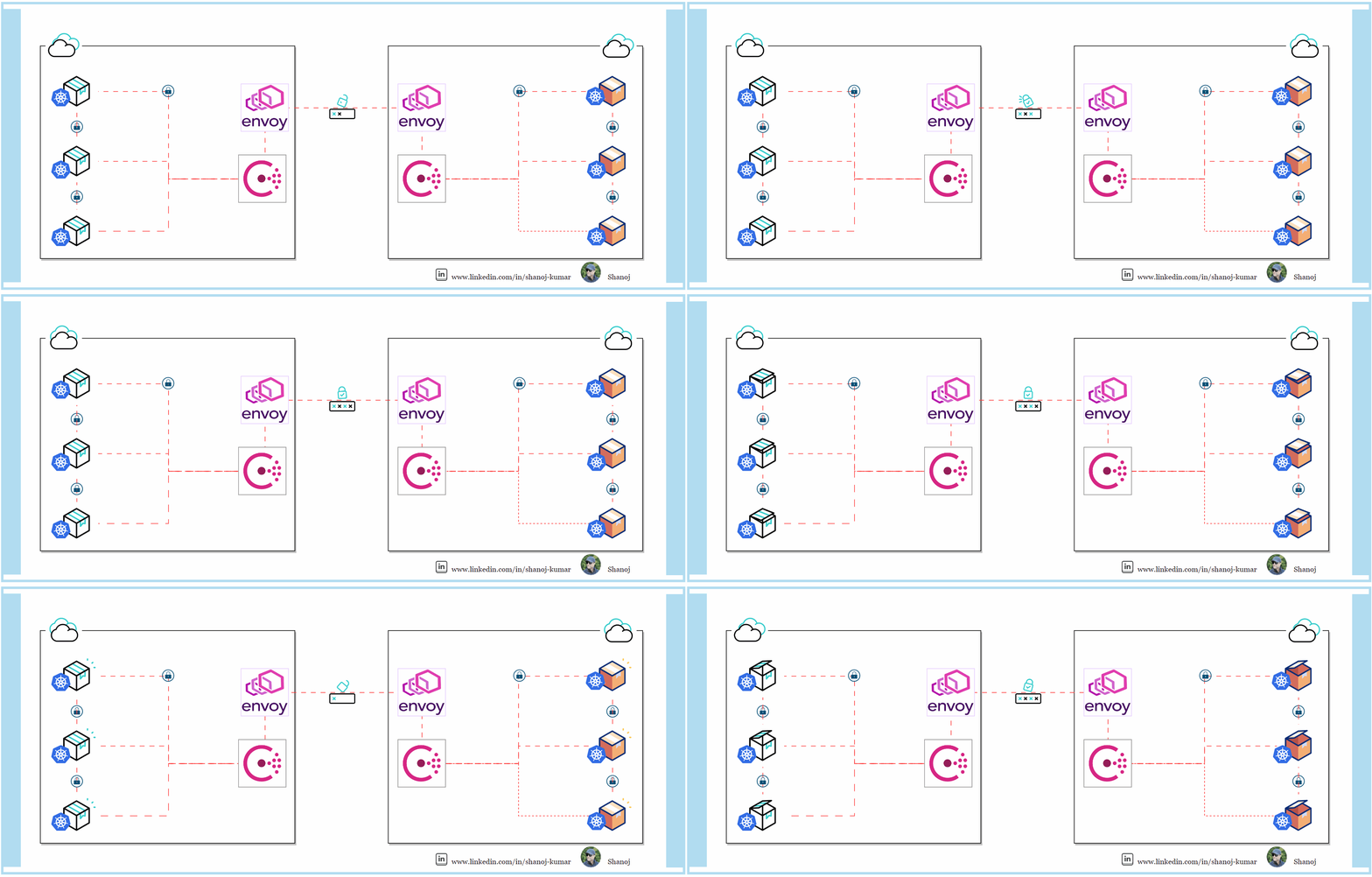
The architecture consists of a Public and Private VPC setup, which encloses different clusters. The ‘LEFT_CLUSTER’ in the VPC is dedicated to critical services like logging and monitoring, which provide insights into the system’s operation and manage transactions. On the other hand, the ‘RIGHT_CLUSTER’ in the VPC contains services for Audit and compliance, Dashboards, and Archived Data, ensuring a robust approach to data management and regulatory compliance.

The diagram shows a service mesh architecture for sensitive banking operations in AWS. It comprises two clusters: the Left Cluster ( VPC) includes a Mesh Gateway, Bank Interface, Authentication and Authorization systems, and a Reconciliation Engine. Right Cluster (VPC) manages Audit, provides a Dashboard, stores Archived Data, and handles Notifications. Consul and Envoy Proxies efficiently manage communication. Monitored by dedicated tools, it ensures operational integrity and security in a complex banking ecosystem.

Mesh Gateways and Envoy Proxies

Mesh Gateways are crucial for inter-cluster communication, simplifying connectivity and network configurations. Envoy Proxies are strategically placed within the service mesh, managing the flow of traffic and enhancing the system’s ability to scale dynamically.

Security and User Interaction

The user’s journey begins with the authentication and authorization measures in place to verify and secure user access.

The Role of Consul

Consul’s service discovery capabilities are essential in allowing services like the Bank Interface and the Reconciliation Engine to discover each other and interact seamlessly, bypassing the limitations of static IP addresses.

Operational Efficiency

The service mesh’s contribution to operational efficiency is particularly evident in its integration with the Reconciliation Engine. This ensures that financial data requiring reconciliation is processed efficiently, securely, and directed towards the relevant services.

The Case for Service Mesh Integration

The shift to cloud-native architecture emphasizes the need for service meshes. This blueprint enhances agility, security, and technology, affirming the service mesh as pivotal for modern cloud networking.

In Plain English

Thank you for being a part of our community! Before you go: