Tag Archives: Coding

Apache Spark 101: Understanding DataFrame Write API Operation

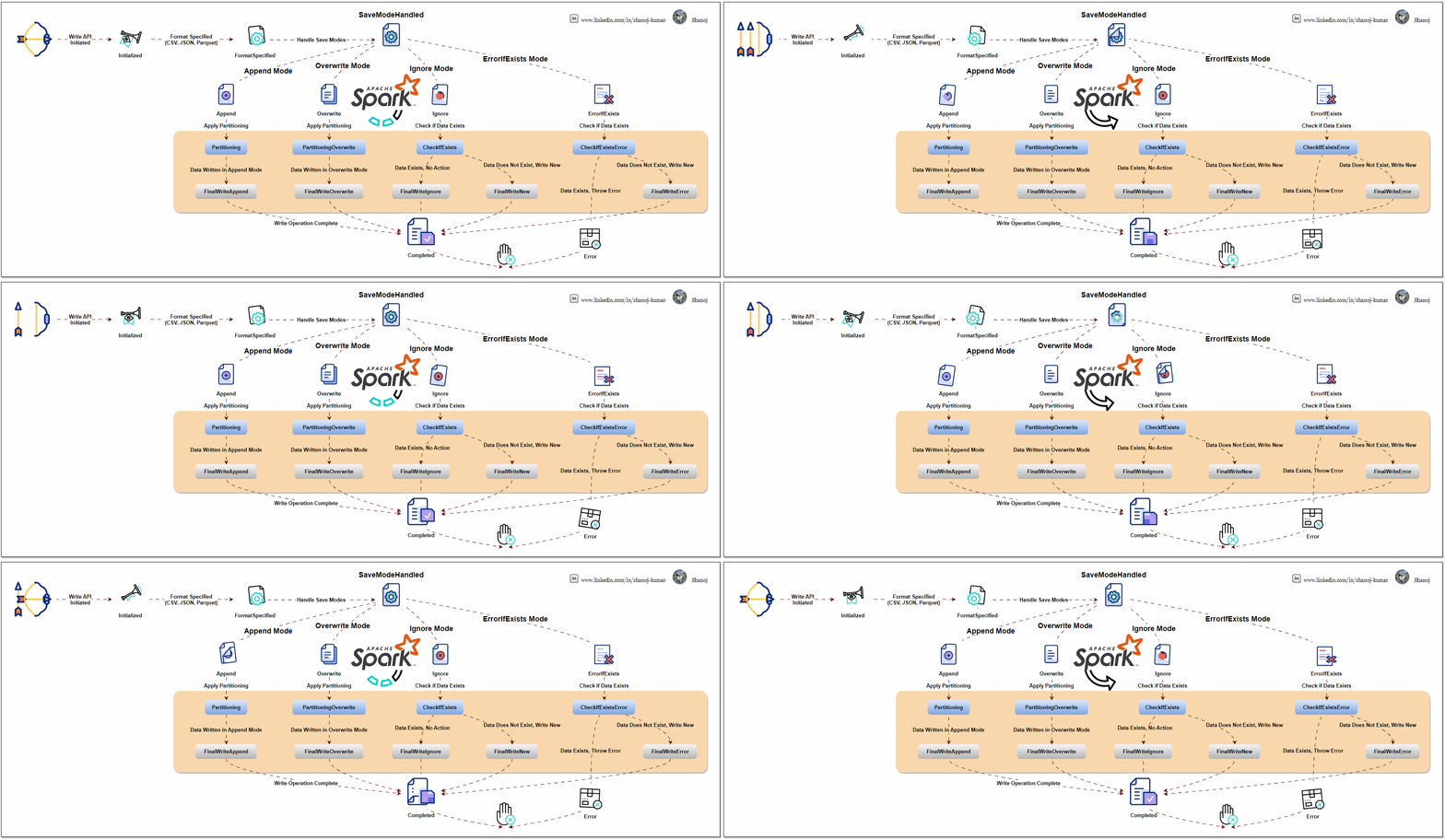
This diagram explains the Apache Spark DataFrame Write API process flow. It starts with an API call to write data in formats like CSV, JSON, or Parquet. The process diverges based on the save mode selected (append, overwrite, ignore, or error). Each mode performs necessary checks and operations, such as partitioning and data write handling. The process ends with either the final write of data or an error, depending on the outcome of these checks and operations.

Apache Spark is an open-source distributed computing system that provides a robust platform for processing large-scale data. The Write API is a fundamental component of Spark’s data processing capabilities, which allows users to write or output data from their Spark applications to different data sources.

Understanding the Spark Write API

Data Sources: Spark supports writing data to a variety of sources, including but not limited to:

  • Distributed file systems like HDFS
  • Cloud storage like AWS S3, Azure Blob Storage
  • Traditional databases (both SQL and NoSQL)
  • Big Data file formats (Parquet, Avro, ORC)

DataFrameWriter: The core class for the Write API is DataFrameWriter. It provides functionality to configure and execute write operations. You obtain a DataFrameWriter by calling the .write method on a DataFrame or Dataset.

Write Modes: Specify how Spark should handle existing data when writing data. Common modes are:

  • append: Adds the new data to the existing data.
  • overwrite: Overwrites existing data with new data.
  • ignore: If data already exists, the write operation is ignored.
  • errorIfExists (default): Throws an error if data already exists.

Format Specification: You can specify the format of the output data, like JSON, CSV, Parquet, etc. This is done using the .format("formatType") method.

Partitioning: For efficient data storage, you can partition the output data based on one or more columns using .partitionBy("column").

Configuration Options: You can set various options specific to the data source, like compression, custom delimiters for CSV files, etc., using .option("key", "value").

Saving the Data: Finally, you use .save("path") to write the DataFrame to the specified path. Other methods .saveAsTable("tableName") are also available for different writing scenarios.

from pyspark.sql import SparkSession
from pyspark.sql import Row
import os

# Initialize a SparkSession
spark = SparkSession.builder \
.appName("DataFrameWriterSaveModesExample") \
.getOrCreate()

# Sample data
data = [
Row(name="Alice", age=25, country="USA"),
Row(name="Bob", age=30, country="UK")
]

# Additional data for append mode
additional_data = [
Row(name="Carlos", age=35, country="Spain"),
Row(name="Daisy", age=40, country="Australia")
]

# Create DataFrames
df = spark.createDataFrame(data)
additional_df = spark.createDataFrame(additional_data)

# Define output path
output_path = "output/csv_save_modes"

# Function to list files in a directory
def list_files_in_directory(path):
files = os.listdir(path)
return files

# Show initial DataFrame
print("Initial DataFrame:")
df.show()

# Write to CSV format using overwrite mode
df.write.csv(output_path, mode="overwrite", header=True)
print("Files after overwrite mode:", list_files_in_directory(output_path))

# Show additional DataFrame
print("Additional DataFrame:")
additional_df.show()

# Write to CSV format using append mode
additional_df.write.csv(output_path, mode="append", header=True)
print("Files after append mode:", list_files_in_directory(output_path))

# Write to CSV format using ignore mode
additional_df.write.csv(output_path, mode="ignore", header=True)
print("Files after ignore mode:", list_files_in_directory(output_path))

# Write to CSV format using errorIfExists mode
try:
additional_df.write.csv(output_path, mode="errorIfExists", header=True)
except Exception as e:
print("An error occurred in errorIfExists mode:", e)


# Stop the SparkSession
spark.stop()

Spark’s Architecture Overview
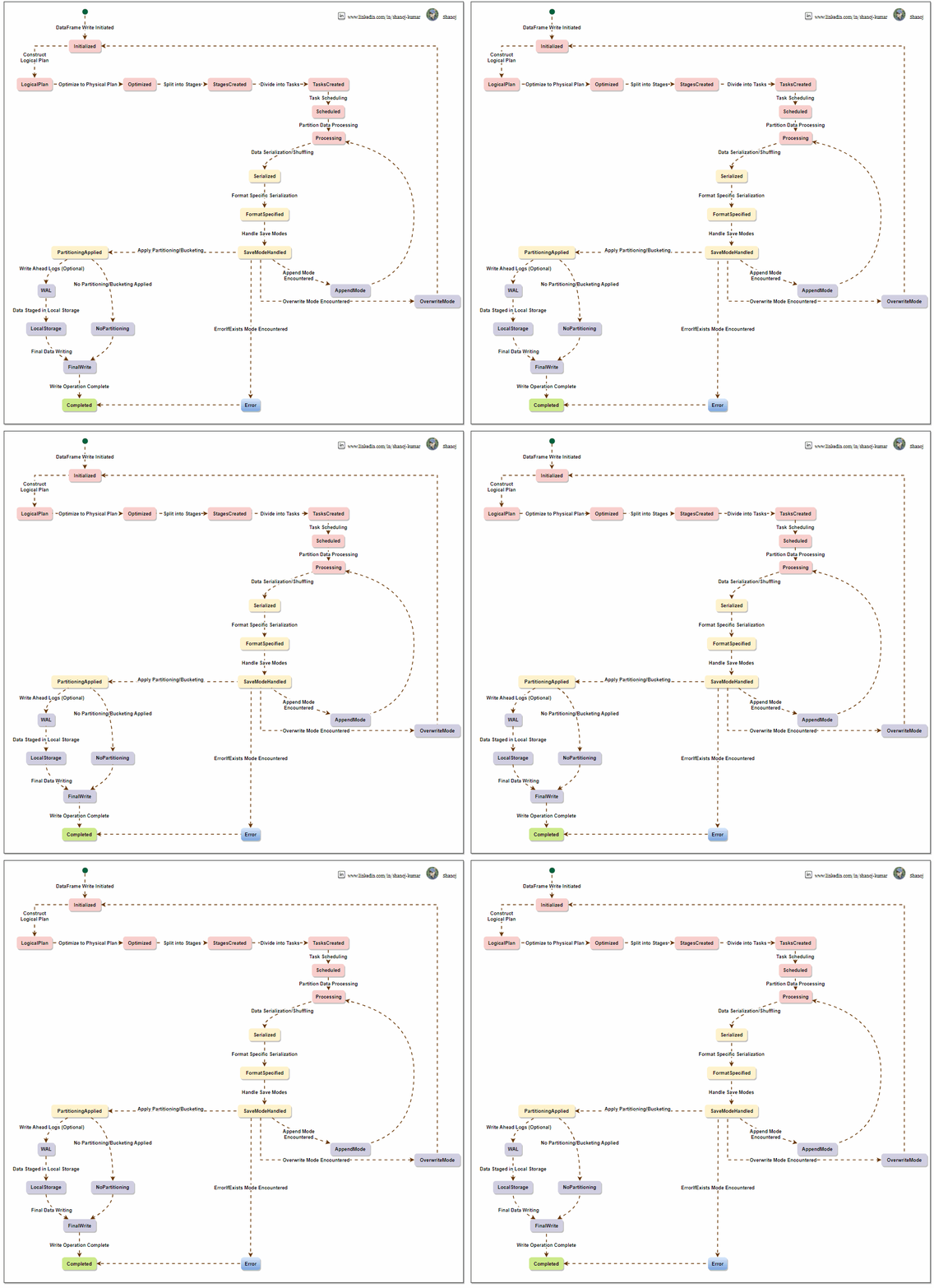
To write a DataFrame in Apache Spark, a sequential process is followed. Spark creates a logical plan based on the user’s DataFrame operations, which is optimized into a physical plan and divided into stages. The system processes data partition-wise, logs it for reliability, and writes it to local storage with defined partitioning and write modes. Spark’s architecture ensures efficient management and scaling of data writing tasks across a computing cluster.

The Apache Spark Write API, from the perspective of Spark’s internal architecture, involves understanding how Spark manages data processing, distribution, and writing operations under the hood. Let’s break it down:

Spark’s Architecture Overview

  1. Driver and Executors: Spark operates on a master-slave architecture. The driver node runs the main() function of the application and maintains information about the Spark application. Executor nodes perform the data processing and write operations.
  2. DAG Scheduler: When a write operation is triggered, Spark’s DAG (Directed Acyclic Graph) Scheduler translates high-level transformations into a series of stages that can be executed in parallel across the cluster.
  3. Task Scheduler: The Task Scheduler launches tasks within each stage. These tasks are distributed among executors.
  4. Execution Plan and Physical Plan: Spark uses the Catalyst optimizer to create an efficient execution plan. This includes converting the logical plan (what to do) into a physical plan (how to do it), considering partitioning, data locality, and other factors.

Writing Data Internally in Spark

Data Distribution: Data in Spark is distributed across partitions. When a write operation is initiated, Spark first determines the data layout across these partitions.

Task Execution for Write: Each partition’s data is handled by a task. These tasks are executed in parallel across different executors.

Write Modes and Consistency:

  • For overwrite and append modes, Spark ensures consistency by managing how data files are replaced or added to the data source.
  • For file-based sources, Spark writes data in a staged approach, writing to temporary locations before committing to the final location, which helps ensure consistency and handling failures.

Format Handling and Serialization: Depending on the specified format (e.g., Parquet, CSV), Spark uses the respective serializer to convert the data into the required format. Executors handle this process.

Partitioning and File Management:

  • If partitioning is specified, Spark sorts and organizes data accordingly before writing. This often involves shuffling data across executors.
  • Spark tries to minimize the number of files created per partition to optimize for large file sizes, which are more efficient in distributed file systems.

Error Handling and Fault Tolerance: In case of a task failure during a write operation, Spark can retry the task, ensuring fault tolerance. However, not all write operations are fully atomic, and specific scenarios might require manual intervention to ensure data integrity.

Optimization Techniques:

  • Catalyst Optimizer: Optimizes the write plan for efficiency, e.g., minimizing data shuffling.
  • Tungsten: Spark’s Tungsten engine optimizes memory and CPU usage during data serialization and deserialization processes.

Write Commit Protocol: Spark uses a write commit protocol for specific data sources to coordinate the process of task commits and aborts, ensuring a consistent view of the written data.


Efficient and reliable data writing is the ultimate goal of Spark’s Write API, which orchestrates task distribution, data serialization, and file management in a complex manner. It utilizes Spark’s core components, such as the DAG scheduler, task scheduler, and Catalyst optimizer, to perform write operations effectively.

Stackademic

Thank you for reading until the end. Before you go:

  • Please consider clapping and following the writer! 👏
  • Follow us on Twitter(X), LinkedIn, and YouTube.
  • Visit Stackademic.com to find out more about how we are democratizing free programming education around the world.

Want to Get Better at System Design Interviews? Here’s How to Prepare

System design interviews can be daunting due to their complexity and the vast knowledge required to excel. Whether you’re a recent graduate or a seasoned engineer, preparing for these interviews necessitates a well-thought-out strategy and access to the right resources. In this article, I’ll guide you to navigate the system design landscape and equip you to succeed in your upcoming interviews.

Start with the Basics

“Web Scalability for Startup Engineers” by Artur Ejsmont — This book is recommended as a starting point for beginners in system design.

“Designing Data-Intensive Applications” by Martin Kleppmann is described as a more in-depth resource for those with a basic understanding of system design.

It’s essential to establish a strong foundation before delving too deep into a subject. For beginners, “Web Scalability for Startup Engineers” is an excellent resource. It covers the basics and prepares you for more advanced concepts. After mastering the fundamentals, “Designing Data-Intensive Applications” by Martin Kleppmann will guide you further into data systems.

Microservices and Domain-Driven Design

“Building Microservices” by Sam Newman — Focuses on microservices architecture and its implications in system design.

Once you are familiar with the fundamentals, the next step is to explore the intricacies of the microservices architectural style through “Building Microservices.” To gain a deeper understanding of practical patterns and design principles, “Microservices Patterns and Best Practices” is an excellent resource. Lastly, for those who wish to understand the philosophy behind system architecture, “Domain-Driven Design” is a valuable read.

API Design and gRPC

“RESTful Web APIs” by Leonard Richardson, Mike Amundsen, and Sam Ruby provides a comprehensive guide to developing web-based APIs that adhere to the REST architectural style.

In the present world, APIs serve as the main connecting point of the internet. If you intend to design effective APIs, a good starting point would be to refer to “RESTful Web APIs” by Leonard Richardson and his colleagues. Moreover, if you are exploring the Remote Procedure Call (RPC) genre, particularly gRPC, then “gRPC: Up and Running” is a comprehensive guide.

Preparing for the Interview

“System Design Interview — An Insider’s Guide” by Alex Xu is an essential book for those preparing for challenging system design interviews.

It offers a comprehensive look at the strategies and thought processes required to navigate these complex discussions. Although it is one of many resources candidates will need, the book is tailored to equip them with the means to dissect and approach real interview questions. The book blends technical knowledge with the all-important communicative skills, preparing candidates to think on their feet and articulate clear and effective system design solutions. Xu’s guide demystifies the interview experience, providing a rich set of examples and insights to help candidates prepare for the interview process.

Domain-Specific Knowledge

Enhance your knowledge in your domain with books such as “Kafka: The Definitive Guide” for Distributed Messaging and “Cassandra: The Definitive Guide” for understanding wide-column stores. “Designing Event-Driven Systems” is crucial for grasping event sourcing and services using Kafka.

General Product Design

Pay attention to product design in system design. Books like “The Design of Everyday Things” and “Hooked: How to Build Habit-Forming Products” teach user-centric design principles, which are increasingly crucial in system design.

Online Resources

The internet is a goldmine of information. You can watch tech conference talks, follow YouTube channels such as Gaurav Sen’s System Design Interview and read engineering blogs from companies like Uber, Netflix, and LinkedIn.


System design is an iterative learning process that blends knowledge, curiosity, and experience. The resources provided here are a roadmap to guide you through this journey. With the help of these books and resources, along with practice and reflection, you will be well on your way to mastering system design interviews. Remember, it’s not just about understanding system design but also about thinking like a system designer.

Stackademic

Thank you for reading until the end. Before you go:

  • Please consider clapping and following the writer! 👏
  • Follow us on Twitter(X), LinkedIn, and YouTube.
  • Visit Stackademic.com to find out more about how we are democratizing free programming education around the world.

Apache Spark 101: select() vs. selectExpr()

Column selection is a frequently used operation when working with Spark DataFrames. Spark provides two built-in methods select() and selectExpr(), to facilitate this task. In this article, we will discuss how to use both methods, explain their main differences, and provide guidance on when to choose one over the other.

To demonstrate these methods, let’s start by creating a sample DataFrame that we will use throughout this article:

# Import the necessary libraries
from pyspark.sql import SparkSession
from pyspark.sql.types import StructType, StructField, IntegerType, StringType
# Create a SparkSession
spark = SparkSession.builder \
.appName('Example') \
.getOrCreate()
# Define the schema
schema = StructType([
StructField('id', IntegerType(), True),
StructField('first_name', StringType(), True),
StructField('last_name', StringType(), True),
StructField('age', IntegerType(), True),
StructField('salary', IntegerType(), True),
StructField('bonus', IntegerType(), True)
])
# Define the data
data = [
(1, 'Aarav', 'Gupta', 28, 60000, 2000),
(2, 'Ishita', 'Sharma', 31, 75000, 3000),
(3, 'Aryan', 'Yadav', 31, 80000, 2500),
(4, 'Dia', 'Verma', 29, 62000, 1800)
]
# Create the DataFrame
df = spark.createDataFrame(data, schema=schema)
# Show the DataFrame
df.show()

DataFrames: In Spark, a DataFrame is a distributed collection of data organized into named columns, similar to a table in a relational database. DataFrames offer a structured and efficient way to work with structured and semi-structured data.

Understanding select()

The select() method in PySpark’s DataFrame API is used to project-specific columns from a DataFrame. It accepts various arguments, including column names, Column objects, and expressions.

  • List of Column Names: You can pass column names as a list of strings to select specific columns.
  • List of Column Objects: Alternatively, you can import the Spark Column class from pyspark.sql.functions, create column objects, and pass them in a list.
  • Expressions: It allows you to create new columns based on existing ones by providing expressions. These expressions can include mathematical operations, aggregations, or any valid transformations.
  • “*” (Star): The star syntax selects all columns, akin to SELECT * in SQL.

Select Specific Columns

To select a subset of columns, provide their names as arguments to the select() method:

selectExpr()

The pyspark.sql.DataFrame.selectExpr() method is similar to select(), but it accepts SQL expressions in string format. This lets you perform more complex column selection and transformations directly within the method. Unlike select(), selectExpr() It only accepts strings as input.

SQL-Like Expressions

One of the key advantages of selectExpr() is its ability to work with SQL-like expressions for column selection and transformation. For example, you can calculate the length of the ‘first_name’ column and alias it as ‘name_length’ as follows:

Built-In Hive Functions

selectExpr() also allows you to leverage built-in Hive functions for more advanced transformations. This is particularly useful for users familiar with SQL or Hive who want to write concise and expressive code. For example, you can cast the ‘age’ column from string to integer:

Adding Constants

You can also add constant fields to your DataFrame using selectExpr(). For example, you can add the current date as a new column:

selectExpr() is a powerful method for column selection and transformation when you need to perform more complex operations within a single method call.

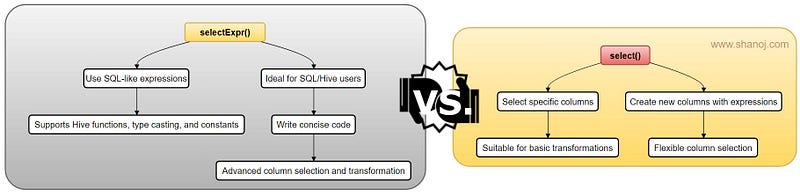
Key Differences and Best Use Cases

Now that we have explored both select() and selectExpr() methods, let’s summarize their key differences and identify the best use cases for each.

select() Method:

  • Use select() when you need to select specific columns or create new columns using expressions.
  • It’s suitable for straightforward column selection and basic transformations.
  • Provides flexibility with column selection using lists of column names or objects.
  • Use it when applying custom functions or complex operations on columns.

selectExpr() Method:

  • Choose selectExpr() when you want to leverage SQL-like expressions for column selection and transformations.
  • It’s ideal for users familiar with SQL or Hive who want to write concise, expressive code.
  • Supports compatibility with built-in Hive functions, casting data types, and adding constants.
  • Use it when you need advanced SQL-like capabilities for selecting and transforming columns.

🌟 Enjoying my content? 🙏 Follow me here: Shanoj Kumar V

Stackademic

Thank you for reading until the end. Before you go:

  • Please consider clapping and following the writer! 👏
  • Follow us on Twitter(X), LinkedIn, and YouTube.
  • Visit Stackademic.com to find out more about how we are democratizing free programming education around the world.

Apache Spark 101:Schema Enforcement vs. Schema Inference

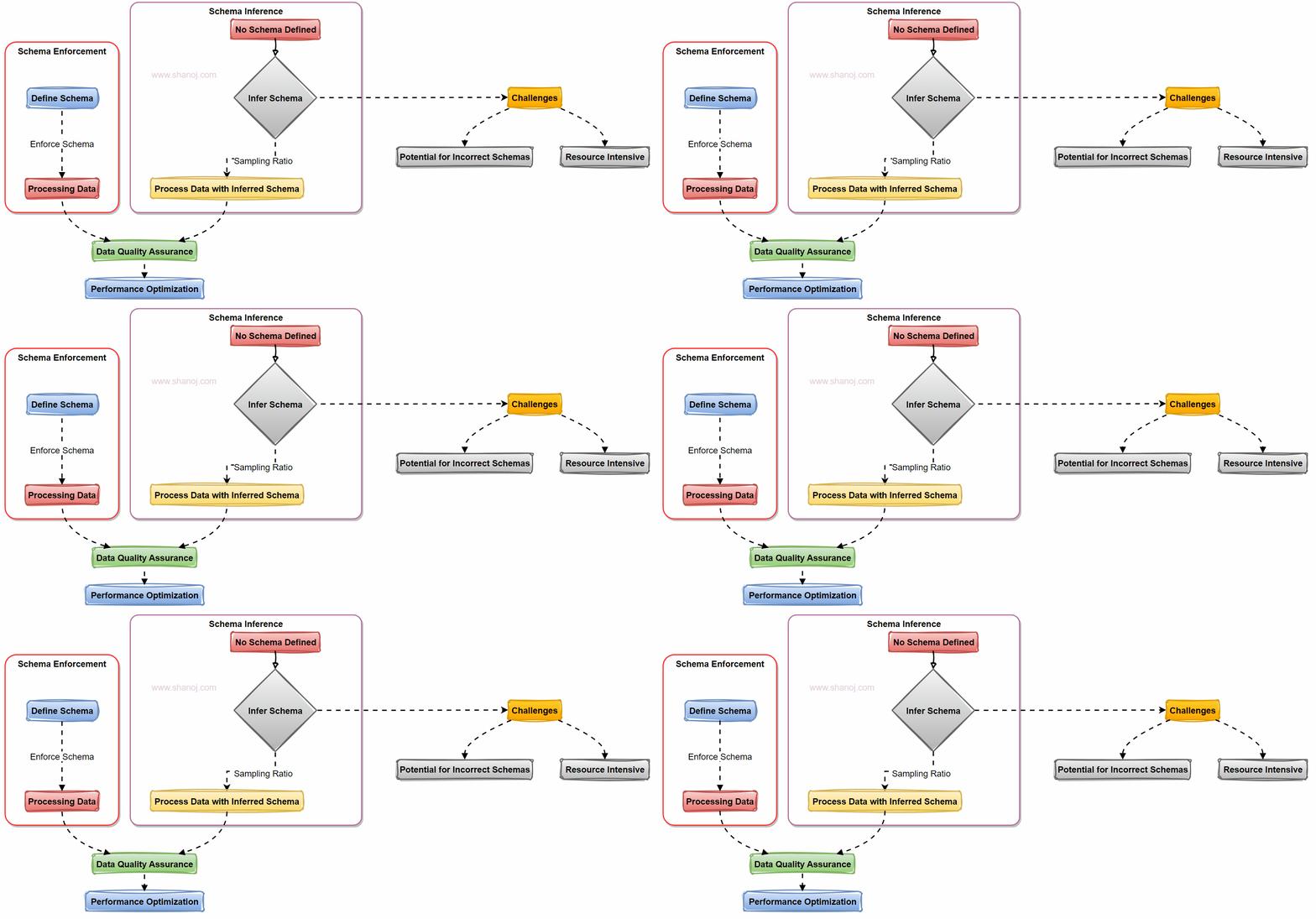
When working with data in Apache Spark, one of the critical decisions you’ll face is how to handle data schemas. Two primary approaches come into play: Schema Enforcement and Schema Inference. Let’s explore these approaches with examples and a visual flowchart.

Understanding Schema in Apache Spark

In Apache Spark, a schema defines the structure of your data, specifying the data types for each field in a dataset. Proper schema management is crucial for data quality and efficient processing.

Schema Enforcement: A Preferred Approach

Schema Enforcement involves explicitly defining a schema for your data before processing it. Here’s why it’s often the preferred choice:

  1. Ensures Data Quality: Enforcing a schema reduces the risk of incorrect schema inference. It acts as a gatekeeper, rejecting data that doesn’t match the defined structure.

For example, schema inference becomes necessary if we use strings as the data input. Let me explain further. For instance, a date might be inferred as a string, and Spark has to scan the data to determine the data types, which can be time-consuming.

2. Performance Optimization: Spark can optimize operations when it knows the schema in advance. This results in faster query performance and more efficient resource usage.

3. Predictable Processing: With a predefined schema, you have predictable data structures and types, making collaboration among teams more straightforward.

Schema Inference: Challenges to Consider

Schema Inference, while flexible, presents challenges:

1. Potential for Incorrect Schemas: Schema inference could lead to incorrect schema detection, causing data interpretation issues.

2. Resource Intensive: Inferring the schema requires scanning the data, which can be time-consuming and resource-intensive, affecting system performance.

Sampling Ratio: A Solution

To mitigate the performance impact of schema inference, you can use a sampling ratio. Instead of scanning the entire dataset, you infer the schema based on a provided ratio. This helps strike a balance between flexibility and performance.

Example: In the case of schema sampling, instead of scanning the complete dataset, you can specify a sampling ratio (e.g., 10%) to infer the schema. This means Spark will analyze only a fraction of the data to determine the schema, reducing the computational overhead.

Two Ways to Enforce Schema

1. Schema Option: You can enforce a schema using Spark’s `schema` option, where you explicitly define the schema in your code.

from pyspark.sql.types import StructType, StructField, StringType, IntegerType

schema = StructType([
StructField("Name", StringType(), nullable=False),
StructField("Age", IntegerType(), nullable=False),
StructField("Email", StringType(), nullable=True)
])

2. Schema DDL: Alternatively, you can enforce the schema using Data Definition Language (DDL) statements when reading data:

df = spark.read.option("header", "true").option("inferSchema", "false").schema(schema).csv("customer_data.csv")

When working with data in Apache Spark, choosing between Schema Enforcement and Schema Inference is critical. Schema Enforcement is often preferred for data quality and performance reasons. However, you can use schema inference with a sampling ratio to strike a balance. Remember that the choice between schema enforcement and inference depends on your data characteristics and processing needs. In many cases, enforcing the schema is the way to go for robust and efficient data pipelines.

🌟 Enjoying my content? 🙏 Follow me here: Shanoj Kumar V

Stackademic

Thank you for reading until the end. Before you go:

  • Please consider clapping and following the writer! 👏
  • Follow us on Twitter(X), LinkedIn, and YouTube.
  • Visit Stackademic.com to find out more about how we are democratizing free programming education around the world.