Tag Archives: Data

Ace Your Data Engineering Interviews: A 6-Month Plan for Engineers and Managers

This article addresses the question, “If I want to prepare today, what should I do?” It offers a 6-month roadmap for aspiring and seasoned Data Engineers or Data Engineering Managers, including course recommendations. Keep in mind that the courses are not mandatory, and you should choose based on your availability and interest.

1. Pick Your Cloud Platform (AWS, Azure, GCP)

  • Duration: 60 days
  • Start by choosing a cloud platform based on your experience and background. It’s important to cover all the data-related services offered by the platform and understand their use cases and best practices.
  • If you’re aiming for a managerial role, you should also touch on well-architected frameworks, particularly those related to staging, ingestion, orchestration, transformation, and visualization.
  • Key Advice: Always include a focus on security, especially when dealing with sensitive data.

Some Useful Resources:

Data Engineering on AWS — The complete training

Data Lake in AWS — Easiest Way to Learn [2024]

Migration to AWS

Optional: Consider taking a Pluralsight Skill IQ or Role IQ test to assess where you stand in your knowledge journey at this stage. It’s a great way to identify areas where you need to focus more attention.

“Give me six hours to chop down a tree and I will spend the first four sharpening the axe.” — Abraham Lincoln

2. Master SQL and Data Structures & Algorithms (DSA)

  • Duration: 30 days
  • SQL is the bread and butter of Data Engineering. Ensure you’ve practiced medium to complex SQL scenarios, focusing on real-world problems.
  • Alongside SQL, cover basic DSA concepts relevant to Data Engineering. You don’t need to delve as deep as a full-stack developer, but understanding a few key areas is crucial.

Key DSA Concepts to Cover:

  • Arrays and Strings: How to manipulate and optimize these data structures.
  • Hashmaps: Essential for efficiently handling large data sets.
  • Linked Lists and Trees: Useful for understanding hierarchical data.
  • Basic Sorting and Searching Algorithms: To optimize data processing tasks.

Some Useful Resources:

SQL for Data Scientists, Data Engineers and Developers

50Days of DSA JavaScript Data Structures Algorithms LEETCODE

3. Deep Dive into Data Lake and Data Warehousing

  • Duration: 30 days
  • A thorough understanding of Data Lakes and Data Warehousing is vital. Start with Apache Spark, which can be implemented using Databricks. For Data Warehousing, choose a platform like Redshift, Snowflake, or BigQuery.
  • I recommend focusing on Databricks and Snowflake as they are cloud-agnostic and offer flexibility across platforms.
  • Useful Resources:

Practical Lakehouse Architecture: Designing and Implementing Modern Data Platforms at Scale

4. Build Strong Foundations in Data Modeling

“In God we trust, all others must bring data.” — W. Edwards Deming

  • Duration: 30 days
  • Data Modeling is critical for designing efficient and scalable data systems. Focus on learning and practicing dimensional data models.
  • Useful Resources:

Data Modeling with Snowflake: A practical guide to accelerating Snowflake development using universal data modeling techniques

5. System Design and Architecture

“The best way to predict the future is to create it.” — Peter Drucker

  • Duration: 30 days
  • System design is an advanced topic that often comes up in interviews, especially for managerial roles. Re-design a large-scale project you’ve worked on and improve it based on well-architected principles.
  • Key Advice: Refer to Amazon customer case studies and engineering blogs from leading companies to make necessary changes to your architecture.
  • Useful Resources:

System Design Primer on GitHub

Designing Data-Intensive Applications: The Big Ideas Behind Reliable, Scalable, and Maintainable Systems

Amazon Architecture Blog

6. Fine-Tune Your Resume and Prepare STAR Stories

“Opportunities don’t happen. You create them.” — Chris Grosser

  • Duration: 15 days
  • Now that you have built up your skills, it’s time to work on your resume. Highlight your accomplishments using the STAR method, focusing on customer-centric stories that showcase your experience.
  • Keep actively searching for jobs but avoid cold applications. Instead, try to connect with someone who can help you with a referral.

7. Utilize Referrals & LinkedIn Contacts

“Your network is your net worth.” — Porter Gale

Building connections and networking is crucial in landing a good job. Utilize LinkedIn and other platforms to connect with industry professionals. Remember to research the company thoroughly and understand their strengths, weaknesses, and key technologies before interviews.

  • Always tailor your job applications and resumes to the specific company and role.
  • Utilize your connections to gain insights and possibly a referral, which significantly increases your chances of getting hired.

8. Always Stay Prepared, Even If You’re Not Looking to Move

“Luck is what happens when preparation meets opportunity.” — Seneca

Even if you’re actively working somewhere and not planning to change jobs, it’s wise to stay prepared. In many cases, workplace politics can overshadow skills, and in such scenarios, the quality of empathy may be lacking. Often, self-preservation takes precedence over team or skilled resources, so it’s important to always be ready to seize new opportunities if they arise.

This roadmap offers a structured approach to mastering the necessary skills for Data Engineering and Data Engineering Manager roles within six months. It’s designed to be flexible — feel free to adjust the timeline based on your current experience and availability. Remember, the key to success lies in consistent practice, continuous learning, and proactive networking.

“The only limit to our realization of tomorrow is our doubts of today.” — Franklin D. Roosevelt

Good luck and best wishes in achieving your career goals!

Stackademic 🎓

Thank you for reading until the end. Before you go:

Apache Hive 101: Enabling ACID Transactions

To create ACID tables, ensure Hive is configured to support ACID transactions by setting the following properties:

SET hive.support.concurrency=true;
SET hive.txn.manager=org.apache.hadoop.hive.ql.lockmgr.DbTxnManager;
SET hive.compactor.initiator.on=true;
SET hive.compactor.worker.threads=1;

Hive Version Compatibility

ACID transactions in Hive are supported from version 0.14.0 onwards. Ensure that your Hive installation is at least this version. Hive 3.x introduced significant improvements and additional features for ACID transactions.

Creating ACID Tables

Full ACID Table

Full ACID tables support all CRUD (Create, Retrieve, Update, Delete) operations and require the ORC file format:

CREATE TABLE acidtbl (
key int,
value string
)
STORED AS ORC
TBLPROPERTIES ("transactional"="true")
;

Insert-Only ACID Table

Insert-only ACID tables support only insert operations and can use various storage formats:

CREATE TABLE acidtbl_insert_only (
key int,
value string
)
STORED AS TEXTFILE
TBLPROPERTIES ("transactional"="true", "transactional_properties"="insert_only")
;

Converting Tables to ACID

Non-ACID to Full ACID

To convert a non-ACID managed table to a full ACID table (requires ORC format):

ALTER TABLE nonacidtbl SET TBLPROPERTIES ('transactional'='true');

Non-ACID to Insert-Only ACID

To convert a non-ACID managed table to an insert-only ACID table:

ALTER TABLE nonacidtbl SET TBLPROPERTIES ('transactional'='true', 'transactional_properties'='insert_only');

Data Operations on ACID Tables

Inserting Data

INSERT INTO acidtbl VALUES (1, 'a');
INSERT INTO acidtbl VALUES (2, 'b');

Updating Data

UPDATE acidtbl SET value='updated' WHERE key=1;

Performing Merge Operations

MERGE INTO acidtbl USING src
ON acidtbl.key = src.key
WHEN MATCHED AND src.value IS NULL THEN DELETE
WHEN MATCHED AND (acidtbl.value != src.value) THEN UPDATE SET value = src.value
WHEN NOT MATCHED THEN INSERT VALUES (src.key, src.value);

Understanding Table Structures

ACID Tables (Transactional)

ACID tables have a specific directory structure in HDFS:

/user/hive/warehouse/t/
├── base_0000022/
│ └── bucket_00000
├── delta_0000023_0000023_0000/
│ └── bucket_00000
└── delta_0000024_0000024_0000/
└── bucket_00000
  • Base Directory: Contains the original data files.
  • Delta Directories: Store changes (inserts, updates, deletes).

Non-ACID Tables

Non-ACID tables have a simpler structure:

/user/hive/warehouse/table_name/
├── file1.orc
├── file2.orc
└── file3.orc

# For partitioned tables:
/user/hive/warehouse/table_name/
├── partition_column=value1/
│ ├── file1.orc
│ └── file2.orc
└── partition_column=value2/
├── file3.orc
└── file4.orc

File Format Considerations

  • Full ACID Tables: Only the ORC (Optimized Row Columnar) file format is supported for full ACID tables that allow all CRUD operations.
  • Insert-Only ACID Tables: These tables support various file formats, not limited to ORC. You can use formats like TEXTFILE, CSV, AVRO, or JSON.
  • Managed Tables: The managed table storage type is required for ACID tables.
  • External Tables: ACID properties cannot be applied to external tables, as changes to external tables are beyond Hive’s control.
  • Converting Existing Tables: When converting a non-ACID managed table to a full ACID table, the data must be in ORC format.
  • Default Format: When creating a full ACID table without specifying the storage format, Hive defaults to using ORC.

Managed vs. External Tables

  • Managed Tables: Support ACID transactions. They can be created as transactional (either full ACID or insert-only).

Example of a full ACID managed table:

CREATE TABLE managed_acid_table (
id INT,
name STRING
)
STORED AS ORC
TBLPROPERTIES ("transactional"="true");

Example of an insert-only ACID managed table:

CREATE TABLE managed_insert_only_table (
id INT,
name STRING
)
STORED AS TEXTFILE
TBLPROPERTIES ("transactional"="true", "transactional_properties"="insert_only");

External Tables: Do not support ACID transactions. These tables are used for data managed outside Hive’s control.

Example of an external table:

CREATE EXTERNAL TABLE external_table (
id INT,
name STRING
)
STORED AS TEXTFILE
LOCATION '/path/to/external/data';

Limitations of ACID Tables

  1. Performance Overhead: ACID tables introduce additional overhead due to the need for transactional logging and compaction processes.
  2. Storage Requirements: The delta files and base files can increase storage requirements.
  3. Compaction: Regular compaction is necessary to maintain performance and manage storage, which can add complexity.
  4. Version Dependency: Ensure that you are using a Hive version that supports the desired ACID features, as improvements and bug fixes are version-dependent.
  5. External Table Limitation: ACID properties cannot be applied to external tables.

Key Points

  1. Only managed tables can be converted to ACID tables.
  2. External tables cannot be made transactional.
  3. Full ACID tables require the ORC file format.
  4. Converting ACID tables back to non-ACID tables is not supported.

Stackademic 🎓

Thank you for reading until the end. Before you go:

Apache Spark Aggregation Methods: Hash-based Vs. Sort-based

Apache Spark provides two primary methods for performing aggregations: Sort-based aggregation and Hash-based aggregation. These methods are optimized for different scenarios and have distinct performance characteristics.

Hash-based Aggregation

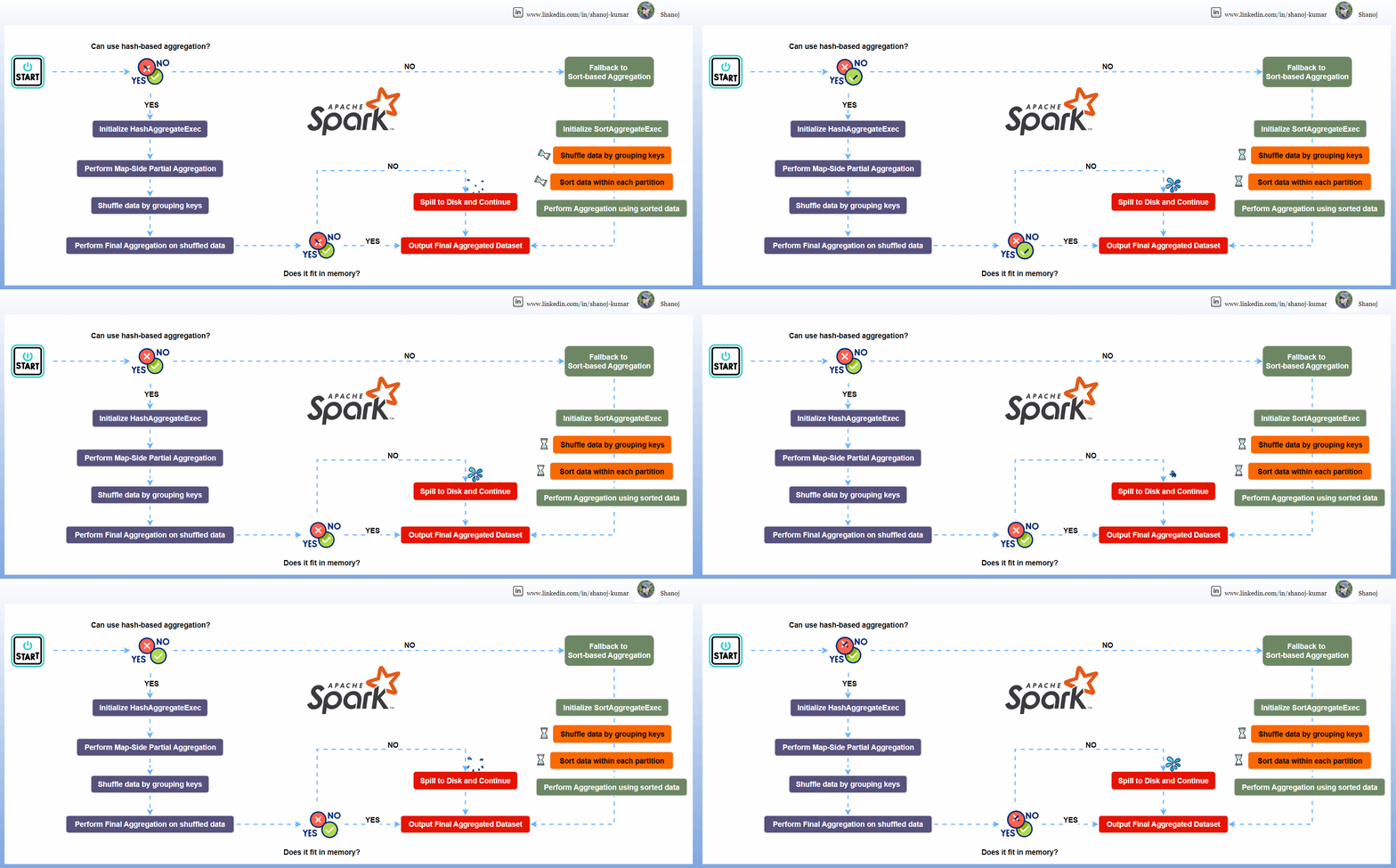
Hash-based aggregation, as implemented by HashAggregateExec, is the preferred method for aggregation in Spark SQL when the conditions allow it. This method creates a hash table where each entry corresponds to a unique group key. As Spark processes rows, it quickly uses the group key to locate the corresponding entry in the hash table and updates the aggregate values accordingly. This method is generally faster because it avoids sorting the data before aggregation. However, it requires that all intermediate aggregate values fit into memory. If the dataset is too large or there are too many unique keys, Spark might be unable to use hash-based aggregation due to memory constraints. Key points about Hash-based aggregation include:

  • It is preferred when the aggregate functions and group by keys are supported by the hash aggregation strategy.
  • It can be significantly faster than sort-based aggregation because it avoids sorting data.
  • It uses off-heap memory for storing the aggregation map.
  • It may fall back to sort-based aggregation if the dataset is too large or has too many unique keys, leading to memory pressure.

Sort-based Aggregation

Sort-based aggregation, as implemented by SortAggregateExec, is used when hash-based aggregation is not feasible, either due to memory constraints or because the aggregation functions or group by keys are not supported by the hash aggregation strategy. This method involves sorting the data based on the group by keys and then processing the sorted data to compute aggregate values. While this method can handle larger datasets since it only requires some intermediate results to fit into memory, it is generally slower than hash-based aggregation due to the additional sorting step. Key points about Sort-based aggregation include:

  • It is used when hash-based aggregation is not feasible due to memory constraints or unsupported aggregation functions or group by keys.
  • It involves sorting the data based on the group by keys before performing the aggregation.
  • It can handle larger datasets since it streams data through disk and memory.

Detailed Explanation of Hash-based Aggregation

Hash-based Aggregation in Apache Spark operates through the HashAggregateExec physical operator. This process is optimized for aggregations where the dataset can fit into memory, and it leverages mutable types for efficient in-place updates of aggregation states.

  • Initialization: When a query that requires aggregation is executed, Spark determines whether it can use hash-based aggregation. This decision is based on factors such as the types of aggregation functions (e.g., sum, avg, min, max, count), the data types of the columns involved, and whether the dataset is expected to fit into memory.
  • Partial Aggregation (Map Side): The aggregation process begins with a “map-side” partial aggregation. For each partition of the input data, Spark creates an in-memory hash map where each entry corresponds to a unique group key. As rows are processed, Spark updates the aggregation buffer for each group key directly in the hash map. This step produces partial aggregate results for each partition.
  • Shuffling: After the partial aggregation, Spark shuffles the data by the grouping keys, so that all records belonging to the same group are moved to the same partition. This step is necessary to ensure that the final aggregation produces accurate results across the entire dataset.
  • Final Aggregation (Reduce Side): Once the shuffled data is partitioned, Spark performs the final aggregation. It again uses a hash map to aggregate the partially aggregated results. This step combines the partial results from different partitions to produce the final aggregate value for each group.
  • Spill to Disk: If the dataset is too large to fit into memory, Spark’s hash-based aggregation can spill data to disk. This mechanism ensures that Spark can handle datasets larger than the available memory by using external storage.
  • Fallback to Sort-based Aggregation: In cases where the hash map becomes too large or if there are memory issues, Spark can fall back to sort-based aggregation. This decision is made dynamically based on runtime conditions and memory availability.
  • Output: The final output of the HashAggregateExec operator is a new dataset where each row represents a group along with its aggregated value(s).

The efficiency of hash-based aggregation comes from its ability to perform in-place updates to the aggregation buffer and its avoidance of sorting the data. However, its effectiveness is limited by the available memory and the nature of the dataset. For datasets that do not fit well into memory or when dealing with complex aggregation functions that are not supported by hash-based aggregation, Spark might opt for sort-based aggregation instead.

Detailed Explanation of Sort-based Aggregation

Sort-based Aggregation in Apache Spark works through a series of steps that involve shuffling, sorting, and then aggregating the data.

  • Shuffling: The data is partitioned across the cluster based on the grouping keys. This step ensures that all records with the same key end up in the same partition.
  • Sorting: Within each partition, the data is sorted by the grouping keys. This is necessary because the aggregation will be performed on groups of data with the same key, and having the data sorted ensures that all records for a given key are contiguous.
  • Aggregation: Once the data is sorted, Spark can perform the aggregation. For each partition, Spark uses a SortBasedAggregationIterator to iterate over the sorted records. This iterator maintains a buffer row to cache the aggregated values for the current group.
  • Processing Rows: As the iterator goes through the rows, it processes them one by one, updating the buffer with the aggregate values. When the end of a group is reached (i.e., the next row has a different grouping key), the iterator outputs a row with the final aggregate value for that group and resets the buffer for the next group.
  • Memory Management: Unlike hash-based aggregation, which requires a hash map to hold all group keys and their corresponding aggregate values, sort-based aggregation only needs to maintain the aggregate buffer for the current group. This means that sort-based aggregation can handle larger datasets that might not fit entirely in memory.
  • Fallback Mechanism: Although not part of the normal operation, it’s worth noting that Spark’s HashAggregateExec can theoretically fall back to sort-based aggregation if it encounters memory issues during hash-based processing.

The sort-based aggregation process is less efficient than hash-based aggregation because it involves the extra step of sorting the data, which is computationally expensive. However, it is more scalable for large datasets or when dealing with immutable types in the aggregation columns that prevent the use of hash-based aggregation.

Stackademic 🎓

Thank you for reading until the end. Before you go:

Apache Spark 101: Dynamic Allocation, spark-submit Command and Cluster Management

This diagram shows Apache Spark’s executor memory model in a YARN-managed cluster. Executors are allocated a specific amount of Heap and Off-Heap memory. Heap memory is divided into Execution Memory, Storage Memory, and User Memory. A small portion is reserved as Reserved Memory. Off-Heap memory is utilized for data not stored in the JVM heap and Overhead accounts for additional memory allocations beyond the executor memory. This allocation optimizes memory usage and performance in Spark applications while ensuring system resources are not exhausted.

Apache Spark’s dynamic allocation feature enables it to automatically adjust the number of executors used in a Spark application based on the workload. This feature is handy in shared cluster environments where resources must be efficiently allocated across multiple applications. Here’s an overview of the critical aspects:

  • Purpose: Automatically scales the number of executors up or down depending on the application’s needs.
  • Benefit: Improves resource utilization and handles varying workloads efficiently.

How It Works

  • Adding Executors: Spark requests more executors when tasks are pending, and resources are underutilized.
  • Removing Executors: Spark releases them back to the cluster if executors are idle for a certain period.
  • Resource Consideration: Takes into account the total number of cores and memory available in the cluster.

Configuration

  • spark.dynamicAllocation.enabled: Must be set to true allow for dynamic allocation.
  • spark.dynamicAllocation.minExecutors: Minimum number of executors Spark will retain.
  • spark.dynamicAllocation.maxExecutors: Maximum number of executors Spark can acquire.
  • spark.dynamicAllocation.initialExecutors: Initial number of executors to run if dynamic allocation is enabled.
  • spark.dynamicAllocation.executorIdleTimeout: Duration after which idle executors are removed.
  • spark.dynamicAllocation.schedulerBacklogTimeout: The time after which Spark will start adding new executors if there are pending tasks.

Integration with External Shuffle Service

  • Necessity: Essential for dynamic allocation to work effectively.
  • Function: Maintains shuffle data after executors are terminated, ensuring data is not lost when executors are dynamically removed.

Advantages

  • Efficient Resource Usage: Only uses resources as needed, freeing them when unused.
  • Adaptability: Adjusts to varying workloads without manual intervention.
  • Cost-Effective: In cloud environments, costs can be reduced by using fewer resources.

Considerations and Best Practices

  • Workload Characteristics: Best suited for jobs with varying stages and resource requirements.
  • Fine-tuning: Requires careful configuration to ensure optimal performance.
  • Monitoring: Keep an eye on application performance and adjust configurations as necessary.

Limitations

  • Not Ideal for All Workloads: It may not benefit applications with stable or predictable resource requirements.
  • Delay in Scaling: There can be a delay in executor allocation and deallocation, which might affect performance.

Use Cases

  • Variable Data Loads: Ideal for applications that experience fluctuating amounts of data.
  • Shared Clusters: Maximizes resource utilization in environments where multiple applications run concurrently.
  • Setup Spark Session with Dynamic Allocation Enabled This assumes Spark is set up with dynamic allocation enabled by default. You can create a Spark session like this:
from pyspark.sql import SparkSession

spark = SparkSession.builder \
.appName("DynamicAllocationDemo") \
.getOrCreate()
  • Run a Spark Job Now, run a simple Spark job to see dynamic allocation in action. For example, you can read a large dataset and perform some transformations or actions on it.
# Example: Load a dataset and perform an action
df = spark.read.csv("path_to_large_dataset.csv")
df.count()
  • Monitor Executors While the job is running, you can monitor the Spark UI (usually available at http://[driver-node]:4040) to see how executors are dynamically allocated and released based on the workload.

Turning Off Dynamic Allocation

To turn off dynamic allocation, you need to set spark.dynamicAllocation.enabled to false. This is how you can do it:

  • Modify Spark Session Configuration
spark.conf.set("spark.dynamicAllocation.enabled", "false")
  • Restart the Spark Session Restarting the Spark session is necessary for the configuration changes to take effect.
  • Verify the Setting You can verify if the dynamic allocation is turned off by checking the configuration:
print(spark.conf.get("spark.dynamicAllocation.enabled"))

Checking if Dynamic Allocation is Enabled

To check if dynamic allocation is currently enabled in your Spark session, you can use the following command:

print(spark.conf.get("spark.dynamicAllocation.enabled"))

This will print true if dynamic allocation is enabled and false if it is disabled.

Important Notes

  • Environment Setup: Ensure your Spark environment (like YARN or standalone cluster) supports dynamic allocation.
  • External Shuffle Service: An external shuffle service must be enabled in your cluster for dynamic allocation to work properly, especially when decreasing the number of executors.
  • Resource Manager: This demo assumes you have a resource manager (like YARN) that supports dynamic allocation.
  • Data and Resources: The effectiveness of the demo depends on the size of your data and the resources of your cluster. You might need a sufficiently large dataset and a cluster setup to observe dynamic allocation effectively.

spark-submit is a powerful tool used to submit Spark applications to a cluster for execution. It’s essential in the Spark ecosystem, especially when working with large-scale data processing. Let’s dive into both a high-level overview and a detailed explanation of spark-submit.

Spark Submit:

High-Level Overview

  • Purpose: spark-submit is the command-line interface for running Spark applications. It handles the packaging of your application, distributing it across the cluster, and executing it.
  • Usage: It’s typically used in environments where Spark is running in standalone cluster mode, Mesos, YARN, or Kubernetes. It’s not used in interactive environments like a Jupyter Notebook.
  • Flexibility: It supports submitting Scala, Java, and Python applications.
  • Cluster Manager Integration: It integrates seamlessly with various cluster managers to allocate resources and manage and monitor Spark jobs.

Detailed Explanation

Command Structure:

  • Basic Syntax: spark-submit [options] <app jar | python file> [app arguments]
  • Options: These include configurations for the Spark application, such as memory size, the number of executors, properties files, etc.
  • App Jar / Python File: The path to a bundled JAR file for Scala/Java applications or a .py file for Python applications.
  • App Arguments: Arguments that need to be passed to the primary method of your application.

Key Options:

  • --class: For Java/Scala applications, the entry point class.
  • --master: The master URL for the cluster (e.g., spark://23.195.26.187:7077, yarn, mesos://, k8s://).
  • --deploy-mode: Whether to deploy your driver on the worker nodes (cluster) or locally as an external client (client).
  • --conf: Arbitrary Spark configuration property in key=value format.
  • Resource Options: Like --executor-memory, --driver-memory, --executor-cores, etc.

Working with Cluster Managers:

  • In YARN mode, spark-submit can dynamically allocate resources based on demand.
  • For Mesos, it can run in either fine-grained mode (lower latency) or coarse-grained mode (higher throughput).
  • In Kubernetes, it can create containers for Spark jobs directly in a Kubernetes cluster.

Environment Variables:

  • Spark uses several environmental variables like SPARK_HOME, JAVA_HOME, etc. These need to be correctly set up.

Advanced Features:

  • Dynamic Allocation: This can allocate or deallocate resources dynamically based on the workload.
  • Logging and Monitoring: Integration with tools like Spark History Server for job monitoring and debugging.
spark-submit \
--class com.example.MyApp \
--master yarn \
--deploy-mode cluster \
--executor-memory 4g \
--total-executor-cores 4 \
/path/to/myApp.jar \
arg1 arg2

Usage Considerations

  • Application Packaging: Applications should be assembled into a fat JAR with all dependencies for Scala and Java.
  • Python Applications: Python dependencies should be managed carefully, especially when working with a cluster.
  • Testing: It’s good practice to test Spark applications locally in --master local mode before deploying to a cluster.
  • Debugging: Since applications are submitted to a cluster, debugging can be more challenging and often relies on log analysis.

Stackademic

Thank you for reading until the end. Before you go:

  • Please consider clapping and following the writer! 👏
  • Follow us on Twitter(X), LinkedIn, and YouTube.
  • Visit Stackademic.com to find out more about how we are democratizing free programming education around the world.

Apache Spark 101: Window Functions

The process begins with data partitioning to enable distributed processing, followed by shuffling and sorting data within partitions and executing partition-level operations. Spark employs a lazy evaluation strategy that postpones the actual computation until an action triggers it. At this point, the Catalyst Optimizer refines the execution plan, including specific optimizations for window functions. The Tungsten Execution Engine executes the plan, optimizing for memory and CPU usage and completing the process.

Apache Spark offers a robust collection of window functions, allowing users to conduct intricate calculations and analysis over a set of input rows. These functions improve the flexibility of Spark’s SQL and DataFrame APIs, simplifying the execution of advanced data manipulation and analytics.

Understanding Window Functions

Window functions in Spark allow users to perform calculations across a set of rows related to the current row. These functions operate on a window of input rows and are particularly useful for ranking, aggregation, and accessing data from adjacent rows without using self-joins.

Common Window Functions

Rank:

  • Assigns a ranking within a window partition, with gaps for tied values.
  • If two rows are tied for rank 1, the next rank will be 3, reflecting the ties in the sequence.

Advantages: Handles ties and provides a clear ranking context.

Disadvantages: Gaps may cause confusion; less efficient on larger datasets due to ranking calculations.

Dense Rank:

  • Operates like rank but without gaps in the ranking order.
  • Tied rows receive the same rank, and the subsequent rank number is consecutive.

Advantages: No gaps in ranking, continuous sequence.

Disadvantages: Less distinction in ties; can be computationally intensive.

Row Number:

  • Gives a unique sequential identifier to each row in a partition.
  • It does not account for ties, as each row is given a distinct number.

Advantages: Assigns a unique identifier; generally faster than rank and dense_rank.

Disadvantages: No tie handling; sensitive to order, which can affect the outcome.

Lead:

  • Provides access to subsequent row data, valid for comparisons with the current row.
  • lead(column, 1) returns the value of column from the next row.

Lag:

  • Retrieves data from the previous row, allowing for retrospective comparison.
  • lag(column, 1) fetches the value of column from the preceding row.

Advantages: Allows for forward and backward analysis; the number of rows to look ahead or back can be specified.

Disadvantages: Edge cases where null is returned for rows without subsequent or previous data; dependent on row order.

These functions are typically used with the OVER clause to define the specifics of the window, such as partitioning and ordering of the rows.

Here’s a simple example to illustrate:

from pyspark.sql import SparkSession
from pyspark.sql.window import Window
import pyspark.sql.functions as F

# Initialize Spark session
spark = SparkSession.builder.appName("windowFunctionsExample").getOrCreate()

# Sample data
data = [("Alice", "Sales", 3000),
("Bob", "Sales", 4600),
("Charlie", "Finance", 5200),
("David", "Sales", 3000),
("Edward", "Finance", 4100)]

# Create DataFrame
columns = ["EmployeeName", "Department", "Salary"]
df = spark.createDataFrame(data, columns)

# Define window specification
windowSpec = Window.partitionBy("Department").orderBy("Salary")

# Apply window functions
df.withColumn("rank", F.rank().over(windowSpec)) \
.withColumn("dense_rank", F.dense_rank().over(windowSpec)) \
.withColumn("row_number", F.row_number().over(windowSpec)) \
.withColumn("lead", F.lead("Salary", 1).over(windowSpec)) \
.withColumn("lag", F.lag("Salary", 1).over(windowSpec)) \
.show()

Common Elements in Spark’s Architecture for Window Functions:

Lazy Evaluation:

Spark’s transformation operations, including window functions, are lazily evaluated. This means the actual computation happens only when an action (like collect or show) is called. This approach allows Spark to optimize the execution plan.

Lazy evaluation in Spark’s architecture allows for the postponement of computations until they are required, enabling the system to optimize the execution plan and minimize unnecessary processing. This approach is particularly beneficial when working with window functions, as it allows Spark to efficiently handle complex calculations and analysis over a range of input rows. The benefits of lazy evaluation in the context of window functions include reduced unnecessary computations, optimized query plans, minimized data movement, and the ability to enable pipelining for efficient task scheduling.

Catalyst Optimizer:

The Catalyst Optimizer applies a series of optimization techniques to enhance query execution time, some particularly relevant to window functions. These optimizations include but are not limited to:

  • Predicate Pushdown: This optimization pushes filters and predicates closer to the data source, reducing the amount of unnecessary data that needs to be processed. When applied to window functions, predicate pushdown can optimize data filtering within the window, leading to more efficient processing.
  • Column Pruning: It eliminates unnecessary columns from being read or loaded during query execution, reducing I/O and memory usage. This optimization can be beneficial when working with window functions, as it minimizes the amount of data that needs to be processed within the window.
  • Constant Folding: This optimization identifies and evaluates constant expressions during query analysis, reducing unnecessary computations during query execution. While not directly related to window functions, constant folding contributes to overall query efficiency.
  • Cost-Based Optimization: It leverages statistics and cost models to estimate the cost of different query plans and selects the most efficient plan based on these estimates. This optimization can help select the most efficient execution plan for window function queries.

The Catalyst Optimizer also involves code generation, where it generates an efficient Java bytecode or optimizes Spark SQL code for executing the query. This code generation process further improves the performance by leveraging the optimizations provided by the underlying execution engine.

In the context of window functions, the Catalyst Optimizer aims to optimize the processing of window operations, including ranking, aggregation, and data access within the window. By applying these optimization techniques, the Catalyst Optimizer contributes to improved performance and efficient execution of Spark SQL queries involving window functions.

Tungsten Execution Engine:

The Tungsten Execution Engine is designed to optimize Spark jobs for CPU and memory efficiency, focusing on the hardware architecture of Spark’s platform. By leveraging off-heap memory management, cache-aware computation, and whole-stage code generation, Tungsten aims to substantially reduce the usage of JVM objects, improve cache locality, and generate efficient code for accessing memory structures.

Integrating the Tungsten Execution Engine with the Catalyst Optimizer allows Spark to handle complex calculations and analysis efficiently, including those involving window functions. This leads to improved performance and optimized data processing.

In the context of window functions, the Catalyst Optimizer generates an optimized physical query plan from the logical query plan by applying a series of transformations. This optimized query plan is then used by the Tungsten Execution Engine to generate optimized code, leveraging the Whole-Stage Codegen functionality introduced in Spark 2.0. The Tungsten Execution Engine focuses on optimizing Spark jobs for CPU and memory efficiency, and it leverages the optimized physical query plan generated by the Catalyst Optimizer to generate efficient code that resembles hand-written code.

Window functions within Spark’s architecture involve several stages:

Data Partitioning:

  • Data is divided into partitions for parallel processing across cluster nodes.
  • For window functions, partitioning is typically done based on specified columns.

Shuffle and Sort:

  • Spark may shuffle data to ensure all rows for a partition are on the same node.
  • Data is then sorted within each partition to prepare for rank calculations.

Rank Calculation and Ties Handling:

  • Ranks are computed within each partition, allowing nodes to process data independently.
  • Ties are managed during sorting, which is made efficient by Spark’s partitioning mechanism.

Lead and Lag Operations:

  • These functions work row-wise within partitions, processing rows in the context of their neighbours.
  • Data locality within partitions minimizes network data transfer, which is crucial for performance.

Execution Plan Optimization:

  • Spark employs lazy evaluation, triggering computations only upon an action request.
  • The Catalyst Optimizer refines the execution plan, aiming to minimize data shuffles.
  • The Tungsten Execution Engine optimizes memory and CPU resources, enhancing the performance of window function calculations.

Apache Spark window functions are a powerful tool for advanced data manipulation and analysis. They enable efficient ranking, aggregation, and access to adjacent rows without complex self-joins. By using these functions effectively, users can unlock the full potential of Apache Spark for analytical and processing needs and derive valuable insights from their data.

Stackademic

Thank you for reading until the end. Before you go:

  • Please consider clapping and following the writer! 👏
  • Follow us on Twitter(X), LinkedIn, and YouTube.
  • Visit Stackademic.com to find out more about how we are democratizing free programming education around the world.

Apache Spark 101: Understanding Spark Code Execution

Apache Spark is a powerful distributed data processing engine widely used in big data and machine learning applications. Thanks to its enriched API and robust data structures such as DataFrames and Datasets, it offers a higher level of abstraction than traditional map-reduce jobs.

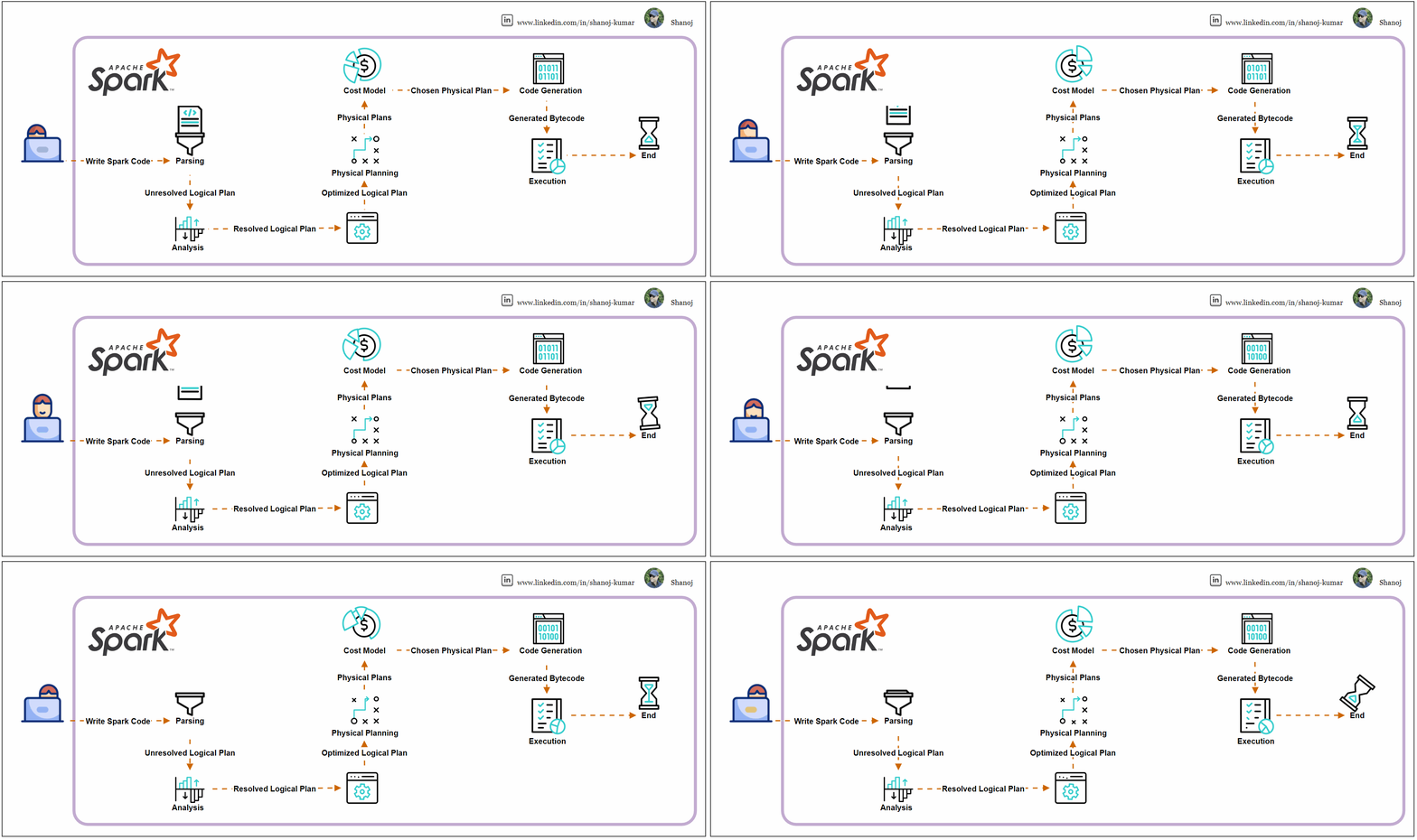
Spark Code Execution Journey

Parsing

  • Spark SQL queries or DataFrame API methods are parsed into an unresolved logical plan.
  • The parsing step converts the code into a Spark-understandable format without checking table or column existence.

Analysis

  • The unresolved logical plan undergoes analysis by the Catalyst optimizer, Spark’s optimization framework.
  • This phase confirms the existence of tables, columns, and functions, resulting in a resolved logical plan where all references are validated against the catalogue schema.

Logical Plan Optimization

  • The Catalyst optimizer applies optimization rules to the resolved logical plan, potentially reordering joins, pushing down predicates, or combining filters, creating an optimized logical plan.

Physical Planning

  • The optimized logical plan is transformed into one or more physical plans, outlining the execution strategy and order of operations like map, filter, and join.

Cost Model

  • Spark evaluates these physical plans using a cost model, selecting the most efficient one based on data sizes and distribution heuristics.

Code Generation

  • Once the final physical plan is chosen, Spark employs WholeStage CodeGen to generate optimized Java bytecode that will run on the executors, minimizing JVM calls and optimizing execution.

Execution

  • The bytecode is distributed to executors across the cluster for execution, with tasks running in parallel, processing data in partitions, and producing the final output.

The Catalyst optimizer is integral throughout these steps, enhancing the performance of Spark SQL queries and DataFrame operations using rule-based and cost-based optimization.

Example Execution Plan

Consider a SQL query that joins two tables and filters and aggregates the data:

SELECT department, COUNT(*)
FROM employees
JOIN departments ON employees.dep_id = departments.id
WHERE employees.age > 30
GROUP BY department

The execution plan may follow these steps:

· Parsed Logical Plan: The initial SQL command is parsed into an unresolved logical plan.

· Analyzed Logical Plan: The plan is analyzed and resolved against the table schemas.

· Optimized Logical Plan: The Catalyst optimizer optimizes the plan.

· Physical Plan: A cost-effective physical plan is selected.

· Execution: The physical plan is executed across the Spark cluster.


The execution plan for the given SQL query in Apache Spark involves several stages, from logical planning to physical execution. Here’s a simplified breakdown:

Parsed Logical Plan: Spark parses the SQL query into an initial logical plan. This plan is unresolved as it only represents the structure of the query without checking the existence of the tables or columns.

'Project ['department]
+- 'Aggregate ['department], ['department, 'COUNT(1)]
+- 'Filter ('age > 30)
+- 'Join Inner, ('employees.dep_id = 'departments.id)
:- 'UnresolvedRelation `employees`
+- 'UnresolvedRelation `departments`

Analyzed Logical Plan: The parsed logical plan is analyzed against the database catalogue. This resolves table and column names and checks for invalid operations or data types.

Project [department#123]
+- Aggregate [department#123], [department#123, COUNT(1) AS count#124]
+- Filter (age#125 > 30)
+- Join Inner, (dep_id#126 = id#127)
:- SubqueryAlias employees
: +- Relation[age#125,dep_id#126] parquet
+- SubqueryAlias departments
+- Relation[department#123,id#127] parquet

Optimized Logical Plan: The Catalyst optimizer applies a series of rules to the logical plan to optimize it. It may reorder joins, push down filters, and perform other optimizations.

Aggregate [department#123], [department#123, COUNT(1) AS count#124]
+- Project [department#123, age#125]
+- Join Inner, (dep_id#126 = id#127)
:- Filter (age#125 > 30)
: +- Relation[age#125,dep_id#126] parquet
+- Relation[department#123,id#127] parquet

Physical Plan: Spark generates one or more physical plans from the logical plan. It then uses a cost model to choose the most efficient physical plan for execution.

*(3) HashAggregate(keys=[department#123], functions=[count(1)], output=[department#123, count#124])
+- Exchange hashpartitioning(department#123, 200)
+- *(2) HashAggregate(keys=[department#123], functions=[partial_count(1)], output=[department#123, count#125])
+- *(2) Project [department#123, age#125]
+- *(2) BroadcastHashJoin [dep_id#126], [id#127], Inner, BuildRight
:- *(2) Filter (age#125 > 30)
: +- *(2) ColumnarToRow
: +- FileScan parquet [age#125,dep_id#126]
+- BroadcastExchange HashedRelationBroadcastMode(List(input[1, int, false]))
+- *(1) ColumnarToRow
+- FileScan parquet [department#123,id#127]

Code Generation: Spark generates Java bytecode for the chosen physical plan to run on each executor. This process is known as WholeStage CodeGen.

Execution: The bytecode is sent to Spark executors distributed across the cluster. Executors run the tasks in parallel, processing the data in partitions.

During execution, tasks are executed within stages, and stages may have shuffle boundaries where data is redistributed across the cluster. The Exchange hashpartitioning indicates a shuffle operation due to the GROUP BY clause.

Stackademic

Thank you for reading until the end. Before you go:

  • Please consider clapping and following the writer! 👏
  • Follow us on Twitter(X), LinkedIn, and YouTube.
  • Visit Stackademic.com to find out more about how we are democratizing free programming education around the world.

Apache Spark 101: Read Modes

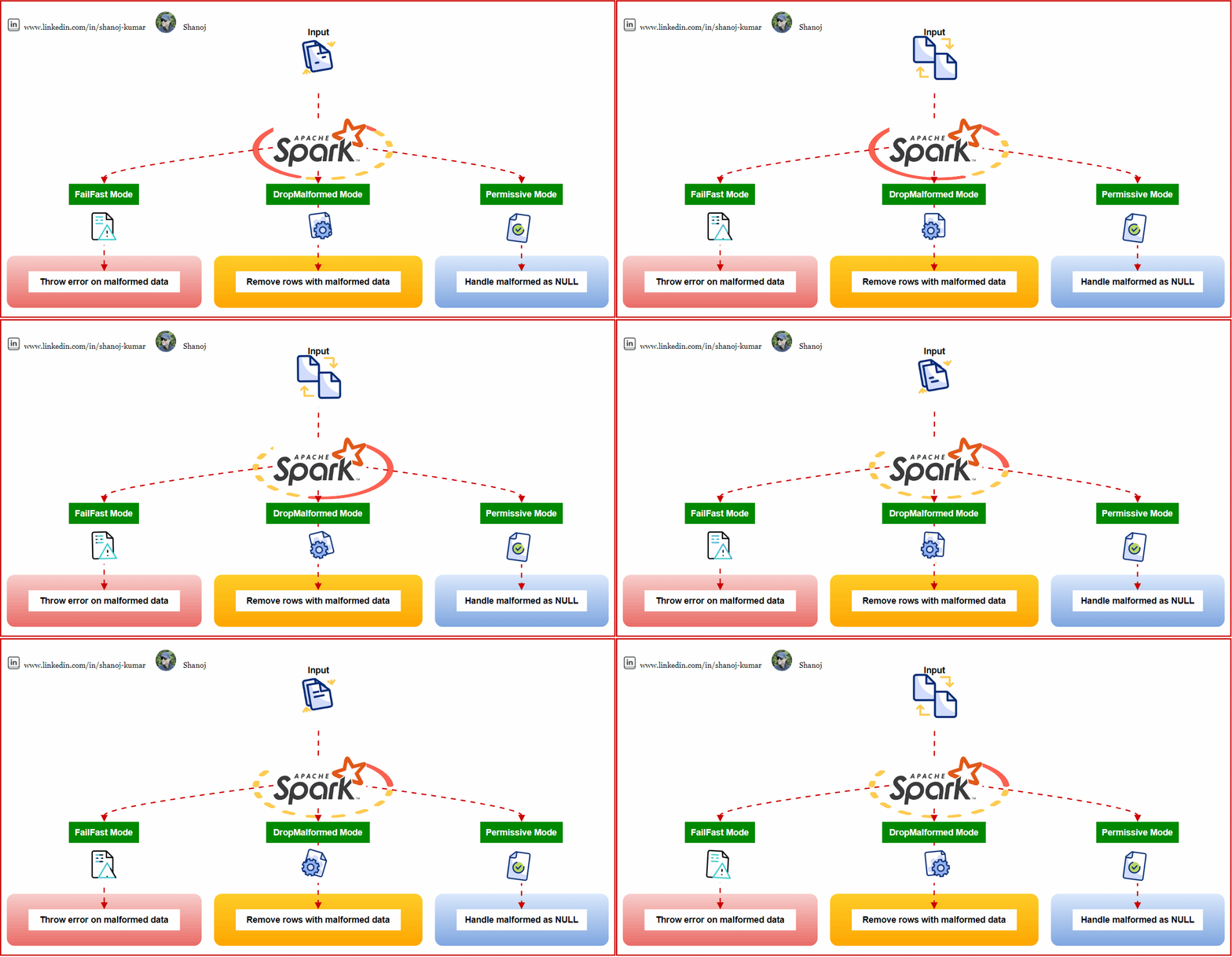
Apache Spark, one of the most powerful distributed data processing engines., provides multiple ways to handle corrupted records during the read process. These methods, known as read modes, allow users to decide how to address malformed data. This article will delve into these read modes, providing a comprehensive understanding of their functionalities and use cases.


Permissive Mode (default):

Spark adopts a lenient approach to data discrepancies in the permissive mode, which is the default setting.

  • Handling of Corrupted Records: Spark will set all fields to null for that specific record upon encountering a corrupted record. Moreover, the corrupted records get allocated to a column named. _corrupt_record.
  • Advantage: This ensures that Spark continues processing without interruption, even if it comes across a few corrupted records. It’s a forgiving mode, handy when data integrity is not the sole priority, and there’s an emphasis on ensuring continuity in processing.

DropMalformed Mode:

As the title suggests, this mode is less forgiving than permissive. Spark takes stringent action against records that don’t match the schema.

  • Handling of Corrupted Records: Spark directly drops rows that contain corrupted or malformed records, ensuring only clean records remain.
  • Advantage: This mode is instrumental if the objective is to work solely with records that align with the expected schema, even if it means discarding a few anomalies. If you aim for a clean dataset and are okay with potential data loss, this mode is your go-to.

FailFast Mode:

FailFast mode is the strictest among the three and is for scenarios where data integrity cannot be compromised.

  • Handling of Corrupted Records: Spark immediately halts the job in this mode and throws an exception when it spots a corrupted record.
  • Advantage: This strict approach ensures unparalleled data quality. This mode is ideal if the dataset must strictly adhere to the expected schema without discrepancies.

To cement the understanding of these read modes, let’s delve into a hands-on example:

from pyspark.sql import SparkSession
import getpass

username = getpass.getuser()
spark = SparkSession.builder \
.config('spark.ui.port', '0') \
.config("spark.sql.warehouse.dir", f"/user/{username}/warehouse") \
.enableHiveSupport() \
.master('yarn') \
.getOrCreate()
# Expected Schema
from pyspark.sql.types import StructType, StructField, StringType, IntegerType

expected_schema = StructType([
StructField("name", StringType(), True),
StructField("age", IntegerType(), True)
])

print("Expected Schema:\n", expected_schema)
print("\n")
# Permissive Mode
print("Permissive Mode:")
print("Expected: Rows with malformed 'age' values will have null in the 'age' column.")
dfPermissive = spark.read.schema(expected_schema).option("mode", "permissive").json("sample_data_malformed.json")
dfPermissive.show()
# DropMalformed Mode
print("\nDropMalformed Mode:")
print("Expected: Rows with malformed 'age' values will be dropped.")
dfDropMalformed = spark.read.schema(expected_schema).option("mode", "dropMalformed").json("sample_data_malformed.json")
dfDropMalformed.show()
# FailFast Mode
print("\nFailFast Mode:")
print("Expected: Throws an error upon encountering malformed data.")
try:
dfFailFast = spark.read.schema(expected_schema).option("mode", "failFast").json("sample_data_malformed.json")
dfFailFast.show()
except Exception as e:
print("Error encountered:", e)

A Note on RDDs versus DataFrames/Datasets:

The discussion about read modes (Permissive, DropMalformed, and FailFast) pertains primarily to DataFrames and Datasets when sourcing data from formats like JSON, CSV, Parquet, and more. These modes become critical when there’s a risk of records not aligning with the expected schema.

Resilient Distributed Datasets (RDDs), a foundational element in Spark, represent a distributed set of objects. Unlike DataFrames and Datasets, RDDs don’t possess a schema. Consequently, when working with RDDs, it’s more about manually processing data than relying on predefined structures. Hence, RDDs don’t intrinsically incorporate these read modes. However, these modes become relevant when transitioning data between RDDs and DataFrames/Datasets or imposing a schema on RDDs.

Understanding and choosing the appropriate read mode in Spark can significantly influence data processing outcomes. While some scenarios require strict adherence to data integrity, others prioritize continuity in processing. By providing these read modes, Spark ensures that it caters to a diverse range of data processing needs. The mode choice should always align with the overarching project goals and data requirements.

Stackademic

Thank you for reading until the end. Before you go:

  • Please consider clapping and following the writer! 👏
  • Follow us on Twitter(X), LinkedIn, and YouTube.
  • Visit Stackademic.com to find out more about how we are democratizing free programming education around the world.

Data Modeling 101: Modern Data Stack

What is Data Modeling?

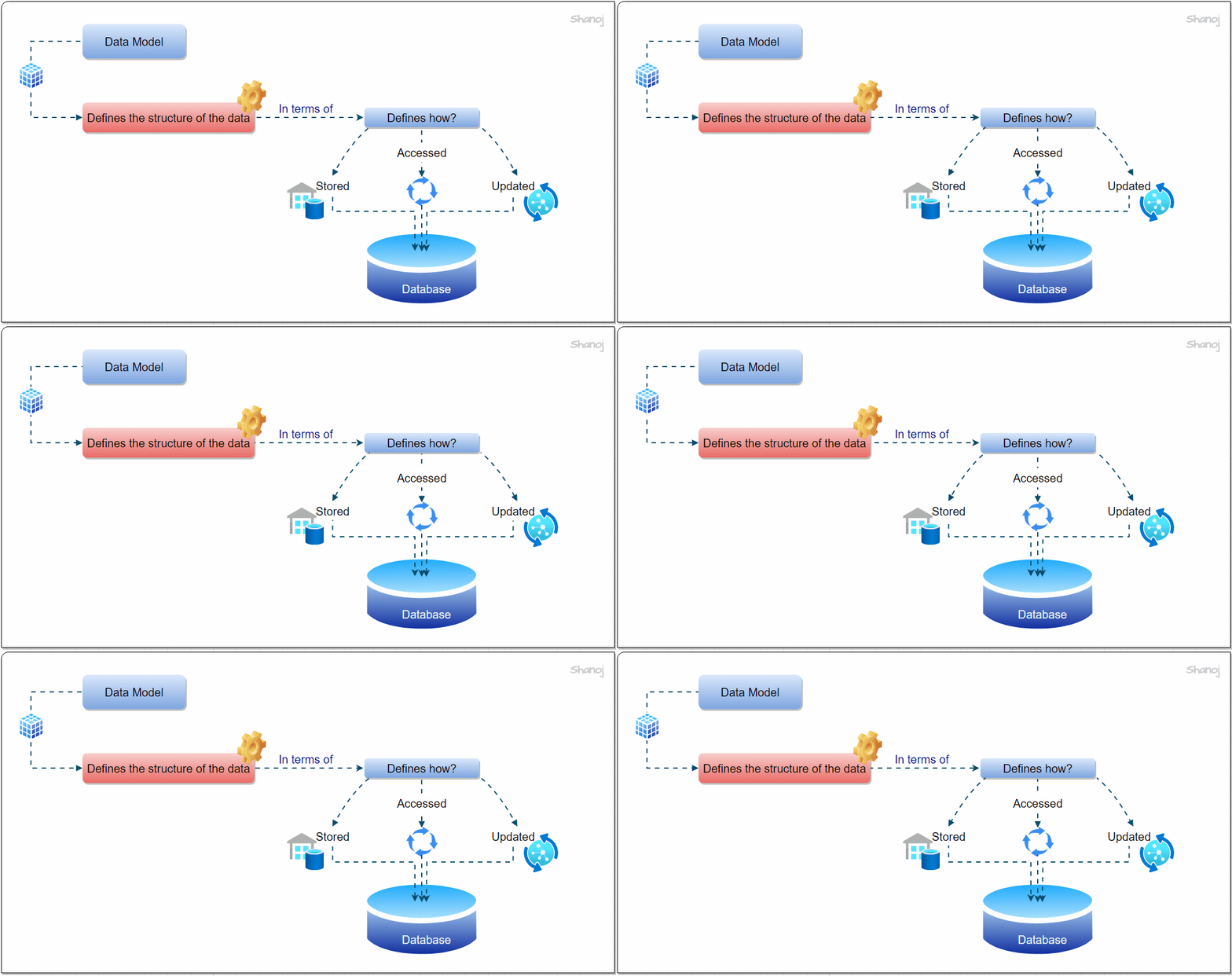
Data modeling is the foundational process of creating a structured representation of data stored in a database. This representation, a data model, serves as a conceptual blueprint for data objects, their relationships, and the governing rules that ensure data integrity and consistency. Data modeling helps us define how data is organized, connected, and utilized within a database or data management system.

Common Data Modeling Approaches:

Normalized Modeling:

The normalized modeling approach, popularized by Bill Inmon, is focused on maintaining data integrity by eliminating redundancy. It involves creating a data warehouse that closely mirrors the structure of the source systems. While this approach ensures a single source of truth, it can lead to complex join operations and may not be ideal for modern column-based data warehouses.

Denormalized Modeling (Dimensional Modeling):

Ralph Kimball’s denormalized modeling, dimensional modeling, emphasizes simplicity and efficiency. It utilizes a star schema structure, which reduces the need for complex joins. Denormalized modeling is designed around business functions, making it well-suited for analytical reporting. It strikes a balance between data redundancy and query performance.

Data Vault Modeling:

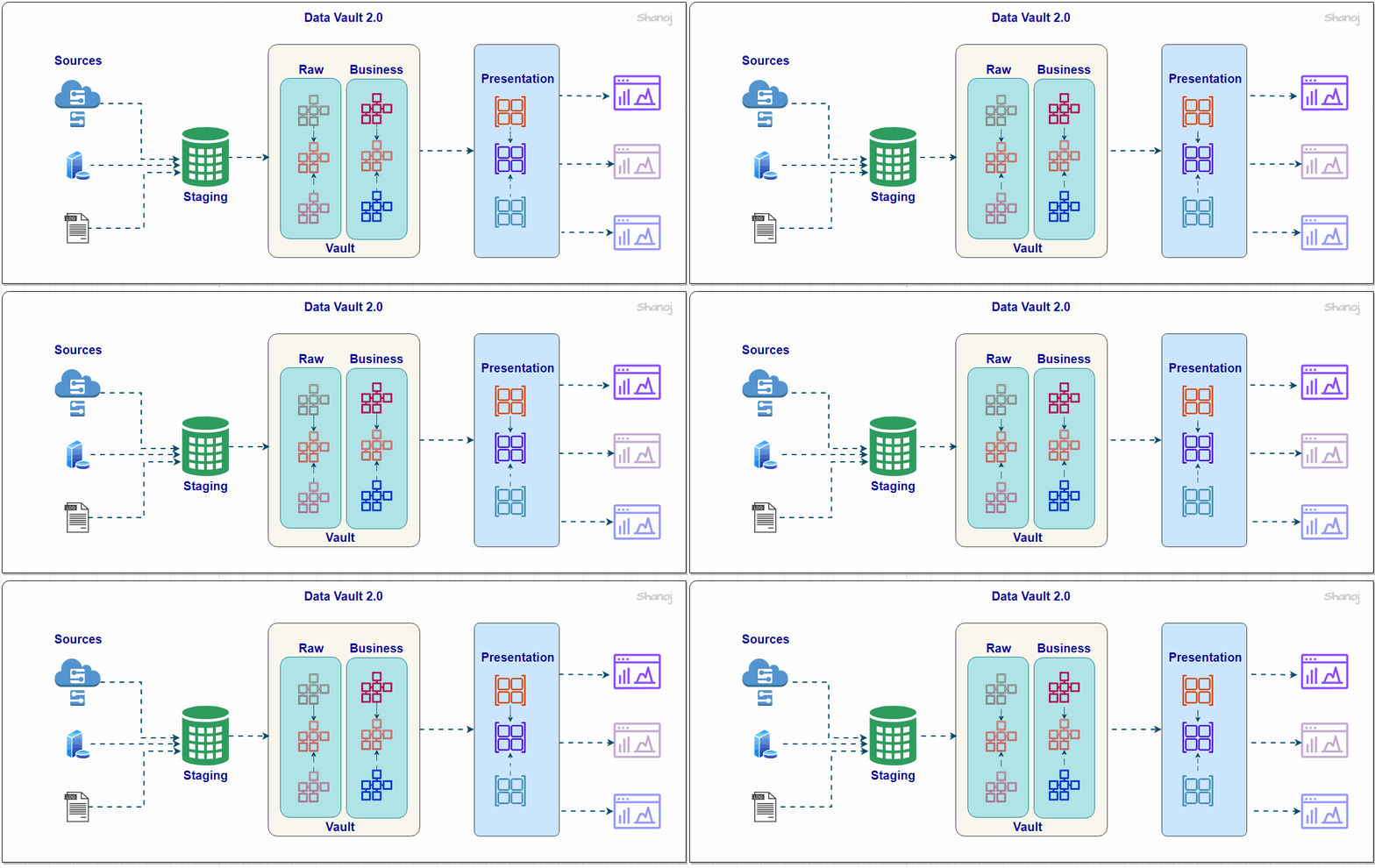
The Data Vault modeling approach is complex and organized, dividing data into hubs, links, and satellites. It focuses on preserving raw data without compromising future transformations. While it is excellent for data storage and organization, a presentation layer is often required for analytical reporting, making it a comprehensive but intricate approach.

One Big Table (OBT) Modeling:

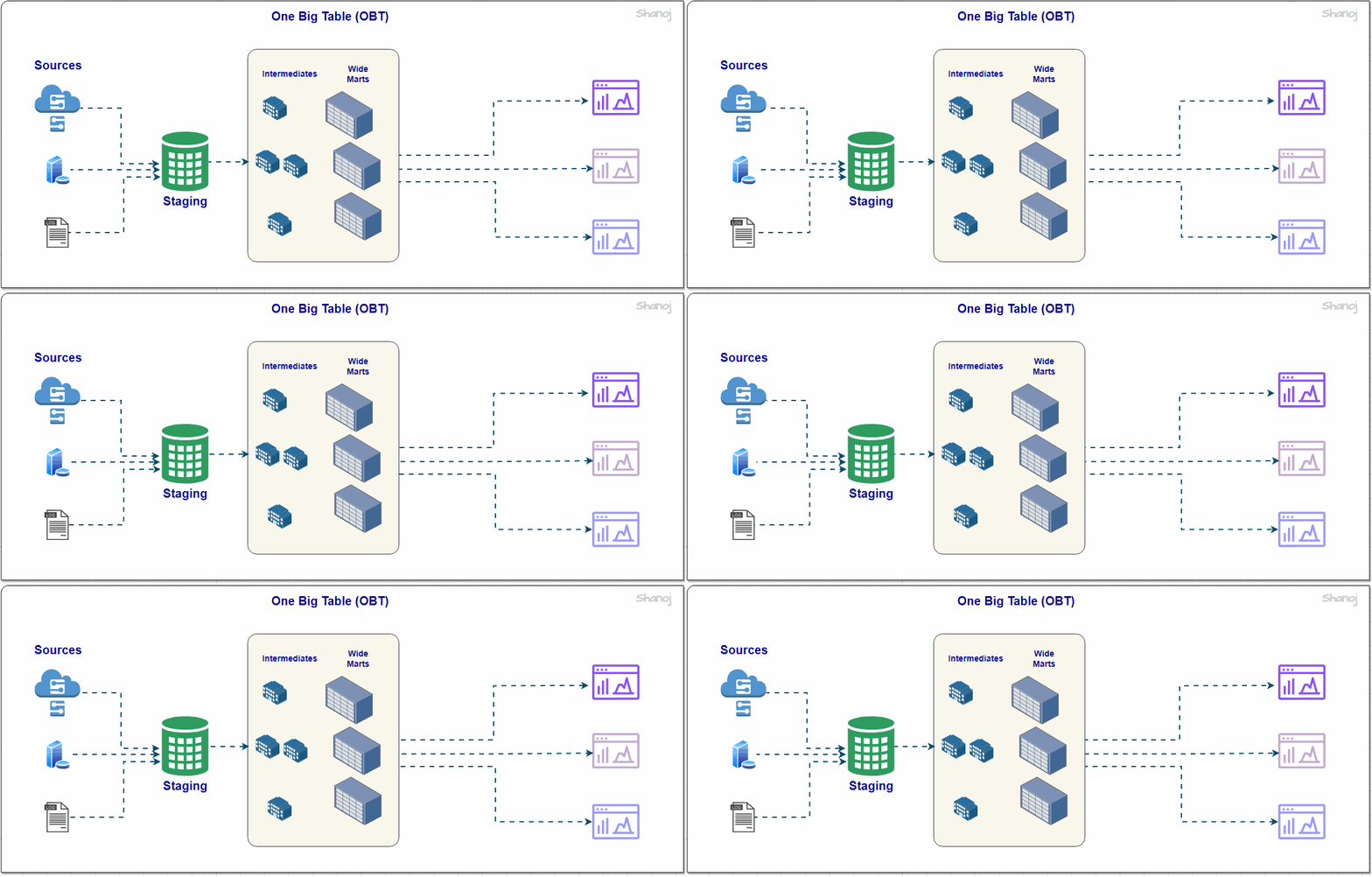
The OBT modeling approach takes advantage of modern storage and computational capabilities. It involves creating wide denormalized tables, minimizing the need for intermediate transformations. While this approach simplifies data modeling, it can increase computational costs and data redundancy, particularly as the organization scales.

Why is Data Modeling Important?

Now that we understand what data modeling entails, let’s explore why it holds such significance in data management and analytics.

Visual Representation and Rule Enforcement:

Data modeling provides a visual representation of data structures, making it easier for data professionals to understand and work with complex datasets. It also plays a crucial role in enforcing business rules, regulatory compliance, and government policies governing data usage. By translating these rules into the data model, organizations ensure that data is handled according to legal and operational standards.

Consistency and Quality Assurance:

Data models serve as a framework for maintaining consistency across various aspects of data management, such as naming conventions, default values, semantics, and security measures. This consistency is essential to ensure data quality and accuracy. A well-designed data model acts as a guardian, preventing inconsistencies and errors arising from ad-hoc data handling.

Facilitating Data Integration:

Organizations often deal with data from multiple sources in today’s data-rich landscape. Data modeling is pivotal in designing structures that enable seamless data integration. Whether you’re working with Power BI, other data visualization tools, or databases, data modeling ensures that data from different entities can be effectively combined and analyzed.

Things to Consider:

Organizational and Mental Clarity:

Regardless of the chosen data modeling approach, organizational clarity and mental clarity should remain paramount. A structured data modeling strategy provides a foundation for managing diverse data sources effectively and maintaining consistency throughout the data pipeline.

Embracing New Technologies:

Modern data technologies offer advanced storage and processing capabilities. Organizations should consider hybrid approaches that combine the best features of different data modeling methods to leverage the benefits of both simplicity and efficiency.

Supporting Data Consumers:

Data modeling should not cater solely to individual users or reporting tools. Consider a robust data mart layer to support various data consumption scenarios, ensuring that data remains accessible and usable by various stakeholders.

🌟 Enjoying my content? 🙏 Follow me here: Shanoj Kumar V

Stackademic

Thank you for reading until the end. Before you go:

  • Please consider clapping and following the writer! 👏
  • Follow us on Twitter(X), LinkedIn, and YouTube.
  • Visit Stackademic.com to find out more about how we are democratizing free programming education around the world.

The Rise of Analytical Engineering: Embracing a Data-Driven Future

I wanted to share my thoughts on an exciting trend that I believe is reshaping the data landscape: analytical engineering. As someone who has personally experienced this shift, I can confidently say that it holds immense potential and opens up thrilling opportunities.

Analytical engineering is at the forefront of the data analytics field, bridging the gap between traditional data engineering and advanced analytics. By combining the best of both worlds, it empowers organizations to uncover deeper insights and make informed, data-driven decisions.

What truly sets analytical engineering apart is its ability to connect data teams with business stakeholders. No longer confined to isolated data operations, analytical engineers actively participate in strategic discussions, contribute to shaping priorities, and align data initiatives with business objectives. This collaboration is a game-changer, driving tangible value and fueling business growth.

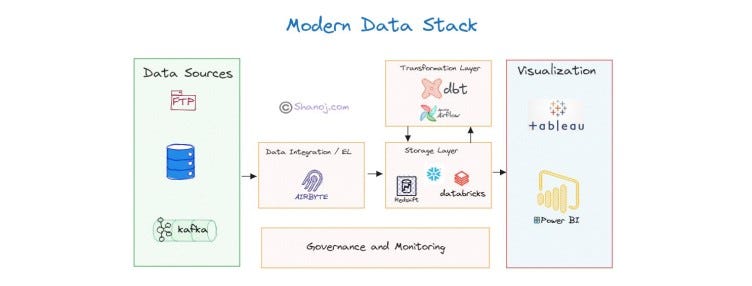
At the core of analytical engineering lies the power of SQL and data modelling. These skills enable analytical engineers to transform and analyze data, creating robust data models that generate accurate and actionable insights. By leveraging modern data stack tools like DBT, analytical engineers streamline the data pipeline, ensuring seamless data ingestion, transformation, and scheduling.

Another critical aspect of analytical engineering is the empowerment of self-service analytics. By providing intuitive tools and platforms, analytical engineers enable business users to explore and analyze data independently. This democratization of data fosters a culture of data-driven decision-making, empowering individuals at all levels to unlock valuable insights without relying solely on technical teams.

The demand for analytical engineering skills is skyrocketing as businesses increasingly recognize the competitive advantage of advanced analytics. Roles like analytics engineer offer professionals a unique opportunity to leverage their technical expertise while driving impactful business outcomes. It’s an exciting time to be part of this field, with competitive salaries and ample room for career growth.

As an Enterprise Solution Architect, I have personally witnessed the transformative power of analytical engineering. It is an exciting career path that merges technical excellence with business acumen, enabling professionals to shape priorities, drive innovation, and significantly impact organizational success. While analytical engineering takes the spotlight, it is important to acknowledge the continued importance of data engineering, as the two disciplines complement each other.

Stackademic

Thank you for reading until the end. Before you go:

  • Please consider clapping and following the writer! 👏
  • Follow us on Twitter(X), LinkedIn, and YouTube.
  • Visit Stackademic.com to find out more about how we are democratizing free programming education around the world.