Tag Archives: Data Engineer

Apache Spark 101: Read Modes

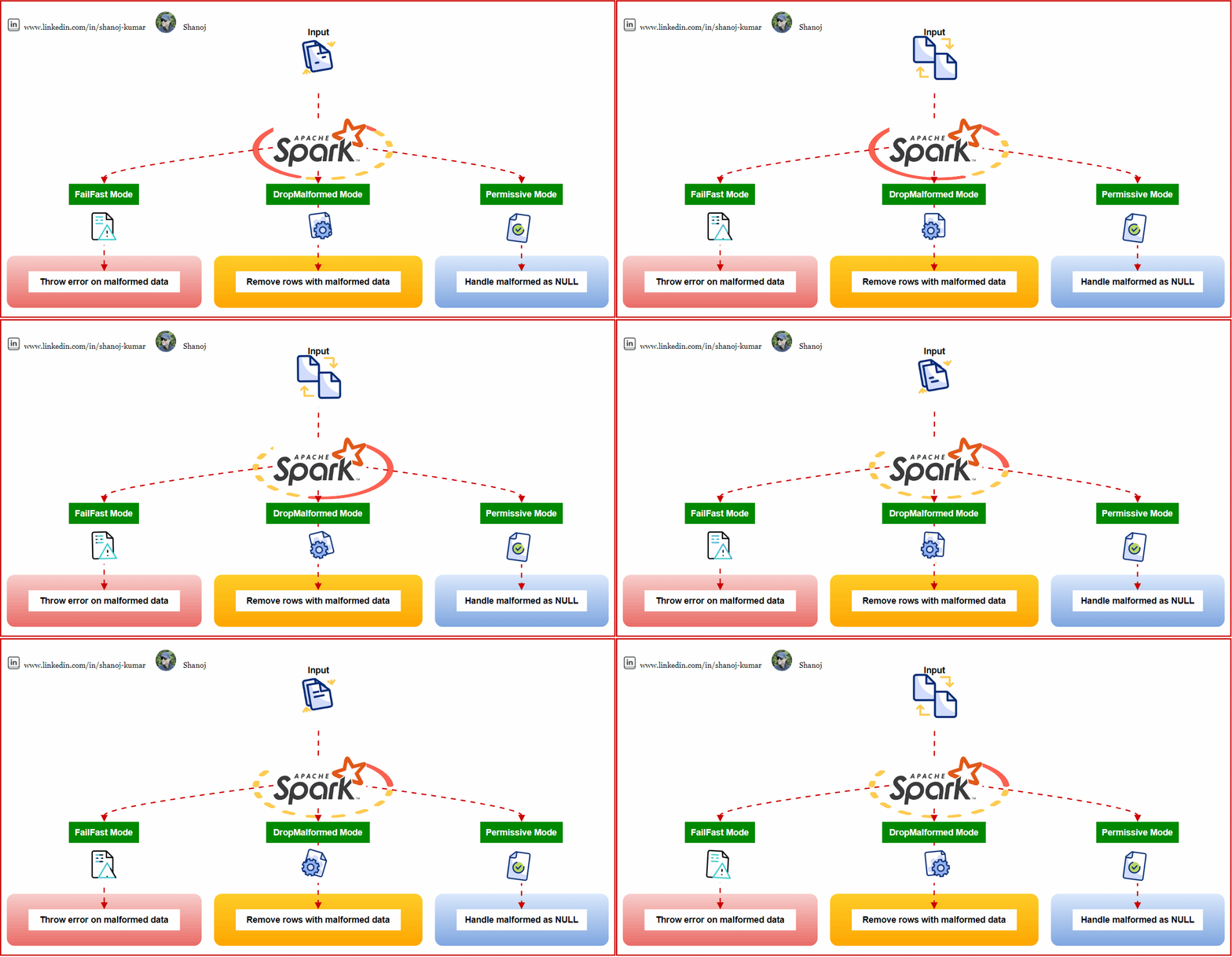
Apache Spark, one of the most powerful distributed data processing engines., provides multiple ways to handle corrupted records during the read process. These methods, known as read modes, allow users to decide how to address malformed data. This article will delve into these read modes, providing a comprehensive understanding of their functionalities and use cases.


Permissive Mode (default):

Spark adopts a lenient approach to data discrepancies in the permissive mode, which is the default setting.

  • Handling of Corrupted Records: Spark will set all fields to null for that specific record upon encountering a corrupted record. Moreover, the corrupted records get allocated to a column named. _corrupt_record.
  • Advantage: This ensures that Spark continues processing without interruption, even if it comes across a few corrupted records. It’s a forgiving mode, handy when data integrity is not the sole priority, and there’s an emphasis on ensuring continuity in processing.

DropMalformed Mode:

As the title suggests, this mode is less forgiving than permissive. Spark takes stringent action against records that don’t match the schema.

  • Handling of Corrupted Records: Spark directly drops rows that contain corrupted or malformed records, ensuring only clean records remain.
  • Advantage: This mode is instrumental if the objective is to work solely with records that align with the expected schema, even if it means discarding a few anomalies. If you aim for a clean dataset and are okay with potential data loss, this mode is your go-to.

FailFast Mode:

FailFast mode is the strictest among the three and is for scenarios where data integrity cannot be compromised.

  • Handling of Corrupted Records: Spark immediately halts the job in this mode and throws an exception when it spots a corrupted record.
  • Advantage: This strict approach ensures unparalleled data quality. This mode is ideal if the dataset must strictly adhere to the expected schema without discrepancies.

To cement the understanding of these read modes, let’s delve into a hands-on example:

from pyspark.sql import SparkSession
import getpass

username = getpass.getuser()
spark = SparkSession.builder \
.config('spark.ui.port', '0') \
.config("spark.sql.warehouse.dir", f"/user/{username}/warehouse") \
.enableHiveSupport() \
.master('yarn') \
.getOrCreate()
# Expected Schema
from pyspark.sql.types import StructType, StructField, StringType, IntegerType

expected_schema = StructType([
StructField("name", StringType(), True),
StructField("age", IntegerType(), True)
])

print("Expected Schema:\n", expected_schema)
print("\n")
# Permissive Mode
print("Permissive Mode:")
print("Expected: Rows with malformed 'age' values will have null in the 'age' column.")
dfPermissive = spark.read.schema(expected_schema).option("mode", "permissive").json("sample_data_malformed.json")
dfPermissive.show()
# DropMalformed Mode
print("\nDropMalformed Mode:")
print("Expected: Rows with malformed 'age' values will be dropped.")
dfDropMalformed = spark.read.schema(expected_schema).option("mode", "dropMalformed").json("sample_data_malformed.json")
dfDropMalformed.show()
# FailFast Mode
print("\nFailFast Mode:")
print("Expected: Throws an error upon encountering malformed data.")
try:
dfFailFast = spark.read.schema(expected_schema).option("mode", "failFast").json("sample_data_malformed.json")
dfFailFast.show()
except Exception as e:
print("Error encountered:", e)

A Note on RDDs versus DataFrames/Datasets:

The discussion about read modes (Permissive, DropMalformed, and FailFast) pertains primarily to DataFrames and Datasets when sourcing data from formats like JSON, CSV, Parquet, and more. These modes become critical when there’s a risk of records not aligning with the expected schema.

Resilient Distributed Datasets (RDDs), a foundational element in Spark, represent a distributed set of objects. Unlike DataFrames and Datasets, RDDs don’t possess a schema. Consequently, when working with RDDs, it’s more about manually processing data than relying on predefined structures. Hence, RDDs don’t intrinsically incorporate these read modes. However, these modes become relevant when transitioning data between RDDs and DataFrames/Datasets or imposing a schema on RDDs.

Understanding and choosing the appropriate read mode in Spark can significantly influence data processing outcomes. While some scenarios require strict adherence to data integrity, others prioritize continuity in processing. By providing these read modes, Spark ensures that it caters to a diverse range of data processing needs. The mode choice should always align with the overarching project goals and data requirements.

Stackademic

Thank you for reading until the end. Before you go:

  • Please consider clapping and following the writer! 👏
  • Follow us on Twitter(X), LinkedIn, and YouTube.
  • Visit Stackademic.com to find out more about how we are democratizing free programming education around the world.
Apache Spark 101: select() vs. selectExpr()

Column selection is a frequently used operation when working with Spark DataFrames. Spark provides two built-in methods select() and selectExpr(), to facilitate this task. In this article, we will discuss how to use both methods, explain their main differences, and provide guidance on when to choose one over the other.

To demonstrate these methods, let’s start by creating a sample DataFrame that we will use throughout this article:

# Import the necessary libraries
from pyspark.sql import SparkSession
from pyspark.sql.types import StructType, StructField, IntegerType, StringType
# Create a SparkSession
spark = SparkSession.builder \
.appName('Example') \
.getOrCreate()
# Define the schema
schema = StructType([
StructField('id', IntegerType(), True),
StructField('first_name', StringType(), True),
StructField('last_name', StringType(), True),
StructField('age', IntegerType(), True),
StructField('salary', IntegerType(), True),
StructField('bonus', IntegerType(), True)
])
# Define the data
data = [
(1, 'Aarav', 'Gupta', 28, 60000, 2000),
(2, 'Ishita', 'Sharma', 31, 75000, 3000),
(3, 'Aryan', 'Yadav', 31, 80000, 2500),
(4, 'Dia', 'Verma', 29, 62000, 1800)
]
# Create the DataFrame
df = spark.createDataFrame(data, schema=schema)
# Show the DataFrame
df.show()

DataFrames: In Spark, a DataFrame is a distributed collection of data organized into named columns, similar to a table in a relational database. DataFrames offer a structured and efficient way to work with structured and semi-structured data.

Understanding select()

The select() method in PySpark’s DataFrame API is used to project-specific columns from a DataFrame. It accepts various arguments, including column names, Column objects, and expressions.

  • List of Column Names: You can pass column names as a list of strings to select specific columns.
  • List of Column Objects: Alternatively, you can import the Spark Column class from pyspark.sql.functions, create column objects, and pass them in a list.
  • Expressions: It allows you to create new columns based on existing ones by providing expressions. These expressions can include mathematical operations, aggregations, or any valid transformations.
  • “*” (Star): The star syntax selects all columns, akin to SELECT * in SQL.

Select Specific Columns

To select a subset of columns, provide their names as arguments to the select() method:

selectExpr()

The pyspark.sql.DataFrame.selectExpr() method is similar to select(), but it accepts SQL expressions in string format. This lets you perform more complex column selection and transformations directly within the method. Unlike select(), selectExpr() It only accepts strings as input.

SQL-Like Expressions

One of the key advantages of selectExpr() is its ability to work with SQL-like expressions for column selection and transformation. For example, you can calculate the length of the ‘first_name’ column and alias it as ‘name_length’ as follows:

Built-In Hive Functions

selectExpr() also allows you to leverage built-in Hive functions for more advanced transformations. This is particularly useful for users familiar with SQL or Hive who want to write concise and expressive code. For example, you can cast the ‘age’ column from string to integer:

Adding Constants

You can also add constant fields to your DataFrame using selectExpr(). For example, you can add the current date as a new column:

selectExpr() is a powerful method for column selection and transformation when you need to perform more complex operations within a single method call.

Key Differences and Best Use Cases

Now that we have explored both select() and selectExpr() methods, let’s summarize their key differences and identify the best use cases for each.

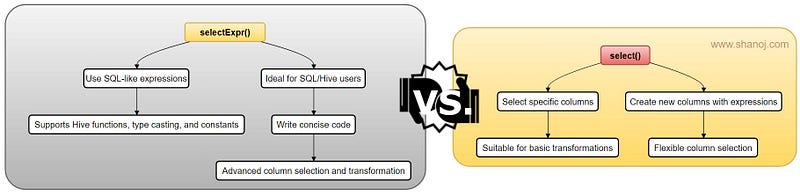
select() Method:

  • Use select() when you need to select specific columns or create new columns using expressions.
  • It’s suitable for straightforward column selection and basic transformations.
  • Provides flexibility with column selection using lists of column names or objects.
  • Use it when applying custom functions or complex operations on columns.

selectExpr() Method:

  • Choose selectExpr() when you want to leverage SQL-like expressions for column selection and transformations.
  • It’s ideal for users familiar with SQL or Hive who want to write concise, expressive code.
  • Supports compatibility with built-in Hive functions, casting data types, and adding constants.
  • Use it when you need advanced SQL-like capabilities for selecting and transforming columns.

🌟 Enjoying my content? 🙏 Follow me here: Shanoj Kumar V

Stackademic

Thank you for reading until the end. Before you go:

  • Please consider clapping and following the writer! 👏
  • Follow us on Twitter(X), LinkedIn, and YouTube.
  • Visit Stackademic.com to find out more about how we are democratizing free programming education around the world.

Apache Flink 101: Stream as Append & Upsert in Dynamic Tables

Apache Flink is a powerful data processing framework that handles batch and stream processing tasks in a single system. Flink provides a flexible and efficient architecture to process large-scale data in real time. In this article, we will discuss two important use cases for stream processing in Apache Flink: Stream as Append and Upsert in Dynamic Tables.

Stream as Append:

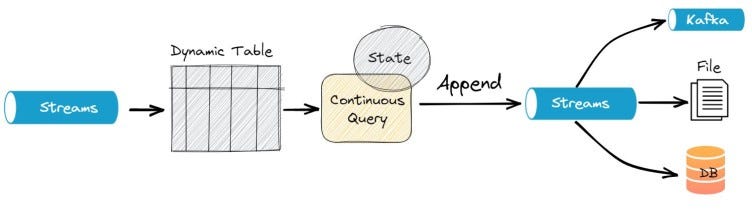
Stream as Append refers to continuously adding new data to an existing table. It is an everyday use case in real-time data processing where the new data must be combined with the current data to form a complete and up-to-date view. In Flink, this can be achieved using Dynamic Tables, which are a way to interact with stateful data streams and tables in Flink.

Suppose we have a sales data stream which a retail company is continuously generating. We want to store this data in a table and append the new data to the existing data.

Here is an example of how to achieve this in PyFlink:

from pyflink.table import StreamTableEnvironment, CsvTableSink, DataTypes
from pyflink.table.descriptors import Schema, OldCsv, FileSystem
# create a StreamTableEnvironment
st_env = StreamTableEnvironment.create()
# define the schema for the sales data stream
sales_schema = Schema().field("item", DataTypes.STRING())\\
.field("price", DataTypes.DOUBLE())\\
.field("timestamp", DataTypes.TIMESTAMP())
# register the sales data stream as a table
st_env.connect(FileSystem().path("/path/to/sales/data"))\\
.with_format(OldCsv().field_delimiter(",").field("item", DataTypes.STRING())\\
.field("price", DataTypes.DOUBLE())\\
.field("timestamp", DataTypes.TIMESTAMP()))\\
.with_schema(sales_schema)\\
.create_temporary_table("sales_table")
# define a table sink to store the sales data
sales_sink = CsvTableSink(["/path/to/sales/table"], ",", 1, FileSystem.WriteMode.OVERWRITE)
# register the sales sink as a table
st_env.register_table_sink("sales_table_sink", sales_sink)
# stream the sales data as-append into the sales sink
st_env.from_path("sales_table").insert_into("sales_table_sink")
# execute the Flink job
st_env.execute("stream-as-append-in-dynamic-table-example")

In this example, we first define the schema for the sales data stream using the Schema API. Then, we use the connect API to register the sales data stream as a table in the StreamTableEnvironment.

Next, the with_format API is used to specify the data format in the sales data stream, which is CSV in this example. Finally, the with_schema API is used to determine the schema of the data in the sales data stream.

Reference: https://nightlies.apache.org/flink/flink-docs-release-1.12/dev/python/table_api_tutorial.html

Next, we define a table sink using the CsvTableSink API, and register it as a table in the StreamTableEnvironment using the register_table_sink API. Next, the insert_into API is used to stream the sales data as-append into the sales sink. Finally, we execute the Flink job using the implemented API.

Reference: https://nightlies.apache.org/flink/flink-docs-release-1.3/api/java/org/apache/flink/table/sinks/CsvTableSink.html

Upsert in Dynamic Tables:

Upsert refers to the process of updating an existing record or inserting a new record if it does not exist. It is an everyday use case in real-time data processing where the data might need to be updated with new information. In Flink, this can be achieved using Dynamic Tables, which provide a flexible way to interact with stateful data streams and tables in Flink.

Here is an example of how to implement upsert in dynamic tables using PyFlink:

from pyflink.datastream import StreamExecutionEnvironment, TimeCharacteristic
from pyflink.table import StreamTableEnvironment, DataTypes
from pyflink.table.descriptors import Schema, OldCsv, FileSystem
# create a StreamExecutionEnvironment and set the time characteristic to EventTime
env = StreamExecutionEnvironment.get_execution_environment()
env.set_stream_time_characteristic(TimeCharacteristic.EventTime)
# create a StreamTableEnvironment
t_env = StreamTableEnvironment.create(env)
# register a dynamic table from the input stream with a unique key
t_env.connect(FileSystem().path("/tmp/sales_data.csv")) \\
.with_format(OldCsv().field("transaction_id", DataTypes.BIGINT())
.field("product", DataTypes.STRING())
.field("amount", DataTypes.DOUBLE())
.field("timestamp", DataTypes.TIMESTAMP())) \\
.with_schema(Schema().field("transaction_id", DataTypes.BIGINT())
.field("product", DataTypes.STRING())
.field("amount", DataTypes.DOUBLE())
.field("timestamp", DataTypes.TIMESTAMP())) \\
.create_temporary_table("sales_table")
# specify the updates using a SQL query
update_sql = "UPDATE sales_table SET amount = new_amount " \\
"FROM (SELECT transaction_id, SUM(amount) AS new_amount " \\
"FROM sales_table GROUP BY transaction_id)"
t_env.sql_update(update_sql)
# start the data processing and sink the result to a CSV file
t_env.execute("upsert_example")

In this example, we first create a StreamExecutionEnvironment and set the time characteristic to EventTime. Then, we create a StreamTableEnvironment and register a dynamic table from the input data stream using the connect method. Finally, the with_format method specifies the input data format, and the with_schema method defines the data schema.

Next, we specify the updates using a SQL query. In this case, we are updating the amount field of the sales_table by summing up the amounts for each transaction ID. Finally, the sql_update method is used to apply the updates to the dynamic table.

Finally, we start the data processing and sink the result to a CSV file using the execute method.

Stackademic

Thank you for reading until the end. Before you go:

  • Please consider clapping and following the writer! 👏
  • Follow us on Twitter(X), LinkedIn, and YouTube.
  • Visit Stackademic.com to find out more about how we are democratizing free programming education around the world.

Apache Flink 101: Checkpointing

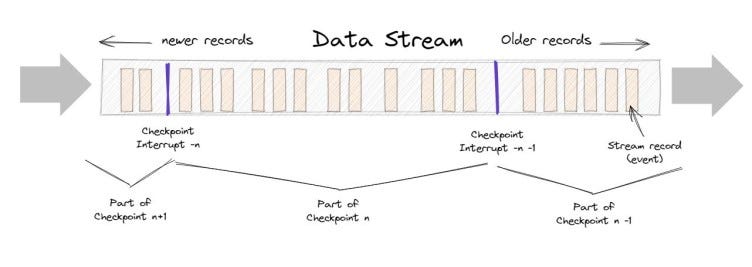
Checkpointing in Apache Flink is the process of saving the current state of a streaming application to a long-term storage system such as HDFS, S3, or a distributed file system on a regular basis. This enables the system to recover from failures by replaying a consistent checkpoint state.

The following are the primary use cases for checkpointing:

  • Stateful Stream Processing: The checkpointing feature of Apache Flink is especially useful for stateful stream processing applications. For example, a real-time fraud detection system that saves the state of a user’s transactions can use checkpointing to save the state regularly and recover it in the event of a failure.
  • Continuous Processing: Checkpointing can also implement continuous data stream processing. If the application is checkpointed at regular intervals, it can be resumed from the last checkpoint in case of a failure, ensuring no data is lost.
  • Event-Driven Applications: It is critical in event-driven architectures to ensure that events are processed in the correct order. Checkpointing can be used to ensure that the application’s state is preserved.
  • Machine Learning and Data Analytics: Checkpointing is also useful in machine learning and data analytics applications where the state of the application needs to be saved periodically to allow for training models or analyzing data.
  • Rolling Upgrades: Checkpointing can be used to implement rolling upgrades of Flink applications. Checkpointing the application’s state before upgrading can be resumed from the last checkpoint after the upgrade, minimizing downtime.

Checkpointing can be enabled in a PyFlink application as follows:

from pyflink.datastream import StreamExecutionEnvironment
# create a StreamExecutionEnvironment
env = StreamExecutionEnvironment.get_execution_environment()
# enable checkpointing
env.enable_checkpointing(interval=1000, checkpoint_directory="hdfs://checkpoints")

In the preceding example, we enable checkpointing with a 1000-millisecond interval, meaning the application’s state will be checkpointed every 1000 milliseconds. The data from the checkpoints will be saved in the “hdfs:/checkpoints” directory.

When checkpointing fails, specify the number of retries and the time between retries.

# enable checkpointing with retries
env.enable_checkpointing(interval=1000, checkpoint_directory="hdfs://checkpoints",
max_concurrent_checkpoints=1,
min_pause_between_checkpoints=5000,
max_failures_before_checkpointing_aborts=3)

In this example, the max concurrent checkpoints parameter is set to 1, implying that only one checkpoint can be active at any given time. The minimum pause between checkpoints setting is set to 5000 milliseconds, meaning there must be a 5000-millisecond pause between two consecutive checkpoints. The value of max failures before checkpointing aborts is set to 3, meaning the application will be terminated if three consecutive checkpoint attempts fail.

Before enabling checkpointing in the application, you must configure the storage system and the directory you want to use for checkpointing.

Stackademic

Thank you for reading until the end. Before you go:

  • Please consider clapping and following the writer! 👏
  • Follow us on Twitter(X), LinkedIn, and YouTube.
  • Visit Stackademic.com to find out more about how we are democratizing free programming education around the world.

Apache Spark 101:Schema Enforcement vs. Schema Inference

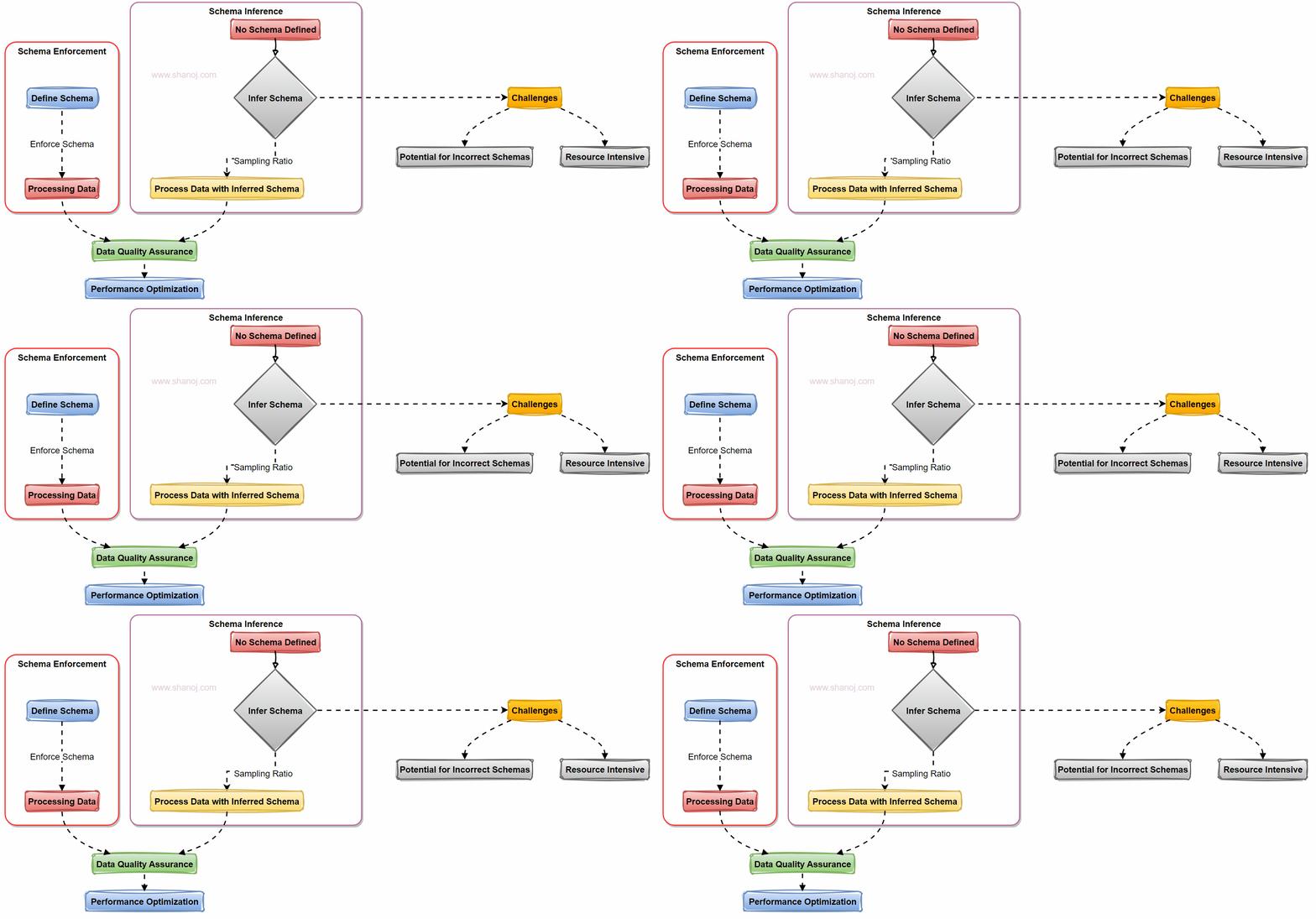
When working with data in Apache Spark, one of the critical decisions you’ll face is how to handle data schemas. Two primary approaches come into play: Schema Enforcement and Schema Inference. Let’s explore these approaches with examples and a visual flowchart.

Understanding Schema in Apache Spark

In Apache Spark, a schema defines the structure of your data, specifying the data types for each field in a dataset. Proper schema management is crucial for data quality and efficient processing.

Schema Enforcement: A Preferred Approach

Schema Enforcement involves explicitly defining a schema for your data before processing it. Here’s why it’s often the preferred choice:

  1. Ensures Data Quality: Enforcing a schema reduces the risk of incorrect schema inference. It acts as a gatekeeper, rejecting data that doesn’t match the defined structure.

For example, schema inference becomes necessary if we use strings as the data input. Let me explain further. For instance, a date might be inferred as a string, and Spark has to scan the data to determine the data types, which can be time-consuming.

2. Performance Optimization: Spark can optimize operations when it knows the schema in advance. This results in faster query performance and more efficient resource usage.

3. Predictable Processing: With a predefined schema, you have predictable data structures and types, making collaboration among teams more straightforward.

Schema Inference: Challenges to Consider

Schema Inference, while flexible, presents challenges:

1. Potential for Incorrect Schemas: Schema inference could lead to incorrect schema detection, causing data interpretation issues.

2. Resource Intensive: Inferring the schema requires scanning the data, which can be time-consuming and resource-intensive, affecting system performance.

Sampling Ratio: A Solution

To mitigate the performance impact of schema inference, you can use a sampling ratio. Instead of scanning the entire dataset, you infer the schema based on a provided ratio. This helps strike a balance between flexibility and performance.

Example: In the case of schema sampling, instead of scanning the complete dataset, you can specify a sampling ratio (e.g., 10%) to infer the schema. This means Spark will analyze only a fraction of the data to determine the schema, reducing the computational overhead.

Two Ways to Enforce Schema

1. Schema Option: You can enforce a schema using Spark’s `schema` option, where you explicitly define the schema in your code.

from pyspark.sql.types import StructType, StructField, StringType, IntegerType

schema = StructType([
StructField("Name", StringType(), nullable=False),
StructField("Age", IntegerType(), nullable=False),
StructField("Email", StringType(), nullable=True)
])

2. Schema DDL: Alternatively, you can enforce the schema using Data Definition Language (DDL) statements when reading data:

df = spark.read.option("header", "true").option("inferSchema", "false").schema(schema).csv("customer_data.csv")

When working with data in Apache Spark, choosing between Schema Enforcement and Schema Inference is critical. Schema Enforcement is often preferred for data quality and performance reasons. However, you can use schema inference with a sampling ratio to strike a balance. Remember that the choice between schema enforcement and inference depends on your data characteristics and processing needs. In many cases, enforcing the schema is the way to go for robust and efficient data pipelines.

🌟 Enjoying my content? 🙏 Follow me here: Shanoj Kumar V

Stackademic

Thank you for reading until the end. Before you go:

  • Please consider clapping and following the writer! 👏
  • Follow us on Twitter(X), LinkedIn, and YouTube.
  • Visit Stackademic.com to find out more about how we are democratizing free programming education around the world.