Tag Archives: Data Engineering

Apache Flink 101: Checkpointing

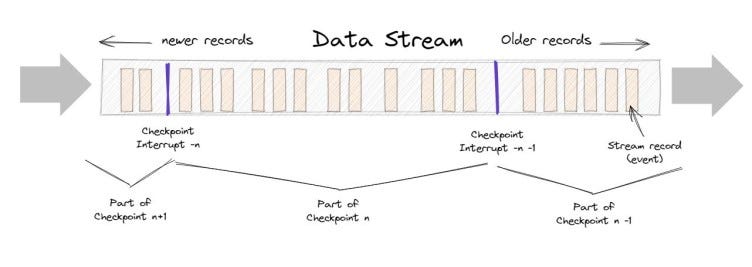
Checkpointing in Apache Flink is the process of saving the current state of a streaming application to a long-term storage system such as HDFS, S3, or a distributed file system on a regular basis. This enables the system to recover from failures by replaying a consistent checkpoint state.

The following are the primary use cases for checkpointing:

  • Stateful Stream Processing: The checkpointing feature of Apache Flink is especially useful for stateful stream processing applications. For example, a real-time fraud detection system that saves the state of a user’s transactions can use checkpointing to save the state regularly and recover it in the event of a failure.
  • Continuous Processing: Checkpointing can also implement continuous data stream processing. If the application is checkpointed at regular intervals, it can be resumed from the last checkpoint in case of a failure, ensuring no data is lost.
  • Event-Driven Applications: It is critical in event-driven architectures to ensure that events are processed in the correct order. Checkpointing can be used to ensure that the application’s state is preserved.
  • Machine Learning and Data Analytics: Checkpointing is also useful in machine learning and data analytics applications where the state of the application needs to be saved periodically to allow for training models or analyzing data.
  • Rolling Upgrades: Checkpointing can be used to implement rolling upgrades of Flink applications. Checkpointing the application’s state before upgrading can be resumed from the last checkpoint after the upgrade, minimizing downtime.

Checkpointing can be enabled in a PyFlink application as follows:

from pyflink.datastream import StreamExecutionEnvironment
# create a StreamExecutionEnvironment
env = StreamExecutionEnvironment.get_execution_environment()
# enable checkpointing
env.enable_checkpointing(interval=1000, checkpoint_directory="hdfs://checkpoints")

In the preceding example, we enable checkpointing with a 1000-millisecond interval, meaning the application’s state will be checkpointed every 1000 milliseconds. The data from the checkpoints will be saved in the “hdfs:/checkpoints” directory.

When checkpointing fails, specify the number of retries and the time between retries.

# enable checkpointing with retries
env.enable_checkpointing(interval=1000, checkpoint_directory="hdfs://checkpoints",
max_concurrent_checkpoints=1,
min_pause_between_checkpoints=5000,
max_failures_before_checkpointing_aborts=3)

In this example, the max concurrent checkpoints parameter is set to 1, implying that only one checkpoint can be active at any given time. The minimum pause between checkpoints setting is set to 5000 milliseconds, meaning there must be a 5000-millisecond pause between two consecutive checkpoints. The value of max failures before checkpointing aborts is set to 3, meaning the application will be terminated if three consecutive checkpoint attempts fail.

Before enabling checkpointing in the application, you must configure the storage system and the directory you want to use for checkpointing.

Stackademic

Thank you for reading until the end. Before you go:

  • Please consider clapping and following the writer! 👏
  • Follow us on Twitter(X), LinkedIn, and YouTube.
  • Visit Stackademic.com to find out more about how we are democratizing free programming education around the world.
Apache Spark 101:Schema Enforcement vs. Schema Inference

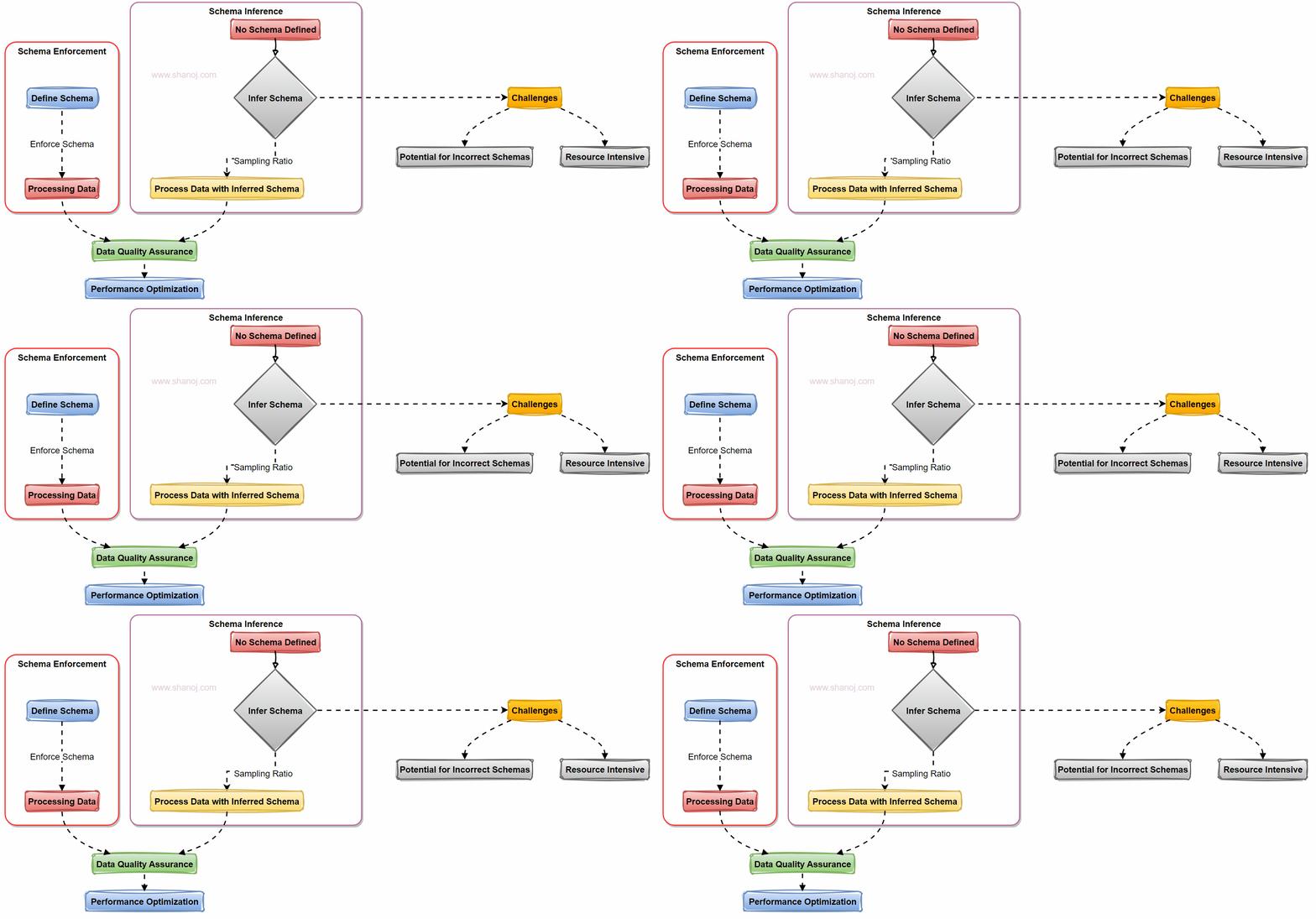
When working with data in Apache Spark, one of the critical decisions you’ll face is how to handle data schemas. Two primary approaches come into play: Schema Enforcement and Schema Inference. Let’s explore these approaches with examples and a visual flowchart.

Understanding Schema in Apache Spark

In Apache Spark, a schema defines the structure of your data, specifying the data types for each field in a dataset. Proper schema management is crucial for data quality and efficient processing.

Schema Enforcement: A Preferred Approach

Schema Enforcement involves explicitly defining a schema for your data before processing it. Here’s why it’s often the preferred choice:

  1. Ensures Data Quality: Enforcing a schema reduces the risk of incorrect schema inference. It acts as a gatekeeper, rejecting data that doesn’t match the defined structure.

For example, schema inference becomes necessary if we use strings as the data input. Let me explain further. For instance, a date might be inferred as a string, and Spark has to scan the data to determine the data types, which can be time-consuming.

2. Performance Optimization: Spark can optimize operations when it knows the schema in advance. This results in faster query performance and more efficient resource usage.

3. Predictable Processing: With a predefined schema, you have predictable data structures and types, making collaboration among teams more straightforward.

Schema Inference: Challenges to Consider

Schema Inference, while flexible, presents challenges:

1. Potential for Incorrect Schemas: Schema inference could lead to incorrect schema detection, causing data interpretation issues.

2. Resource Intensive: Inferring the schema requires scanning the data, which can be time-consuming and resource-intensive, affecting system performance.

Sampling Ratio: A Solution

To mitigate the performance impact of schema inference, you can use a sampling ratio. Instead of scanning the entire dataset, you infer the schema based on a provided ratio. This helps strike a balance between flexibility and performance.

Example: In the case of schema sampling, instead of scanning the complete dataset, you can specify a sampling ratio (e.g., 10%) to infer the schema. This means Spark will analyze only a fraction of the data to determine the schema, reducing the computational overhead.

Two Ways to Enforce Schema

1. Schema Option: You can enforce a schema using Spark’s `schema` option, where you explicitly define the schema in your code.

from pyspark.sql.types import StructType, StructField, StringType, IntegerType

schema = StructType([
StructField("Name", StringType(), nullable=False),
StructField("Age", IntegerType(), nullable=False),
StructField("Email", StringType(), nullable=True)
])

2. Schema DDL: Alternatively, you can enforce the schema using Data Definition Language (DDL) statements when reading data:

df = spark.read.option("header", "true").option("inferSchema", "false").schema(schema).csv("customer_data.csv")

When working with data in Apache Spark, choosing between Schema Enforcement and Schema Inference is critical. Schema Enforcement is often preferred for data quality and performance reasons. However, you can use schema inference with a sampling ratio to strike a balance. Remember that the choice between schema enforcement and inference depends on your data characteristics and processing needs. In many cases, enforcing the schema is the way to go for robust and efficient data pipelines.

🌟 Enjoying my content? 🙏 Follow me here: Shanoj Kumar V

Stackademic

Thank you for reading until the end. Before you go:

  • Please consider clapping and following the writer! 👏
  • Follow us on Twitter(X), LinkedIn, and YouTube.
  • Visit Stackademic.com to find out more about how we are democratizing free programming education around the world.