Tag Archives: Data Science

Understanding Memory Spills in Apache Spark

Memory spill in Apache Spark is the process of transferring data from RAM to disk, and potentially back again. This happens when the dataset exceeds the available memory capacity of an executor during tasks that require more memory than is available. In such cases, data is spilled to disk to free up RAM and prevent out-of-memory errors. However, this process can slow down processing due to the slower speed of disk I/O compared to memory access.

Dynamic Occupancy Mechanism

Apache Spark employs a dynamic occupancy mechanism for managing Execution and Storage memory pools. This mechanism enhances the flexibility of memory usage by allowing Execution Memory and Storage Memory to borrow from each other, depending on workload demands:

  • Execution Memory: Primarily used for computation tasks such as shuffles, joins, and sorts. When execution tasks demand more memory, they can borrow from the Storage Memory if it is underutilized.
  • Storage Memory: Used for caching and persisting RDDs, DataFrames, and Datasets. If the demand for storage memory exceeds its allocation, and Execution Memory is not fully utilized, Storage Memory can expand into the space allocated for Execution Memory.

Spark’s internal memory manager controls this dynamic sharing and is crucial for optimizing the utilization of available memory resources, significantly reducing the likelihood of memory spills.

Common Performance Issues Related to Spills

Spill(disk) and Spill(memory): When data doesn’t fit in RAM, it is temporarily written to disk. This operation, while enabling Spark to handle larger datasets, impacts computation time and efficiency because disk access is slower than memory access.

Impact on Performance: Spills to disk can negatively affect performance, increasing both the cost and operational complexity of Spark applications. The strength of Spark lies in its in-memory computing capabilities; thus, disk spills are counterproductive to its design philosophy.

Solutions for Memory Spill in Apache Spark

Mitigating memory spill issues involve several strategies aimed at optimizing memory use, partitioning data more effectively, and improving overall application performance.

Optimizing Memory Configuration

  • Adjust memory allocation settings to provide sufficient memory for both execution and storage, potentially increasing the memory per executor.
  • Tune the ratio between execution and storage memory based on the specific requirements of your workload.

Partitioning Data

  • Optimize data partitioning to ensure even data distribution across partitions, which helps in avoiding memory overloads in individual partitions.
  • Consider different partitioning strategies such as range, hash, or custom partitioning based on the nature of your data.

Caching and Persistence

  • Use caching and persistence methods (e.g., cache() or persist()) to store intermediate results or frequently accessed data in memory, reducing the need for recomputation.
  • Select the appropriate storage level for caching to balance between memory usage and CPU efficiency.

Monitoring and Tuning

  • Monitor memory usage and spills using Spark UI or other monitoring tools to identify and address bottlenecks.
  • Adjust configurations dynamically based on performance metrics and workload patterns.

Data Compression

  • Employ data compression techniques and columnar storage formats (e.g., Parquet, ORC) to reduce the memory footprint.
  • Compress RDDs using serialization mechanisms like MEMORY_ONLY_SER to minimize memory usage.

Avoiding Heavy Shuffles

  • Optimize join operations and minimize unnecessary data movement by using strategies such as broadcasting smaller tables or implementing partition pruning.
  • Reduce shuffle operations which can lead to spills by avoiding wide dependencies and optimizing shuffle operations.

Formulaic Approach to Avoid Memory Spills

Apache Spark’s memory management model is designed to balance between execution memory (used for computation like shuffles, joins, sorts) and storage memory (used for caching and persisting data). Understanding and optimizing the use of these memory segments can significantly reduce the likelihood of memory spills.

Memory Configuration Parameters:

  • Total Executor Memory (spark.executor.memory): The total memory allocated per executor.
  • Memory Overhead (spark.executor.memoryOverhead): Additional memory allocated to each executor, beyond spark.executor.memory, for Spark to execute smoothly.
  • Spark Memory Fraction (spark.memory.fraction): Specifies the proportion of the executor memory dedicated to Spark’s memory management system (default is 0.6 or 60%).

Simplified Memory Calculation:

Calculate Available Memory for Spark:

Available Memory=(Total Executor Memory−Memory Overhead)×Spark Memory FractionAvailable Memory=(Total Executor Memory−Memory Overhead)×Spark Memory Fraction

Determine Execution and Storage Memory: Spark splits the available memory between execution and storage. The division is dynamic, but under memory pressure, storage can shrink to as low as the value defined by spark.memory.storageFraction (default is 0.5 or 50% of Spark memory).

Example Calculation:

  • Suppose an executor is configured with 10GB (spark.executor.memory = 10GB) and the default overhead (10% of executor memory or at least 384MB). Let’s assume an overhead of 1GB for simplicity and the default memory fractions.
  • Total Executor Memory: 10GB
  • Memory Overhead: 1GB
  • Spark Memory Fraction: 0.6 (60%)

Available Memory for Spark=(10GB−1GB)×0.6=5.4GBAvailable Memory for Spark=(10GB−1GB)×0.6=5.4GB

  • Assuming spark.memory.storageFraction is set to 0.5, both execution and storage memory pools could use up to 2.7GB each under balanced conditions.

Strategies to Avoid Memory Spills:

  • Increase Memory Allocation: If possible, increasing spark.executor.memory ensures more memory is available for Spark processes.
  • Adjust Memory Fractions: Tweaking spark.memory.fraction and spark.memory.storageFraction can help allocate memory more efficiently based on the workload. For compute-intensive operations, you might allocate more memory for execution.

Real-life Use Case: E-commerce Sales Analysis

An e-commerce platform experienced frequent memory spills while processing extensive sales data during holiday seasons, leading to performance bottlenecks.

Problem:

Large-scale aggregations and joins were causing spills to disk, slowing down the analysis of sales data, impacting the ability to generate real-time insights for inventory and pricing adjustments.

Solution:

  • Memory Optimization: The data team increased the executor memory from 8GB to 16GB per executor and adjusted the spark.memory.fraction to 0.8 to dedicate more memory to Spark’s managed memory system.
  • Partitioning and Data Skew Management: They implemented custom partitioning strategies to distribute the data more evenly across nodes, reducing the likelihood of individual tasks running out of memory.
  • Caching Strategy: Important datasets used repeatedly across different stages of the analysis were persisted in memory, and the team carefully chose the storage levels to balance between memory usage and CPU efficiency.
  • Monitoring and Tuning: Continuous monitoring of the Spark UI and logs allowed the team to identify memory-intensive operations and adjust configurations dynamically. They also fine-tuned spark.memory.storageFraction to better balance between execution and storage memory, based on the nature of their tasks.

These strategies significantly reduced the occurrence of memory spills, improved the processing speed of sales data analysis, and enabled the e-commerce platform to adjust inventory and pricing strategies in near real-time during peak sales periods.

This example demonstrates the importance of a holistic approach to Spark memory management, including proper configuration, efficient data partitioning, and strategic use of caching, to mitigate memory spill issues and enhance application performance.

Stackademic 🎓

Thank you for reading until the end. Before you go:

Apache Spark 101: Dynamic Allocation, spark-submit Command and Cluster Management

This diagram shows Apache Spark’s executor memory model in a YARN-managed cluster. Executors are allocated a specific amount of Heap and Off-Heap memory. Heap memory is divided into Execution Memory, Storage Memory, and User Memory. A small portion is reserved as Reserved Memory. Off-Heap memory is utilized for data not stored in the JVM heap and Overhead accounts for additional memory allocations beyond the executor memory. This allocation optimizes memory usage and performance in Spark applications while ensuring system resources are not exhausted.

Apache Spark’s dynamic allocation feature enables it to automatically adjust the number of executors used in a Spark application based on the workload. This feature is handy in shared cluster environments where resources must be efficiently allocated across multiple applications. Here’s an overview of the critical aspects:

  • Purpose: Automatically scales the number of executors up or down depending on the application’s needs.
  • Benefit: Improves resource utilization and handles varying workloads efficiently.

How It Works

  • Adding Executors: Spark requests more executors when tasks are pending, and resources are underutilized.
  • Removing Executors: Spark releases them back to the cluster if executors are idle for a certain period.
  • Resource Consideration: Takes into account the total number of cores and memory available in the cluster.

Configuration

  • spark.dynamicAllocation.enabled: Must be set to true allow for dynamic allocation.
  • spark.dynamicAllocation.minExecutors: Minimum number of executors Spark will retain.
  • spark.dynamicAllocation.maxExecutors: Maximum number of executors Spark can acquire.
  • spark.dynamicAllocation.initialExecutors: Initial number of executors to run if dynamic allocation is enabled.
  • spark.dynamicAllocation.executorIdleTimeout: Duration after which idle executors are removed.
  • spark.dynamicAllocation.schedulerBacklogTimeout: The time after which Spark will start adding new executors if there are pending tasks.

Integration with External Shuffle Service

  • Necessity: Essential for dynamic allocation to work effectively.
  • Function: Maintains shuffle data after executors are terminated, ensuring data is not lost when executors are dynamically removed.

Advantages

  • Efficient Resource Usage: Only uses resources as needed, freeing them when unused.
  • Adaptability: Adjusts to varying workloads without manual intervention.
  • Cost-Effective: In cloud environments, costs can be reduced by using fewer resources.

Considerations and Best Practices

  • Workload Characteristics: Best suited for jobs with varying stages and resource requirements.
  • Fine-tuning: Requires careful configuration to ensure optimal performance.
  • Monitoring: Keep an eye on application performance and adjust configurations as necessary.

Limitations

  • Not Ideal for All Workloads: It may not benefit applications with stable or predictable resource requirements.
  • Delay in Scaling: There can be a delay in executor allocation and deallocation, which might affect performance.

Use Cases

  • Variable Data Loads: Ideal for applications that experience fluctuating amounts of data.
  • Shared Clusters: Maximizes resource utilization in environments where multiple applications run concurrently.
  • Setup Spark Session with Dynamic Allocation Enabled This assumes Spark is set up with dynamic allocation enabled by default. You can create a Spark session like this:
from pyspark.sql import SparkSession

spark = SparkSession.builder \
.appName("DynamicAllocationDemo") \
.getOrCreate()
  • Run a Spark Job Now, run a simple Spark job to see dynamic allocation in action. For example, you can read a large dataset and perform some transformations or actions on it.
# Example: Load a dataset and perform an action
df = spark.read.csv("path_to_large_dataset.csv")
df.count()
  • Monitor Executors While the job is running, you can monitor the Spark UI (usually available at http://[driver-node]:4040) to see how executors are dynamically allocated and released based on the workload.

Turning Off Dynamic Allocation

To turn off dynamic allocation, you need to set spark.dynamicAllocation.enabled to false. This is how you can do it:

  • Modify Spark Session Configuration
spark.conf.set("spark.dynamicAllocation.enabled", "false")
  • Restart the Spark Session Restarting the Spark session is necessary for the configuration changes to take effect.
  • Verify the Setting You can verify if the dynamic allocation is turned off by checking the configuration:
print(spark.conf.get("spark.dynamicAllocation.enabled"))

Checking if Dynamic Allocation is Enabled

To check if dynamic allocation is currently enabled in your Spark session, you can use the following command:

print(spark.conf.get("spark.dynamicAllocation.enabled"))

This will print true if dynamic allocation is enabled and false if it is disabled.

Important Notes

  • Environment Setup: Ensure your Spark environment (like YARN or standalone cluster) supports dynamic allocation.
  • External Shuffle Service: An external shuffle service must be enabled in your cluster for dynamic allocation to work properly, especially when decreasing the number of executors.
  • Resource Manager: This demo assumes you have a resource manager (like YARN) that supports dynamic allocation.
  • Data and Resources: The effectiveness of the demo depends on the size of your data and the resources of your cluster. You might need a sufficiently large dataset and a cluster setup to observe dynamic allocation effectively.

spark-submit is a powerful tool used to submit Spark applications to a cluster for execution. It’s essential in the Spark ecosystem, especially when working with large-scale data processing. Let’s dive into both a high-level overview and a detailed explanation of spark-submit.

Spark Submit:

High-Level Overview

  • Purpose: spark-submit is the command-line interface for running Spark applications. It handles the packaging of your application, distributing it across the cluster, and executing it.
  • Usage: It’s typically used in environments where Spark is running in standalone cluster mode, Mesos, YARN, or Kubernetes. It’s not used in interactive environments like a Jupyter Notebook.
  • Flexibility: It supports submitting Scala, Java, and Python applications.
  • Cluster Manager Integration: It integrates seamlessly with various cluster managers to allocate resources and manage and monitor Spark jobs.

Detailed Explanation

Command Structure:

  • Basic Syntax: spark-submit [options] <app jar | python file> [app arguments]
  • Options: These include configurations for the Spark application, such as memory size, the number of executors, properties files, etc.
  • App Jar / Python File: The path to a bundled JAR file for Scala/Java applications or a .py file for Python applications.
  • App Arguments: Arguments that need to be passed to the primary method of your application.

Key Options:

  • --class: For Java/Scala applications, the entry point class.
  • --master: The master URL for the cluster (e.g., spark://23.195.26.187:7077, yarn, mesos://, k8s://).
  • --deploy-mode: Whether to deploy your driver on the worker nodes (cluster) or locally as an external client (client).
  • --conf: Arbitrary Spark configuration property in key=value format.
  • Resource Options: Like --executor-memory, --driver-memory, --executor-cores, etc.

Working with Cluster Managers:

  • In YARN mode, spark-submit can dynamically allocate resources based on demand.
  • For Mesos, it can run in either fine-grained mode (lower latency) or coarse-grained mode (higher throughput).
  • In Kubernetes, it can create containers for Spark jobs directly in a Kubernetes cluster.

Environment Variables:

  • Spark uses several environmental variables like SPARK_HOME, JAVA_HOME, etc. These need to be correctly set up.

Advanced Features:

  • Dynamic Allocation: This can allocate or deallocate resources dynamically based on the workload.
  • Logging and Monitoring: Integration with tools like Spark History Server for job monitoring and debugging.
spark-submit \
--class com.example.MyApp \
--master yarn \
--deploy-mode cluster \
--executor-memory 4g \
--total-executor-cores 4 \
/path/to/myApp.jar \
arg1 arg2

Usage Considerations

  • Application Packaging: Applications should be assembled into a fat JAR with all dependencies for Scala and Java.
  • Python Applications: Python dependencies should be managed carefully, especially when working with a cluster.
  • Testing: It’s good practice to test Spark applications locally in --master local mode before deploying to a cluster.
  • Debugging: Since applications are submitted to a cluster, debugging can be more challenging and often relies on log analysis.

Stackademic

Thank you for reading until the end. Before you go:

  • Please consider clapping and following the writer! 👏
  • Follow us on Twitter(X), LinkedIn, and YouTube.
  • Visit Stackademic.com to find out more about how we are democratizing free programming education around the world.

Apache Spark 101: Understanding Spark Code Execution

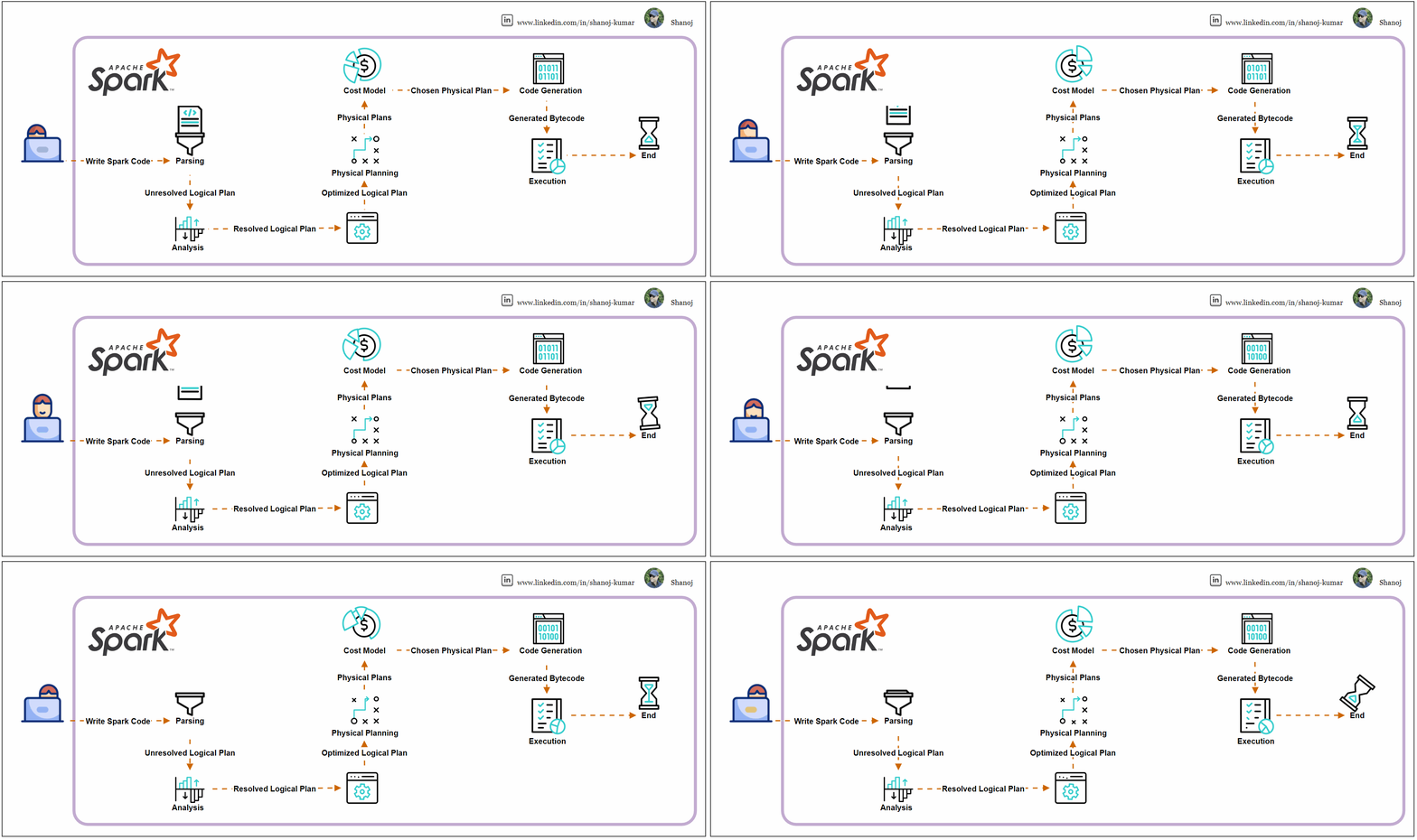
Apache Spark is a powerful distributed data processing engine widely used in big data and machine learning applications. Thanks to its enriched API and robust data structures such as DataFrames and Datasets, it offers a higher level of abstraction than traditional map-reduce jobs.

Spark Code Execution Journey

Parsing

  • Spark SQL queries or DataFrame API methods are parsed into an unresolved logical plan.
  • The parsing step converts the code into a Spark-understandable format without checking table or column existence.

Analysis

  • The unresolved logical plan undergoes analysis by the Catalyst optimizer, Spark’s optimization framework.
  • This phase confirms the existence of tables, columns, and functions, resulting in a resolved logical plan where all references are validated against the catalogue schema.

Logical Plan Optimization

  • The Catalyst optimizer applies optimization rules to the resolved logical plan, potentially reordering joins, pushing down predicates, or combining filters, creating an optimized logical plan.

Physical Planning

  • The optimized logical plan is transformed into one or more physical plans, outlining the execution strategy and order of operations like map, filter, and join.

Cost Model

  • Spark evaluates these physical plans using a cost model, selecting the most efficient one based on data sizes and distribution heuristics.

Code Generation

  • Once the final physical plan is chosen, Spark employs WholeStage CodeGen to generate optimized Java bytecode that will run on the executors, minimizing JVM calls and optimizing execution.

Execution

  • The bytecode is distributed to executors across the cluster for execution, with tasks running in parallel, processing data in partitions, and producing the final output.

The Catalyst optimizer is integral throughout these steps, enhancing the performance of Spark SQL queries and DataFrame operations using rule-based and cost-based optimization.

Example Execution Plan

Consider a SQL query that joins two tables and filters and aggregates the data:

SELECT department, COUNT(*)
FROM employees
JOIN departments ON employees.dep_id = departments.id
WHERE employees.age > 30
GROUP BY department

The execution plan may follow these steps:

· Parsed Logical Plan: The initial SQL command is parsed into an unresolved logical plan.

· Analyzed Logical Plan: The plan is analyzed and resolved against the table schemas.

· Optimized Logical Plan: The Catalyst optimizer optimizes the plan.

· Physical Plan: A cost-effective physical plan is selected.

· Execution: The physical plan is executed across the Spark cluster.


The execution plan for the given SQL query in Apache Spark involves several stages, from logical planning to physical execution. Here’s a simplified breakdown:

Parsed Logical Plan: Spark parses the SQL query into an initial logical plan. This plan is unresolved as it only represents the structure of the query without checking the existence of the tables or columns.

'Project ['department]
+- 'Aggregate ['department], ['department, 'COUNT(1)]
+- 'Filter ('age > 30)
+- 'Join Inner, ('employees.dep_id = 'departments.id)
:- 'UnresolvedRelation `employees`
+- 'UnresolvedRelation `departments`

Analyzed Logical Plan: The parsed logical plan is analyzed against the database catalogue. This resolves table and column names and checks for invalid operations or data types.

Project [department#123]
+- Aggregate [department#123], [department#123, COUNT(1) AS count#124]
+- Filter (age#125 > 30)
+- Join Inner, (dep_id#126 = id#127)
:- SubqueryAlias employees
: +- Relation[age#125,dep_id#126] parquet
+- SubqueryAlias departments
+- Relation[department#123,id#127] parquet

Optimized Logical Plan: The Catalyst optimizer applies a series of rules to the logical plan to optimize it. It may reorder joins, push down filters, and perform other optimizations.

Aggregate [department#123], [department#123, COUNT(1) AS count#124]
+- Project [department#123, age#125]
+- Join Inner, (dep_id#126 = id#127)
:- Filter (age#125 > 30)
: +- Relation[age#125,dep_id#126] parquet
+- Relation[department#123,id#127] parquet

Physical Plan: Spark generates one or more physical plans from the logical plan. It then uses a cost model to choose the most efficient physical plan for execution.

*(3) HashAggregate(keys=[department#123], functions=[count(1)], output=[department#123, count#124])
+- Exchange hashpartitioning(department#123, 200)
+- *(2) HashAggregate(keys=[department#123], functions=[partial_count(1)], output=[department#123, count#125])
+- *(2) Project [department#123, age#125]
+- *(2) BroadcastHashJoin [dep_id#126], [id#127], Inner, BuildRight
:- *(2) Filter (age#125 > 30)
: +- *(2) ColumnarToRow
: +- FileScan parquet [age#125,dep_id#126]
+- BroadcastExchange HashedRelationBroadcastMode(List(input[1, int, false]))
+- *(1) ColumnarToRow
+- FileScan parquet [department#123,id#127]

Code Generation: Spark generates Java bytecode for the chosen physical plan to run on each executor. This process is known as WholeStage CodeGen.

Execution: The bytecode is sent to Spark executors distributed across the cluster. Executors run the tasks in parallel, processing the data in partitions.

During execution, tasks are executed within stages, and stages may have shuffle boundaries where data is redistributed across the cluster. The Exchange hashpartitioning indicates a shuffle operation due to the GROUP BY clause.

Stackademic

Thank you for reading until the end. Before you go:

  • Please consider clapping and following the writer! 👏
  • Follow us on Twitter(X), LinkedIn, and YouTube.
  • Visit Stackademic.com to find out more about how we are democratizing free programming education around the world.

Book Review: Essential Math for Data Science [Detailed]

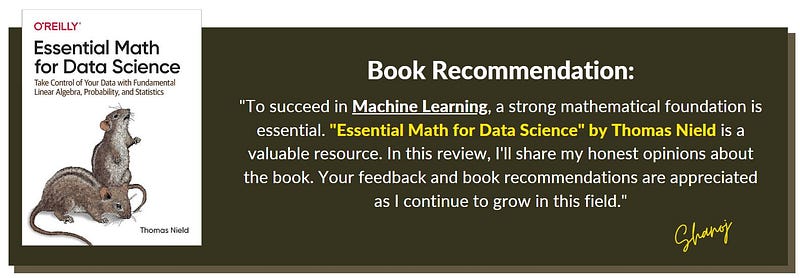
I recently asked my close friends for feedback on what skills I should work on to advance my career. The consensus was clear: I must focus on AI/ML and front-end technologies. I take their suggestions seriously and have decided to start with a strong foundation. Since I’m particularly interested in machine learning, I realized that mathematics is at the core of this field. Before diving into the technological aspects, I must strengthen my mathematical fundamentals. With this goal in mind, I began exploring resources and found “Essential Math for Data Science” by Thomas Nield to be a standout book. In this review, I’ll provide my honest assessment of the book.

Review:

Chapter 1: Basic Mathematics and Calculus The book starts with an introduction to basic mathematics and calculus. This chapter serves as a refresher for those new to mathematical concepts. It covers topics like limits and derivatives, making it accessible for beginners while providing a valuable review for others. The use of coding exercises helps reinforce understanding.

Chapter 2: Probability The second chapter introduces probability with relevant real-life examples. This approach makes the abstract concept of probability more relatable and easier to grasp for readers.

Chapter 3: Descriptive and Inferential Statistics Chapter 3 builds on the concepts of probability, seamlessly connecting them to descriptive and inferential statistics. The author’s storytelling approach, such as the example involving a botanist, adds a practical and engaging dimension to statistics.

Chapter 4: Linear Algebra is a fundamental topic for data science, and this chapter covers it nicely. It starts with the basics of vectors and matrices, making it accessible to those new to the subject.

Chapter 5: The chapter on linear regression is well-structured and covers key aspects, including finding the best-fit line, correlation coefficients, and prediction intervals. Including stochastic gradient descent is a valuable addition, providing readers with a practical understanding of the topic.

Chapter 6: This chapter delves into logistic regression and classification, explaining concepts like R-squared, P-values, and confusion matrices. The discussion of ROC AUC and handling class imbalances is particularly useful.

Chapter 7: offers an overview of neural networks, discussing the forward and backward passes. While it provides a good foundation, it could benefit from more depth, especially considering the importance of neural networks in modern data science and machine learning.

Chapter 8: The final chapter offers valuable career guidance for data science enthusiasts. It provides insights and advice on navigating a career in this field, making it a helpful addition to the book.

Exercises and Examples One of the book’s strengths is its inclusion of exercises and example problems at the end of each chapter. These exercises challenge readers to apply what they’ve learned and reinforce their understanding of the concepts.

“Essential Math for Data Science” by Thomas Nield is a fantastic resource for individuals looking to strengthen their mathematical foundation in data science and machine learning. It is well-structured, and the author’s practical approach makes complex concepts more accessible. The book is an excellent supplementary resource, but some areas have room for additional depth. On a scale of 1 to 10, I rate it a solid 9.

As I delve deeper into the world of data science and machine learning, strengthening my mathematical foundation is just the beginning. “Essential Mathematics for Data Science” has provided me with a solid starting point. However, my learning journey continues, and I’m excited to explore these additional resources:

  1. “Essential Math for AI: Next-Level Mathematics for Efficient and Successful AI Systems”
  2. “Practical Linear Algebra for Data Science: From Core Concepts to Applications Using Python”
  3. “Practical Statistics for Data Scientists: 50+ Essential Concepts Using R and Python”

Also, I value your insights, and if you have any recommendations or advice to share, please don’t hesitate to comment below. Your feedback is invaluable as I progress in my studies.

🌟 Enjoying my content? 🙏 Follow me here: Shanoj Kumar V

Stackademic

Thank you for reading until the end. Before you go:

  • Please consider clapping and following the writer! 👏
  • Follow us on Twitter(X), LinkedIn, and YouTube.
  • Visit Stackademic.com to find out more about how we are democratizing free programming education around the world.