
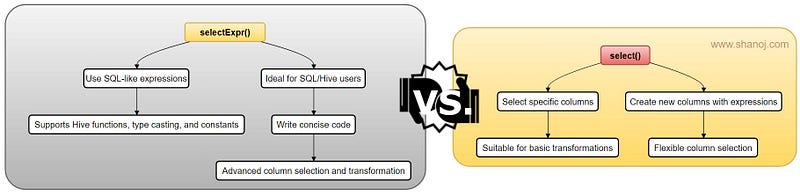
Column selection is a frequently used operation when working with Spark DataFrames. Spark provides two built-in methods select() and selectExpr(), to facilitate this task. In this article, we will discuss how to use both methods, explain their main differences, and provide guidance on when to choose one over the other.
To demonstrate these methods, let’s start by creating a sample DataFrame that we will use throughout this article:
# Import the necessary libraries
from pyspark.sql import SparkSession
from pyspark.sql.types import StructType, StructField, IntegerType, StringType
# Create a SparkSession
spark = SparkSession.builder \
    .appName('Example') \
    .getOrCreate()
# Define the schema
schema = StructType([
    StructField('id', IntegerType(), True),
    StructField('first_name', StringType(), True),
    StructField('last_name', StringType(), True),
    StructField('age', IntegerType(), True),
    StructField('salary', IntegerType(), True),
    StructField('bonus', IntegerType(), True)
])
# Define the data
data = [
    (1, 'Aarav', 'Gupta', 28, 60000, 2000),
    (2, 'Ishita', 'Sharma', 31, 75000, 3000),
    (3, 'Aryan', 'Yadav', 31, 80000, 2500),
    (4, 'Dia', 'Verma', 29, 62000, 1800)
]
# Create the DataFrame
df = spark.createDataFrame(data, schema=schema)
# Show the DataFrame
df.show()

DataFrames: In Spark, a DataFrame is a distributed collection of data organized into named columns, similar to a table in a relational database. DataFrames offer a structured and efficient way to work with structured and semi-structured data.
Understanding select()
The select() method in PySpark’s DataFrame API is used to project-specific columns from a DataFrame. It accepts various arguments, including column names, Column objects, and expressions.
- List of Column Names: You can pass column names as a list of strings to select specific columns.
- List of Column Objects: Alternatively, you can import the Spark Column class from
pyspark.sql.functions, create column objects, and pass them in a list. - Expressions: It allows you to create new columns based on existing ones by providing expressions. These expressions can include mathematical operations, aggregations, or any valid transformations.
- “*” (Star): The star syntax selects all columns, akin to
SELECT *in SQL.
Select Specific Columns
To select a subset of columns, provide their names as arguments to the select() method:

selectExpr()
The pyspark.sql.DataFrame.selectExpr() method is similar to select(), but it accepts SQL expressions in string format. This lets you perform more complex column selection and transformations directly within the method. Unlike select(), selectExpr() It only accepts strings as input.
SQL-Like Expressions
One of the key advantages of selectExpr() is its ability to work with SQL-like expressions for column selection and transformation. For example, you can calculate the length of the ‘first_name’ column and alias it as ‘name_length’ as follows:

Built-In Hive Functions
selectExpr() also allows you to leverage built-in Hive functions for more advanced transformations. This is particularly useful for users familiar with SQL or Hive who want to write concise and expressive code. For example, you can cast the ‘age’ column from string to integer:

Adding Constants
You can also add constant fields to your DataFrame using selectExpr(). For example, you can add the current date as a new column:

selectExpr()is a powerful method for column selection and transformation when you need to perform more complex operations within a single method call.
Key Differences and Best Use Cases
Now that we have explored both select() and selectExpr() methods, let’s summarize their key differences and identify the best use cases for each.
select() Method:
- Use
select()when you need to select specific columns or create new columns using expressions. - It’s suitable for straightforward column selection and basic transformations.
- Provides flexibility with column selection using lists of column names or objects.
- Use it when applying custom functions or complex operations on columns.
selectExpr() Method:
- Choose
selectExpr()when you want to leverage SQL-like expressions for column selection and transformations. - It’s ideal for users familiar with SQL or Hive who want to write concise, expressive code.
- Supports compatibility with built-in Hive functions, casting data types, and adding constants.
- Use it when you need advanced SQL-like capabilities for selecting and transforming columns.
🌟 Enjoying my content? 🙏 Follow me here: Shanoj Kumar V
Stackademic
Thank you for reading until the end. Before you go:
- Please consider clapping and following the writer! 👏
- Follow us on Twitter(X), LinkedIn, and YouTube.
- Visit Stackademic.com to find out more about how we are democratizing free programming education around the world.
 Shanoj