
Why every developer should understand the fundamentals of language model processing

TL;DR
Text processing is the foundation of all language model applications, yet most developers use pre-built libraries without understanding the underlying mechanics. In this Day 2 tutorial of our learning journey, I’ll walk you through building a complete text processing pipeline from scratch using Python. You’ll implement tokenization strategies, vocabulary building, word embeddings, and a simple language model with interactive visualizations. The focus is on understanding how each component works rather than using black-box solutions. By the end, you’ll have created a modular, well-structured text processing system for language models that runs locally, giving you deeper insights into how tools like ChatGPT process language at their core. Get ready for a hands-on, question-driven journey into the fundamentals of LLM text processing!
Introduction: Why Text Processing Matters for LLMs
Have you ever wondered what happens to your text before it reaches a language model like ChatGPT? Before any AI can generate a response, raw text must go through a sophisticated pipeline that transforms it into a format the model can understand. This processing pipeline is the foundation of all language model applications, yet it’s often treated as a black box.
In this Day 2 project of our learning journey, we’ll demystify the text processing pipeline by building each component from scratch. Instead of relying on pre-built libraries that hide the inner workings, we’ll implement our own tokenization, vocabulary building, word embeddings, and a simple language model. This hands-on approach will give you a deeper understanding of the fundamentals that power modern NLP applications.
What sets our approach apart is a focus on question-driven development — we’ll learn by doing. At each step, we’ll pose real development questions and challenges (e.g., “How do different tokenization strategies affect vocabulary size?”) and solve them hands-on. This way, you’ll build a genuine understanding of text processing rather than just following instructions.
Learning Note: Text processing transforms raw text into numerical representations that language models can work with. Understanding this process gives you valuable insights into why models behave the way they do and how to optimize them for your specific needs.
Project Overview: A Complete Text Processing Pipeline
The Concept
We’re building a modular text processing pipeline that transforms raw text into a format suitable for language models and includes visualization tools to understand what’s happening at each step. The pipeline includes text cleaning, multiple tokenization strategies, vocabulary building with special tokens, word embeddings with dimensionality reduction visualizations, and a simple language model for text generation. We’ll implement this with a clean Streamlit interface for interactive experimentation.
Key Learning Objectives
- Tokenization Strategies: Implement and compare different approaches to breaking text into tokens
- Vocabulary Management: Build frequency-based vocabularies with special token handling
- Word Embeddings: Create and visualize vector representations that capture semantic meaning
- Simple Language Model: Implement a basic LSTM model for text generation
- Visualization Techniques: Use interactive visualizations to understand abstract NLP concepts
- Project Structure: Design a clean, maintainable code architecture
Learning Note: What is tokenization? Tokenization is the process of breaking text into smaller units (tokens) that a language model can process. These can be words, subwords, or characters. Different tokenization strategies dramatically affect a model’s abilities, especially with rare words or multilingual text.
Project Structure
I’ve organized the project with the following structure to ensure clarity and easy maintenance:
GitHub Repository: day-02-text-processing-pipeline
day-02-text-processing-pipeline/
│
├── data/                       # Data directory
│   ├── raw/                    # Raw input data
│   │   └── sample_headlines.txt  # Sample text data
│   └── processed/              # Processed data outputs
│
├── src/                        # Source code
│   ├── preprocessing/          # Text preprocessing modules
│   │   ├── cleaner.py          # Text cleaning utilities
│   │   └── tokenization.py     # Tokenization implementations
│   │
│   ├── vocabulary/             # Vocabulary building
│   │   └── vocab_builder.py    # Vocabulary construction
│   │
│   ├── models/                 # Model implementations
│   │   ├── embeddings.py       # Word embedding utilities
│   │   └── language_model.py   # Simple language model
│   │
│   └── visualization/          # Visualization utilities
│       └── visualize.py        # Plotting functions
│
├── notebooks/                  # Jupyter notebooks
│   ├── 01_tokenization_exploration.ipynb
│   └── 02_language_model_exploration.ipynb
│
├── tests/                      # Unit tests
│   ├── test_preprocessing.py
│   ├── test_vocabulary.py
│   ├── test_embeddings.py
│   └── test_language_model.py
│
├── app.py                      # Streamlit interactive application
├── requirements.txt            # Project dependencies
└── README.md                   # Project documentation
The Architecture: How It All Fits Together
Our pipeline follows a clean, modular architecture where data flows through a series of transformations:

Let’s explore each component of this architecture:
1. Text Preprocessing Layer
The preprocessing layer handles the initial transformation of raw text:
- Text Cleaning (
src/preprocessing/cleaner.py): Normalizes text by converting to lowercase, removing extra whitespace, and handling special characters. - Tokenization (
src/preprocessing/tokenization.py): Implements multiple strategies for breaking text into tokens: - Basic word tokenization (splits on whitespace with punctuation handling)
- Advanced tokenization (more sophisticated handling of special characters)
- Character tokenization (treats each character as a separate token)
Learning Note: Different tokenization strategies have significant tradeoffs. Word-level tokenization creates larger vocabularies but handles each word as a unit. Character-level has tiny vocabularies but requires longer sequences. Subword methods like BPE offer a middle ground, which is why they’re used in most modern LLMs.
2. Vocabulary Building Layer
The vocabulary layer creates mappings between tokens and numerical IDs:
- Vocabulary Construction (
src/vocabulary/vocab_builder.py): Builds dictionaries mapping tokens to unique IDs based on frequency. - Special Tokens: Adds utility tokens like
<|unk|>(unknown),<|endoftext|>,[BOS](beginning of sequence), and[EOS](end of sequence). - Token ID Conversion: Transforms text to sequences of token IDs that models can process.
3. Embedding Layer
The embedding layer creates vector representations of tokens:
- Embedding Creation (
src/models/embeddings.py): Initializes vector representations for each token. - Embedding Visualization: Projects high-dimensional embeddings to 2D using PCA or t-SNE for visualization.
- Semantic Analysis: Provides tools to explore relationships between words in the embedding space
4. Language Model Layer
The model layer implements a simple text generation system:
- Model Architecture (
src/models/language_model.py): Defines an LSTM-based neural network for sequence prediction. - Text Generation: Using the model to produce new text based on a prompt.
- Temperature Control: Adjusting the randomness of generated text.
5. Interactive Interface Layer
The user interface provides interactive exploration of the pipeline:
- Streamlit App (
app.py): Creates a web interface for experimenting with all pipeline components. - Visualization Tools: Interactive charts and visualizations that help understand abstract concepts.
- Parameter Controls: Sliders and inputs for adjusting model parameters and seeing results in real-time.
By separating these components, the architecture allows you to experiment with different approaches at each layer. For example, you could swap the tokenization strategy without affecting other parts of the pipeline, or try different embedding techniques while keeping the rest constant.
Data Flow: From Raw Text to Language Model Input
To understand how our pipeline processes text, let’s follow the journey of a sample sentence from raw input to model-ready format:
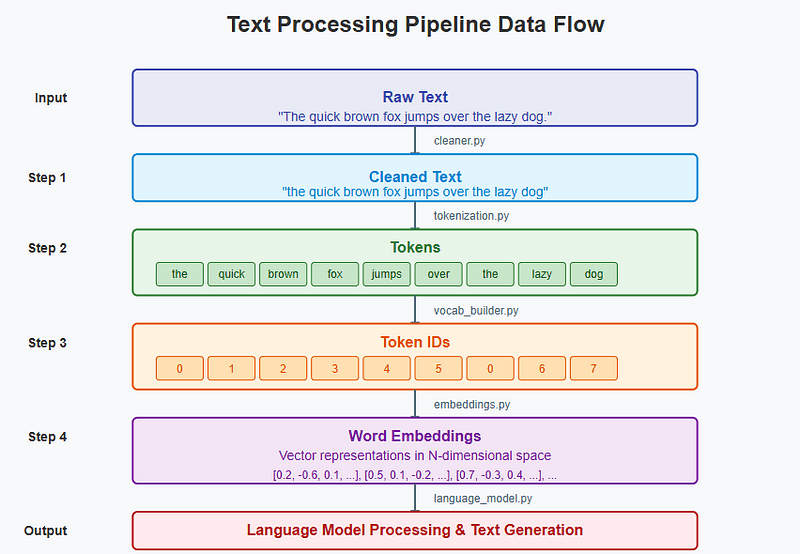
In this diagram, you can see how raw text transforms through each step:
- Raw Text: “The quick brown fox jumps over the lazy dog.”
- Text Cleaning: Conversion to lowercase, whitespace normalization
- Tokenization: Breaking into tokens like [“the”, “quick”, “brown”, …]
- Vocabulary Mapping: Converting tokens to IDs (e.g., “the” → 0, “quick” → 1, …)
- Embedding: Transforming IDs to vector representations
- Language Model: Processing embedded sequences for prediction or generation
This end-to-end flow demonstrates how text gradually transforms from human-readable format to the numerical representations that language models require.
Key Implementation Insights
GitHub Repository: day-02-text-processing-pipeline
Multiple Tokenization Strategies
One of the most important aspects of our implementation is the support for different tokenization approaches. In src/preprocessing/tokenization.py, we implement three distinct strategies:
Basic Word Tokenization: A straightforward approach that splits text on whitespace and handles punctuation separately. This is similar to how traditional NLP systems process text.
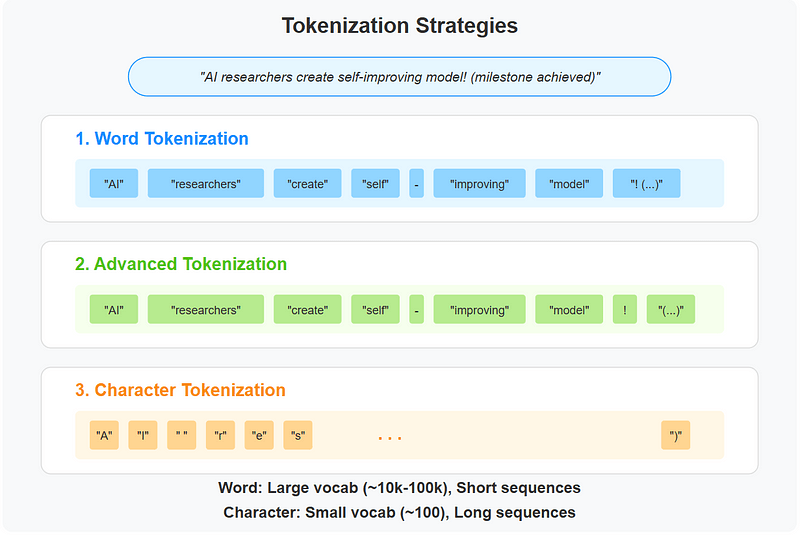
Advanced Tokenization: A more sophisticated approach that provides better handling of special characters and punctuation. This approach is useful for cleaning noisy text from sources like social media.
Character Tokenization: The simplest approach that treats each character as an individual token. While this creates shorter vocabularies, it requires much longer sequences to represent the same text.
By implementing multiple strategies, we can compare their effects on vocabulary size, sequence length, and downstream model performance. This helps us understand why modern LLMs use more complex methods like Byte Pair Encoding (BPE).
Vocabulary Building with Special Tokens
Our vocabulary implementation in src/vocabulary/vocab_builder.py demonstrates several important concepts:
Frequency-Based Ranking: Tokens are sorted by frequency, ensuring that common words get lower IDs. This is a standard practice in vocabulary design.
Special Token Handling: We explicitly add tokens like <|unk|> for unknown words and [BOS]/[EOS] for marking sequence boundaries. These special tokens are crucial for model training and inference.
Vocabulary Size Management: The implementation includes options to limit vocabulary size, which is essential for practical language models where memory constraints are important.
Word Embeddings Visualization
Perhaps the most visually engaging part of our implementation is the embedding of the visualization in src/models/embeddings.py:

Vector Representation: Each token is a high-dimensional vector, capturing semantic relationships between words.
Dimensionality Reduction: We use techniques like PCA and t-SNE to project these high-dimensional vectors into a 2D space for visualization.
Semantic Clustering: The visualizations reveal how semantically similar words cluster together in the embedding space, demonstrating how embeddings capture meaning.
Simple Language Model Implementation
The language model in src/models/language_model.py demonstrates the core architecture of sequence prediction models:
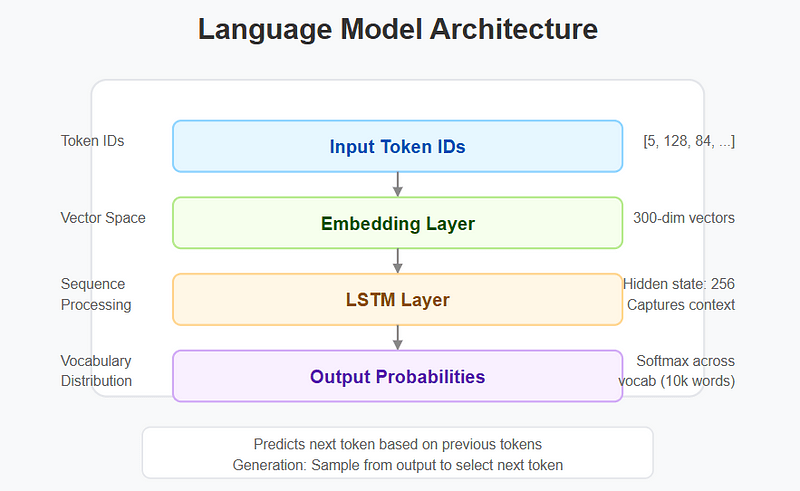
LSTM Architecture: We use a Long Short-Term Memory network to capture sequential dependencies in text.
Embedding Layer Integration: The model begins by converting token IDs to their embedding representations.
Text Generation: We implement a sampling-based generation approach that can produce new text based on a prompt.
Interactive Exploration with Streamlit
The Streamlit application in app.py ties everything together:
Interactive Input: Users can enter their own text to see how it’s processed through each stage of the pipeline.
Real-Time Visualization: The app displays tokenization results, vocabulary statistics, embedding visualizations, and generated text.
Parameter Tuning: Sliders and controls allow users to adjust model parameters like temperature or embedding dimension and see the effects instantly.
Challenges & Learnings
Challenge 1: Creating Intuitive Visualizations for Abstract Concepts
The Problem: Many NLP concepts like word embeddings are inherently high-dimensional and abstract, making them difficult to visualize and understand.
The Solution: We implemented dimensionality reduction techniques (PCA and t-SNE) to project high-dimensional embeddings into 2D space, allowing users to visualize relationships between words.
What You’ll Learn: Abstract concepts become more accessible when visualized appropriately. Even if the visualizations aren’t perfect representations of the underlying mathematics, they provide intuitive anchors that help develop mental models of complex concepts.
Challenge 2: Ensuring Coherent Component Integration
The Problem: Each component in the pipeline has different input/output requirements. Ensuring these components work together seamlessly is challenging, especially when different tokenization strategies are used.
The Solution: We created a clear data flow architecture with well-defined interfaces between components. Each component accepts standardized inputs and returns standardized outputs, making it easy to swap implementations.
What You’ll Learn: Well-defined interfaces between components are as important as the components themselves. Clear documentation and consistent data structures make it possible to experiment with different implementations while maintaining a functional pipeline.
Results & Impact
By working through this project, you’ll develop several key skills and insights:
Understanding of Tokenization Tradeoffs
You’ll learn how different tokenization strategies affect vocabulary size, sequence length, and the model’s ability to handle out-of-vocabulary words. This understanding is crucial for working with custom datasets or domain-specific language.
Vocabulary Management Principles
You’ll discover how vocabulary design impacts both model quality and computational efficiency. The practices you learn (frequency-based ordering, special tokens, size limitations) are directly applicable to production language model systems.
Embedding Space Intuition
The visualizations help build intuition about how semantic information is encoded in vector spaces. You’ll see firsthand how words with similar meanings cluster together, revealing how models “understand” language.
Model Architecture Insights
Building a simple language model provides the foundation for understanding more complex architectures like Transformers. The core concepts of embedding lookup, sequential processing, and generation through sampling are universal.
Practical Applications
These skills apply directly to real-world NLP tasks:
- Custom Domain Adaptation: Apply specialized tokenization for fields like medicine, law, or finance
- Resource-Constrained Deployments: Optimize vocabulary size and model architecture for edge devices
- Debugging Complex Models: Identify issues in larger systems by understanding fundamental components
- Data Preparation Pipelines: Build efficient preprocessing for large-scale NLP applications
Final Thoughts & Future Possibilities
Building a text processing pipeline from scratch gives you invaluable insights into the foundations of language models. You’ll understand that:
- Tokenization choices significantly impact vocabulary size and model performance
- Vocabulary management involves important tradeoffs between coverage and efficiency
- Word embeddings capture semantic relationships in a mathematically useful way
- Simple language models can demonstrate core principles before moving to transformers
As you continue your learning journey, this project provides a solid foundation that can be extended in multiple directions:
- Implement Byte Pair Encoding (BPE): Add a more sophisticated tokenization approach used by models like GPT
- Build a Transformer Architecture: Replace the LSTM with a simple Transformer encoder-decoder
- Add Attention Mechanisms: Implement basic attention to improve model performance
- Create Cross-Lingual Embeddings: Extend the system to handle multiple languages
- Implement Model Fine-Tuning: Add capabilities to adapt pre-trained embeddings to specific domains
What component of the text processing pipeline are you most interested in exploring further? The foundations you’ve built in this project will serve you well as you continue to explore the fascinating world of language models.
This is part of an ongoing series on building practical understanding of LLM fundamentals through hands-on mini-projects. Check out Day 1: Building a Local Q&A Assistant if you missed it, and stay tuned for more installments!

 Shanoj