Tag Archives: System design interview

API 101: Understanding Different Types of APIs

API, short for Application Programming Interface, is a fundamental concept in software development. It establishes well-defined methods for communication between software components, enabling seamless interaction. APIs define how software components communicate effectively.

Key Concepts in APIs:

  • Interface vs. Implementation: An API defines an interface through which one software piece can interact with another, just like a user interface allows users to interact with software.
  • APIs are for Software Components: APIs primarily enable communication between software components or applications, providing a standardized way to send and receive data.
  • API Address: An API often has an address or URL to identify its location, which is crucial for other software to locate and communicate with it. In web APIs, this address is typically a URL.
  • Exposing an API: When a software component makes its API available, it “exposes” the API. Exposed APIs allow other software components to interact by sending requests and receiving responses.

Different Types of APIs:

Let’s explore the four main types of APIs: Operating System API, Library API, Remote API, and Web API.

Operating System API

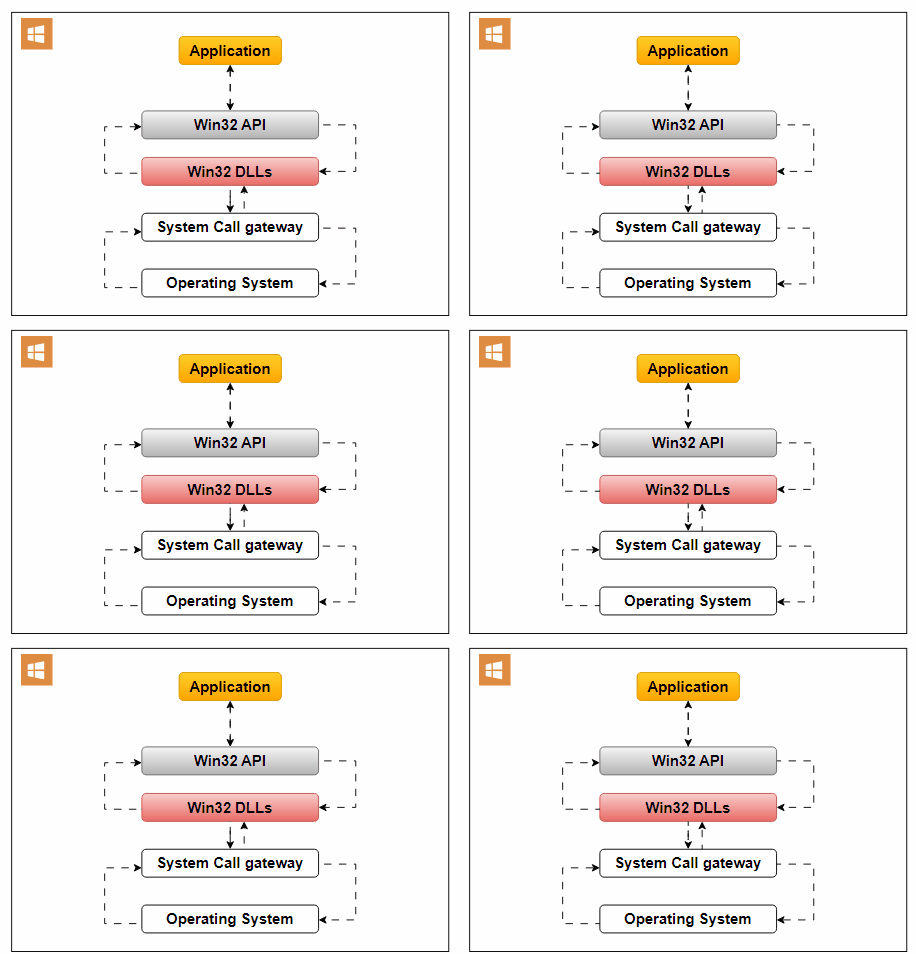
An Operating System API enables applications to interact with the underlying operating system. It allows applications to access essential OS services and functionalities.
Use Cases:

  • File Access: Applications often require file system access for reading, writing, or managing files. The Operating System API facilitates this interaction.
  • Network Communication: To establish network connections for data exchange, applications rely on the OS’s network-related services.
  • User Interface Elements: Interaction with user interface elements like windows, buttons, and dialogues is possible through the Operating System API.

An example of an Operating System API is the Win32 API, designed for Windows applications. It offers functions for handling user interfaces, file operations, and system settings.

Library API

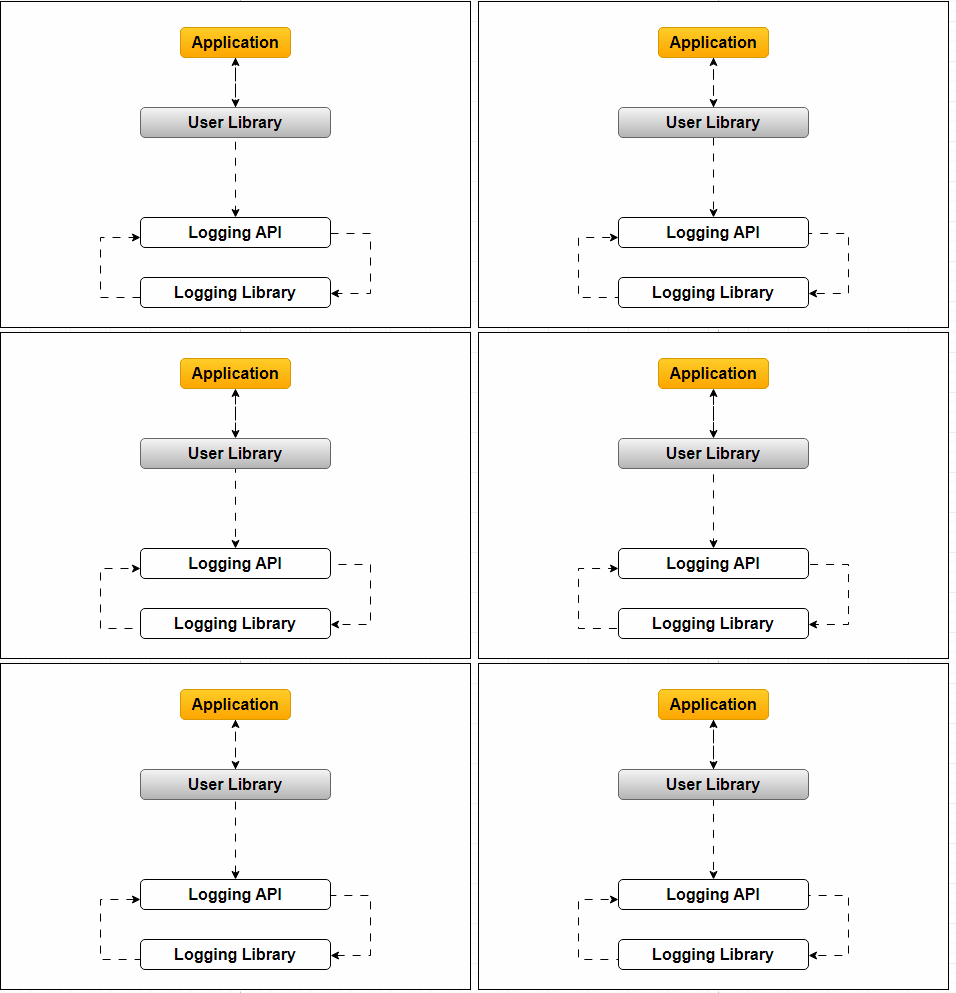
Library APIs allow applications to utilize external libraries or modules simultaneously. These libraries provide additional functionalities, enhancing applications.
Use Cases:

  • Extending Functionality: Applications often require specialized functionalities beyond their core logic. Library APIs enable the inclusion of these functionalities.
  • Code Reusability: Developers can reuse pre-built code components by using libraries, saving time and effort.
  • Modularity: Library APIs promote modularity in software development by separating core functionality from auxiliary features.

For example, an application with a User library may incorporate logging capabilities through a Logging library’s API.

Remote API

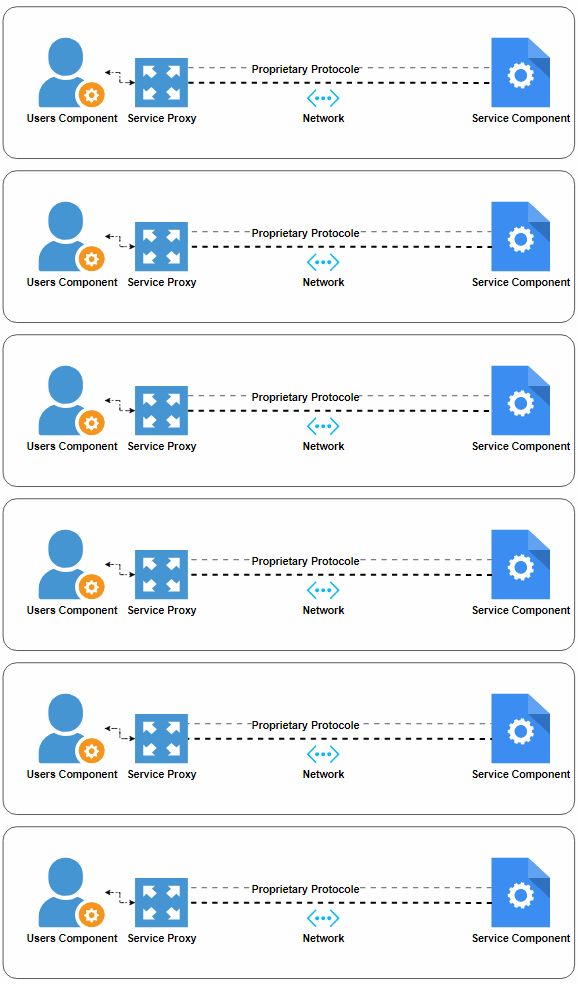
Remote APIs enable communication between software components or applications distributed over a network. These components may not run in the same process or server.
Key Features:

  • Network Communication: Remote APIs facilitate communication between software components on different machines or servers.
  • Remote Proxy: One component creates a proxy (often called a Remote Proxy) to communicate with the remote component. This proxy handles network protocols, addressing, method signatures, and authentication.
  • Platform Consistency: Client and server components using a Remote API must often be developed using the same platform or technology stack.

Examples of Remote APIs include DCOM, .NET Remoting, and Java RMI (Remote Method Invocation).

Web API

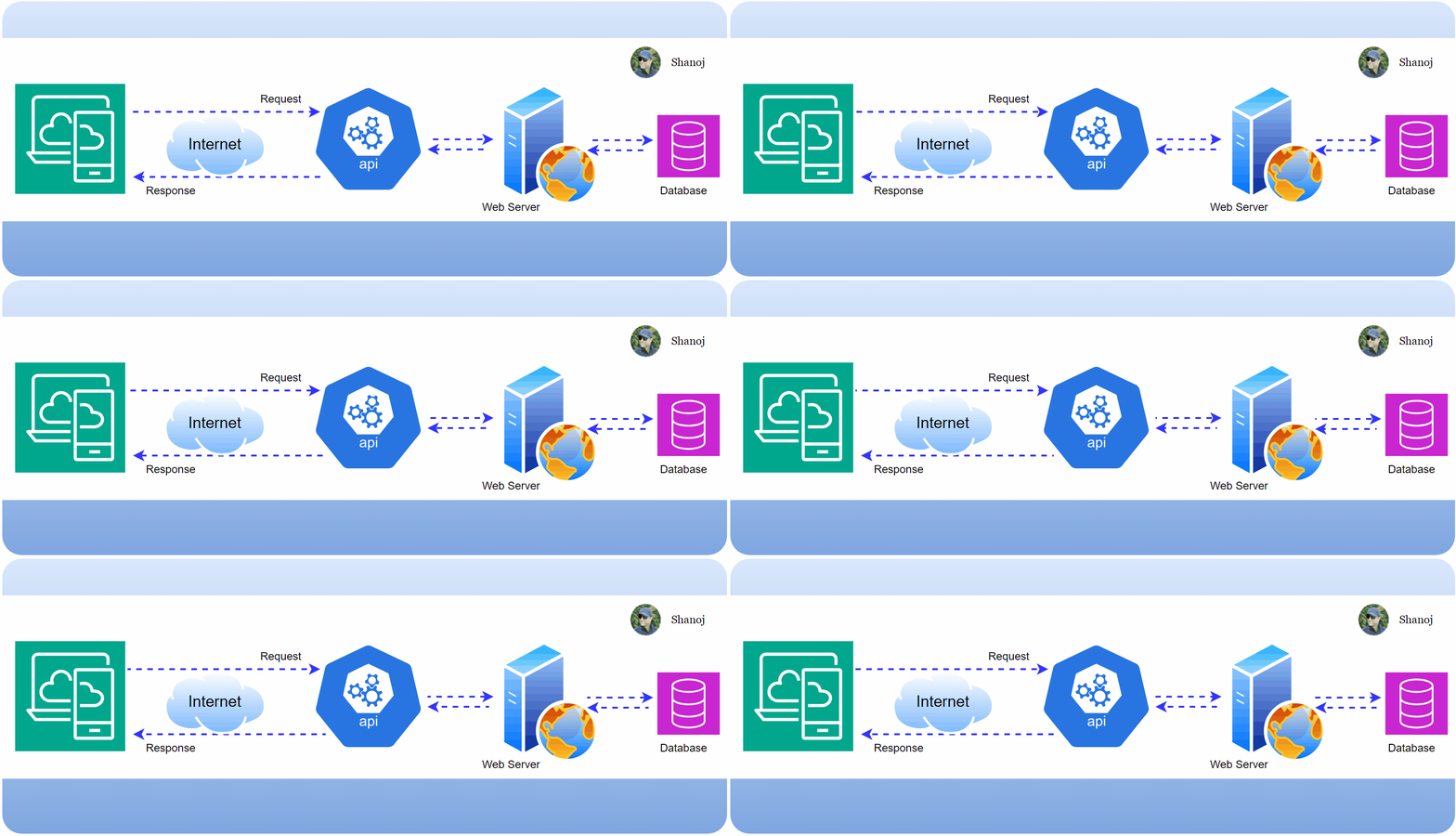
Web APIs allow web applications to communicate over the Internet based on standard protocols, making them interoperable across platforms, OSs, and programming languages.

Key Features:

  • Internet Communication: Web APIs enable web apps to interact with remote web services and exchange data over the Internet.
  • Platform-Agnostic: Web APIs support web apps developed using various technologies, promoting seamless interaction.
  • Widespread Popularity: Web APIs are vital in modern web development and integration.

Use Cases:

  • Data Retrieval: Web apps can access Web APIs to retrieve data from remote services, such as weather information or stock prices.
  • Action Execution: Web APIs allow web apps to perform actions on remote services, like posting a tweet on Twitter or updating a user’s profile on social media.

Types of Web APIs

Now, let’s explore four popular approaches for building Web APIs: SOAP, REST, GraphQL, and gRPC.

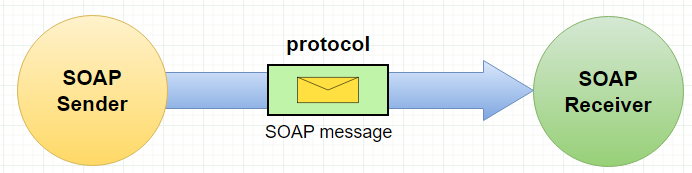
  • SOAP (Simple Object Access Protocol): Is a protocol for exchanging structured information to implement web services, relying on XML as its message format. Known for strict standards and reliability, it is suitable for enterprise-level applications requiring ACID-compliant transactions.
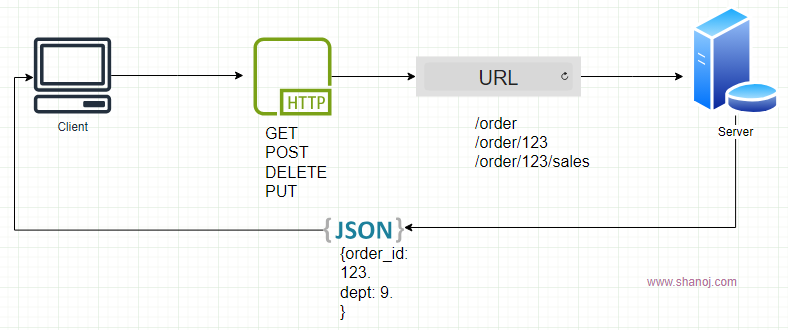
  • REST (Representational State Transfer): This architectural style uses URLs and data formats like JSON and XML for message exchange. It is simple, stateless, and widely used in web and mobile applications, emphasizing simplicity and scalability.
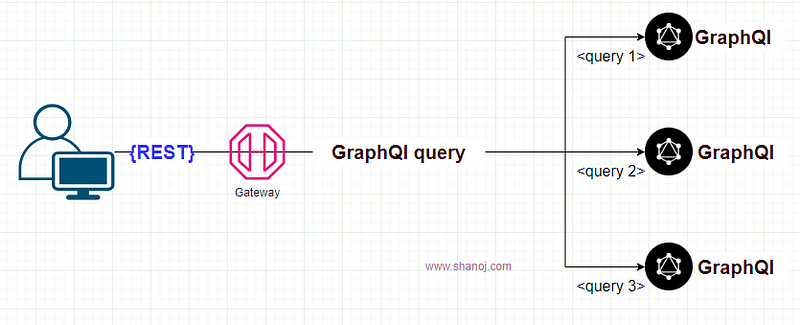
  • GraphQL: Developed by Facebook, GraphQL provides flexibility in querying and updating data. Clients can specify the fields they want to retrieve, reducing over-fetching and enabling real-time updates.
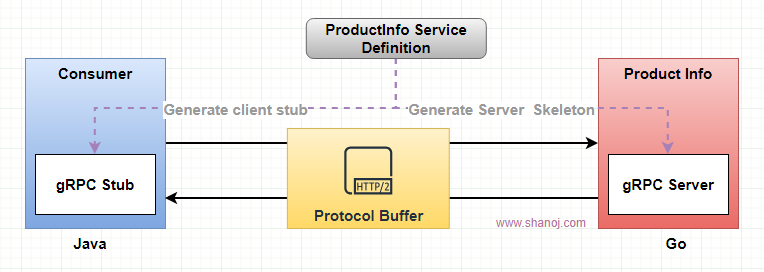
  • gRPC (Google Remote Procedure Call): Developed by Google, gRPC is based on HTTP/2 and Protocol Buffers (protobuf). It excels in microservices architectures and scenarios involving streaming or bidirectional communication.
Real-World Use Cases:

  • Operating System API: An image editing software accesses the file system for image manipulation.
  • Library API: A web application leverages the ‘TensorFlow’ library API to integrate advanced machine learning capabilities for sentiment analysis of user-generated content.
  • Remote API: A ride-sharing service connects distributed passenger and driver apps.
  • Web API: An e-commerce site provides real-time stock availability information.
  • SOAP: A banking app that handles secure financial transactions.
  • REST: A social media platform exposes a RESTful API for third-party developers.
  • GraphQL: A news content management system that enables flexible article queries.
  • gRPC: An online gaming platform that maintains real-time player-server communication.

APIs are vital for effective software development, enabling various types of communication between software components. The choice of API type depends on specific project requirements and use cases. Understanding these different API types empowers developers to choose the right tool for the job.


If you enjoyed reading this and would like to explore similar content, please refer to the following link:

REST vs. GraphQL: Tale of Two Hotel Waiters” by Shanoj Kumar V

Stackademic

Thank you for reading until the end. Before you go:

  • Please consider clapping and following the writer! 👏
  • Follow us on Twitter(X), LinkedIn, and YouTube.
  • Visit Stackademic.com to find out more about how we are democratizing free programming education around the world.
System Design 101: Adapting & Evolving Design Patterns in Software Development

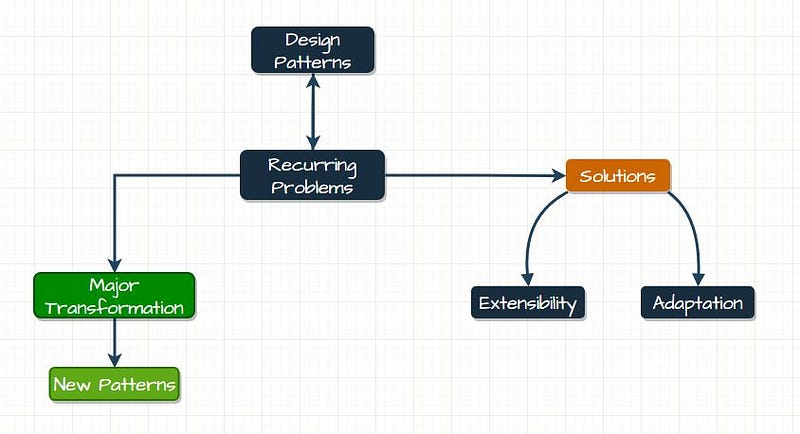
Think of 𝐝𝐞𝐬𝐢𝐠𝐧 𝐩𝐚𝐭𝐭𝐞𝐫𝐧𝐬 as solutions to recurring problems. 𝑻𝒉𝒆𝒚’𝒓𝒆 𝒍𝒊𝒌𝒆 𝒕𝒊𝒎𝒆-𝒕𝒆𝒔𝒕𝒆𝒅 𝒓𝒆𝒄𝒊𝒑𝒆𝒔 𝒇𝒐𝒓 𝒄𝒐𝒎𝒎𝒐𝒏 𝒊𝒔𝒔𝒖𝒆𝒔 𝒊𝒏 𝒔𝒐𝒇𝒕𝒘𝒂𝒓𝒆 𝒅𝒆𝒗𝒆𝒍𝒐𝒑𝒎𝒆𝒏𝒕. But what if the problem you’re dealing with isn’t the same as the one a particular pattern addresses? Here’s the cool part: you can often adapt existing patterns. It’s like 𝐭𝐰𝐞𝐚𝐤𝐢𝐧𝐠 a recipe to suit your taste.

However, there’s a catch. When implementing a pattern, you should always consider ‘𝐞𝐱𝐭𝐞𝐧𝐬𝐢𝐛𝐢𝐥𝐢𝐭𝐲’. This means building in a bit of 𝐟𝐥𝐞𝐱𝐢𝐛𝐢𝐥𝐢𝐭𝐲. Think of it as future-proofing. You’re saying, ‘Hey, this solution might need to change a little down the road when new ingredients become available.’

But what if the problem undergoes a 𝐦𝐚𝐣𝐨𝐫 𝐭𝐫𝐚𝐧𝐬𝐟𝐨𝐫𝐦𝐚𝐭𝐢𝐨𝐧? Imagine your favourite recipe changes from baking a cake to grilling a steak. That’s when you realize the old recipe won’t work anymore. It’s time to introduce a new pattern — a new recipe perfect for the 𝐫𝐞𝐯𝐚𝐦𝐩𝐞𝐝 𝐩𝐫𝐨𝐛𝐥𝐞𝐦.

In a nutshell, updating a design pattern depends on how the problem it tackles changes. If it’s just a 𝐦𝐢𝐧𝐨𝐫 𝐭𝐰𝐞𝐚𝐤, you can often tweak the pattern. But if the problem takes an entirely 𝐝𝐢𝐟𝐟𝐞𝐫𝐞𝐧𝐭 𝐝𝐢𝐫𝐞𝐜𝐭𝐢𝐨𝐧, it’s time to welcome a new pattern into the kitchen. The key is to keep your solutions 𝐞𝐟𝐟𝐞𝐜𝐭𝐢𝐯𝐞 𝐚𝐧𝐝 𝐮𝐩-𝐭𝐨-𝐝𝐚𝐭𝐞 as the world evolves.

Designing an AWS-Based Notification System

To build an effective notification system, it’s essential to understand the components and flow of each notification service.

iOS Push Notifications with AWS

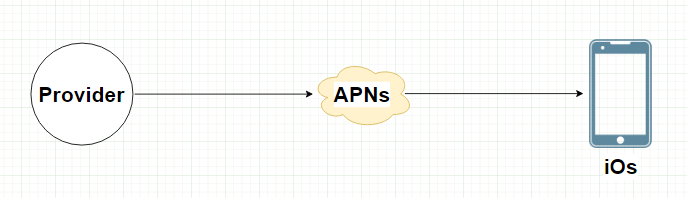
  • Provider: Host your backend on Amazon EC2 instances.
  • APNS Integration: Use Amazon SNS (Simple Notification Service) to interface with APNS.

Android Push Notifications with AWS

  • Provider: Deploy your backend on AWS Elastic Beanstalk or Lambda.
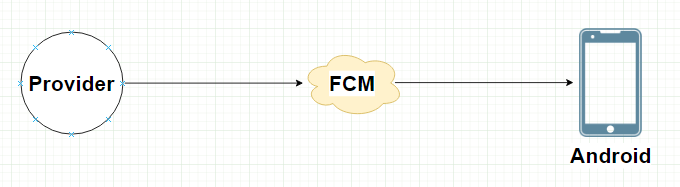
  • FCM Integration: Connect your backend to FCM through HTTP requests.

SMS Messages with AWS

  • Provider: Integrate your system with AWS Lambda.
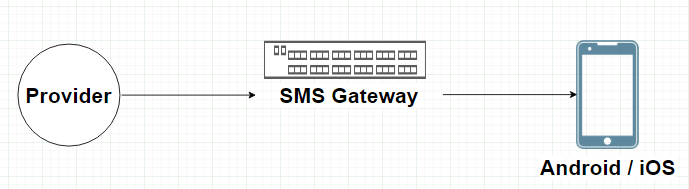
  • SMS Gateway: AWS Pinpoint can be used as an SMS gateway for delivery.

Email Notifications with AWS

  • Provider: Leverage Amazon SES for sending emails.
  • Email Service: Utilize Amazon SES’s built-in email templates.

System Components

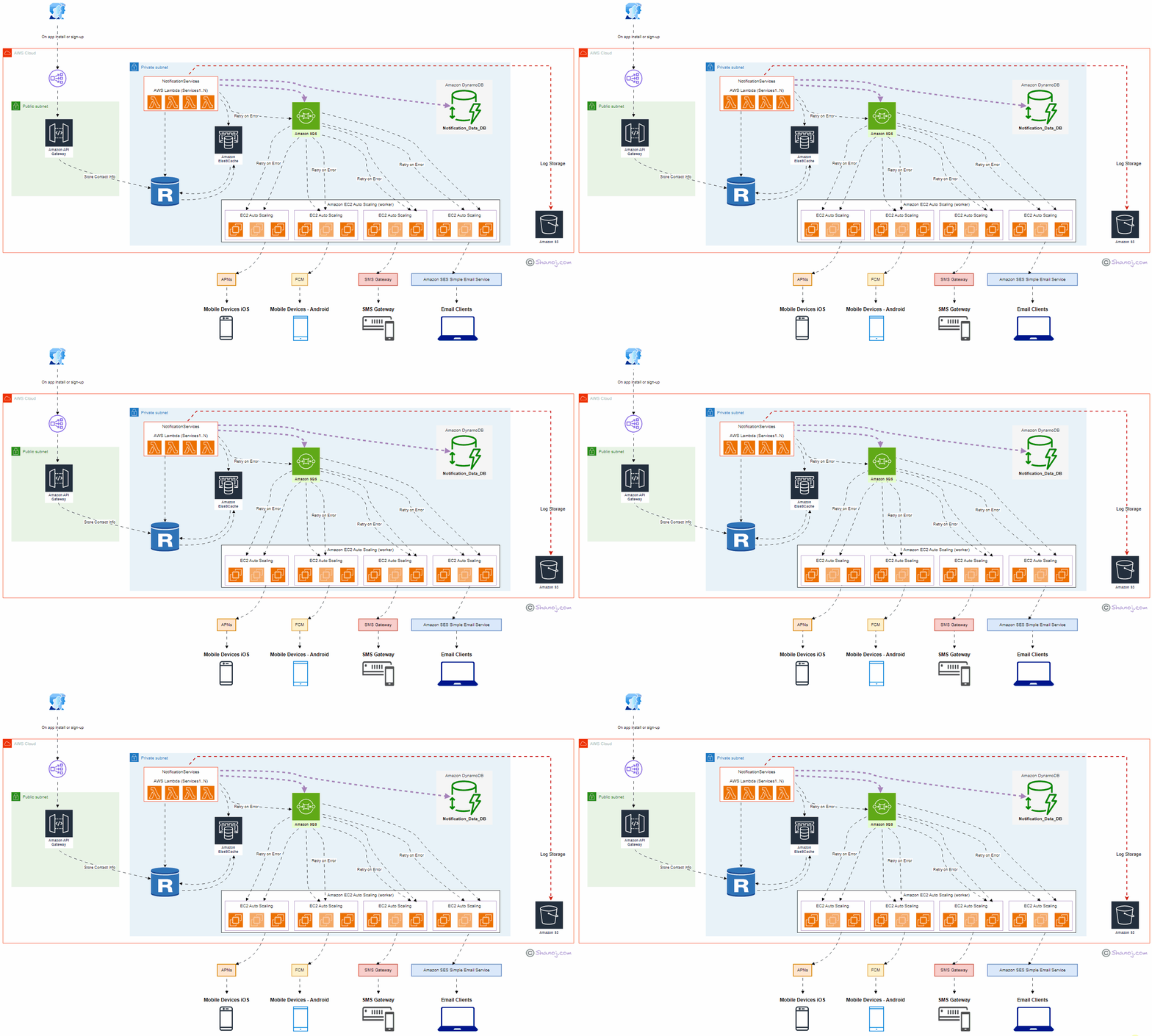
User: Represents end-users interacting with the system through mobile applications or email clients. User onboarding takes place during app installation or new signups.

ELB (Public): Amazon Elastic Load Balancer (ELB) serves as the entry point to the system, distributing incoming requests to the appropriate components. It ensures high availability and scalability.

API Gateway: Amazon API Gateway manages and exposes APIs to the external world. It securely handles API requests and forwards them to the Notification Service.

NotificationService (AWS Lambda — Services1..N): Implemented using AWS Lambda, this central component processes incoming notifications, orchestrates the delivery flow and communicates with other services. It’s designed to scale automatically with demand.

Amazon DynamoDB: DynamoDB stores notification content data in JSON format. This helps prevent data loss and enables efficient querying and retrieval of notification history.

Amazon RDS: Amazon Relational Database Service (RDS) stores contact information securely. It’s used to manage user data, enhancing the personalized delivery of notifications.

Amazon ElastiCache: Amazon ElastiCache provides an in-memory caching layer, improving system responsiveness by storing frequently accessed notifications.

Amazon SQS: Amazon Simple Queue Service (SQS) manages notification queues, including iOS, Android, SMS, and email. It ensures efficient distribution and processing.

Worker Servers (Amazon EC2 Auto Scaling): Auto-scaling Amazon EC2 instances act as workers responsible for processing notifications, handling retries, and interacting with third-party services.

Third-Party Services: These services, such as APNs, FCM, SMS Gateways, and Amazon SES (Simple Email Service), deliver notifications to end-user devices or email clients.

S3 (Amazon Simple Storage Service): Amazon S3 is used for storing system logs, facilitating auditing, monitoring, and debugging.

Design Considerations:

Scalability: The system is designed to scale horizontally and vertically to accommodate increasing user loads and notification volumes. AWS Lambda, EC2 Auto Scaling, and API Gateway handle dynamic scaling efficiently.

Data Persistence: Critical data, including contact information and notification content, is stored persistently in Amazon RDS and DynamoDB to prevent data loss.

High Availability: Multiple availability zones and fault-tolerant architecture enhance system availability and fault tolerance. ELB and Auto Scaling further contribute to high availability.

Redundancy: Redundancy in components and services ensures continuous operation even during failures. For example, multiple Worker Servers and Third-Party Services guarantee reliable notification delivery.

Security: AWS Identity and Access Management (IAM) and encryption mechanisms are employed to ensure data security and access control.

Performance: ElastiCache and caching mechanisms optimize system performance, reducing latency and enhancing user experience.

Cost Optimization: The pay-as-you-go model of AWS allows cost optimization by scaling resources based on actual usage, reducing infrastructure costs during idle periods.

Stackademic

Thank you for reading until the end. Before you go:

  • Please consider clapping and following the writer! 👏
  • Follow us on Twitter(X), LinkedIn, and YouTube.
  • Visit Stackademic.com to find out more about how we are democratizing free programming education around the world.
System Design Interview: Serverless Web Crawler using AWS

Architecture Overview:

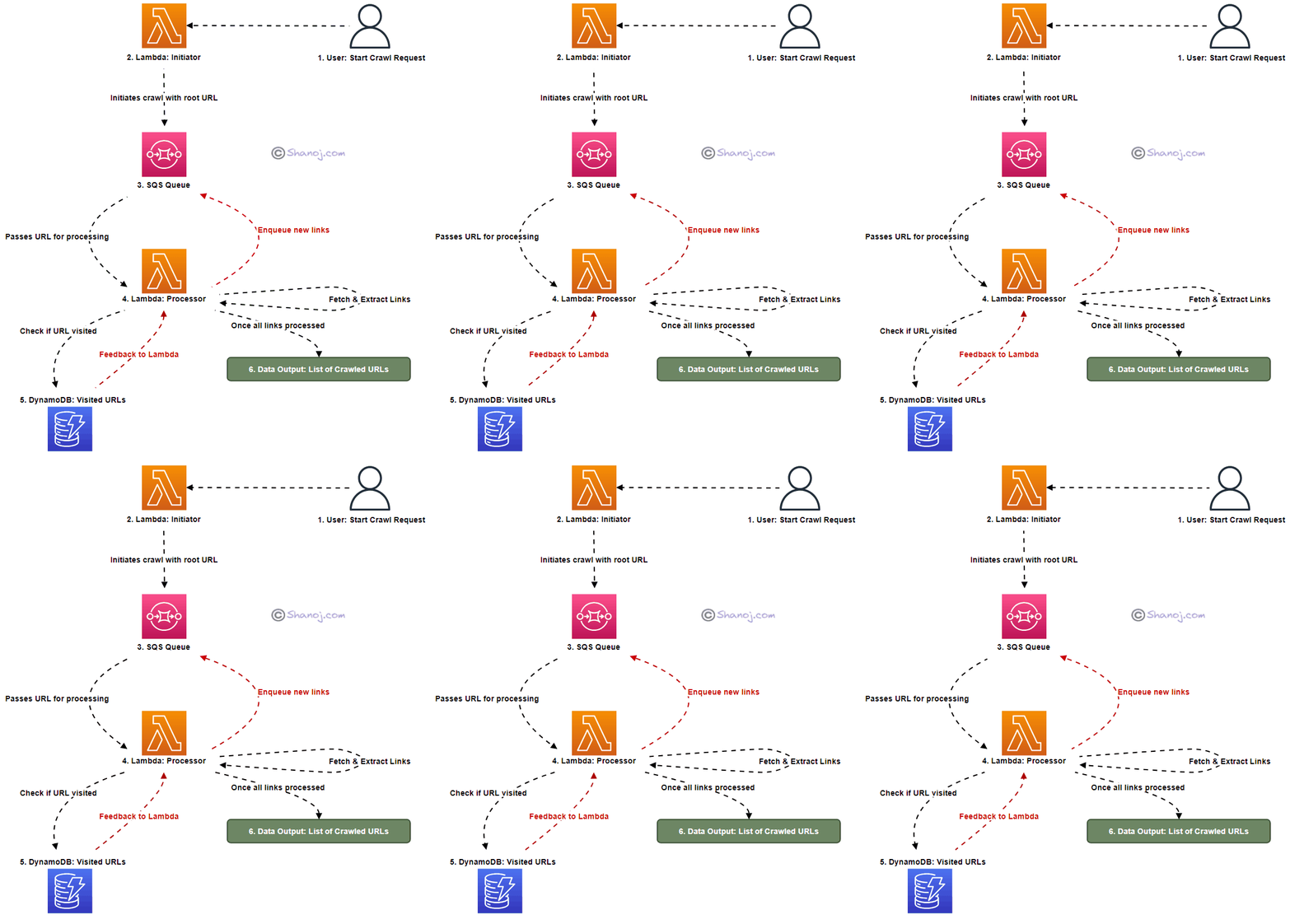
The main components of our serverless crawler are Lambda functions, an SQS queue, and a DynamoDB table. Here’s a breakdown:

  • Lambda: Two distinct functions — one for initiating the crawl and another for the actual processing.
  • SQS: Manages pending crawl tasks as a buffer and task distributor.
  • DynamoDB: Stores visited URLs, ensuring we avoid redundant visits.

Workflow & Logic Rationale:

Initiation:

Starting Point (Root URL):

Logic: The crawl starts with a root URL, e.g., “www.shanoj.com”.

Rationale: A defined beginning allows the crawler to commence in a guided manner.

Uniqueness with UUID:

Logic: A unique run ID is generated for every crawl to ensure distinction.

Rationale: These guards against potential data overlap in the case of concurrent crawls.

Avoiding Redundant Visits:

Logic: The root URL is pre-emptively marked as “visited”.

Rationale: This step is integral to maximizing efficiency by sidestepping repeated processing.

The URL then finds its way to SQS, awaiting crawling.

Processing:

Link Extraction:

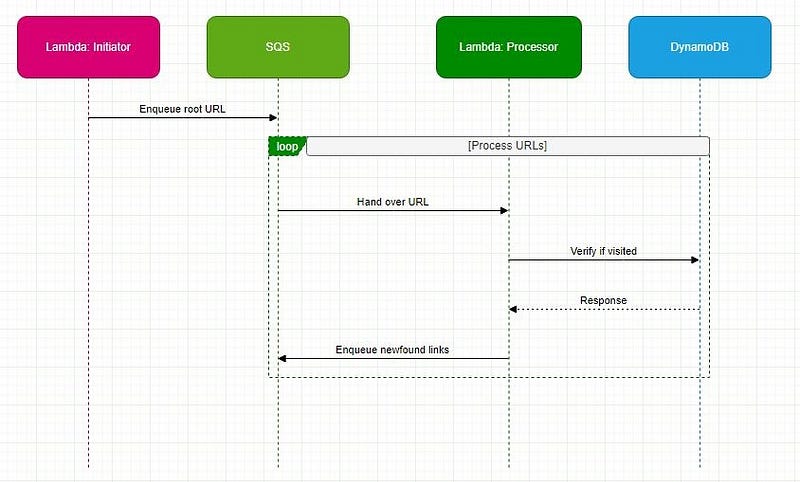
Logic: A secondary Lambda function polls SQS for URLs. Once a URL is retrieved, the associated webpage is fetched. All the links are identified and extracted within this webpage for further processing.

Rationale: Extracting all navigable paths from our current location is pivotal to web exploration.

Depth-First Exploration Strategy:

Logic: Extracted links undergo a check against DynamoDB. If previously unvisited, they’re designated as such in the database and enqueued back into SQS.

Rationale: This approach delves deep into one link’s pathways before backtracking, optimizing resource utilization.

Special Considerations:

A challenge for web crawlers is the potential for link loops, which can usher in infinite cycles. By verifying the “visited” status of URLs in DynamoDB, we proactively truncate these cycles.

Back-of-the-Envelope Estimation for Web Crawling:

1. Data Download:

  • Webpages per month: 1 billion
  • The average size of a webpage: 500 KB

Total data downloaded per month:

1,000,000,000 (webpages) × 500 KB = 500,000,000,000 KB

or 500 TB (terabytes) of data every month.

2. Lambda Execution:

Assuming that the Lambda function needs to be invoked for each webpage to process and extract links:

  • Number of Lambda executions per month: 1 billion

(One would need to further consider the execution time for each Lambda function and the associated costs)

3. DynamoDB Storage:

Let’s assume that for each webpage, we store only the URL and some metadata which might, on average, be 1 KB:

  • Total storage needed for DynamoDB per month:
  • 1,000,000,000 (webpages) × 1 KB = 1,000,000,000 KB
  • or 1 TB of data storage every month.

(However, if you’re marking URLs as “visited” and removing them post the crawl, then the storage might be significantly less on a persistent basis.)

4. SQS Messages:

Each webpage URL to be crawled would be a message in SQS:

  • Number of SQS messages per month: 1 billion

The system would require:

  • 500 TB of data storage and transfer capacity for the actual web pages each month.
  • One billion Lambda function executions monthly for processing.
  • About 1 TB of storage in DynamoDB might vary based on retention and removal strategies.
  • One billion SQS messages to manage the crawl queue.

Stackademic

Thank you for reading until the end. Before you go:

  • Please consider clapping and following the writer! 👏
  • Follow us on Twitter(X), LinkedIn, and YouTube.
  • Visit Stackademic.com to find out more about how we are democratizing free programming education around the world.
AWS-Based URL Shortener: Design, Logic, and Scalability

Here’s a behind-the-scenes look at creating a URL-shortening service using Amazon Web Services (AWS).

Users and System Interaction:

  • User Requests: Users submit a long web address wanting a shorter version, or they might want to use a short link to reach the original website or remove a short link.
  • API Gateway: This is AWS’s reception. It directs user requests to the right service inside AWS.
  • Lambda Functions: These are the workers. They perform tasks like making a link shorter, retrieving the original from a short link, or deleting a short link.
  • DynamoDB: This is the storage room. All the long and short web addresses are stored here.
  • ElastiCache: Before heading to DynamoDB, the system checks here first when users access a short link. It’s faster.
  • VPC & Subnets: This is the AWS structure. The welcoming part (API Gateway) is public, while sensitive data (DynamoDB) is kept private and secure.

Making Links Shorter for Users:

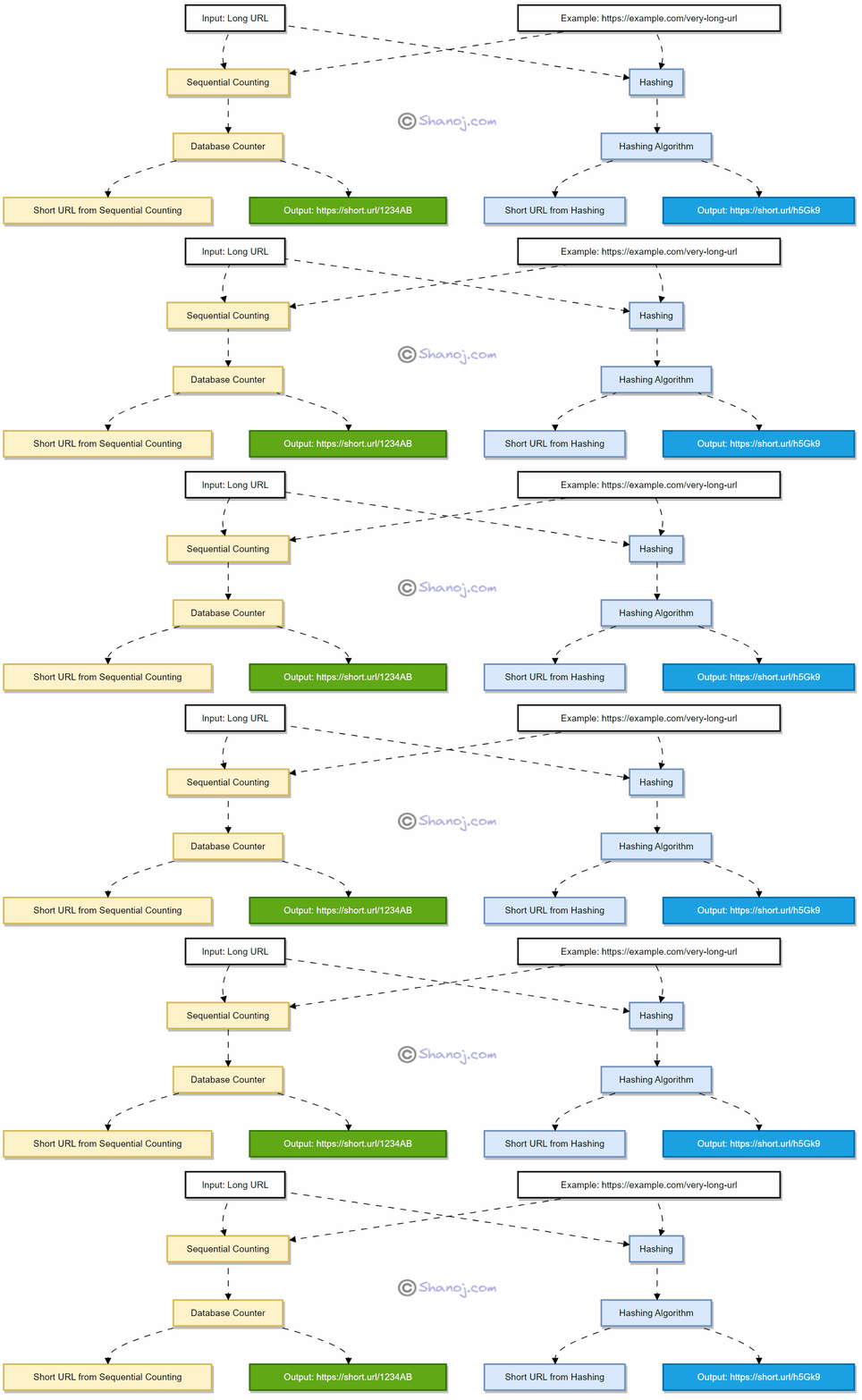
  • Sequential Counting: Every web link gets a unique number. To keep it short, that number is converted into a combination of letters and numbers.
  • Hashing: The system also shortens the long web address into a fixed-length string. This method may produce similar results for different links, but the system manages and differentiates them efficiently.

Sequential Counting: This takes a long URL as input and uses a unique counter value from the database to generate a short URL.

For instance, the URL https://example.com/very-long-url might be shortened to https://short.url/1234AB using a unique number from the database, then converting this number into a mix of letters and numbers.

Hashing: This involves taking a long URL and converting it to a fixed-size string of characters using a hashing algorithm. So, https://example.com/very-long-url could become https://short.url/h5Gk9.

The rationale for Combining:

  1. Enhanced Uniqueness & Collision Handling: Sequential counting ensures uniqueness, and in the unlikely event of a hashing collision, the sequential identifier can be used as a fallback or combined with the hash.
  2. Balancing Predictability & Compactness: Hashing gives compact URLs, and by adding a sequential component, we reduce predictability.
  3. Scalability & Performance: Sequential lookups are faster. If the hash table grows large, the performance could degrade due to hash collisions. Combining with sequential IDs ensures fast retrievals.

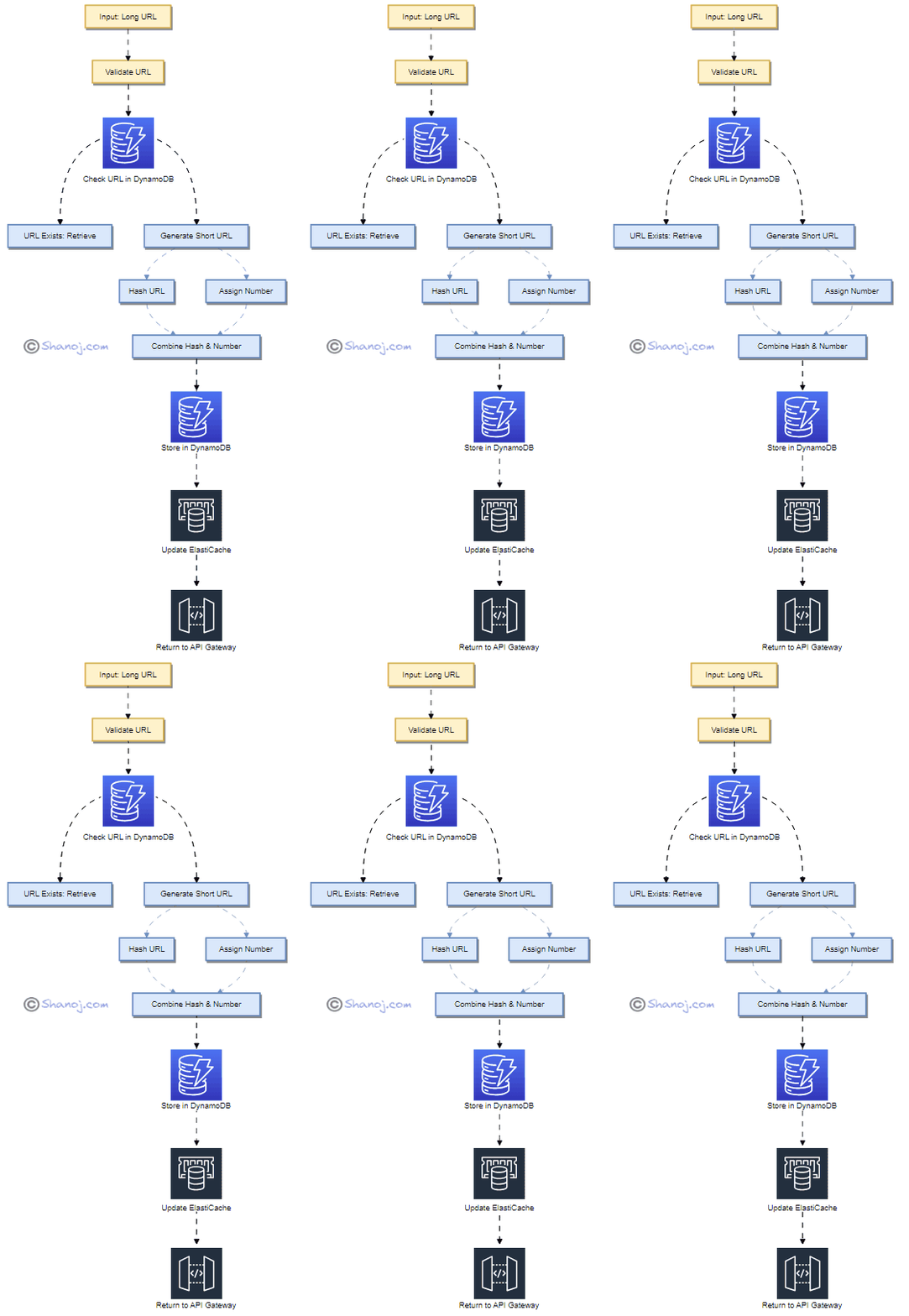
Lambda Function for Shortening (PUT Request)

  1. Input: Long URL e.g. “https://www.example.com/very-long-url
  2. URL Exists: Retrieved Shortened URL e.g. “abcd12”
  3. Hash URL: Output e.g. “a1b2c3”
  4. Assign Number: Unique Sequential Number e.g. “456”
  5. Combine Hash & Number: e.g. “a1b2c3456”
  6. Store in DynamoDB: {“https://www.example.com/very-long-url“: “a1b2c3456”}
  7. Update ElastiCache: {“a1b2c3456”: “https://www.example.com/very-long-url”}
  8. Return to API Gateway: Shortened URL e.g. “a1b2c3456”

Lambda Function for Redirecting (GET Request)

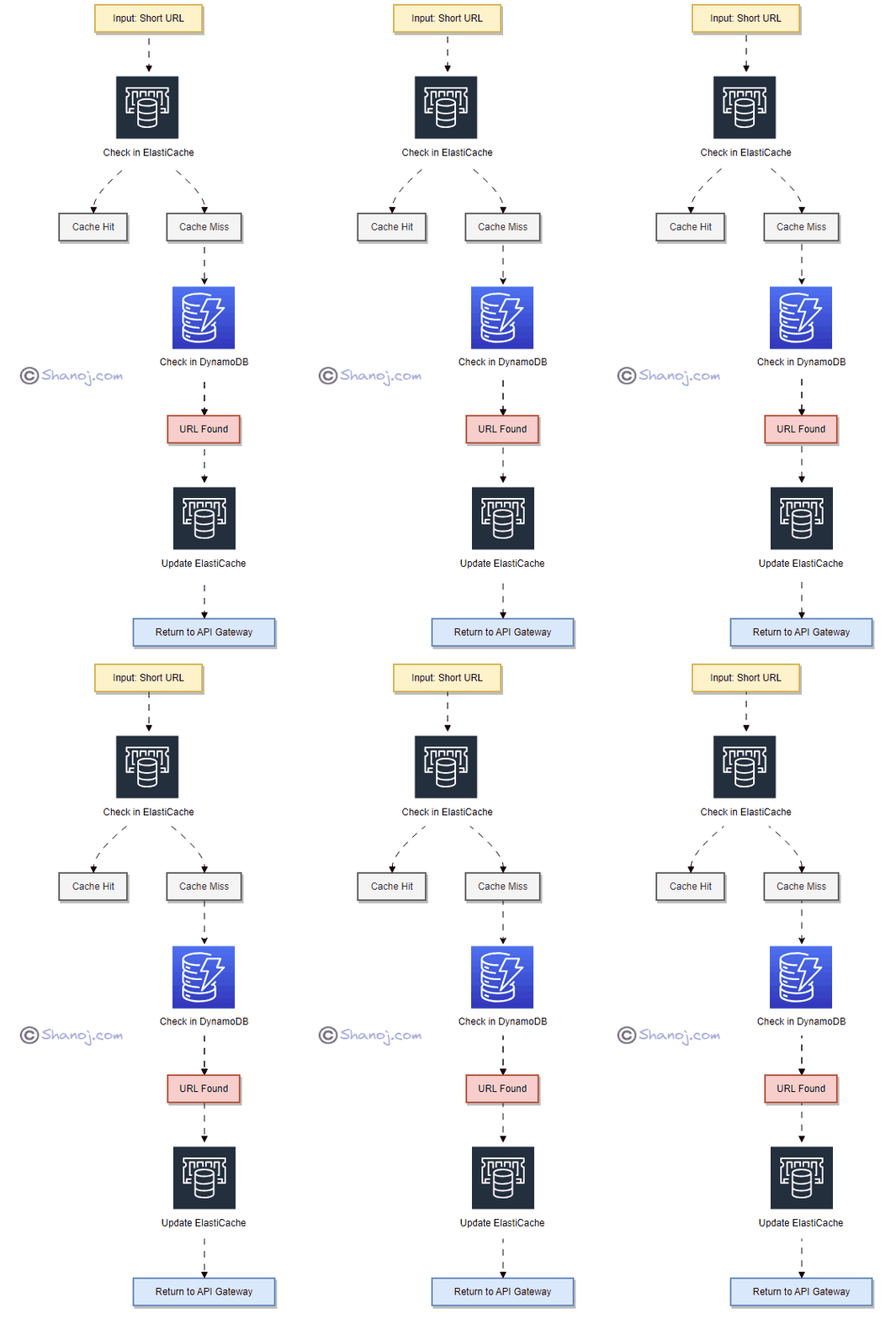
  • Input: The user provides a short URL like “a1b2c3456”.
  • Check-in ElastiCache: System looks up the short URL in ElastiCache.
  • Cache Hit: If the Long URL is found in the cache, the system retrieves it directly.
  • Cache Miss: If not in the cache, the system searches in DynamoDB.
  • Check-in DynamoDB: Searches the DynamoDB for the corresponding Long URL.
  • URL Found: The Long URL matching the given short URL is found, e.g. “https://www.example.com/very-long-url“.
  • Update ElastiCache: System updates the cache with {“a1b2c3456”: “https://www.example.com/very-long-url”}.
  • Return to API Gateway: The system redirects users to the original Long URL.

Lambda Function for Deleting (DELETE Request)

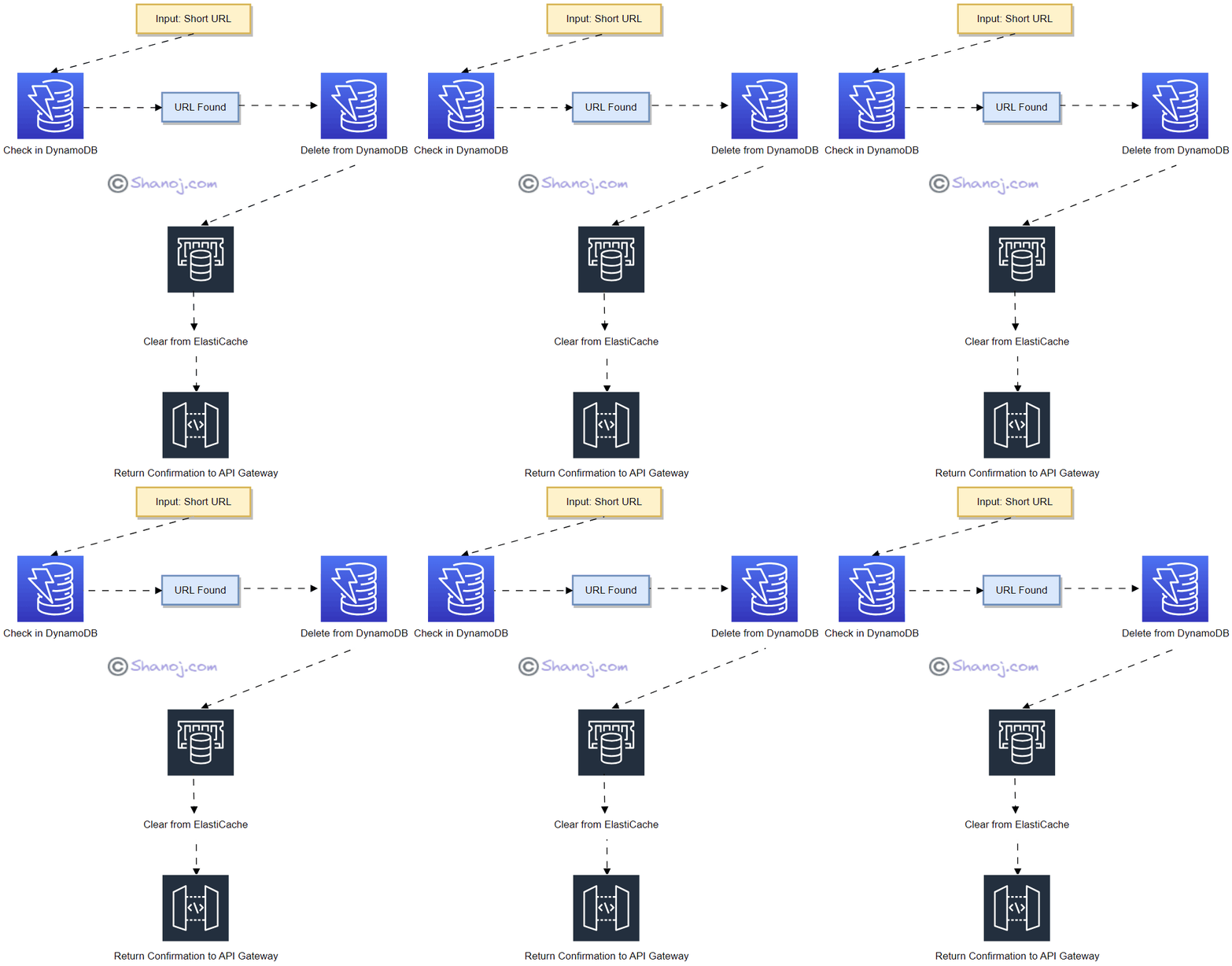
  • Input: The user provides a short URL they want to delete.
  • Check-in DynamoDB: System looks up the short URL in DynamoDB.
  • URL Found: If the URL mapping for the short URL is found, it proceeds to deletion.
  • Delete from DynamoDB: The system deletes the URL mapping from DynamoDB.
  • Clear from ElastiCache: The System also clears the URL mapping from the cache to ensure that the short URL no longer redirects users.
  • Return Confirmation to API Gateway: After the deletion is successful, a confirmation is sent to the API Gateway, confirming the user about the deletion.

Simple Math Behind Our URL Shortening (Envelope Estimation):

When we use a 6-character mix of letters (both small and capital) and numbers for our short URLs, we have about 56.8 billion different combinations. If users create 100 million short links every day, we can keep making unique links for over 500 days without repeating them.

In Plain English

Thank you for being a part of our community! Before you go:

System Design Interview — An Insider’s Guide: Volumes 1 & 2

Throughout the years, I have committed myself to continuously improving my skills in system design. My drive to pursue further knowledge and resources didn’t stem from seeking external validation or a new job opportunity. Instead, I sought to elevate my current role and excel in it. One of my go-to resources in this journey has been Alex Xu’s book, which has become a reliable companion. Every time I revisit it, I am reminded of crucial concepts and invigorated in my approach to problem-solving:

System Design Interview — An Insider’s Guide (Volume 1):

  • Solutions to 16 real system design scenarios, offering practical guidance for enterprise architects to enhance their problem-solving skills.

The book covers diverse topics, from scaling user traffic to designing complex systems like chat systems and search autocomplete systems.

System Design Interview — An Insider’s Guide (Volume 2):

  • A four-step framework serving as a systematic approach to system design interviews.
  • Detailed solutions to 13 real system design interview questions.
  • Over 300 diagrams offer visual explanations of various systems.

The book covers topics like proximity services, distributed message queues, and real-time gaming leaderboards, among others. It caters to readers who possess a basic understanding of distributed systems.

Stackademic

Thank you for reading until the end. Before you go:

  • Please consider clapping and following the writer! 👏
  • Follow us on Twitter(X), LinkedIn, and YouTube.
  • Visit Stackademic.com to find out more about how we are democratizing free programming education around the world.
System Design 101: The token-bucket algorithm

The token bucket algorithm is a technique for managing the frequency of system events. It keeps track of a bucket of tokens continuously added to at a set rate. These tokens can be viewed as units of capacity or permission that can be used to regulate the frequency at which events take place.

  • The token bucket algorithm limits the number of tokens that can be in the bucket at any given time, representing the maximum capacity or permission available to the system.
  • Tokens are added to the bucket at a fixed rate over time, starting with an empty bucket.
  • When an event occurs, it requests a token from the bucket.
  • If a token is available, it is removed from the bucket, allowing the event to occur.
  • If no tokens are available, the event is blocked or delayed until a token becomes available.
  • After each event, the algorithm checks whether the bucket has exceeded its capacity, and if so, additional tokens are discarded.
  • This ensures that the bucket is not too full and the system remains controlled.

Preparing for a System Design Interview: Focus on Trade-offs, Not Mechanics

Are you getting ready for a system design interview? It is critical to approach it with the proper mindset and preparation. System design deals with components at a higher level, so staying out of the trenches is vital. Instead, interviewers are looking for a high-level understanding of the system, the ability to identify key components and their interactions, and the ability to weigh trade-offs between various design options.

During the interview, pay attention to the trade-offs rather than the mechanics. You must make decisions about the system’s scalability, dependability, security, and cost-effectiveness. Understanding the trade-offs between these various aspects is critical to make informed decisions.

Here are a few examples to prove my point:

  • If you’re creating a social media platform, you must choose between scalability and cost-effectiveness. Should you, for example, use a scalable but expensive cloud platform or a less expensive but less scalable hosting service?
  • When creating an e-commerce website, you must make trade-offs between security and usability. Should you, for example, require customers to create an account with a complex password or let them checkout as a guest with a simpler password?
  • When designing a transportation management system, you must balance dependability and cost-effectiveness. Should you, for example, use real-time data to optimise routes and minimise delays, or should you rely on historical data to save money?